


Brand: MOTU
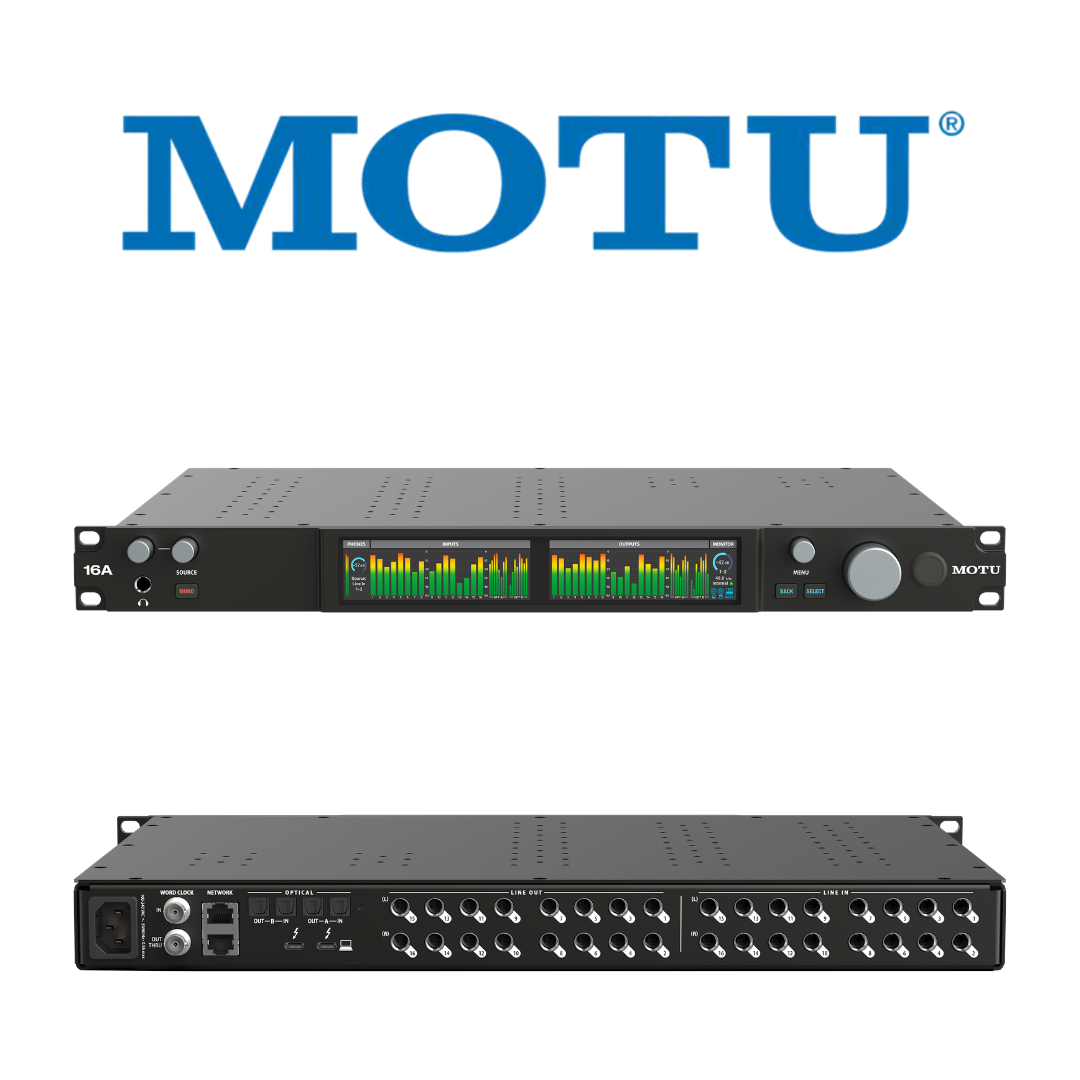
MOTU 16A
Category: Audio Interfaces
32-in/34-out Thunderbolt 4 / USB4 / AVB Rack Interface — 66 Channels • On-Board DSP • 125 dB Dynamic Range • —114 dB THD + N • —129 dBu EIN • Equipped with Renowned ESS Sabre32™ DAC Technology • CueMix Pro • 64-Channel DSP Mixer • AVB Gigabit Networking
 Get 5% OFF on Prepaid Orders
Copied!
Get 5% OFF on your First Purchase.
Copied!
Buy 2 and GET 10% OFF
Copied!
Get 5% OFF on Prepaid Orders
Copied!
Get 5% OFF on your First Purchase.
Copied!
Buy 2 and GET 10% OFF
Copied!
GENERAL / PRODUCT IDENTITY
| SPECIFICATIONS | DETAILS |
|---|---|
|
Product name |
MOTU 16A |
|
Manufacturer |
MOTU (Mark of the Unicorn), Cambridge, MA, USA |
|
Product category |
Professional audio interface / soundcard |
|
Form factor |
1U rack (19-inch) |
|
Total I/O channels (simultaneous) |
66 (32 inputs + 34 outputs) |
|
Maximum sample rate |
192 kHz |
|
Bit depth |
24-bit |
|
Manufacturer warranty |
2 years |
|
Compatibility |
macOS 12 or later, Windows 11 23H2 or later, iOS 17.5 or later (low-latency Thunderbolt driver requires M-series iPad) |
COMPUTER CONNECTIVITY
| SPECIFICATIONS | DETAILS |
|---|---|
|
Host interface |
Thunderbolt 4 / USB4 (USB-C), 40 Gbps |
|
Backward compatibility |
Thunderbolt 3, USB 3.x, USB 2.0 |
|
Maximum computer I/O channels |
256 (128 in + 128 out) via Thunderbolt / USB4 |
|
Round-trip latency (RTL) |
~1.8 ms @ 96 kHz / 32-sample buffer |
|
Thunderbolt daisy-chain |
Up to 6 additional Thunderbolt devices |
|
Included cable |
40 Gbps USB4 USB-C cable, 2 m length |
|
Mac drivers |
Core Audio (macOS 12 or later) |
|
Windows drivers |
ASIO and WDM (Windows 11 23H2 or later) |
|
Class-compliant firmware |
Yes — iOS compatible (no separate driver) |
ANALOGUE INPUTS
| SPECIFICATIONS | DETAILS |
|---|---|
|
Count |
16 |
|
Connector type |
1/4-inch TRS (balanced or unbalanced), rear panel |
|
Level type |
Line level |
|
Dynamic range (A-weighted) |
120 dB |
|
THD+N |
-114 dB |
|
Maximum input level |
+21 dBu |
|
Input calibration |
Boost/trim in 1 dB increments (per channel) |
|
Phase invert |
Yes, per channel |
|
Sample rate range |
44.1 / 48 / 88.2 / 96 / 176.4 / 192 kHz |
ANALOGUE OUTPUTS
| SPECIFICATIONS | DETAILS |
|---|---|
|
Count |
16 |
|
Connector type |
1/4-inch TRS, rear panel |
|
Level type |
Line level |
|
DC-coupled |
Yes (all 16 outputs — CV/modular compatible) |
|
Dynamic range (A-weighted) |
125 dB |
|
THD+N |
-114 dB |
|
Maximum output level |
+21 dBu |
|
Output calibration |
Trim in 1 dB increments (per channel) |
HEADPHONE OUTPUT
| SPECIFICATIONS | DETAILS |
|---|---|
|
Count |
1 (stereo) |
|
Connector |
1/4-inch TRS, front panel |
|
Dynamic range (A-weighted) |
118 dB |
|
THD+N |
-110 dB |
|
Maximum output level |
+13.3 dBu |
|
Output impedance |
< 1 Ohm |
|
Controls |
Independent volume knob + source select knob + Mono button |
DIGITAL I/O
| SPECIFICATIONS | DETAILS |
|---|---|
|
ADAT optical banks |
2 (Bank A and Bank B) |
|
ADAT channels at 44.1 / 48 kHz |
16 total (8 per bank) |
|
ADAT channels at 88.2 / 96 kHz |
8 total via S/MUX (4 per bank) |
|
Bank A TOSLink (optical S/PDIF) |
Optional stereo, up to 96 kHz |
|
ADAT connector type |
TOSLINK fibre-optic |
|
Word clock input |
BNC, all sample rates up to 192 kHz |
|
Word clock output |
BNC, all sample rates up to 192 kHz |
|
Word clock thru |
BNC |
DSP MIXER AND PROCESSING
| SPECIFICATIONS | DETAILS |
|---|---|
|
DSP arithmetic precision |
32-bit floating point |
|
Mixer input channels |
64 |
|
Mixer buses |
32 (26 aux + main + reverb/group + monitor + solo) |
|
EQ per channel and bus |
4-band double-precision parametric |
|
HPF (input channels) |
Yes |
|
Gate (input channels) |
Yes |
|
Compressor (inputs and buses) |
Yes |
|
Reverb |
Yes (modelled classic spaces) |
|
Maximum DSP sample rate |
96 kHz |
|
Standalone mixer operation |
Yes (without connected computer) |
AVB AUDIO NETWORKING
| SPECIFICATIONS | DETAILS |
|---|---|
|
Ethernet ports |
2 x Gigabit Ethernet (integrated AVB switch) |
|
AVB standard |
IEEE 802.1 AVB / IEEE 1722 / IEEE 1722.1 |
|
Network channels per unit |
128 in + 128 out |
|
AVB streams per unit |
16 in + 16 out (1–8 channels per stream, configurable) |
|
Fixed point-to-point latency |
2 ms |
|
Maximum cable run (copper) |
100 m per segment (CAT-5e / CAT-6) |
|
Maximum direct daisy-chain |
8 units |
|
Multi-host support |
Yes — multiple computers simultaneously |
|
MOTU AVB backward compatibility |
Yes (1248, 8M, 8A, earlier 16A) |
|
Clock sync standard |
IEEE 802.1AS (nanosecond accuracy) |
|
Stream formats |
AAF (AVTP Audio Format); AM8-24 (legacy) |
FRONT PANEL AND CONTROL
| SPECIFICATIONS | DETAILS |
|---|---|
|
Displays |
2 x 3.9-inch TFT LCD, 480 x 128 px, 24-bit RGB colour |
|
Talkback |
Yes — dedicated button |
|
Monitor select |
A/B/C speaker select (3 monitor pairs) |
|
Headphone volume |
Dedicated rotary knob (front panel) |
|
Headphone source |
Dedicated source select knob (front panel) |
|
Mono monitoring button |
Yes |
|
Meter views |
All / Analog Only / Digital Only (selectable via front panel) |
|
Menu access |
Hardware settings accessible from front-panel menu |
SOFTWARE AND CONTROL APPLICATION
| SPECIFICATIONS | DETAILS |
|---|---|
|
Control application |
CueMix Pro (macOS, Windows, iOS) |
|
Wi-Fi control |
Yes — via CueMix Pro over local Wi-Fi network |
|
Multiple simultaneous control sessions |
Yes |
|
Loopback |
Yes (for live streaming and podcasting) |
|
Routing grid |
Yes — global matrix view of all connections |
|
Included DAW |
MOTU Performer Lite (macOS and Windows) |
|
Included virtual instruments |
100+ |
|
Included sample content |
6 GB (Big Fish Audio, Lucidsamples, Loopmasters) |
PHYSICAL SPECIFICATIONS
| SPECIFICATIONS | DETAILS |
|---|---|
|
Rack format |
1U, full-rack (19-inch) |
|
Dimensions (W × D × H) |
482.6 × 311 × 44.4 mm (19.0 × 12.25 × 1.75 in) |
|
Chassis material |
Steel (with integrated rack ears) |
|
Power supply |
Internal (IEC mains cable included) |
|
Weight |
Not specified by manufacturer on current product page |
INCLUDED ACCESSORIES AND SOFTWARE
| SPECIFICATIONS | DETAILS |
|---|---|
|
Thunderbolt / USB4 cable |
40 Gbps USB-C to USB-C, 2 m |
|
Power cable |
IEC mains cable |
|
Control software |
CueMix Pro (free — macOS, Windows, iOS) |
|
DAW software |
MOTU Performer Lite (macOS, Windows) |
|
Sample content |
6 GB loops and one-shots (Big Fish Audio, Lucidsamples, Loopmasters) |
|
Virtual instruments |
100+ included with Performer Lite |
|
Rack hardware |
Integrated rack ears (no additional mounting kit required) |
1. PRODUCT OVERVIEW
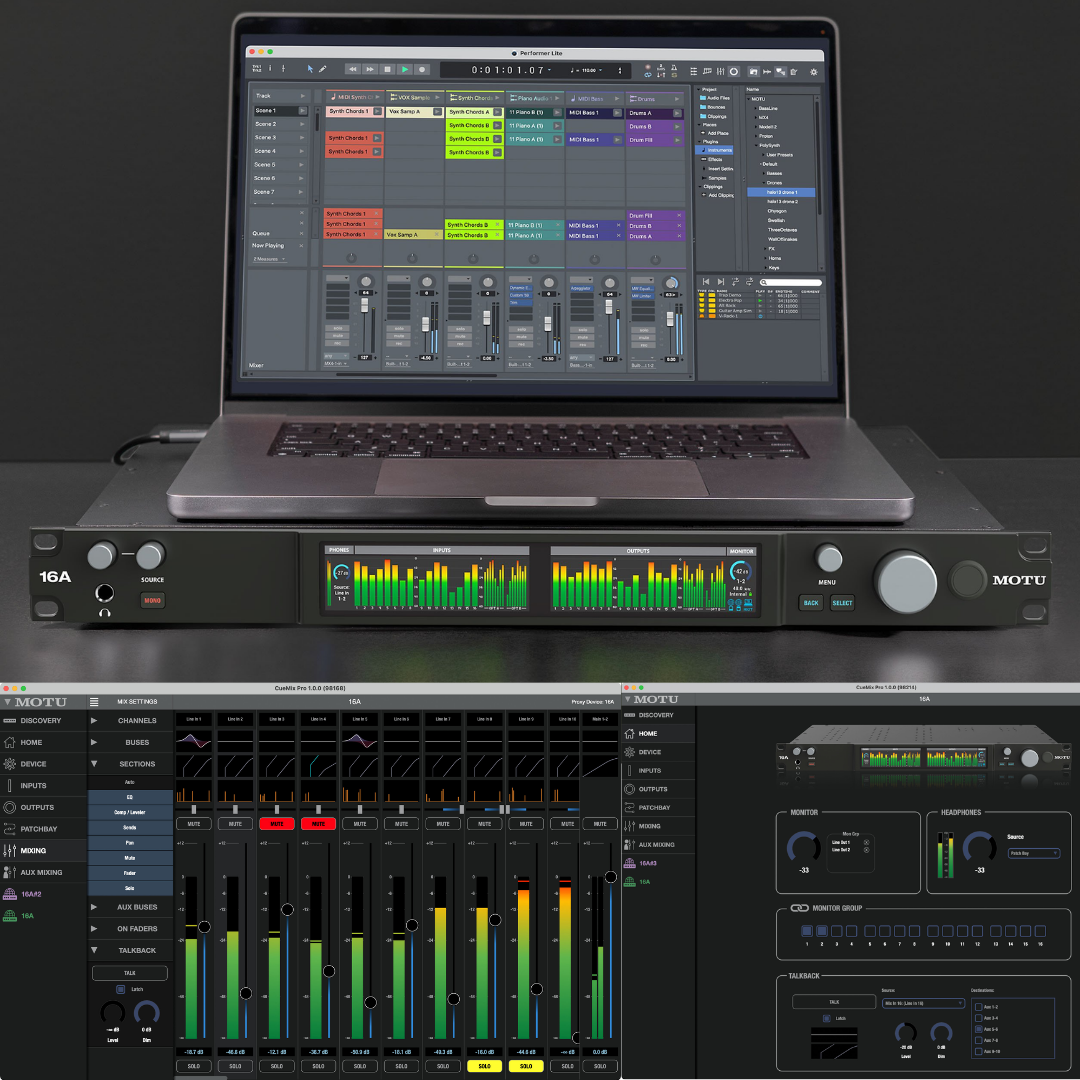
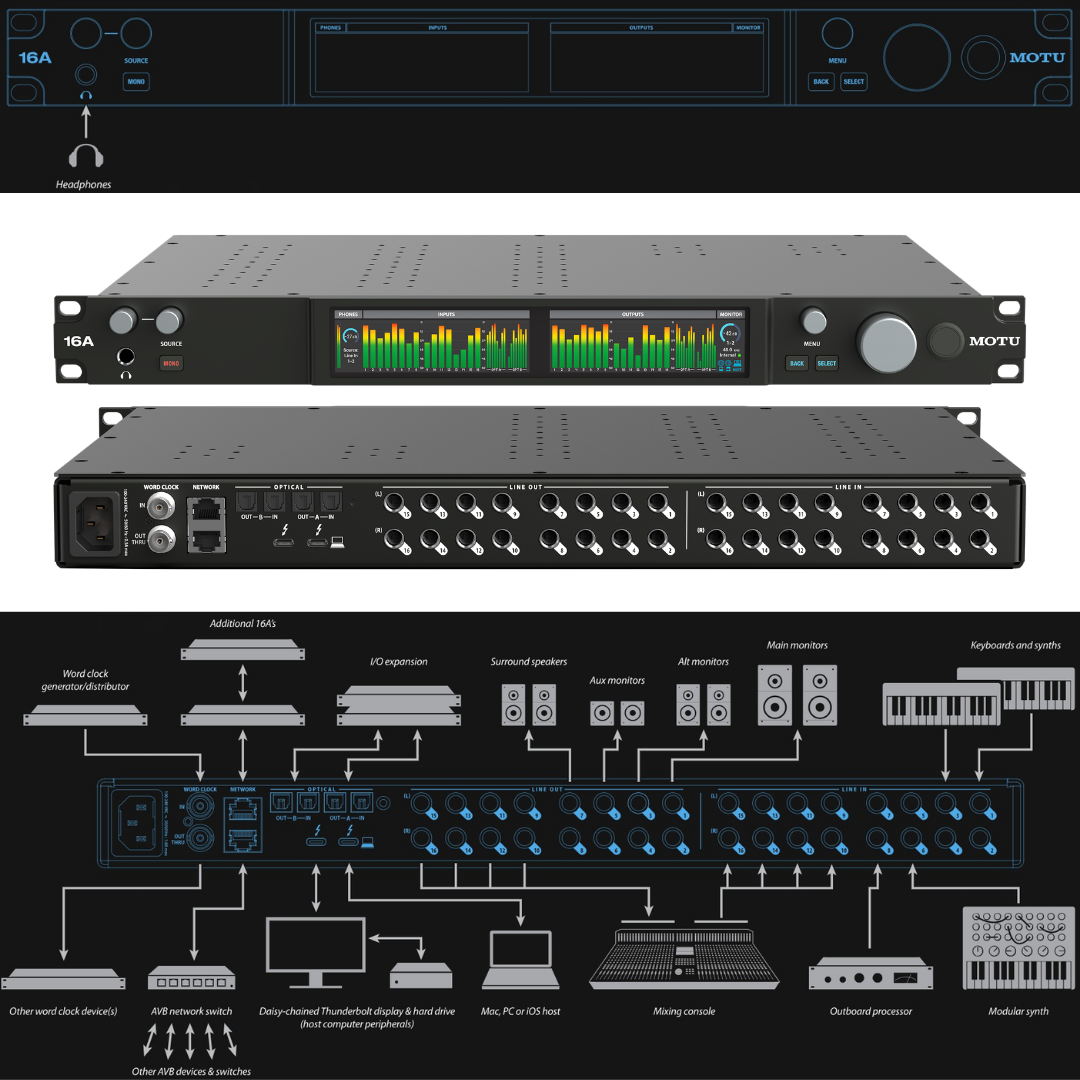
The MOTU 16A is a completely redesigned, full-rack (1U) professional audio interface that occupies the top tier of MOTU's Studio line. It holds the distinction of being the world's first audio interface equipped with Thunderbolt 4 and USB4 connectivity — a landmark engineering achievement that marks a new chapter in interface performance. The 16A delivers 66 simultaneous audio channels (32 inputs and 34 outputs) through 16 balanced/unbalanced TRS analog inputs, 16 DC-coupled TRS analog outputs, two banks of 8-channel ADAT optical I/O, and a discrete front-panel headphone output. This makes it simultaneously a precision analogue line router, a digital audio interface, an AVB network node, a full-featured DSP mixer, and a control room hub — all in a 1U chassis.
At the heart of the 16A's analogue performance are ESS Sabre32 Ultra DAC converters, a technology synonymous with the highest echelon of digital-to-analogue conversion. These converters are engineered around a proprietary 32-bit HyperStream architecture that uses noise-shaping and multi-level oversampling DAC modulation to push measured analogue output performance to 125 dB dynamic range (A-weighted) and -114 dB THD+N — specifications that place the 16A on par with reference-grade analogue gear. The analogue inputs achieve 120 dB dynamic range. Critically, these are not theoretical marketing figures: they are actual measured results published by MOTU and corroborated by independent measurement. All 16 analogue outputs are DC-coupled, an engineering choice with significant implications for modular synthesis workflows, as it allows the 16A to transmit control-voltage (CV) signals directly from a DAW into a Eurorack or semi-modular system without a separate CV interface.
MOTU introduced the redesigned 16A in late 2024, marking the product's evolution from the original AVB-era 16A (which used Thunderbolt 2 and USB 2.0 with a 324×24 LCD) to this next-generation design featuring dual 3.9-inch full-colour TFT displays, the new CueMix Pro control application, and 40 Gbps Thunderbolt 4/USB4 connectivity. The new interface accommodates 256 channels of computer I/O (128 in / 128 out) over a single Thunderbolt 4 cable — bandwidth that would have required an entire machine room of equipment only a decade ago. MOTU built the 16A on thirty years of audio interface engineering expertise, and the result is a product positioned as the primary interface for professional recording studios, broadcast facilities, post-production suites, live sound rigs, and large-scale installed audio networks.
The 16A's integrated AVB (Audio Video Bridging) switch with two Gigabit Ethernet ports enables building large-scale audio networks using nothing more than standard CAT-5e or CAT-6 cabling. Each 16A unit can transmit and receive 128 audio channels across the network, with a fixed and deterministic 2 ms point-to-point latency regardless of cable length up to 100 metres. Up to eight 16A units can be daisy-chained directly; connecting an external AVB switch expands this to a network of virtually unlimited scale. The 16A is also compatible with the entire existing MOTU AVB device family, including earlier generation 1248, 8A, and 8M units — a forward- and backward-compatible ecosystem that protects investment across upgrade cycles.
2. COMPUTER CONNECTIVITY
2.1 Thunderbolt 4 and USB4: Universal 40 Gbps Connectivity
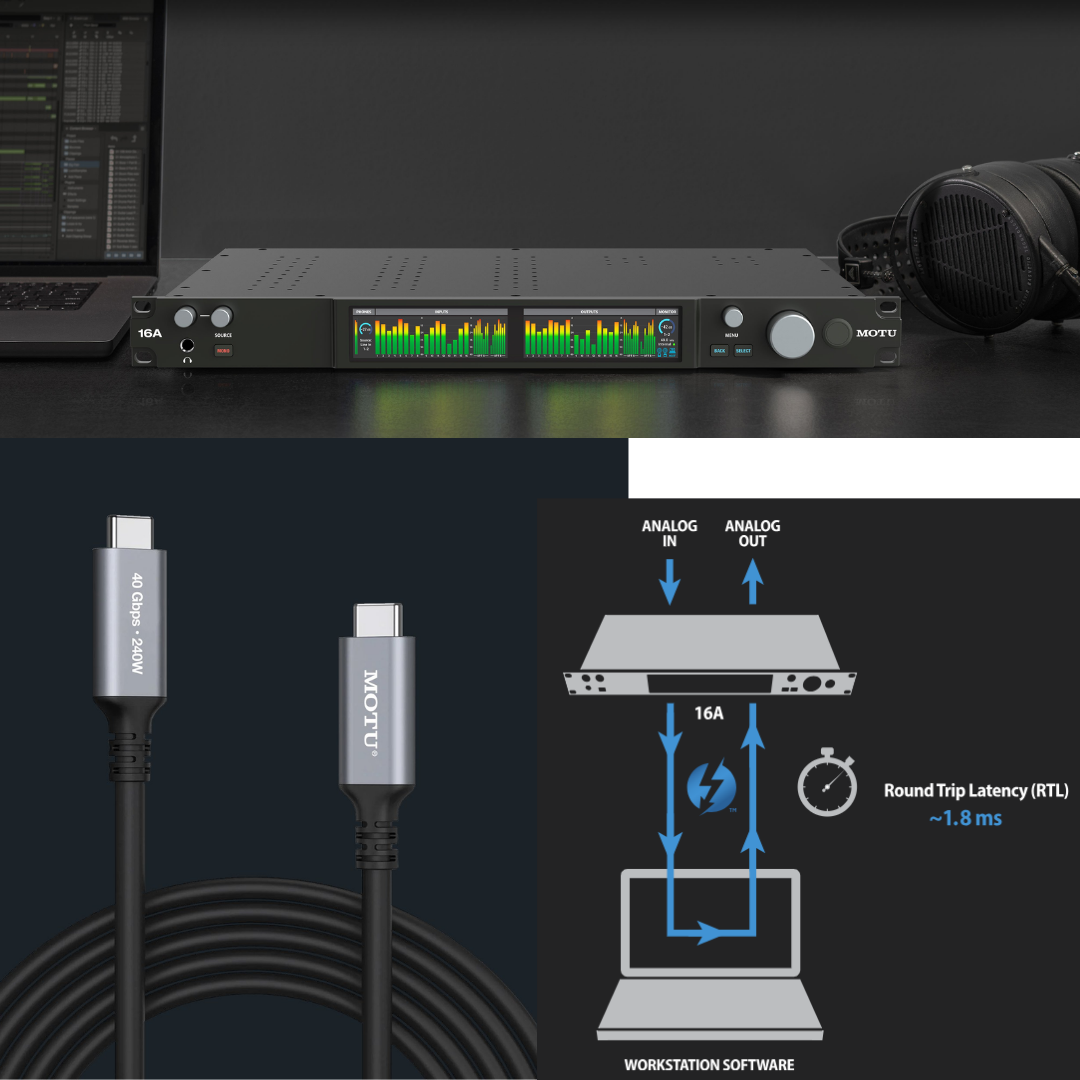
The MOTU 16A achieves its industry-first status through a USB-C port that negotiates the fastest available connection protocol between the host device and the interface. When connected to a Thunderbolt 4 or USB4 host, the link operates at 40 Gbps — enough bandwidth to sustain 256 channels of audio at 24-bit/96 kHz simultaneously, with vast headroom to spare. Unlike previous interface generations that required a dedicated Thunderbolt host controller, the 16A's USB-C architecture is protocol-agnostic: it will negotiate down to Thunderbolt 3, USB 3.x, or even USB 2.0 where required, ensuring compatibility with any modern Mac, Windows PC, or iOS device. The included cable is a 40 Gbps Thunderbolt-compatible USB4 C-to-C cable, 2 metres in length.
The practical implication of 40 Gbps bandwidth is transformative. Where a USB 2.0 connection (480 Mbps) limited earlier interfaces to a modest channel count, a Thunderbolt 4 connection can route all 256 host channels (128 in + 128 out) simultaneously without saturating the bus. This also allows the 16A to share its Thunderbolt chain with other high-bandwidth peripherals — RAID storage arrays, 8K video displays, Thunderbolt docks — without audio performance being affected. The Thunderbolt daisy-chain supports up to six devices in sequence off a single host port.
For iOS users, the 16A connects via its USB-C port to an iPad with USB-C directly, or to older Lightning-equipped iPads using Apple's Lightning-to-USB-C camera connection kit (sold separately). Class-compliant firmware ensures the 16A operates without additional drivers on iOS, making it fully supported for mobile recording sessions.
Computer I/O Summary
|
SPECIFICATIONS |
DETAILS |
|---|---|
Connection interface |
Thunderbolt 4 / USB4 (USB-C), 40 Gbps |
Backward compatibility |
Thunderbolt 3, USB 3.x, USB 2.0 (negotiated automatically) |
Computer I/O channels (TB4/USB4) |
256 total: 128 in + 128 out |
Round-trip latency (RTL) @ 96 kHz / 32 samples |
~1.8 ms (Thunderbolt 4) |
iOS connectivity |
USB-C direct (iOS 17.5 or later required); Lightning via camera connection kit (sold separately). Low-latency Thunderbolt driver support available only for iPad models with an M-series processor. |
Thunderbolt daisy-chain capacity |
Up to 6 additional Thunderbolt devices |
Cable included |
40 Gbps USB4 / Thunderbolt 4 compatible USB-C, 2 m |
Mac drivers |
Core Audio (macOS 12 or later) |
Windows drivers |
ASIO and WDM (Windows 11 23H2 or later) |
Class-compliant firmware |
Yes (USB audio class-compliant — no driver required for iOS) |
3. ANALOGUE I/O AND AUDIO QUALITY
3.1 ESS Sabre32 Ultra DAC Technology
The ESS Sabre32 Ultra is a family of audio-grade digital-to-analogue converters developed by ESS Technology, widely regarded as setting the benchmark for low-distortion, high-dynamic-range conversion in professional applications. The Sabre32 architecture uses HyperStream DAC modulation — a proprietary technique that reduces quantisation noise by distributing it over a very wide frequency range far above the audible band, then applies precision analogue filtering. The result is an exceptionally flat noise floor with no correlated distortion artefacts, which is why ESS converters are specified in measurements that were previously achievable only with discrete circuit designs.
In the MOTU 16A, the ESS Sabre32 Ultra converters produce a measured output dynamic range of 125 dB (A-weighted, 20 Hz to 20 kHz), a THD+N of -114 dB on analogue outputs, and a maximum output level of +21 dBu. The analogue inputs achieve 120 dB dynamic range with the same -114 dB THD+N. The headphone output achieves 118 dB dynamic range with -110 dB THD+N, with an output impedance below 1 Ohm — low enough to drive virtually any headphone load without affecting its frequency response. The entire signal path supports 24-bit resolution at sample rates from 44.1 kHz through 192 kHz, though the DSP mixer and effects engine operates up to 96 kHz.
3.2 Mathematical Validation of Dynamic Range
The ESS Sabre32 Ultra specification of 125 dB A-weighted dynamic range on outputs can be cross-checked against the THD+N measurement. A -114 dB THD+N figure (relative to full scale) represents a signal-to-distortion-plus-noise ratio consistent with approximately 18.5 equivalent bits of resolution (SNR = 6.02 × bits + 1.76 dB). A 125 dB A-weighted dynamic range is consistent with approximately 20.5 equivalent bits when accounting for A-weighting (which adds approximately 2–4 dB over unweighted measurements in a well-designed converter). These figures are mutually consistent and validate the specification.
Note that MOTU publishes 120 dB dynamic range for analogue inputs and 125 dB for analogue outputs. This asymmetry is typical in professional interface design: the analogue input path includes pre-conditioning circuitry (impedance matching, soft-clipping protection) that introduces a small additional noise contribution compared to the output path, which is a more direct conversion of a known digital signal. The 5 dB difference is consistent with best-practice analogue front-end design and does not represent a specification discrepancy.
3.3 DC-Coupled Outputs and CV Compatibility
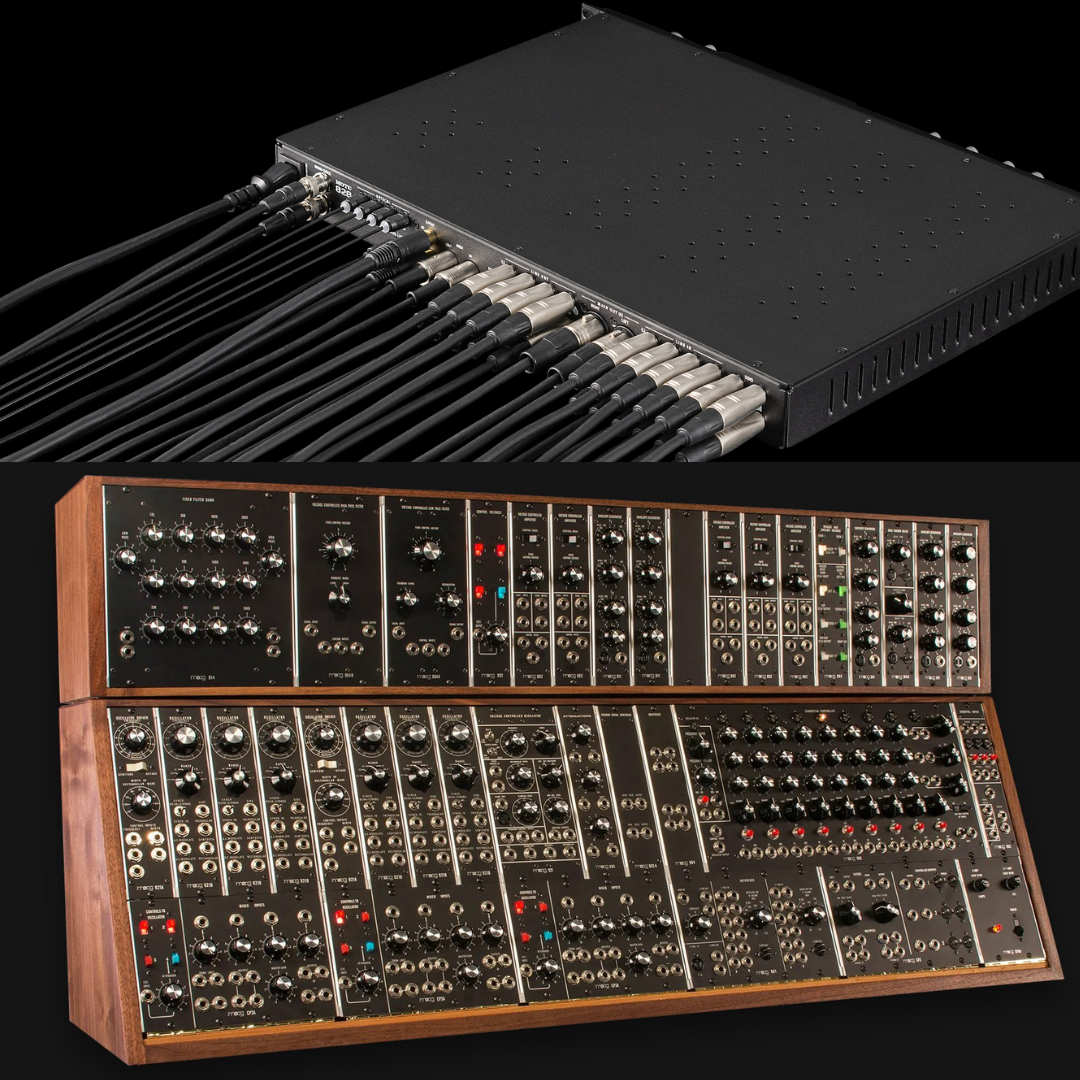
All 16 analogue outputs on the MOTU 16A are DC-coupled — meaning the output signal path has no coupling capacitors between the converter and the TRS output jack. In audio applications, AC coupling (via capacitor) is standard practice to block any DC offset voltage from reaching loudspeakers or recording equipment. However, in modular synthesis, the control signals that govern oscillator pitch, filter cutoff, amplitude, and so on are direct-current voltages, not audio frequencies. A DC-coupled output can accurately reproduce these voltages, enabling the 16A to function as a precision CV interface from within a DAW, generating LFO modulations, envelope shapes, pitch sequences, and gate signals that drive Eurorack or semi-modular synthesizers directly.
Analogue Input Specifications
|
SPECIFICATIONS |
DETAILS |
|---|---|
Number of analogue inputs |
16 (balanced/unbalanced TRS, 1/4-inch, rear panel) |
Input type |
Line-level; balanced (TRS) or unbalanced (TS) |
Dynamic range (A-weighted) |
120 dB |
THD+N |
-114 dB |
Maximum input level |
+21 dBu |
Phase invert |
Individual per channel (via CueMix Pro) |
Trim/boost range |
+/- adjustable in 1 dB increments (via CueMix Pro) |
Sample rate support |
44.1 / 48 / 88.2 / 96 / 176.4 / 192 kHz |
Bit depth |
24-bit |
Analogue Output Specifications
|
SPECIFICATIONS |
DETAILS |
|---|---|
Number of analogue outputs |
16 (TRS, 1/4-inch, rear panel) |
Output type |
Line-level; DC-coupled (all 16 outputs) |
Dynamic range (A-weighted) |
125 dB |
THD+N |
-114 dB |
Maximum output level |
+21 dBu |
DC-coupled (CV compatible) |
Yes — all 16 outputs |
Trim range |
Adjustable in 1 dB increments (via CueMix Pro) |
Sample rate support |
44.1 / 48 / 88.2 / 96 / 176.4 / 192 kHz |
Bit depth |
24-bit |
Headphone Output Specifications
|
SPECIFICATIONS |
DETAILS |
|---|---|
Location |
Front panel |
Number of outputs |
1 (stereo, 1/4-inch TRS) |
Dynamic range (A-weighted) |
118 dB |
THD+N |
-110 dB |
Maximum output level |
+13.3 dBu |
Output impedance |
< 1 Ohm |
Volume control |
Independent front-panel knob |
Source selection |
Independent front-panel knob (any output pair, CueMix bus, USB/TB channel, custom mix) |
Mono monitoring |
Yes — front-panel Mono button (splits mono source to L and R) |
4. DIGITAL I/O
4.1 ADAT Optical I/O
The MOTU 16A provides two independent banks (Bank A and Bank B) of 8-channel ADAT optical I/O, each using the Alesis Digital Audio Tape (ADAT) Lightpipe protocol over standard TOSLINK fibre-optic connectors. At 44.1 kHz and 48 kHz, each bank carries 8 discrete 24-bit audio channels, providing 16 additional channels of digital expansion. At 88.2 kHz and 96 kHz, the ADAT standard employs S/MUX (sample multiplexing), which doubles the word clock rate per channel, halving the channel count per optical bank to 4 — yielding 8 total channels of 96 kHz optical I/O across both banks.
Bank A additionally supports stereo TOSLink (optical S/PDIF) I/O at sample rates up to 96 kHz. This can be enabled in software to connect to consumer and semi-professional equipment using the IEC 60958 S/PDIF over optical protocol — DVD players, DAT machines, keyboard workstations, and digital effects processors — converting Bank A from 8-channel ADAT to a 2-channel S/PDIF optical connection. Bank B retains its ADAT function when Bank A is in TOSLink mode.
4.2 Word Clock
The 16A provides word clock input, output, and thru on BNC connectors on the rear panel. Word clock is a square-wave synchronisation signal at the sample rate frequency that allows multiple digital audio devices to lock to a common timing reference — a prerequisite for seamless operation of multiple digital devices in the same facility. The 16A's word clock supports all sample rates from 44.1 kHz to 192 kHz, making it compatible with even the highest-resolution digital workflows. The word clock thru output allows daisy-chaining multiple devices without additional word clock distribution amplifiers.
Digital I/O Specifications
|
SPECIFICATIONS |
DETAILS |
|---|---|
ADAT optical banks |
2 (Bank A and Bank B) |
ADAT channels @ 44.1/48 kHz |
16 (8 per bank) |
ADAT channels @ 88.2/96 kHz |
8 via S/MUX (4 per bank) |
Bank A — optional TOSLink (optical S/PDIF) |
Yes, up to 96 kHz (stereo) |
ADAT connector type |
TOSLINK optical fibre (standard) |
Word clock input |
BNC, all sample rates to 192 kHz |
Word clock output |
BNC, all sample rates to 192 kHz |
Word clock thru |
BNC |
Internal clock stability |
Crystal-referenced PLL |
Supported sample rates |
44.1, 48, 88.2, 96, 176.4, 192 kHz |
5. DSP MIXER AND EFFECTS
5.1 64-Channel Mixing Architecture
The MOTU 16A contains a dedicated 32-bit floating-point DSP engine that powers a 64-channel, 32-bus mixer operating entirely within the hardware — independent of the host computer's CPU. This is not a software mixer running on the computer; it is a hardware DSP processor on the 16A's mainboard that performs mixing and effects computations in real time, with zero additional latency contribution from the mixing process. The mixer accepts up to 64 simultaneous input channels from any combination of sources: the 16 physical analogue inputs, the 16 digital ADAT channels, channels returning from the host computer via Thunderbolt/USB, and audio streams arriving over the AVB network.
The 32 output buses include 26 auxiliary sends (for flexible monitor mixes or effects routing), a main mix bus, a reverb bus (which can alternatively serve as an additional group bus), a monitor bus, and a solo bus. This architecture mirrors the structure of a large-format analogue console, allowing engineers to simultaneously produce a main mix (for recording or house output), multiple independent monitor mixes (for performer headphone feeds), effects returns, and group processing chains — all with hardware DSP precision. The mixer operates at all sample rates up to 96 kHz.
5.2 Per-Channel Processing: EQ, Dynamics, and Filtering
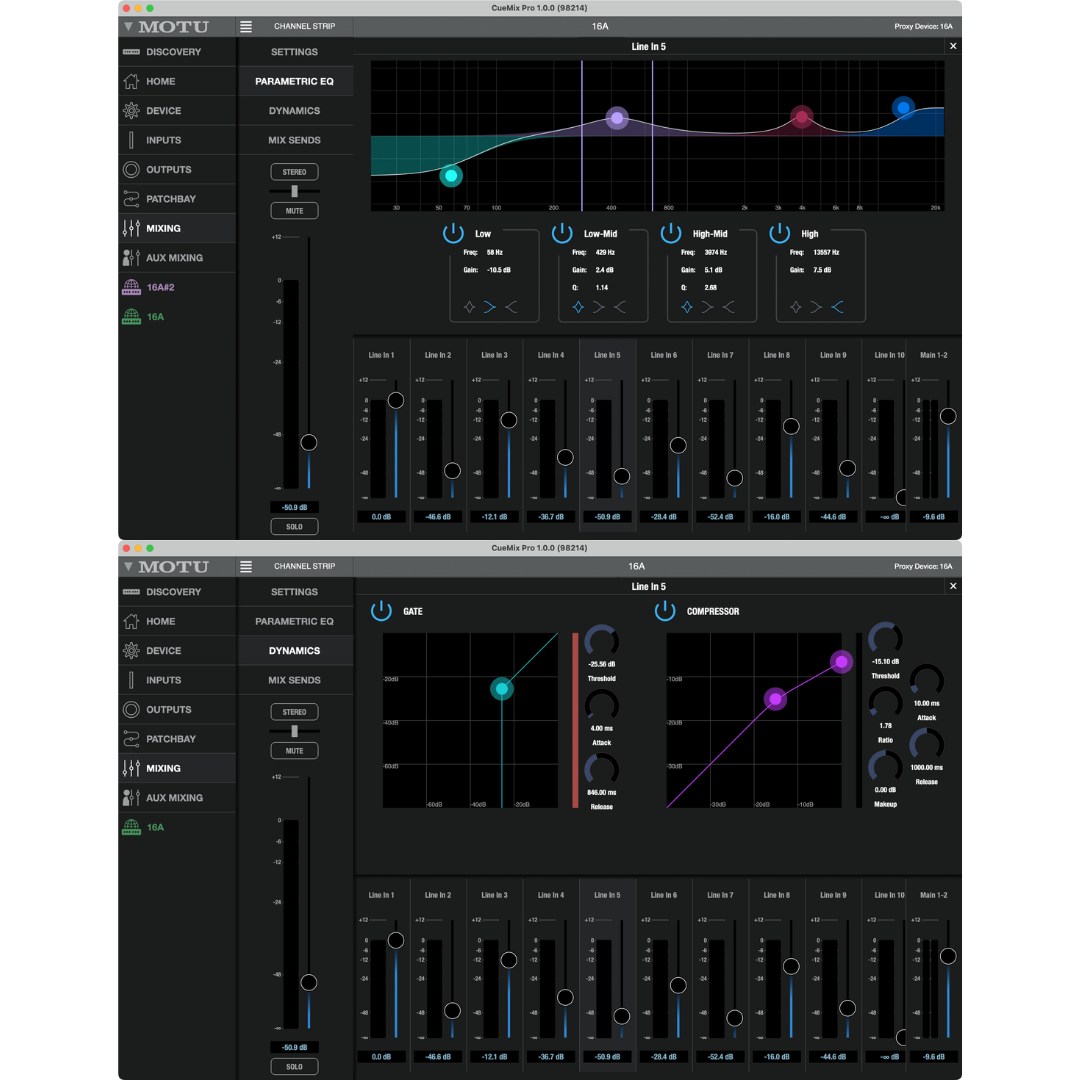
Every one of the 64 input channels and every output bus in the MOTU 16A's mixer is equipped with a comprehensive processing chain. The equaliser is a 4-band double-precision parametric design, where each band is defined by centre frequency, gain (boost/cut), and Q (bandwidth). Unlike single-precision floating-point, double-precision EQ computation preserves filter coefficient accuracy to approximately 15 decimal digits — important at narrow Q values and extreme frequency settings where rounding errors in single-precision arithmetic can cause filter instability or audible artefacts. Input channels additionally have a high-pass filter for low-frequency rumble and wind noise removal, a gate (with threshold, attack, hold, and release controls) for noise-gating and expander functions, and a compressor for dynamic control. Output buses have the compressor as well.
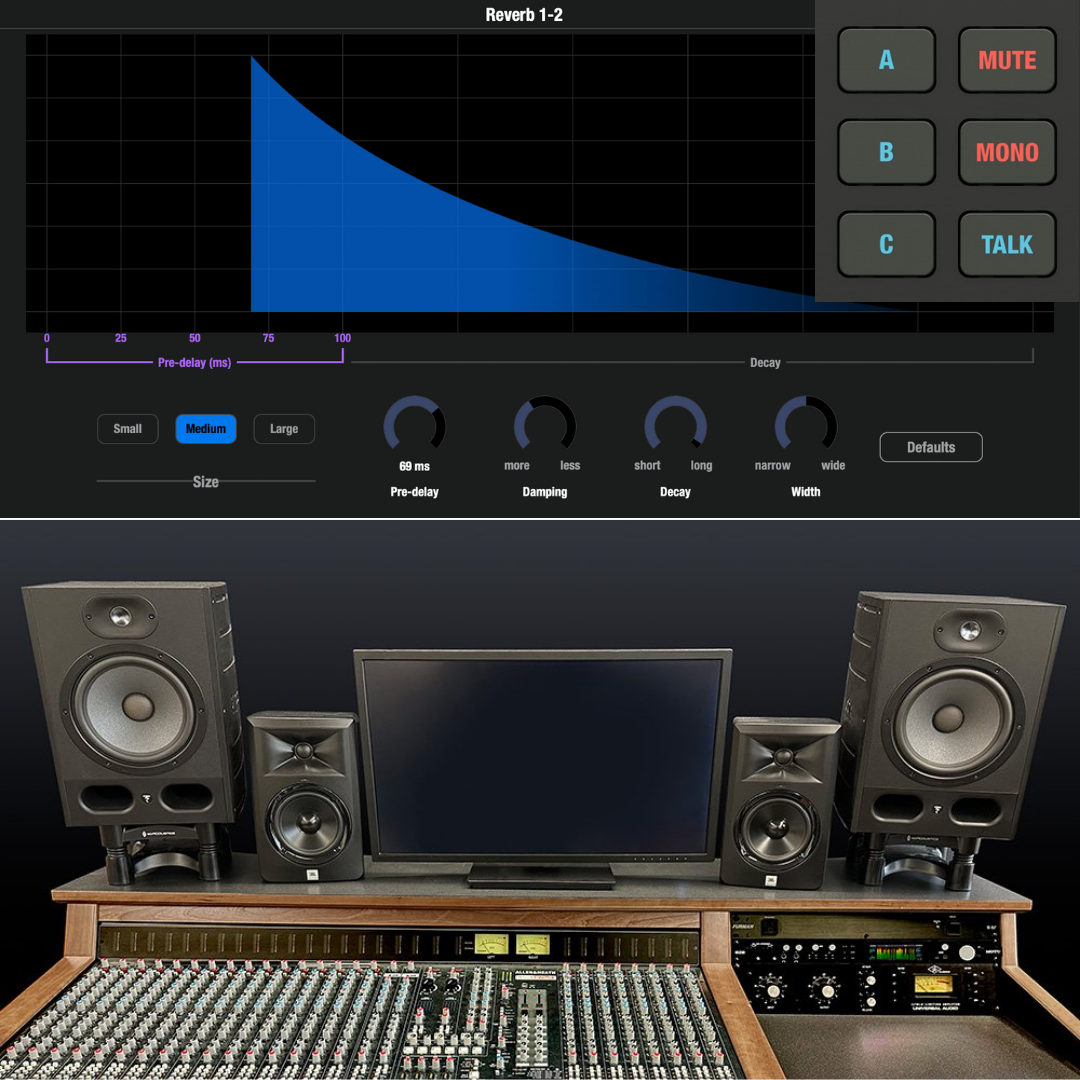
The reverb processor models classic acoustic spaces and is available as a send effect from any or all mixer channels. Reverb and other DSP processing continue to operate when the 16A runs in standalone mode (without a connected computer), enabling it to function as an autonomous stage mixer or monitor console running entirely from AVB inputs and outputs.
DSP Mixer Specifications
|
SPECIFICATIONS |
DETAILS |
|---|---|
DSP precision |
32-bit floating point |
Mixer input channels |
64 |
Mixer output buses |
32 (26 aux + main + reverb/group + monitor + solo) |
Per-channel processing: EQ |
4-band double-precision parametric EQ (all inputs and buses) |
Per-channel processing: HPF |
High-pass filter (input channels) |
Per-channel processing: Gate |
Gate / expander (input channels) |
Per-channel processing: Compressor |
Compressor (input channels and output buses) |
Reverb |
Yes — send/return reverb processor, classic space models |
Maximum DSP operating sample rate |
96 kHz |
Standalone operation |
Yes — full mixer + effects without computer |
Control interface |
CueMix Pro app (macOS, Windows, iOS) over Wi-Fi or wired |
Wi-Fi control |
Yes — CueMix Pro over Wi-Fi from phone, tablet, or laptop |
6. AVB NETWORKING
6.1 Audio Video Bridging (AVB): The IEEE Standard for Professional Audio Networks
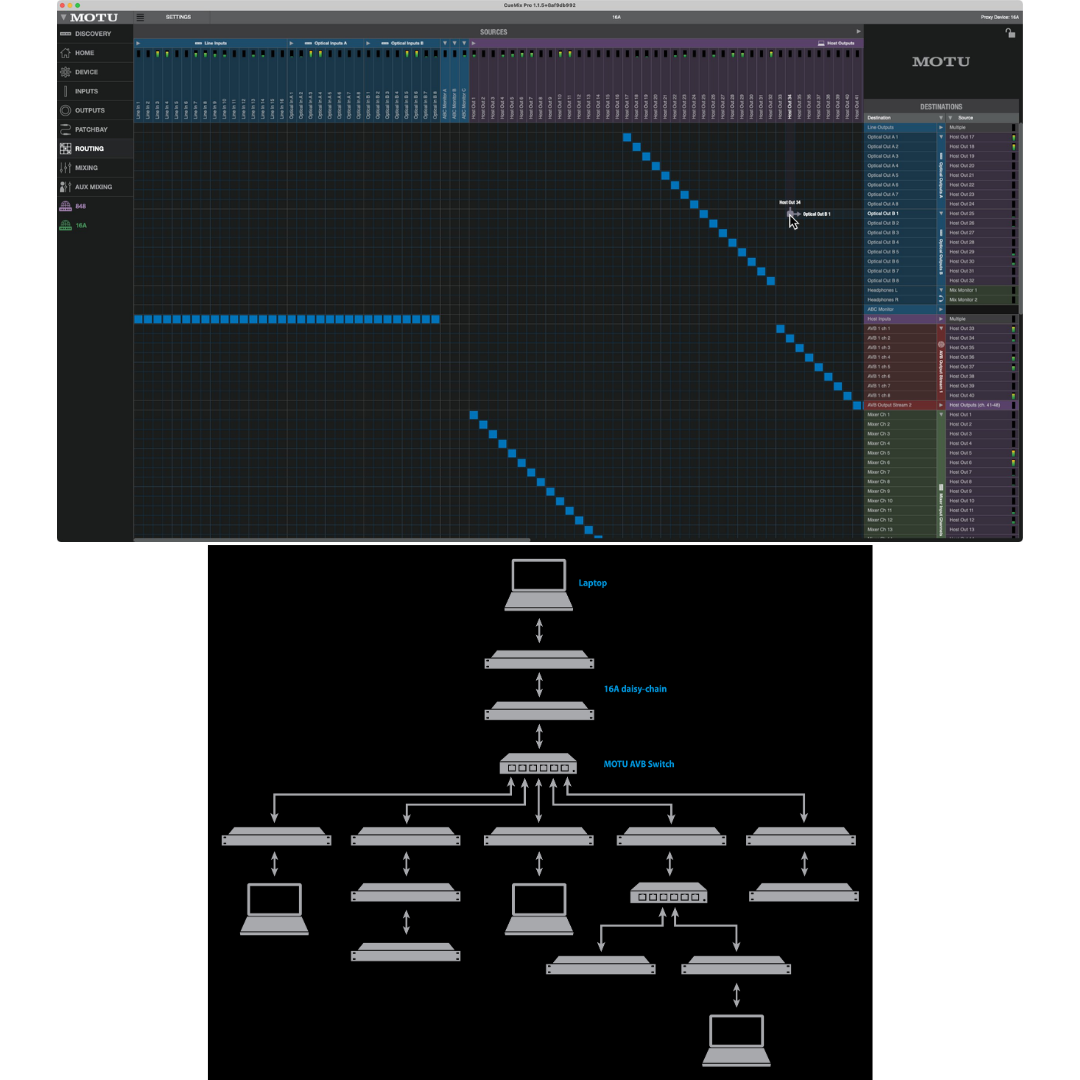
Audio Video Bridging (AVB) is a suite of IEEE standards (IEEE 802.1Qav, 802.1Qat, 802.1AS, IEEE 1722) developed specifically for time-sensitive audio and video streaming over Ethernet. Unlike general-purpose network protocols such as Dante or AES67, which operate over standard Ethernet and require managed quality-of-service (QoS) configuration, AVB operates at the network hardware level with built-in bandwidth reservation and clock synchronisation — no network management experience is required. The MOTU 16A implements AVB as an integrated feature, with two Gigabit Ethernet ports providing a built-in AVB switch that allows daisy-chaining multiple units directly without any external switching hardware.
The key property of AVB that distinguishes it from general-purpose networking is guaranteed latency. AVB reserves network bandwidth at the physical layer for audio streams, preventing other network traffic from causing audio dropouts or timing jitter. Network latency from point to point is fixed at 2 ms regardless of cable length (up to 100 metres per segment), number of switches traversed, or number of audio channels active. This determinism is not achievable with non-AVB network protocols without careful traffic management. For live sound applications where latency directly affects performer comfort, or for large-scale installed systems where cable runs span buildings, this fixed latency is a significant operational advantage.
Each MOTU 16A transmits and receives 128 audio channels over the AVB network (16 streams of up to 8 channels each, with each stream individually configurable between 1 and 8 channels). The new 16A supports AAF (AVTP Audio Format) stream formats as well as the legacy AM8-24 format for compatibility with earlier MOTU AVB devices. Multiple host computers can access all devices on the same AVB network simultaneously, enabling collaborative workflows where a recording engineer and a monitor engineer on the same network each have full independent access to all audio channels.
AVB Networking Specifications
|
SPECIFICATIONS |
DETAILS |
|---|---|
Network interface |
2 × Gigabit Ethernet (integrated AVB switch) |
Network protocol |
IEEE 802.1 AVB (Audio Video Bridging) |
Network channels per device |
128 in + 128 out |
AVB streams per device |
16 streams in / 16 streams out |
Channels per stream |
1–8 (individually configurable) |
AVB point-to-point latency |
2 ms fixed (regardless of cable length or chain depth) |
Maximum cable run per segment |
100 m (CAT-5e or CAT-6); longer with fibre-optic |
Maximum daisy-chain (direct) |
8 × MOTU 16A units |
External AVB switch support |
Yes — unlimited scale with compatible AVB switches |
Compatibility |
All MOTU AVB devices (1248, 8M, 8A, previous 16A, etc.) |
Clock synchronisation |
IEEE 802.1AS (nanosecond-accurate, network-wide) |
Control protocol |
IEEE 1722.1 (Connection Management; CueMix Pro acts as 1722.1 controller) |
AVB stream formats |
AAF (AVTP Audio Format); AM8-24 (legacy MOTU format) |
Multi-host support |
Yes — multiple computers can access all devices simultaneously |
7. FRONT PANEL AND DISPLAYS
7.1 Dual 3.9-Inch TFT Displays
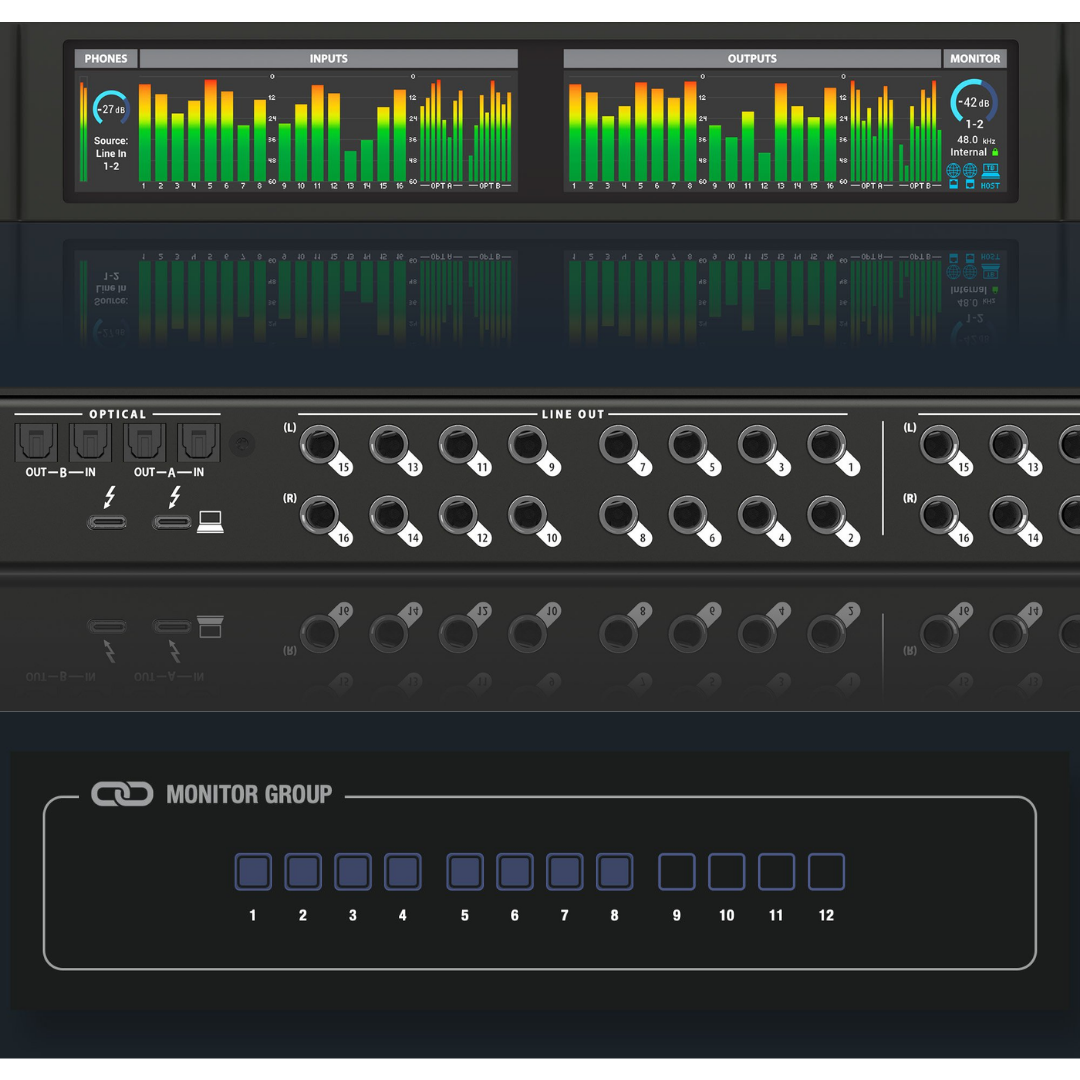
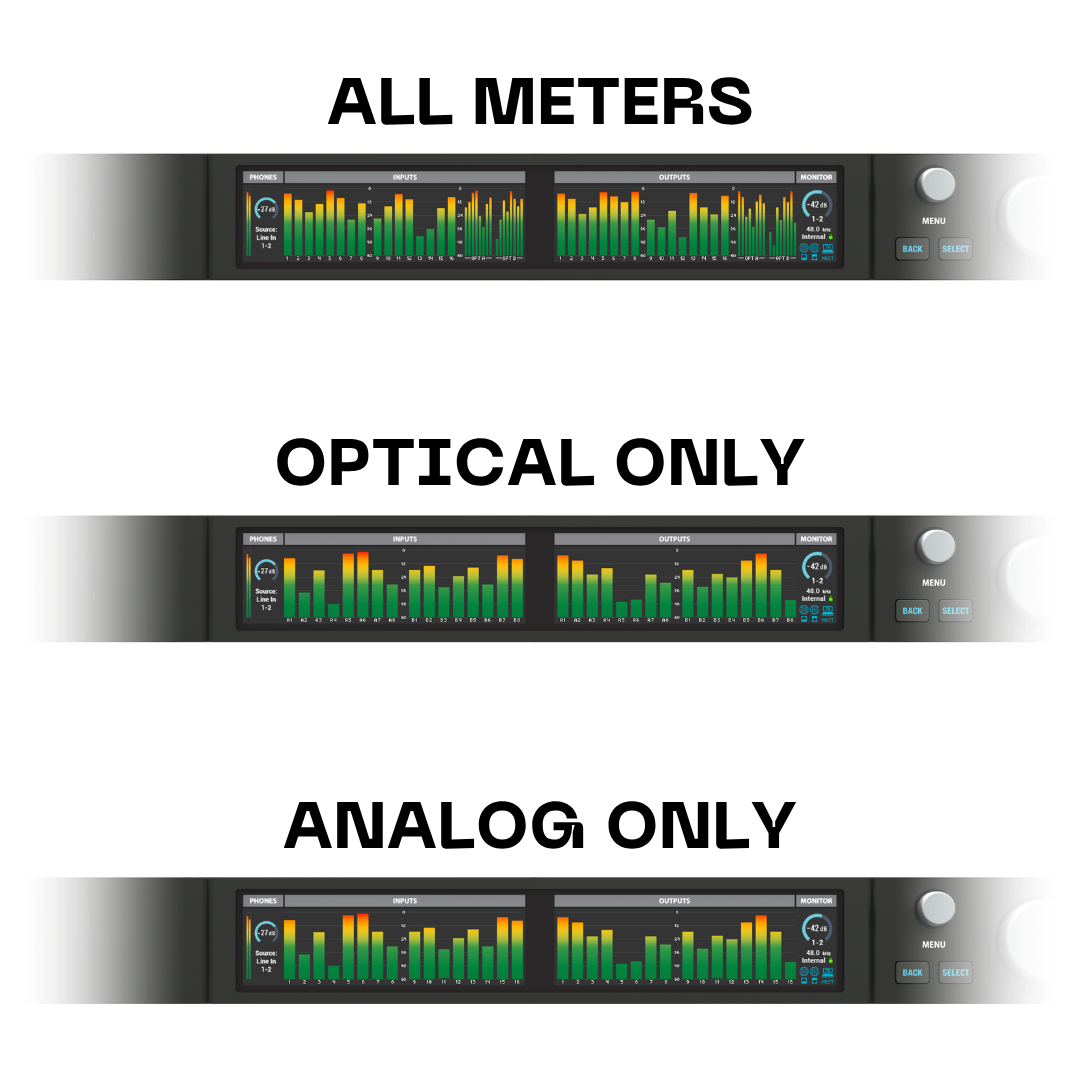
The redesigned MOTU 16A features two large, 3.9-inch full-colour TFT (Thin-Film Transistor) LCD displays on the front panel, each running at 480 × 128 pixel resolution with 24-bit RGB colour depth. These dual displays provide the metering real estate to visualise all 16 analogue channels and all 16 ADAT optical channels simultaneously in high resolution. Engineers can select from multiple pre-configured meter views — Analog Only, Digital Only, All Meters — to match the current workflow without scrolling or mode-switching. Status information including sample rate, sync source, clock status, and current headphone source is shown alongside the meters.
Navigation through hardware settings is accomplished via front-panel menu controls adjacent to the displays, providing direct hardware-level access to core parameters without requiring the CueMix Pro software to be open. This is valuable in live sound or installed environments where a computer may not be immediately accessible.
7.2 Control Room Features: Talkback and Monitor Switching
The front panel includes a dedicated talkback button, which allows the engineer to speak into a connected microphone and route the talkback signal to selected performer monitor mixes. The A/B/C speaker select buttons allow instant comparison between up to three independent sets of studio monitors connected to three output pairs of the 16A, without any reconfiguration in software — indispensable for referencing a mix on different speaker systems. These control-room features have historically been found only on dedicated monitor controllers or large-format mixing consoles; the 16A integrates them directly into the interface.
Front Panel Features
|
SPECIFICATIONS |
DETAILS |
|---|---|
Display count |
2 |
Display size |
3.9 inches (each) |
Display type |
TFT LCD, 24-bit RGB colour |
Display resolution |
480 x 128 pixels (each) |
Meter views |
All Meters / Analog Only / Digital Only (selectable) |
Headphone volume |
Independent rotary knob |
Headphone source select |
Independent rotary knob (any output pair, bus, or channel) |
Mono button (headphone) |
Yes — splits mono channel to both L and R |
Talkback |
Yes — dedicated button |
Monitor select |
A/B/C speaker select buttons (three monitor pairs) |
Menu navigation |
Front-panel menu controls for hardware settings access |
8. CUEMIX PRO CONTROL APPLICATION
8.1 Cross-Platform Wireless Control
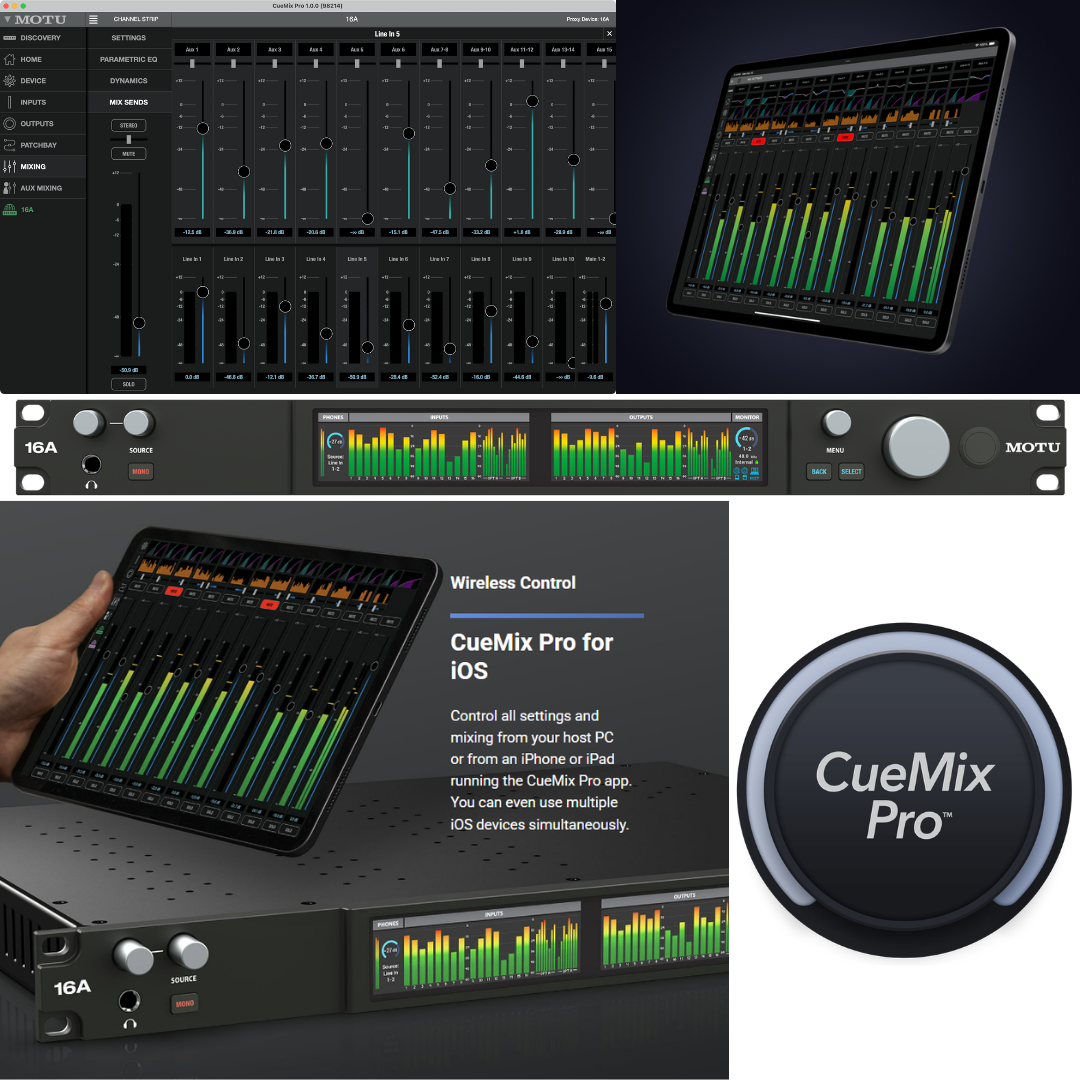
CueMix Pro is MOTU's dedicated control application for the 16A, available for macOS, Windows, and iOS. It provides a comprehensive graphical interface for every controllable parameter of the 16A: device settings, clock source, sample rate, input/output levels, boost/trim calibration, phase invert, signal routing, patchbay configuration, DSP mixer operation, effects processing, and AVB network management. Multiple instances of CueMix Pro can be running simultaneously on different devices — a studio engineer controlling the main mix on a MacBook Pro, a performer adjusting their monitor mix on an iPhone, and a system administrator managing the AVB network on a Windows PC can all operate concurrently without conflict.
CueMix Pro connects to the 16A either via the direct Thunderbolt/USB host connection or over Wi-Fi through a router connected to the 16A's Ethernet port. This wireless control capability is particularly powerful in live sound contexts: a monitor engineer can walk the stage and adjust performer monitor mixes from a tablet or phone, hearing the changes in real time without returning to the front-of-house position. The 16A's network-aware architecture and IEEE 1722.1 implementation means that CueMix Pro also serves as a discovery and configuration tool for any 1722.1-compatible third-party AVB devices on the same network.
8.2 Routing Grid and Patchbay
CueMix Pro includes two complementary routing views: a virtual patchbay using intuitive patch cords for individual signal routing decisions, and a Routing Grid for a global "bird's-eye" matrix view of all connections in the system. The Routing Grid displays all sources on one axis and all destinations on the other, with activity meters on each signal path. A single click creates or removes a routing connection, and any single source (or stereo pair) can be routed to unlimited simultaneous destinations — a splitting function that is essential for complex broadcast or installed-sound topologies.
CueMix Pro Software Features
|
SPECIFICATIONS |
DETAILS |
|---|---|
Available platforms |
macOS, Windows, iOS |
Connection method |
Thunderbolt / USB (wired) or Wi-Fi (wireless over local network) |
Simultaneous control sessions |
Multiple devices at the same time |
iOS app |
Yes (CueMix Pro for iOS — App Store) |
Routing views |
Virtual patchbay (patch cords) + Routing Grid (matrix) |
Source splitting |
Any single source to unlimited destinations |
Third-party AVB device control |
Yes — acts as IEEE 1722.1 controller for any 1722.1-compatible device |
Loopback function |
Yes — routes computer output back as input for live streaming / podcasting |
Meter views selectable in software |
Yes |
9. MOTU PRODUCT FAMILY: POSITIONING THE 16A
The redesigned 16A occupies the analogue I/O flagship position in MOTU's current interface line-up. Comparing it to key siblings clarifies its specific value proposition for different facility types.
MODEL |
ANALOGUE I/O |
MIC PREAMPS |
DIGITAL I/O |
PRIMARY APPLICATION |
|---|---|---|---|---|
MOTU 16A |
16 in / 16 out (line) |
None |
16 ch ADAT + Word Clock |
Large analogue patchbay, AVB hub |
MOTU 10pre |
8 in / 10 out |
10 mic preamps |
16 ch ADAT + Word Clock |
Studio with extensive mic inputs |
MOTU 828 |
8 in / 8 out (line) |
None |
16 ch ADAT + Word Clock |
Mid-size analogue routing |
MOTU M6 |
4 in / 4 out |
None (2 combo inputs) |
None |
Small studio / home studio |
MOTU UltraLite-mk5 |
8 in / 8 out (line) |
2 mic preamps |
16 ch ADAT |
Mobile / compact studio |
The 16A's defining differentiator within MOTU's line is its 16 × 16 analogue channel count. No other MOTU interface provides this volume of balanced line-level I/O, making the 16A the natural choice for facilities that require connection to large patchbays, outboard gear racks, summing amplifiers, multiple consoles, or large monitor systems. It trades microphone preamps for raw channel density — studios requiring preamps will pair the 16A with external preamplifiers such as the MOTU 10pre or third-party rack preamps connected via ADAT.
10. BUILD QUALITY AND FORM FACTOR
The MOTU 16A is housed in a rugged steel chassis occupying 1U of rack space. The enclosure is described by MOTU and third-party reviewers as "near-bulletproof" — it is constructed from thick-gauge sheet metal with integrated rack ears, designed to withstand the rigours of touring, live sound, and mobile recording deployments where equipment is subject to vibration, thermal cycling, and mechanical impact. The unit measures 482.6 × 311 × 44.4 mm (19 × 12.25 × 1.75 inches) and is powered by an internal power supply (with IEC mains cable included), eliminating the external power-brick topology that complicates cable management in rackmount environments.
The dual 3.9-inch TFT displays on the front panel represent a significant quality upgrade over the original 16A's 324 × 24 single-line LCD. With 480 × 128 pixel resolution and 24-bit colour, these displays render metering graphics and status information with clarity and resolution appropriate to critical professional environments. MOTU backs the 16A with a two-year manufacturer's warranty.
Physical Specifications
|
SPECIFICATIONS |
DETAILS |
|---|---|
Form factor |
1U, full-rack (19-inch standard) |
Dimensions (W × D × H) |
482.6 × 311 × 44.4 mm (19 × 12.25 × 1.75 inches) |
Construction material |
Steel chassis with integrated rack ears |
Power supply |
Internal (IEC mains cable included) |
Weight |
Not specified by manufacturer on current product page |
Front panel displays |
2 × 3.9-inch TFT LCD, 480 × 128 px, 24-bit RGB |
Manufacturer warranty |
2 years |
Operating systems |
macOS 12 or later, Windows 11 23H2 or later, iOS 17.5 or later |
11. IDEAL APPLICATIONS AND USE CASES
- Professional recording studio: Central analogue router connecting multiple outboard preamps, compressors, EQs, and summing amplifiers via the 16-channel TRS matrix.
- Post-production facility: High-channel-count interface for ADR, Foley, and final mix suites requiring multiple monitor feeds and patchbay integration.
- Broadcast and radio: Multi-channel line-level hub for routing between consoles, codecs, telephone hybrids, and production desktops.
- Live sound reinforcement: Stage rack interface providing 16 analogue sends to amplifier racks, with AVB networking to front-of-house and monitor positions.
- Theatre and performing arts: Monitor mixing with individual performer IEM mixes (up to 16 analogue outputs) and talkback integration.
- House of worship: Multi-zone audio distribution with AVB expansion to multiple buildings or campus locations over CAT-6 infrastructure.
- Electronic music and modular synthesis: DC-coupled outputs delivering CV control voltage directly from DAW automation lanes to Eurorack synthesizers.
- Music schools and universities: High-channel-count teaching facility hub that can be centrally monitored and controlled from CueMix Pro over Wi-Fi.
- Installed sound systems: Permanent rack installation as AVB network node, routing audio throughout a building over existing CAT-6 infrastructure.
- Mobile and location recording: Rugged steel chassis survives transport; standalone mixer operation with Wi-Fi control enables fieldwork without laptop.
- Rental and production companies: Universal Thunderbolt 4/USB4 compatibility ensures the 16A works seamlessly with any modern Mac or Windows host.
HOW TO READ THIS DOCUMENT
This document is the operational companion to the MOTU 16A Product Description and Technical Specifications document. Where the Specs document answers "what does the 16A do and how is it measured?", this document answers "how do I actually deploy and use the 16A in my specific professional environment?" Every workflow section describes a named scenario with physical setup, signal routing, configuration detail, and the specific features of the 16A that make that workflow efficient or even possible. Together, the two documents constitute a complete technical and operational reference for the MOTU 16A.
Three defining workflow advantages of the MOTU 16A appear repeatedly across the scenarios in this document. First, its 16 × 16 balanced TRS line channel matrix makes it the highest analogue channel-density interface in MOTU's lineup, enabling it to serve as the central patchbay for any facility that outgrows 8-channel interfaces. Second, its DC-coupled outputs and 64-channel DSP mixer with 32 independent buses allow the 16A to generate up to 32 simultaneous, independently mixed monitor or distribution feeds — each processed through parametric EQ, compression, and reverb — without any CPU load on the host computer. Third, its integrated AVB networking with dual Gigabit Ethernet ports enables facilities to grow from a single interface to a building-wide audio network over standard network cabling, with a fixed 2 ms latency that does not increase regardless of network scale.
Each workflow section is structured as follows: a scenario description, a physical and signal-routing walkthrough, a discussion of which 16A features are most critical in that environment, and a summary table for use as a practitioner's checklist. Some workflows include multiple sub-scenarios to cover common variations within the same environment. Select the workflows most relevant to your application — not every section will apply to every reader.
WORKFLOW 1 — THE PROFESSIONAL RECORDING STUDIO
Scenario A: Permanent Studio Installation with Patchbay Integration
In a professional recording studio, the analogue patchbay is the nervous system of the facility — it connects microphone preamplifiers, outboard compressors, equalisers, insert effects, the recording interface, and the monitor system via a matrix of normalised and half-normalised connections. The MOTU 16A is purpose-built for this topology: its 16 balanced TRS analogue inputs accept normalised outputs from any row of the patchbay (typically the outputs from 16 channels of outboard preamplification), and its 16 DC-coupled outputs feed into another patchbay row that distributes to mix bus inserts, stem outputs, headphone amplifiers, and monitor speakers.
In a typical permanent studio installation, the rear of the 16A is wired directly to the patchbay. Channels 1–8 of the TRS inputs receive the line outputs of a high-quality 8-channel preamp rack (such as an API 3124+ or Neve 1073 DPX) that handles all microphone inputs. Channels 9–16 receive programme returns from outboard effects (Lexicon reverbs, Neve 33609 compressors, SSL bus compressors). The 16 TRS outputs feed headphone amplifier distribution units, the main monitor speaker system, and foldback IEM transmitters. The two ADAT optical banks expand the system further: Bank A connects to an additional 8-channel preamp with ADAT output (such as an AMS Neve 8816 summing amp), while Bank B feeds a digital patchbay or external digital effects unit.
The 16A's DSP mixer then provides a complete monitor mixing system without any reliance on the DAW mixer. Individual performer headphone mixes are configured as separate aux buses in CueMix Pro: Bus 1 is the drummer's mix, Bus 2 is the bassist's mix, Bus 3 is the guitarist's mix, and so on. Each performer mix receives appropriate reverb and delay from the 16A's onboard reverb processor. The engineer controls all monitor levels from the CueMix Pro app on a MacBook Pro or iPad, and performers can adjust their own mixes from iPads running CueMix Pro in the live room — wirelessly over the studio's Wi-Fi network. The computer (running Pro Tools, Logic Pro, or Digital Performer) sees the 16A as a 128-in / 128-out Thunderbolt device and performs all tracking, editing, and mixing operations with an RTL of approximately 1.8 ms.
Workflow Summary: Permanent Studio with Patchbay
| WORKFLOW ELEMENTS | DETAILS / CONFIGURATIONS |
|---|---|
Interface connection to DAW |
Thunderbolt 4 / USB4 (40 Gbps), ~1.8 ms RTL at 96 kHz |
Analogue inputs 1–8 |
Normalised from 8-channel outboard mic preamp outputs (patchbay row) |
Analogue inputs 9–16 |
Returns from outboard effects (compressors, EQs, reverbs) |
Analogue outputs 1–8 |
Main monitor system (A/B/C switching via front panel) |
Analogue outputs 9–16 |
Headphone amplifier distribution / IEM transmitters |
ADAT Bank A |
Second 8-ch preamp or summing amplifier with ADAT I/O |
ADAT Bank B |
Digital effects unit or additional I/O expansion |
DSP mixer: performer monitor buses |
Up to 26 independent aux mixes (one per performer) |
Monitor reverb/EQ for performers |
16A onboard DSP — zero DAW CPU load |
Monitor mix control by performers |
CueMix Pro on iOS (Wi-Fi) in live room |
Engineer control platform |
CueMix Pro on macOS or iOS at engineering position |
Sample rate |
44.1 or 48 kHz for tracking; up to 96 kHz for high-res sessions |
DAW platform |
Pro Tools, Logic Pro, Digital Performer, Reaper, or any ASIO/Core Audio DAW |
Scenario B: Large Ensemble Recording with ADAT Expansion
Recording large ensembles — orchestras, choirs, chamber groups, big bands — frequently requires more than 16 simultaneous microphone channels. The 16A accommodates this through its ADAT optical expansion. A second 8-channel preamp rack equipped with an ADAT output (such as an Focusrite OctoPre or Neve 8804) connects to Bank A, delivering 8 additional channels at 44.1/48 kHz. A third ADAT-equipped preamp connects to Bank B, bringing the total microphone channel count to 32 simultaneous channels: 16 via the analogue TRS inputs (from the first preamplifier stage) and 16 via the two ADAT banks. All 32 channels are recorded simultaneously in the DAW as discrete tracks, with the 16A presenting them as channels 1–32 on the Thunderbolt connection.
Workflow Summary: Large Ensemble Recording
| WORKFLOW ELEMENTS | DETAILS / CONFIGURATIONS |
|---|---|
Total simultaneous microphone channels |
32 (16 TRS analogue + 8 ch ADAT Bank A + 8 ch ADAT Bank B) |
TRS analogue inputs (channels 1–16) |
First 8-ch preamp × 2 (or 16-ch preamp rack) |
ADAT Bank A (channels 17–24) |
Second 8-ch preamp with ADAT output |
ADAT Bank B (channels 25–32) |
Third 8-ch preamp with ADAT output |
DAW recording tracks |
32 simultaneous discrete channels at 24-bit / 48 kHz |
Conductor/artist headphone feed |
Dedicated aux bus from 16A DSP mixer — no DAW roundtrip |
Monitor mixing control |
CueMix Pro over Wi-Fi |
WORKFLOW 2 — LIVE SOUND AND VENUE PRODUCTION
Scenario A: FOH Recording and Stage Interface for Venue Production
In live sound applications, the MOTU 16A serves two complementary roles simultaneously: as a stage rack interface that receives microphone signals from the stage (via DI boxes and stage splitters), and as a multitrack recording interface that feeds the FOH computer for capture and/or virtual soundcheck. The 16A is positioned in the stage rack or FOH rack depending on the cable topology. Its 16 TRS inputs accept line-level outputs from the mic splitter snake or the direct outs of a stage box, giving the recording engineer access to all 16 raw pre-fader microphone signals. Simultaneously, the 16A feeds the FOH digital console via its ADAT outputs (Bank A and B), providing 16 channels of line-level input to the console's stagebox expansion or analogue input banks.
The 16A's DSP mixer is used in this scenario to generate monitor mixes for the stage. With the Thunderbolt cable connected to the FOH laptop running a DAW (Reaper, Pro Tools, or any ASIO host), the engineer can record all 16 channels of the live performance to individual tracks for broadcast delivery, post-production mixing, or virtual soundcheck playback. CueMix Pro's loopback feature allows the FOH engineer to route the recorded playback back through the 16A to the console for virtual soundcheck — setting gain, EQ, and compression on the console while listening to yesterday's recording through the live PA system as if the band were still on stage.
Workflow Summary: FOH Recording and Stage Interface
| WORKFLOW ELEMENTS | DETAILS / CONFIGURATIONS |
|---|---|
16A physical location |
Stage rack or FOH rack (connected to host laptop via Thunderbolt) |
Analogue inputs 1–16 |
Pre-fader direct outs or mic splitter snake, all instrument/vocal channels |
ADAT Bank A/B outputs |
16 ch digital feed to FOH console analogue/ADAT input expansion |
DAW recording |
16 simultaneous tracks (24-bit / 48 kHz) on FOH laptop |
Virtual soundcheck |
Loopback: DAW playback routed back through 16A to console |
Monitor mixes (onstage) |
16A DSP mixer aux buses — independent performer mixes |
RTL for monitor system |
~1.8 ms (Thunderbolt 4) — transparent for in-ear monitoring |
FOH control |
CueMix Pro on laptop or tablet over Wi-Fi |
Sample rate |
48 kHz (broadcast / live standard) |
Scenario B: Standalone Stage Mixer with Wi-Fi Control
For smaller venue productions or residency setups where a dedicated FOH computer is not practical, the 16A can function as a fully autonomous standalone mixer. In standalone mode, the DSP mixer processes all input signals, applies EQ, compression, and reverb, and routes processed signals to the 16 analogue outputs — all without any computer connection. A monitor engineer controls all levels, EQ, and effects settings from a tablet running CueMix Pro over the venue Wi-Fi (or via a small travel router connected to the 16A's Ethernet port). This configuration requires no laptop, no DAW licence, and no driver management at the venue — only a tablet, the 16A, and a network connection.
Workflow Summary: Standalone Stage Mixer
| WORKFLOW ELEMENTS | DETAILS / CONFIGURATIONS |
|---|---|
Computer connection |
None (standalone mode) |
Control interface |
CueMix Pro on iPad / Android tablet over Wi-Fi |
Wi-Fi connection |
Small travel router plugged into 16A Ethernet port, or venue Wi-Fi |
Inputs |
16 TRS analogue (line-level from stage splitter or DI direct outs) |
Outputs |
16 TRS analogue (to amplifiers, IEM transmitters, main PA returns) |
DSP processing |
Full 64-ch mixer, EQ, compressor, gate, HPF, reverb — all onboard |
Monitor mixes |
Up to 26 independent aux buses (performer IEM feeds) |
Total personnel required |
1 monitor engineer with tablet |
WORKFLOW 3 — BROADCAST AND RADIO STUDIO
Scenario: Multi-Source Radio and Television Production
Broadcast facilities — radio studios, television production galleries, and IPTV streaming operations — share a common requirement: multiple simultaneous audio sources need to be ingested, processed, mixed, and routed to multiple output destinations (air chain, recording, monitoring, contribution feeds) with minimal latency and maximum reliability. The MOTU 16A's 16 × 16 analogue channel count maps directly onto the multi-source routing requirements of a broadcast audio environment.
A typical radio facility configuration places the 16A at the core of the routing architecture. Analogue inputs 1–4 receive outputs from telephone hybrid units (for live caller audio). Inputs 5–8 receive outputs from on-air microphone preamp channels (presenter, co-host, guest positions). Inputs 9–12 receive returns from the playout system (Zara Radio, SAM Broadcaster, or similar). Inputs 13–16 receive returns from contribution codecs or remote interview lines. The 16A's 16 TRS outputs feed the broadcast console, audio-over-IP codec inputs, streaming encoder line inputs, production room monitor feeds, and headphone amplifiers for on-air talent. Loopback in CueMix Pro allows the station's on-air stream to be fed back into the computer as a discrete input for quality monitoring and recording of the broadcast output.
CueMix Pro's A/B/C monitor switching is directly applicable in broadcast: the producer uses Speaker A for the control room main monitors, Speaker B for a smaller NS-10 reference pair, and Speaker C for a small consumer-grade speaker to check how the mix translates to listener systems — all switched instantly from the front panel without touching the DAW or console.
Workflow Summary: Radio Broadcast Studio
| WORKFLOW ELEMENTS | DETAILS / CONFIGURATIONS |
|---|---|
Analogue inputs 1–4 |
Telephone hybrid units (4 simultaneous caller lines) |
Analogue inputs 5–8 |
Microphone preamp line outputs (presenter / co-host / guests) |
Analogue inputs 9–12 |
Playout system line outputs (music, jingles, adverts) |
Analogue inputs 13–16 |
Contribution codec returns / remote interview feeds |
Analogue outputs 1–4 |
Broadcast console insert returns / main fader feeds |
Analogue outputs 5–8 |
Streaming encoder inputs / air chain outputs |
Analogue outputs 9–12 |
Control room monitor feed + headphone amplifiers |
Analogue outputs 13–16 |
Production room feed + recording system input |
Loopback |
On-air stream returned to DAW input for recording and monitoring |
Monitor switching |
A/B/C (three monitor pairs) via 16A front-panel buttons |
Control app |
CueMix Pro on macOS at production desk |
Sample rate |
48 kHz (broadcast standard) |
Thunderbolt RTL |
~1.8 ms — fully transparent for on-air production |
WORKFLOW 4 — POST-PRODUCTION AND AUDIO-FOR-PICTURE
Scenario: ADR, Foley, and Final Mix Suite
Post-production facilities for film, television, and streaming content have demanding I/O requirements: multiple monitoring environments (the dubbing theatre, the ADR booth, the supervising editor's suite), multiple processing chains for dialogue, music, and sound effects, and a requirement for frame-accurate synchronisation with picture. The MOTU 16A fits naturally into the post-production infrastructure as a high-channel-count interface that connects the Pro Tools or Nuendo workstation to the mixing console, outboard processing, and monitor system.
In an ADR (Automated Dialogue Replacement) setup, the 16A's TRS inputs receive the cleaned-up dialogue pre-mixes from the console, the scratch vocal from the ADR booth microphone (via a preamp), and the picture playback audio from the edit workstation. The 16A's outputs feed the ADR booth's playback system (so the actor can hear the original performance for lip-sync), the supervisor's cue mix, and the main studio monitors. The 64-channel DSP mixer is configured to generate a picture-sync guide track with a pronounced timing click (derived from the original dialogue) on the actor's headphone feed, with independent level control from the production track. No additional monitor controller hardware is required — the 16A's A/B/C speaker switching and talkback cover all control-room communication functions.
At high sample rates (88.2 or 96 kHz), the 16A's ADAT optical channels each carry only 4 channels via S/MUX, which is important to plan for in post-production suites that rely on ADAT connections to external A-D converters or Pro Tools HDX expansion. Word clock connectivity ensures the 16A locks to the facility's master clock (typically distributed from a Rosendahl or Adrienne card in the Pro Tools HD system), maintaining sample-accurate alignment between the DAW, console, and any external digital devices.
Workflow Summary: ADR and Post-Production Suite
| WORKFLOW ELEMENTS | DETAILS / CONFIGURATIONS |
|---|---|
Interface connection |
Thunderbolt 4 to Pro Tools / Nuendo workstation |
Sample rate |
48 kHz (standard delivery) or 96 kHz (high-res masters) |
Clock source |
External word clock from facility master clock (BNC word clock input) |
Analogue inputs 1–8 |
Console direct outs (dialogue, music, Foley stems) |
Analogue inputs 9–12 |
ADR booth microphone via external preamp |
Analogue inputs 13–16 |
Picture workstation outputs / music playback returns |
Analogue outputs 1–8 |
Main dubbing console input returns |
Analogue outputs 9–12 |
ADR booth playback speakers + actor headphone feed |
Analogue outputs 13–16 |
Three sets of studio monitors (A/B/C) |
ADAT Bank A |
Pro Tools HD expansion or external A-D converter |
ADAT Bank B |
Surround sound decoder or Atmos renderer I/O |
Talkback |
16A front-panel talkback to ADR booth feed |
Monitor switching |
A/B/C speaker select (dubbing theatre / NS-10 / Auratone) |
Word clock |
Output to additional digital devices in the facility |
WORKFLOW 5 — HOUSE OF WORSHIP
Scenario: Multi-Microphone Worship Facility with Live Stream and Campus Distribution
Houses of worship are among the most demanding professional audio environments for an interface, because they simultaneously require broadcast-quality multitrack recording, multiple independent performer monitor mixes, a live stream output to internet audiences, and often a distributed audio system that extends across multiple buildings or campuses. The MOTU 16A's combination of high analogue channel count, AVB networking, loopback functionality, and onboard DSP mixing makes it exceptionally well-suited to this application.
In a typical house-of-worship deployment, the 16A is rack-mounted in the FOH or AV rack. Analogue inputs 1–16 receive line-level outputs from the stage box or console direct outs, capturing all worship team microphone channels, DI sources, and ambient microphones. The 16A's Thunderbolt connection feeds a host MacBook Pro running Logic Pro or Pro Tools for simultaneous multitrack recording of the full service. The loopback feature routes the main stereo mix (from the FOH console via analogue inputs 15–16) back into the DAW as a discrete stereo track, providing a complete single-file recording of the service alongside the individual tracks.
For live streaming, CueMix Pro's loopback function routes the FOH stereo mix and any additional stem mixes to virtual audio channels that the streaming software (OBS Studio, Wirecast, or vMix) can access directly, eliminating the need for an external audio interface for the streaming computer. Two 16A units daisy-chained via their Gigabit Ethernet AVB ports can cover a campus with two buildings: Unit 1 at the main auditorium FOH position, Unit 2 in the overflow room or secondary chapel. Both units share 128 bidirectional audio channels over a single CAT-6 cable at 2 ms fixed latency, and both are controlled from a single CueMix Pro session by the volunteer audio team.
Workflow Summary: House of Worship Production
| WORKFLOW ELEMENTS | DETAILS / CONFIGURATIONS |
|---|---|
Interface connection |
Thunderbolt 4 to MacBook Pro (recording + streaming host) |
Analogue inputs 1–12 |
Worship team microphones and DIs (via stage box direct outs) |
Analogue inputs 13–14 |
Ambient room microphones |
Analogue inputs 15–16 |
FOH console main stereo output (programme mix) |
DAW recording |
Multitrack (channels 1–16) + stereo programme mix (loopback) |
Live stream output |
CueMix Pro loopback — FOH mix routed to OBS / Wirecast |
Performer monitor mixes |
16A DSP mixer: up to 26 independent aux mixes via TRS outputs |
Campus overflow audio |
AVB network to second 16A in overflow room (CAT-6 cable, 2 ms) |
Volunteer control |
CueMix Pro on iPad over Wi-Fi — simplified view for non-engineers |
Streaming computer |
Separate laptop accessing loopback channels from 16A |
Sample rate |
48 kHz |
AVB clocking |
Master clock: primary 16A; slave: overflow room 16A |
WORKFLOW 6 — MUSIC EDUCATION: UNIVERSITY AND CONSERVATORY
Scenario: Teaching Studio and Ensemble Recording Facility
Music schools, conservatories, and university audio programmes require production facilities that serve multiple simultaneous functions: individual student recording suites, ensemble capture rooms, and teaching environments where an instructor can monitor and demonstrate from a central position. The MOTU 16A's network architecture is particularly well-suited to educational facilities, where one administrative interface needs visibility across multiple rooms and the equipment must be robust enough for student operation while flexible enough for professional-standard teaching demonstrations.
In a university teaching studio, the 16A is connected to the instructor's workstation via Thunderbolt 4. Students in the live room or ensemble space use microphone preamps connected to the 16A's TRS inputs and ADAT expansion, providing up to 32 simultaneous recording channels for ensemble sessions. The instructor demonstrates tracking, overdubbing, and mixing techniques from the control room, with all DAW sessions displayed on a large classroom screen. Simultaneously, CueMix Pro running on a second computer (student workstation) allows students to explore signal routing and monitor mixing independently. Because multiple CueMix Pro sessions can run concurrently on the same network, the instructor and student computers have independent views of the same 16A, and both can make and observe routing changes in real time.
The 16A's Wi-Fi control capability allows instructors to demonstrate mix adjustments from anywhere in the room — walking towards the ensemble to demonstrate microphone placement technique while simultaneously adjusting monitor levels for the performers from an iPad. The A/B/C speaker switching supports comparative listening exercises: students switch between a studio monitor, a smaller reference speaker, and a consumer-grade playback system to learn how mix decisions translate across different listening environments.
Workflow Summary: University Teaching Studio
| WORKFLOW ELEMENTS | DETAILS / CONFIGURATIONS |
|---|---|
Primary host |
Instructor workstation (macOS or Windows), Thunderbolt 4 |
Student workstation |
Additional computer running CueMix Pro (simultaneous access) |
Analogue inputs |
16 channels from preamp rack (vocals, instruments, room mics) |
ADAT expansion |
Up to 16 additional channels from ADAT-equipped preamp racks |
Total recording channels |
Up to 32 simultaneous (ensemble sessions) |
Instructor mobility |
CueMix Pro on iPad via Wi-Fi — full control from anywhere in room |
Student exploration |
Simultaneous CueMix Pro session on student computer |
Comparative listening |
A/B/C speaker switching for reference training |
Monitor mixes for ensemble |
Up to 26 independent aux buses — each section hears custom mix |
Recording format |
24-bit / 48 kHz (standard) or 96 kHz (high-resolution projects) |
DAW platform |
Logic Pro, Pro Tools, Digital Performer, Reaper |
WORKFLOW 7 — PODCAST STUDIO AND LIVE STREAMING PRODUCTION
Scenario: Multi-Host Podcast with Remote Guests and OBS Integration
Podcast production has evolved into a sophisticated multi-channel discipline at the professional end of the market, where shows may feature four or more simultaneous in-room hosts, live call-in guests, pre-recorded clips, backing music beds, and real-time live streaming to YouTube, Twitch, or podcast platforms. The MOTU 16A's loopback functionality, high channel count, and CueMix Pro DSP mixer provide a complete solution for this workflow without requiring a hardware mixer at all.
In a professional podcast studio, each host's microphone is connected to an outboard preamp (or a channel of a small console), with the preamp line output feeding one of the 16A's TRS inputs. Remote guests connected via Zoom, Riverside.fm, or Source-Connect appear as software audio channels returned from the DAW host to the 16A's mixer. The 16A DSP mixer creates individual pre-fader monitor mixes for each host via separate aux buses: each host hears all other hosts, the remote guest, and the backing music at levels customised for their own preference, delivered to a personal headphone amplifier connected to one of the 16A's TRS outputs. The hosts' headphone mixes are created and adjusted from CueMix Pro on the producer's iPad, without interrupting the recording.
For live streaming, CueMix Pro's loopback function is configured to create a stereo mix of all sources — local hosts, remote guest, music bed — and route it to a virtual audio device that OBS Studio sees as an audio input. This eliminates the need for a separate audio interface for the streaming computer. The producer can hear the programme output at any time from the 16A's front-panel headphone output (source: loopback mix), while the hosts listen to their individual monitor mixes from the TRS outputs.
Workflow Summary: Multi-Host Podcast Production
| WORKFLOW ELEMENTS | DETAILS / CONFIGURATIONS |
|---|---|
Host microphone inputs |
16A analogue TRS inputs 1–4 (via individual preamps) |
Remote guest audio |
DAW software channel (Zoom / Riverside return) routed via CueMix Pro |
Music bed and SFX |
DAW playback channels — routed to DSP mixer as separate inputs |
Per-host headphone mix |
16A DSP mixer: 4 independent aux buses (one per host) |
Host headphone amplifiers |
Connected to analogue TRS outputs 1–4 (one output per host) |
Programme output monitor |
Analogue TRS output 5–6 (main mix to control room monitors) |
OBS Studio audio input |
CueMix Pro loopback — stereo programme mix as virtual audio device |
Producer control |
CueMix Pro on iPad over Wi-Fi |
DAW recording |
Multi-track: all hosts and guests on separate tracks for editing |
Live stream latency |
< 5 ms total (16A DSP + loopback path) |
Sample rate |
48 kHz |
WORKFLOW 8 — ELECTRONIC MUSIC AND MODULAR SYNTHESIS
Scenario: CV-Integrated DAW-to-Eurorack Hybrid Production
The integration of Eurorack modular synthesizers with a DAW-based production environment has become one of the defining creative workflows in contemporary electronic music production and sound design. The challenge is that Eurorack synthesizers respond to control voltages (CV) in the range of 0–10V or -5V to +5V, rather than audio frequencies — voltages that cannot pass through AC-coupled audio outputs because the coupling capacitors block the DC component of the signal. The MOTU 16A's DC-coupled outputs solve this problem directly: any of the 16 TRS outputs can transmit a control voltage signal from a DAW into a Eurorack system with full precision, sample-rate accuracy, and sub-millisecond timing.
In practice, the workflow connects the 16A's DC-coupled TRS outputs to a Eurorack CV-audio adapter (such as an Expert Sleepers ES-9 breakout, though many studios simply attenuate the 16A output signal directly into a Eurorack module's CV input). The DAW generates CV signals from dedicated CV generation plug-ins (Silent Way, Voltage Modular, or similar), or from MIDI-to-CV conversion plug-ins that map MIDI note data to pitch CV voltages. The DAW automation system then controls the CV output values over time, effectively using the 16A as a multi-channel analogue automation controller for the Eurorack system. Because the 16A supports up to 16 simultaneous CV outputs, a composer can simultaneously control pitch (1V/octave), gate, filter cutoff, resonance, VCA amplitude, LFO rate, reverb send, and effects parameters across multiple voices — entirely from within the DAW.
The 16A's 16 analogue inputs are used simultaneously to record the Eurorack audio outputs (oscillators, filters, effects) back into the DAW, allowing the modular signal processing chain to be integrated with DAW plugins and mixed with sample-based material. The system runs at 96 kHz for the lowest possible CV update rate (a 96 kHz CV signal updates 96,000 times per second, enabling extremely precise envelope shapes and pitch control), with the 1.8 ms Thunderbolt RTL ensuring that DAW automation response times are transparent in real-time performance.
Workflow Summary: DAW-Eurorack CV Integration
| WORKFLOW ELEMENTS | DETAILS / CONFIGURATIONS |
|---|---|
DC-coupled outputs in use |
Outputs 1–8 (pitch CV, gate, filter, VCA, modulation per voice) |
CV voltage range |
Set by DAW plug-in output level (matched to Eurorack CV input range) |
CV signals generated |
Silent Way / Volta plug-ins in DAW — pitch, gate, envelope shapes |
DAW automation |
DAW automation lanes control CV output values over timeline |
Eurorack audio returns |
Analogue inputs 1–8 (oscillator / filter / effects audio outputs) |
Recording format |
24-bit / 96 kHz (high resolution for precise CV timing) |
RTL at 96 kHz |
~1.8 ms — transparent for live CV modulation performance |
Monitor output |
Analogue outputs 9–10 (to studio monitors) |
Headphone output |
Front panel — source: main mix bus from CueMix Pro |
DAW platform |
Ableton Live, Logic Pro, Digital Performer with Silent Way / CV tools |
WORKFLOW 9 — MULTI-ROOM AVB NETWORK FACILITY
Scenario: Building-Wide Audio Network with Multiple MOTU Units
Large facilities — commercial recording complexes, campus sound systems, installed theatre systems, broadcast facilities, and large houses of worship — require audio routing infrastructure that spans physical distances of tens or hundreds of metres between rooms. Installing individual multi-channel analogue cables for each audio pathway is costly, inflexible, and subject to signal degradation over long runs. The MOTU 16A's AVB networking capability, built on the IEEE 802.1 standard, transforms standard network infrastructure into a professional audio transport capable of carrying hundreds of channels with a fixed, deterministic latency.
A multi-building facility installs one MOTU 16A in each room that requires audio I/O: the main recording studio, the overdub booth, the machine room, the live room, and the client lounge. Each unit connects to the facility's CAT-6 network via its Gigabit Ethernet port. An external IEEE 802.1 AVB-compatible switch (such as a Cisco CBC-series or Extreme Networks switch with AVB support) interconnects all units. Every 16A on the network can transmit and receive 128 audio channels from every other 16A on the network simultaneously, over the facility's existing CAT-6 cabling. CueMix Pro running on a central administration computer manages all routing decisions: which room's inputs feed which other room's outputs, which monitor mix goes to which building, and which channels are recorded to which host computer. Cable runs of up to 100 metres per CAT-6 segment are supported with no signal degradation; longer runs are accommodated with fibre-optic Ethernet links.
The AVB network's clocking standard (IEEE 802.1AS) achieves phase alignment between all devices that is measured in nanoseconds — better than sample-accurate sync — ensuring that audio routed between rooms arrives at a consistent time reference regardless of which route it takes through the network. This is essential for applications such as conference systems (where audio from multiple rooms needs to be summed without comb-filtering artefacts) and broadcast contribution (where multiple room feeds must be synchronised for a multichannel mix).
Workflow Summary: Multi-Room AVB Network
| WORKFLOW ELEMENTS | DETAILS / CONFIGURATIONS |
|---|---|
Number of MOTU 16A units (example) |
4 (main studio, live room, overdub booth, machine room) |
Network infrastructure |
CAT-6 cabling + AVB-compatible Gigabit Ethernet switch |
Channels per link |
128 in + 128 out per unit |
Total network audio channels (4 units) |
Up to 512 simultaneous channels |
Point-to-point latency |
2 ms fixed (regardless of distance or hops) |
Maximum cable run (copper) |
100 m per CAT-6 segment |
Extended distance |
Fibre-optic Ethernet for runs beyond 100 m |
Clock synchronisation |
IEEE 802.1AS — nanosecond accuracy, network-wide |
Multi-host recording |
Multiple computers on same network, each recording their local 16A |
Central management |
CueMix Pro on admin workstation — controls all units simultaneously |
Backward compatibility |
Previous MOTU AVB devices (1248, 8M, 8A) compatible |
Scalability |
Add more 16A units or AVB switches at any time without reconfiguration |
WORKFLOW 10 — AUDIO RENTAL AND MOBILE PRODUCTION
Scenario: Location Recording and Mobile Production Unit
Rental companies and location recording specialists require equipment that is simultaneously rugged, flexible, universally compatible, and capable of operating in environments without stable computer connections. The MOTU 16A's steel construction, internal power supply, universal Thunderbolt 4/USB4 compatibility, standalone DSP mixer mode, and Wi-Fi control make it an ideal platform for mobile production, whether in a film location sound cart, a mobile recording truck, a corporate event AV rack, or a festival monitor position.
For location film and television audio, the 16A serves as the interface between a cart-based recording system (a MacBook Pro or Windows workstation running Sound Devices Wingman-compatible or Pro Tools software) and the microphone feeds arriving from boom operators, lavalier transmitter receivers, and stereo room mics. All 16 TRS inputs receive pre-mixed or split microphone feeds, and the DAW records all channels simultaneously for editorial use. The 16A's word clock input ensures it synchronises to the production's timecode source (a Tentacle Sync or SoundDevices CL-12 feeding BNC word clock), maintaining frame-accurate alignment with the camera feeds.
For corporate event and conference AV, the 16A is commonly used as a high-channel-count interface for a broadcast-quality audio setup in venues that do not have a permanent installation. The rental company connects the 16A to a laptop running Reaper, configures the DSP mixer with appropriate EQ and compression for the venue acoustics, and operates the entire system wirelessly from a tablet while the event is in progress. Because the 16A is USB class-compliant, it also works immediately with any Thunderbolt 3 or USB-C MacBook without driver installation — a significant operational advantage in rental scenarios where client computers may need to connect to the interface without prior preparation.
Workflow Summary: Mobile Production and Rental
| WORKFLOW ELEMENTS | DETAILS / CONFIGURATIONS |
|---|---|
Host computer |
MacBook Pro / Windows laptop, Thunderbolt 4 or USB4 connection |
Analogue inputs |
16 x TRS (mic preamp outputs, lavalier receiver outputs, DIs) |
DAW recording |
Multi-track at 24-bit / 48 kHz; all 16 channels simultaneously |
Clock synchronisation |
Word clock input locked to timecode generator (BNC) |
Standalone mixer mode |
Available when computer not connected (rental / event use) |
Wi-Fi control |
Tablet running CueMix Pro — wireless operation during event |
Power |
Internal power supply — single IEC connection, no external brick |
Construction |
Steel chassis — rack-mounted for transport protection |
Driver requirement for client computers |
None — USB class-compliant firmware (plug-and-play on macOS / iOS) |
Monitor switching |
A/B/C speaker select — compare on three different speaker sets at venue |
ADAT expansion |
ADAT inputs from digital console or additional preamps if required |
WORKFLOW 11 — THEATRE AND PERFORMING ARTS
Scenario: Musical Theatre Monitor System and Recording
Musical theatre productions have one of the most complex audio requirements in the live sound world: large casts with individual body-worn wireless microphone transmitters, multiple monitor systems for band members in the pit and performers on stage, a multi-channel effects system for reverbs and enhancement, multitrack recording for cast albums and archival purposes, and a production intercom system for stage management. The MOTU 16A's combination of 16 analogue I/O channels, 26-bus DSP mixer, onboard reverb, and word clock synchronisation addresses these requirements across a single interface.
In a typical touring or repertory theatre configuration, the 16A is installed in the FOH rack. All 16 analogue TRS inputs receive direct outs from the FOH mixing console (one per wireless microphone channel), providing the recording system with clean, unprocessed vocal feeds for the cast album multitrack recording. The 16A's Thunderbolt output feeds a dedicated recording computer running Pro Tools, capturing 16 tracks simultaneously. Simultaneously, the 16A's ADAT Bank A connects to an ADAT-equipped IEM distribution system, providing 8 channels of submixed monitor feeds to the band IEM transmitters. ADAT Bank B connects to the stage monitor mixing console's digital expansion.
The 16A's front-panel talkback button enables the FOH engineer to communicate with the monitor engineer during performance without breaking the production intercom circuit. The A/B/C speaker switching allows the FOH engineer to check the house mix on the main PA, a near-field monitor pair at the mix position, and a hearing loop feed monitor — ensuring the production meets accessibility requirements.
Workflow Summary: Musical Theatre Production
| WORKFLOW ELEMENTS | DETAILS / CONFIGURATIONS |
|---|---|
Analogue inputs 1–16 |
FOH console direct outs (one per wireless mic channel) |
Thunderbolt recording |
16-track multitrack recording (cast album / archival) in Pro Tools |
ADAT Bank A (output) |
8-ch IEM distribution submix to band monitors |
ADAT Bank B (output) |
8-ch feed to stage monitor console ADAT expansion |
DSP mixer (16A internal) |
Effects processing for monitor mixes — reverb, EQ, compression |
Talkback |
16A front-panel button — FOH to monitor communication |
Monitor switching |
A/B/C — main PA / near-field mix position / hearing loop monitor |
Word clock |
Synced to house master clock for digital console integration |
Sample rate |
48 kHz (live performance standard) |
Recording computer |
Separate MacBook Pro running Pro Tools |
FEATURE-TO-WORKFLOW CROSS-REFERENCE MATRIX
The following matrix maps each major feature of the MOTU 16A to the workflow environments where it is most frequently deployed. Use this as a quick-reference tool when evaluating whether the 16A is the right fit for a specific application.
| 16A FEATURES | MOST RELEVANT WORKFLOWS |
|---|---|
16 x balanced TRS analogue inputs |
Recording Studio, Live Sound, Post-Production, Broadcast, Theatre |
16 x DC-coupled TRS analogue outputs |
Electronic Music / Modular Synthesis, Recording Studio (monitor distribution), Mobile Production |
Thunderbolt 4 / USB4 (40 Gbps, 256 ch) |
Recording Studio, Post-Production, Mobile Production, University / Education |
RTL ~1.8 ms at 96 kHz |
Recording Studio (tracking), Live Sound (IEM monitoring), Electronic Music (CV response) |
ESS Sabre32 Ultra: 125 dB / 120 dB dynamic range |
Mastering, Post-Production, High-resolution recording, Broadcast |
DC-coupled outputs (CV compatible) |
Electronic Music (Eurorack integration), modular synthesis production |
2 x ADAT optical banks (16 ch at 48 kHz) |
Recording Studio (ADAT expansion), Post-Production, Theatre, Large Ensemble Recording |
Word clock in/out/thru |
Broadcast, Post-Production, Theatre, Multi-room facility (digital sync) |
Bank A: optional TOSLink S/PDIF |
Post-Production (consumer digital device connection), Broadcast, Radio Studio |
64-channel DSP mixer (32 buses) |
Recording Studio (monitor mixes), Live Sound, House of Worship, Theatre, Standalone Mode |
26 aux buses |
House of Worship (multi-zone), Large Ensemble (per-performer IEM), Live Sound (multiple monitor mixes) |
4-band double-precision parametric EQ |
All studio and live workflows — applicable on every input and bus |
Gate, compressor, HPF per input |
Recording Studio, Podcast, Broadcast, House of Worship, Live Sound |
Onboard reverb processor |
Monitor mixing (all live and studio workflows), standalone stage mixer |
Standalone operation (no computer) |
Live Sound, House of Worship (volunteer operation), Mobile Production, Corporate Event |
2 x Gigabit Ethernet (AVB) |
Multi-room facility, House of Worship (campus), Theatre (networked monitoring), Large venue |
Fixed 2 ms AVB latency |
Multi-room facility, House of Worship, Large venue installation |
128 AVB channels per device |
Multi-room AVB network, large-scale installed systems |
Dual 3.9-inch TFT displays (480 x 128 px) |
Live Sound (visual metering in dark environments), Recording Studio, Broadcast |
A/B/C speaker select |
Recording Studio, Post-Production, Broadcast, Education (comparative listening) |
Talkback button |
Recording Studio, ADR, House of Worship, Theatre, Broadcast |
CueMix Pro Wi-Fi control (iOS / macOS / Windows) |
All workflows — particularly House of Worship, Live Sound, Education, Mobile Production |
Multiple simultaneous CueMix Pro sessions |
University Education, Multi-room AVB network, House of Worship (multiple operators) |
Loopback function |
Podcast Production, Live Streaming, Broadcast, House of Worship live stream |
Precision boost/trim (1 dB steps) |
Broadcast (calibrated levels), Post-Production, Recording Studio (system gain staging) |
Phase invert per input channel |
Recording Studio (microphone phase alignment), Live Sound (multi-mic setups) |
USB class-compliant firmware (iOS) |
Mobile Production, Education (student-owned iPads), Rental (plug-and-play) |
Performer Lite + 6 GB content included |
Education, Home Studio, Band self-recording |