


Brand: MOTU
MOTU 828
Category: Audio Interfaces
28-in/32-out USB3 Rack Audio-Interface — 60 Channels • On-Board DSP • 125 dB Dynamic Range • —114 dB THD + N • —129 dBu EIN • Equipped with Renowned ESS Sabre32™ DAC Technology • CueMix 5 • Dual Headphone Outputs
 Get 5% OFF on Prepaid Orders
Copied!
Get 5% OFF on your First Purchase.
Copied!
Buy 2 and GET 10% OFF
Copied!
Get 5% OFF on Prepaid Orders
Copied!
Get 5% OFF on your First Purchase.
Copied!
Buy 2 and GET 10% OFF
Copied!
GENERAL OVERVIEW
| SPECIFICATIONS | DETAILS |
|---|---|
|
Product Name |
MOTU 828 (2024 — 5th Generation) |
|
Manufacturer |
MOTU (Mark Of The Unicorn, Inc.), Cambridge, MA, USA |
|
Product Category |
USB Audio Interface / Soundcard with DSP Mixer |
|
Generation History |
5th generation; original 828 introduced 2001 |
|
Announcement Date |
January 9, 2024 |
|
Total Inputs |
28 |
|
Total Outputs |
32 |
|
Total Simultaneous Channels |
60 (28 in + 32 out) |
|
Converter Technology |
ESS Sabre32 Ultra™ DAC Technology |
|
Bit Depth |
24-bit |
|
Form Factor |
1U rack-mount, 19-inch standard width |
|
Manufacturer Product Page |
motu.com/en-us/products/828/ |
COMPUTER CONNECTIVITY
| SPECIFICATIONS | DETAILS |
|---|---|
|
Computer Interface |
USB-C connector (USB 3 / USB 3.2 Gen 1, 5 Gbps) |
|
USB Backward Compatibility |
Compatible with USB 2 (Hi-Speed, 480 Mbps) hosts |
|
Included USB Cable |
High-quality 2-metre USB-C cable, certified to USB 3.2 standard |
|
Total USB Channels |
Up to 60 (28 in + 32 out) |
|
Class-Compliant Mode |
USB Audio Class 2.0 — plug-and-play on macOS and iOS, no driver needed |
|
Mac Driver |
Optional Core Audio driver for minimum latency and loopback |
|
Windows Driver |
ASIO + WDM Wave drivers included |
|
Round Trip Latency (RTL) |
~2 ms at 96 kHz, 32-sample host buffer (with MOTU driver) |
|
iOS Compatibility |
USB-C iPads: direct connection; Lightning devices: Apple Lightning-to-USB3 Camera Adapter (sold separately) |
|
Wi-Fi Control |
Yes — via CueMix 5 app on any device on the same Wi-Fi network as the host computer |
|
Simultaneous Wi-Fi Controllers |
Multiple iOS devices / computers can connect simultaneously |
|
Network Security |
Password protection and network discovery features |
ANALOGUE INPUTS
| SPECIFICATIONS | DETAILS |
|---|---|
|
Mic/Line/Hi-Z Inputs |
2 × XLR/TRS combination (combo) jacks — Channels 1–2 (front panel) |
|
Mic Input Connector |
XLR, balanced, pin 2 hot |
|
Line Input Connector |
TRS, balanced, tip hot |
|
Instrument (Hi-Z) Input |
TS, unbalanced, 1 MΩ impedance |
|
Insert Sends |
2 × balanced TRS (one per mic channel, rear panel) |
|
Insert Returns |
2 × balanced TRS (one per mic channel, rear panel) — function as line inputs with no mic connected |
|
TRS Line Inputs |
8 × 1/4" TRS (balanced/unbalanced), rear panel |
|
Line Input Max Level |
+21 dBu |
|
Digital Gain per Input |
+20 dB available per analogue input (in CueMix 5) |
|
Input Trim/Boost |
Per-channel 1 dB increment calibration (in CueMix 5) |
|
Phase Invert |
Per channel on mic/line/hi-Z inputs (in CueMix 5) |
|
Total Analogue Inputs (no mic connected) |
10 (8 TRS + 2 insert returns) |
MICROPHONE PREAMPS
| SPECIFICATIONS | DETAILS |
|---|---|
|
Preamp Count |
2 (one per combo jack, Channels 1–2) |
|
EIN (Equivalent Input Noise) |
-129 dBu (measured) |
|
Mic Input Dynamic Range |
118 dB (A-weighted, measured) |
|
Mic Input THD+N |
-114 dB (unweighted, measured) |
|
Preamp Gain Range |
+74 dB maximum |
|
Gain Resolution |
1 dB increments |
|
Phantom Power |
Individual +48V per channel |
|
Pad |
-20 dB pad per channel |
|
Phase Invert |
Yes — per channel |
|
Remote Control |
Yes — from computer or iOS device via CueMix 5 |
|
Hardware Inserts |
Yes — dedicated balanced send/return insert per channel (Channels 1-2) |
|
Theoretical Preamp Dynamic Range (EIN to +21 dBu) |
~150 dB (unweighted, theoretical) |
ANALOGUE OUTPUTS
| SPECIFICATIONS | DETAILS |
|---|---|
|
TRS Line Outputs |
8 × 1/4" TRS balanced, rear panel |
|
Main Outputs |
2 × XLR balanced (stereo, separate from TRS line outputs) |
|
Main Output Connector |
XLR, balanced, pin 2 hot |
|
Headphone Outputs |
2 × 1/4" TRS stereo (front panel, independent volume) |
|
Total Analogue Outputs |
12 (8 TRS + 2 XLR main + 2 headphone) |
|
Output Max Level |
+21 dBu |
|
DC Coupling |
Yes — all analogue TRS outputs are DC-coupled (CV-compatible) |
|
Output Trim |
Per-channel 1 dB increment calibration (in CueMix 5) |
|
Monitor Group |
Yes — assign any output subset to master fader for surround control (5.1/7.1) |
|
A/B Speaker Select |
Yes — front-panel button routes between two monitor pairs |
|
Talkback |
Yes — front-panel Talk button |
|
Mute (Main Out) |
Yes — front-panel Mute button |
|
Sum to Mono (Main Out) |
Yes — front-panel Sum-to-Mono button |
CONVERTER PERFORMANCE (ANALOGUE I/O)
| SPECIFICATIONS | DETAILS |
|---|---|
|
DAC/ADC Platform |
ESS Technology Sabre32 Ultra™ |
|
Line/Main Output Dynamic Range |
125 dB (A-weighted, measured) |
|
Line/Main Output THD+N |
-114 dB (0.0002%, unweighted, measured) |
|
Mic Input Dynamic Range |
118 dB (A-weighted, measured) |
|
Mic Input THD+N |
-114 dB (unweighted, measured) |
|
Mic Input EIN |
-129 dBu (measured) |
|
Supported Sample Rates |
44.1, 48, 88.2, 96, 176.4, 192 kHz |
|
Maximum Bit Depth |
24-bit |
|
Maximum Output Level (TRS/XLR) |
+21 dBu |
|
Maximum Input Level (Line) |
+21 dBu |
DIGITAL I/O
| SPECIFICATIONS | DETAILS |
|---|---|
|
ADAT Optical Bank A |
8-channel ADAT Lightpipe at 44.1/48 kHz; 4-channel S/MUX at 88.2/96 kHz |
|
ADAT Optical Bank B |
8-channel ADAT Lightpipe at 44.1/48 kHz; 4-channel S/MUX at 88.2/96 kHz |
|
Total ADAT Channels (44.1/48 kHz) |
16 in + 16 out |
|
Total ADAT Channels (88.2/96 kHz) |
8 in + 8 out (S/MUX) |
|
Bank A Alternative Mode |
Stereo TOSLink (optical S/PDIF) up to 96 kHz |
|
S/PDIF I/O |
Stereo RCA coaxial S/PDIF (in and out); up to 96 kHz |
|
S/PDIF Source Assignment |
Any source signal assignable to S/PDIF output (in CueMix 5) |
|
Word Clock Input |
BNC (all sample rates up to 192 kHz) |
|
Word Clock Output |
BNC (all sample rates up to 192 kHz) |
|
Word Clock Thru |
Yes — optional (front-panel / CueMix 5 selectable) |
DSP MIXER & CUEMIX 5
| SPECIFICATIONS | DETAILS |
|---|---|
|
DSP Mixer Channels |
24-channel digital mixer |
|
Mix Buses |
8 stereo buses |
|
DSP EQ |
4-band parametric EQ per input channel (freq, gain, Q; outer bands: peak/bell, high-shelf, low-shelf) |
|
DSP Gate |
Noise gate per input channel (threshold, attack, hold, release) |
|
DSP Compressor |
Compressor per input channel (threshold, ratio, attack, release) |
|
DSP Reverb |
Shared reverb effects bus (per-channel send level) |
|
DSP Processing Mode |
Near-zero latency — independent of USB host computer |
|
Standalone Operation |
Yes — DSP mixer operates without USB host connected |
|
CueMix 5 Platforms |
macOS, Windows, iOS |
|
CueMix 5 iOS Features |
Touch-optimised, full mixing and effects control, parametric EQ graphic display |
|
Wi-Fi Control |
Yes — all CueMix 5 functions accessible wirelessly from any device on same network |
|
Headphone Mix Flexibility |
Each output can mirror main outs, any output pair, any CueMix bus, or custom mix with reverb |
FRONT PANEL CONTROLS & DISPLAY
| SPECIFICATIONS | DETAILS |
|---|---|
|
Front Panel Display |
3.9-inch TFT display, 480 × 128 pixels, 24-bit RGB colour |
|
Display Content |
Real-time level metering for all analogue and digital I/O; hardware settings menu |
|
Meter View Options |
Analogue only, digital only, all I/O, and custom combinations |
|
Front Panel Buttons |
A/B speaker select, Talk, Mute (main out), Sum-to-Mono (main out) |
|
Headphone Output Controls |
2 × independent front-panel volume knobs |
|
Main Monitor Control |
Front-panel master monitor volume knob |
|
Front-Panel Inputs |
2 × XLR/TRS combo jacks (Channels 1–2) |
|
Front-Panel Headphone Jacks |
2 × 1/4" TRS stereo |
|
Hardware Menu Access |
Full hardware settings accessible from front-panel display without computer |
MIDI & FOOTSWITCH
| SPECIFICATIONS | DETAILS |
|---|---|
|
MIDI Input |
1 × 5-pin DIN MIDI IN |
|
MIDI Output |
1 × 5-pin DIN MIDI OUT |
|
MIDI Thru Mode |
Yes — loops MIDI IN to MIDI OUT, bypassing computer (selectable) |
|
MIDI Channels |
16 MIDI channels to/from USB host |
|
Footswitch Input |
1 × 1/4" TS (standard momentary foot switch, sold separately) |
|
Footswitch Function 1 |
Hands-free punch-in/punch-out during recording |
|
Footswitch Function 2 |
Mappable to any keystroke in host software |
SYSTEM REQUIREMENTS
| SPECIFICATIONS | DETAILS |
|---|---|
|
Mac — OS |
macOS 12 or later (Apple Silicon and Intel supported; 8+ GB RAM recommended) |
|
Mac — Driver |
Optional Core Audio driver (for minimum latency and loopback) |
|
Windows — OS |
Windows 11 23H2 or later (x86-64 / ARM64 / ARM Snapdragon; 8+ GB RAM recommended) |
|
Windows — Drivers |
ASIO and WDM Wave drivers included |
|
iOS — Compatibility |
USB Audio Class 2.0 (plug-and-play) |
|
iOS — USB-C Connection |
Direct connection via included USB-C cable |
|
iOS — Lightning Connection |
Apple Lightning to USB 3 Camera Adapter required (sold separately) |
|
Class-Compliant Mode |
Mac and iOS — no driver required |
|
Compatible DAWs (Mac) |
Pro Tools, Logic Pro, Digital Performer, GarageBand, Ableton Live, Cubase, Reaper, Studio One, Reason, and all Core Audio apps |
|
Compatible DAWs (Windows) |
Pro Tools, Ableton Live, Cubase, FL Studio, Reaper, Studio One, Sonar, Vegas Pro, Sound Forge, and all ASIO/WDM apps |
INCLUDED SOFTWARE & ACCESSORIES
| SPECIFICATIONS | DETAILS |
|---|---|
|
Mixing/Control App |
CueMix 5 (Mac, Windows, iOS) — included |
|
DAW 1 |
MOTU Performer Lite — full multitrack recording, editing, mixing, mastering |
|
DAW 2 |
Ableton Live Lite |
|
Virtual Instruments |
100+ instruments in Performer Lite |
|
Sample Content |
6 GB loops, samples, and one-shots |
|
Sample Providers |
Big Fish Audio, LucidSamples, Loopmasters, MOTU |
|
USB Cable |
High-quality 2-metre USB-C cable (USB 3.2 certified) |
|
Power Cable |
Mains power cable |
PHYSICAL SPECIFICATIONS
| SPECIFICATIONS | DETAILS |
|---|---|
|
Form Factor |
1U rack-mount (1.75" / 44.45 mm height), 19-inch standard width |
|
Chassis Construction |
Metal enclosure |
|
Rack Height |
1U (1 rack unit) |
|
Rack Width |
19-inch standard (full-width) |
|
Dimensions (W × D × H) |
19 × 12.25 × 1.75 in / 48.26 × 31.1 × 4.44 cm (W × D × H, enclosure only) |
|
Weight |
11 lbs / 5 kgs |
|
Power |
IEC mains power (power cable included) |
|
Operating Voltage |
Internal 100–240V auto-switching supply; 50–60 Hz; 0.5A max |
1. PRODUCT OVERVIEW
The MOTU 828 (2024) is the fifth-generation redesign of one of the most consequential audio interfaces in the history of the medium. First introduced in 2001 as the world's first consumer FireWire audio interface, the 828 line has been MOTU's flagship one-rack-unit, two-preamp studio interface across five hardware revisions spanning more than two decades. The 2024 828 represents the most ambitious and comprehensive redesign since the line's inception: it replaces the FireWire and Thunderbolt connectivity of earlier generations with 5 Gbps USB 3 (USB 3.2 Gen 1) via a USB-C connector, delivers the highest measured performance in the product's history, introduces a completely new 3.9-inch full-colour TFT front-panel display, and incorporates the CueMix 5 software platform for DSP mixing, effects, and wireless control.
The 828 occupies the professional workhorse tier of MOTU's interface lineup — above the compact M-Series (M2/M4/M6/UltraLite) in channel count, I/O complexity, and rack-mount form factor, and below the Thunderbolt/AVB flagship interfaces (848, 1248) in network connectivity and total channel scaling. Its defining value proposition is the combination of 60 simultaneous audio channels (28 inputs and 32 outputs), professional microphone preamp quality, comprehensive digital I/O expansion capability, a full-featured onboard DSP mixer with effects, and USB 3 connectivity — all in a single 1U rackmount chassis that connects to any Mac, PC, or iOS device with a single cable. MOTU announced the 2024 828 on January 9, 2024, describing it as building on twenty-two years of proven success as an industry-leading audio interface brand.
Three headline achievements define the 2024 828's technical position. First, the converter platform: ESS Sabre32 Ultra™ DAC Technology delivers a measured 125 dB A-weighted dynamic range on the analogue outputs and -114 dB THD+N (unweighted) — figures that represent the highest measured performance in any MOTU 828-generation interface to date, surpassing the preceding 828es (Thunderbolt/AVB, 2015–2023) which measured 123 dB dynamic range and -108 dB THD+N on its outputs. Second, the microphone preamps: the completely redesigned front-end circuitry achieves -114 dB THD+N, 118 dB dynamic range, and -129 dBu EIN, with a remarkable 74 dB of available gain in 1 dB increments — figures that rival standalone microphone preamplifier units costing several times the 828's price. Third, the connectivity: USB 3's 5 Gbps bandwidth enables all 60 channels to be transferred simultaneously without bandwidth constraints, while class-compliant USB Audio Class 2.0 firmware means the interface is immediately operational on macOS and iOS with no driver installation.
The 2024 828 ships with an extensive software bundle: CueMix 5 (the native DSP mixing and monitoring application for Mac, Windows, and iOS), MOTU Performer Lite, Ableton Live Lite, and over 6 GB of loops and sample content from Big Fish Audio, LucidSamples, and Loopmasters. As the authorised MOTU distributor for Eastern India, Shivansh Electronics supplies and supports the full MOTU interface range — including the 828 — across West Bengal and neighbouring states.
2. COMPUTER CONNECTIVITY & USB3 ARCHITECTURE
The 2024 828 connects to a host computer via a single USB-C port operating at USB 3 (5 Gbps, USB 3.2 Gen 1) — also backward-compatible with USB 2 hosts at Hi-Speed (480 Mbps). The 5 Gbps USB 3 bandwidth provides substantial headroom for the 828's full 60-channel I/O payload. A high-quality 2-metre USB-C cable certified to the USB 3.2 standard is included in the box. The USB-C connector replaces the FireWire and Thunderbolt connectors of previous 828 generations, making the 2024 model universally compatible with any modern computer — including Apple Silicon Macs, Windows laptops, and USB-C iPads — without requiring Thunderbolt or specialty adapters.
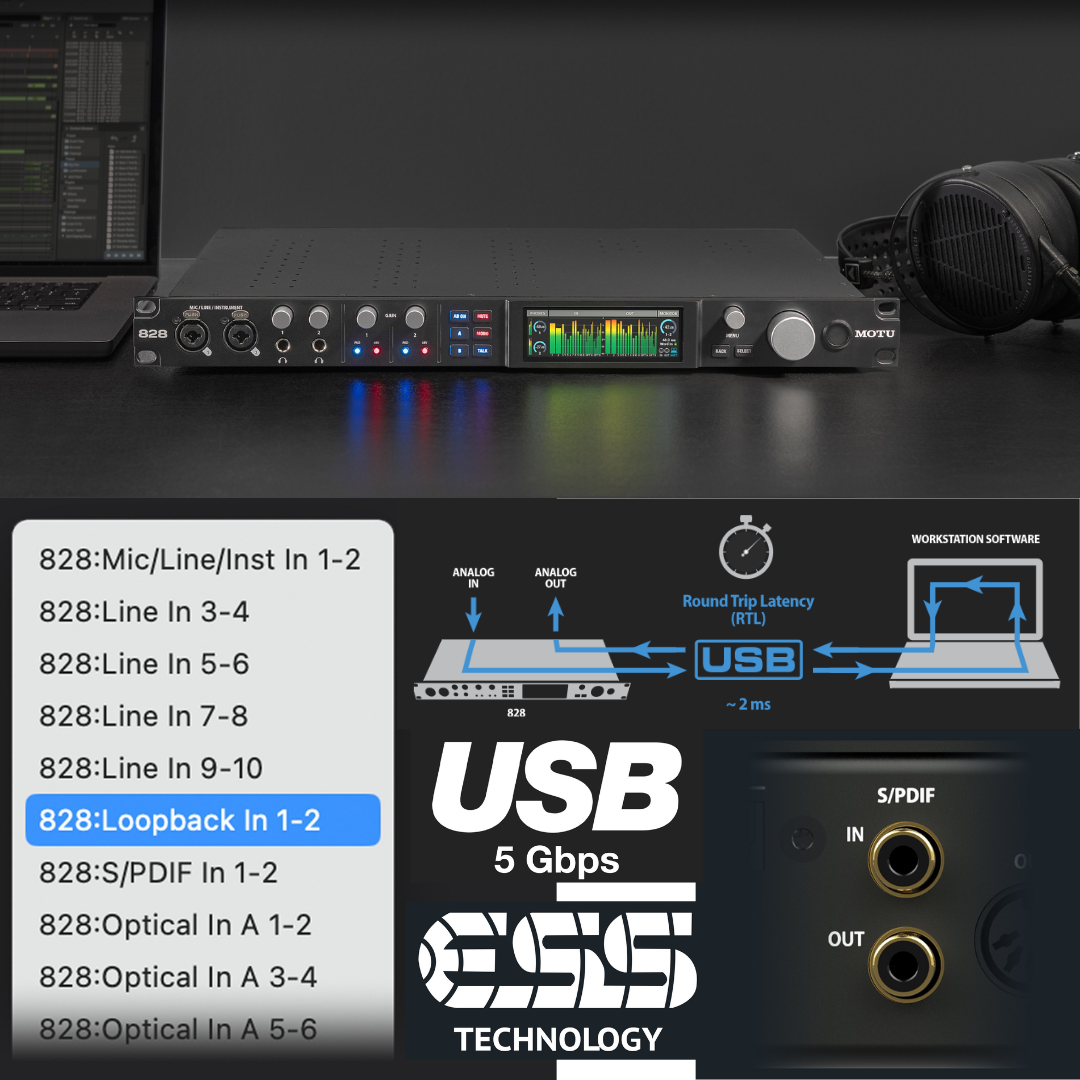
USB Audio Class 2.0 compliance is built into the 828's firmware, enabling plug-and-play operation on macOS and iOS without driver installation. On Windows hosts, MOTU provides dedicated ASIO and WDM Wave drivers that deliver the minimum-latency performance: a Round Trip Latency (RTL) of approximately 2 milliseconds at 96 kHz with a 32-sample host buffer. This 2 ms RTL is achieved with high-performance DAW hosts such as MOTU Digital Performer and makes real-time software monitoring through plugins genuinely viable — the brief delay is below the threshold of auditory perception for most performers in most recording contexts. On macOS, the optional Core Audio driver is recommended for access to the loopback channels and for minimum-latency operation; the class-compliant Core Audio driver also provides solid out-of-the-box functionality.
For iOS users, the 828 connects directly to USB-C iPads via the included USB-C cable, with no adapter required. For Lightning-port iPhones and iPads, Apple's Lightning to USB 3 Camera Adapter (sold separately) enables connection. CueMix 5 for iOS provides full mixing control over the 828's DSP from the iPad or iPhone touchscreen, with multiple iOS devices able to connect and control the 828 simultaneously. The 828 is also network-aware: if connected to a computer that is on a Wi-Fi network, the CueMix 5 app running on any device on the same network can control the 828 wirelessly — enabling hands-free remote control from anywhere in the studio or control room without a secondary USB connection.
3. CONVERTER TECHNOLOGY & ANALOGUE PERFORMANCE
ESS Technology's Sabre32 Ultra™ platform is the foundation of the 828's extraordinary measured performance. The ESS Sabre32 architecture is characterised by a 32-bit processing core, patented Hyperstream™ modulator, and multi-bit sigma-delta architecture. The Hyperstream modulator operates at extremely high oversampling rates, effectively pushing quantisation noise above the audio band and allowing active noise shaping to reduce in-band noise to levels below what conventional sigma-delta converters achieve. The resulting noise floor, combined with the ESS interpolation and decimation filters, directly produces the 125 dB A-weighted dynamic range measured on the 828's main outputs.
The main analogue outputs achieve a measured dynamic range of 125 dB A-weighted and -114 dB THD+N (unweighted). To contextualise these figures: a 125 dB dynamic range means the noise floor sits 125 dB below the maximum output level of the converter — approximately equivalent to the acoustic dynamic range between the softest audible sound and the threshold of pain. The -114 dB THD+N (approximately 0.00020% THD+N) means that harmonic distortion and noise combined constitute less than one ten-thousandth of one per cent of the output signal. These are genuinely exceptional figures for a USB interface in the 828's price tier and match or exceed the performance of many dedicated professional converters costing substantially more.
The separate main outputs on balanced XLR jacks are notable: providing XLR rather than TRS connectors on the primary monitor output is a professional-grade detail that reduces impedance mismatch, improves RF rejection over long cable runs, and signals compatibility with professional console infrastructure. The 8 TRS line outputs use a maximum level of +21 dBu — matching the line inputs — providing ample headroom for routing to professional outboard processors, sub-mixers, and amplifiers without gain staging concerns.
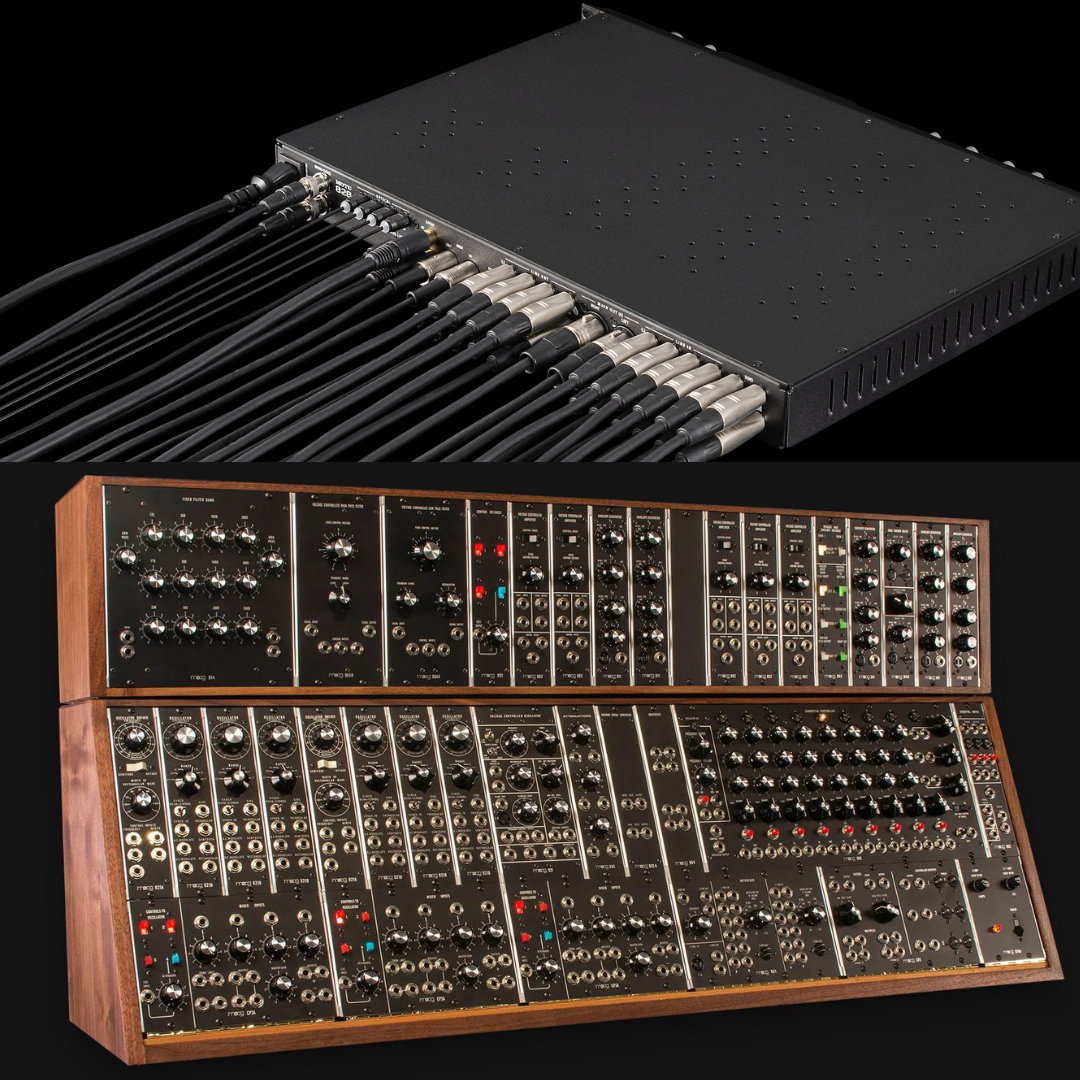
The 8× balanced TRS line outputs are DC-coupled. This DC coupling extends the frequency response of the TRS outputs all the way to 0 Hz, with no high-pass filtering capacitors in the signal path. Beyond its sub-bass accuracy advantages for music production, DC coupling enables the 828 to serve directly as a Control Voltage (CV) interface for analogue and modular synthesisers, sending precisely timed voltage events from DAW automation to hardware synthesis parameters. This capability, which MOTU explicitly flags as a feature, is unusual in a full-featured studio interface of this class and opens production workflows that are impossible on AC-coupled alternatives. Note: DC coupling is confirmed by MOTU only for the 8× TRS line outputs; the 2× main XLR outputs do not carry a DC-coupled designation in MOTU's published specifications.
4. MICROPHONE PREAMPS & FRONT-PANEL INPUTS
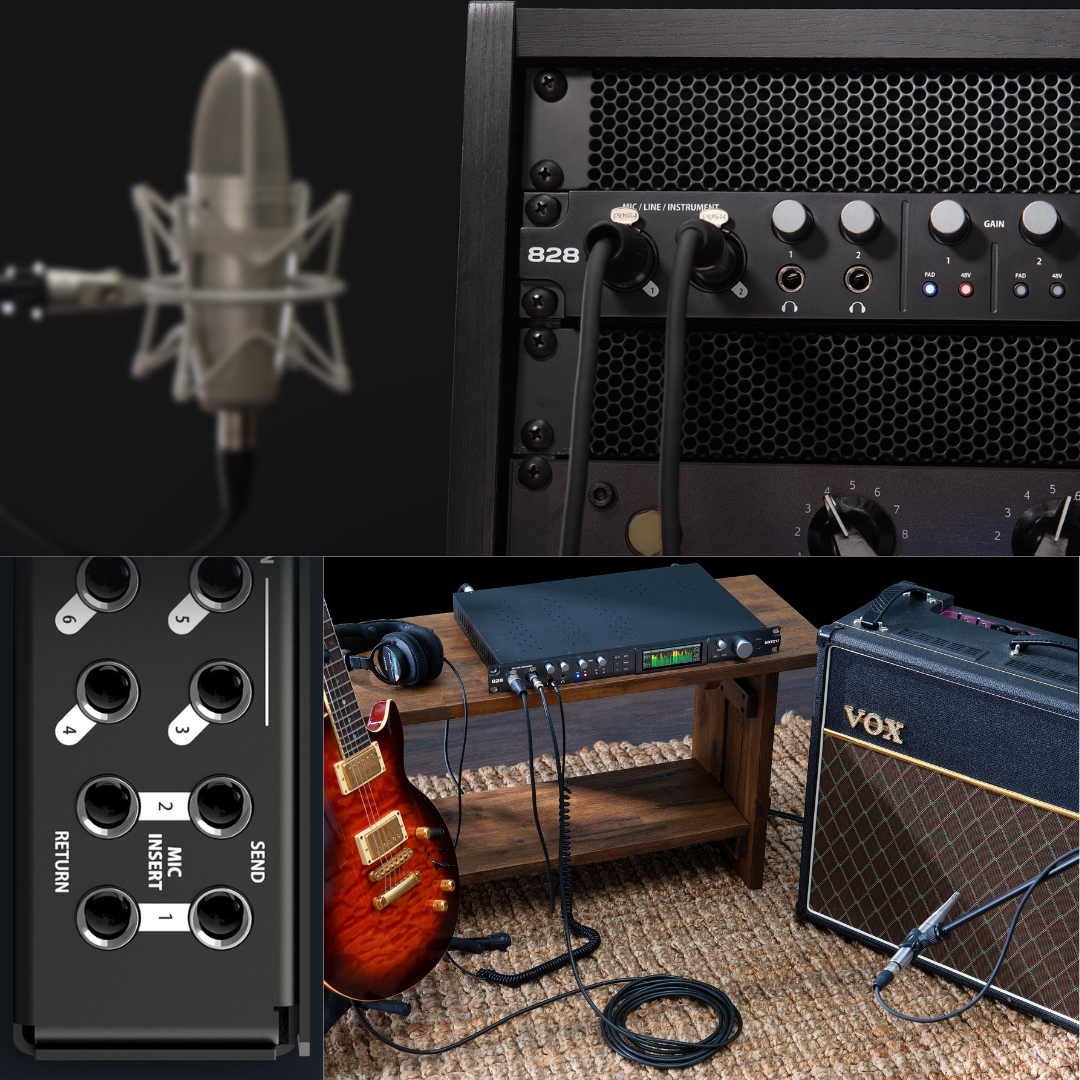
The 828's two microphone preamp channels are accessed via XLR/TRS combination (combo) jacks on the front panel. Each combo jack accepts a balanced XLR microphone (pin 2 hot), a balanced TRS line-level signal, or an unbalanced TS high-impedance instrument signal (guitar, bass) through the same connector — the signal path is automatically selected by the connector type inserted. The front-panel positioning of these inputs is deliberate: it allows rapid cable connection and disconnection in recording sessions without reaching behind the rack.
The preamp specification is the 828's most technically significant achievement in this generation. A measured Equivalent Input Noise (EIN) of -129 dBu means that the electronic noise contributed by the preamp itself, referred back to the input, is below -129 dBu. This is achieved through careful circuit design using cutting-edge discrete components in the input stage — MOTU specifically describes the components as delivering 'ultra-transparent sound.' An EIN of -129 dBu is a reference-class figure: it means that even the most sensitive ribbon microphones, room microphones placed at distance, or quiet acoustic sources (whispered dialogue, pianissimo instruments) will not encounter audible preamp self-noise. The 118 dB dynamic range and -114 dB THD+N figures for the mic input chain confirm that the ADC following the preamp is equally capable of capturing the full signal without degradation.
The available gain range of +74 dB (adjustable in 1 dB increments via the CueMix 5 software or front-panel controls) is a significant advance over previous 828 generations and covers an exceptionally wide range of microphone types and sources: low-output ribbon microphones typically require 55–70 dB of gain for recording quiet sources, and the 828 provides this with headroom to spare. A -20 dB pad is available on each channel, lowering the clipping point by 20 dB to accommodate close-miked loud sources (kick drums, electric guitar cabinets, snare drums) that would otherwise clip the preamp input. Phase invert (polarity reversal) is independently available per channel, accessible remotely from the CueMix 5 application.
Each of the two mic channels includes a dedicated hardware insert: a balanced send and balanced return on individual TRS jacks, mounted on the rear panel. This insert loop allows a hardware compressor, equaliser, de-esser, or other outboard processor to be placed in the signal chain between the preamp output and the ADC input — i.e., the outboard processor operates on the microphone signal in the analogue domain before digitisation. This is a signal chain architecture normally found only in professional recording consoles and high-end multi-channel preamp units; the presence of insert loops on a two-preamp USB interface at this price point is genuinely unusual. When nothing is connected to the front-panel mic input jacks, the rear-panel insert returns function as additional line inputs with identical signal path characteristics to the eight main TRS line inputs — effectively providing ten line inputs total in this configuration.
5. ANALOGUE I/O ARCHITECTURE
Beyond the two mic/line/hi-Z combo channels, the 828 provides eight additional balanced TRS line inputs on the rear panel. These inputs accept +21 dBu maximum, with a +20 dB digital trim available per input in CueMix 5, allowing the gain structure to be precisely calibrated to match the output levels of connected equipment — synthesisers, drum machines, outboard processors, mixer group outputs, or any other line-level source. All eight inputs are balanced (tip-hot TRS), providing common-mode rejection against ground noise, AC hum, and RF interference in a professional cabling environment.
On the output side, the 828 provides eight balanced TRS line outputs, a separate pair of XLR main outputs, and two 1/4-inch TRS headphone outputs on the front panel — totalling twelve analogue outputs. The main outs on XLR jacks serve the primary monitor speaker pair. The eight TRS line outputs can feed any combination of secondary monitors, headphone amplifier inputs, outboard effects sends, surround amplifier channels, or recording equipment. A trim control per output (in 1 dB increments) via CueMix 5 allows level calibration for each destination.
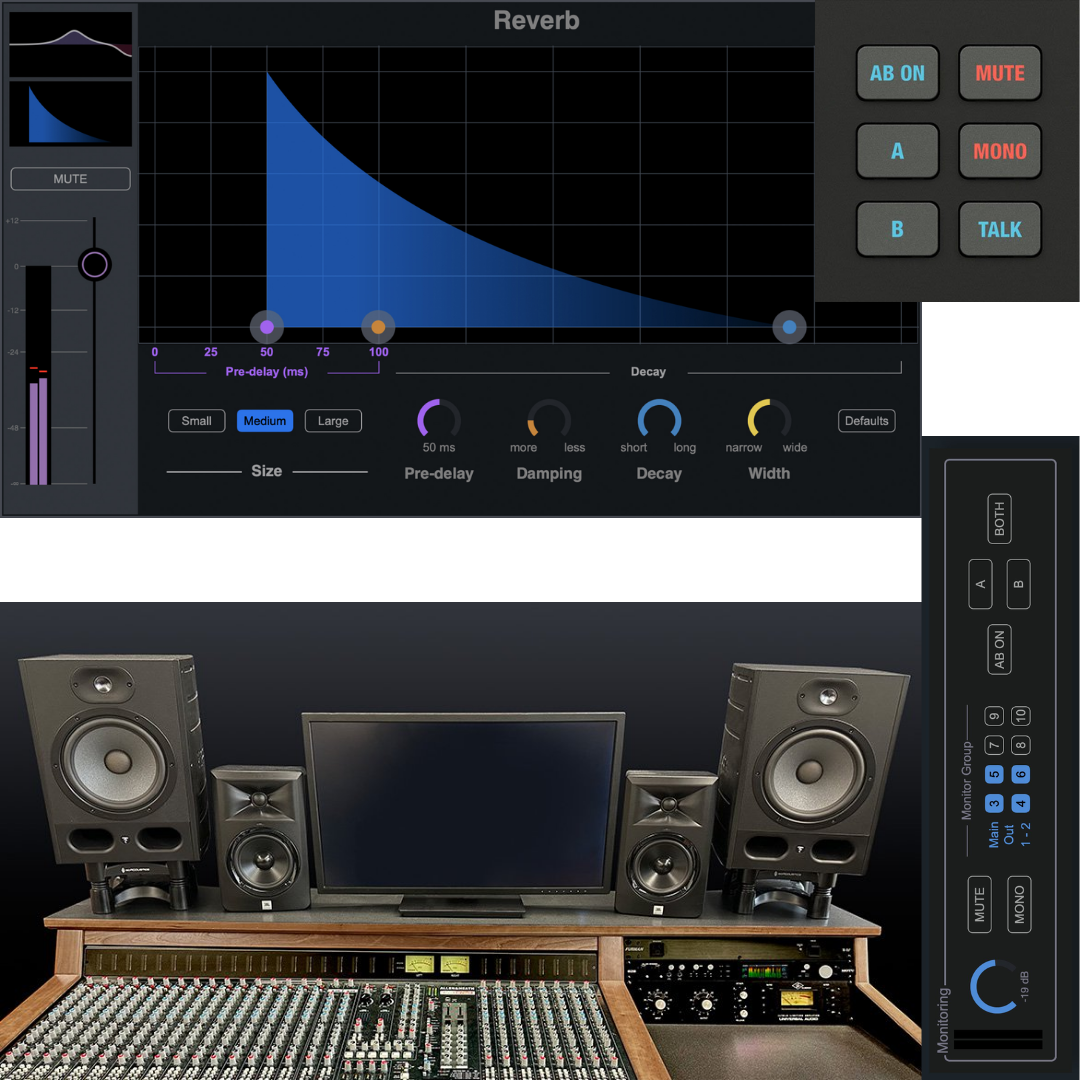
The Monitor Group feature in CueMix 5 allows any combination of analogue output pairs to be assigned to a single master monitor fader — enabling the engineer to control a 5.1 or 7.1 surround speaker system with a single fader movement. This is a powerful workflow feature for post-production and surround mixing environments: a 7.1 system using six or eight of the TRS line outputs can be raised, lowered, or muted as a single unit from the CueMix 5 monitor section, without individual adjustment of each output channel. The A/B speaker select buttons on the front panel allow rapid comparison between two different monitor pairs, and the Talkback button activates a talkback microphone routing (via CueMix 5) to communicate with performers in a recording room. Dedicated Mute and Sum-to-Mono buttons for the main outputs enable essential quality control checks during mixing sessions.
6. DIGITAL I/O — ADAT, S/PDIF & WORD CLOCK
The 828's digital I/O complement is comprehensive and constitutes a major differentiator from smaller USB interfaces. Two independent banks of optical I/O (Bank A and Bank B) each accommodate up to 8 channels of ADAT Lightpipe at 44.1 and 48 kHz, providing 16 ADAT channels total at standard sample rates. At double sample rates (88.2 and 96 kHz), each bank switches automatically to S/MUX (Sample Multiplexing) mode, providing 4 channels per bank (8 channels total) at the higher rates. Bank A additionally offers an optional stereo TOSLink (optical S/PDIF) mode for two-channel digital transfers at sample rates up to 96 kHz — selectable in CueMix 5 to replace the ADAT function of Bank A when only a two-channel optical connection is needed.
The ADAT protocol is worth understanding in depth for engineers evaluating the 828 for studio expansion. ADAT Lightpipe was standardised in the early 1990s by Alesis and has become the most widely used multi-channel optical digital I/O format in professional audio. It carries 8 channels of 24-bit audio at up to 48 kHz on a single TOSLINK fibre-optic cable using time-division multiplexing. Every major microphone preamplifier expander (SSL, RME, Focusrite, Behringer, API, and many others), digital mixer, DA converter, and studio-grade outboard processor in the professional market includes ADAT connectivity. The 828's two ADAT banks therefore provide a direct expansion path to 24 additional channels (16 ADAT in + the 828's 10 analogue inputs = 26 inputs total at 48 kHz) simply by connecting ADAT-equipped expanders — without any additional USB connections or cables.
Stereo RCA S/PDIF I/O is provided for two-channel digital connection to CD transports, DAT machines, digital effects processors, or other equipment using the Sony/Philips Digital Interface protocol. The S/PDIF I/O supports sample rates up to 96 kHz with the 828 acting as clock master or slave. Any source signal can be assigned to the S/PDIF output in CueMix 5.
BNC Word Clock input and output jacks (with optional Thru mode) allow the 828 to synchronise to an external master clock source or to distribute clock to other digital devices in a studio. Word clock is the professional standard for synchronising multiple digital audio devices in a studio installation: by connecting all devices to a common clock reference, sample-accurate synchronisation is maintained and the inter-device jitter that would otherwise cause audible artefacts is eliminated. The 828's word clock I/O supports all sample rates up to 192 kHz, making it compatible with the full range of professional digital clock generators from Antelope, Apogee, Lynx, and similar clock reference manufacturers.
7. DSP MIXER, CUEMIX 5 & ONBOARD EFFECTS
The 828 incorporates a dedicated Digital Signal Processor (DSP) chip that operates entirely independently of the host computer. This onboard DSP drives the CueMix 5 mixing system: a 24-channel digital mixer with 8 stereo mix buses that can be freely configured to create any combination of monitor mixes, headphone cue mixes, effects sends, or sub-group outputs. The 24-channel mixer handles all 828 analogue inputs, digital inputs, and USB return channels — any of these can be assigned to any of the 8 stereo buses with independent level, pan, and mute per channel per bus. This is the operational engine that enables the 828 to function as a standalone digital mixer with effects, without a host computer connected.
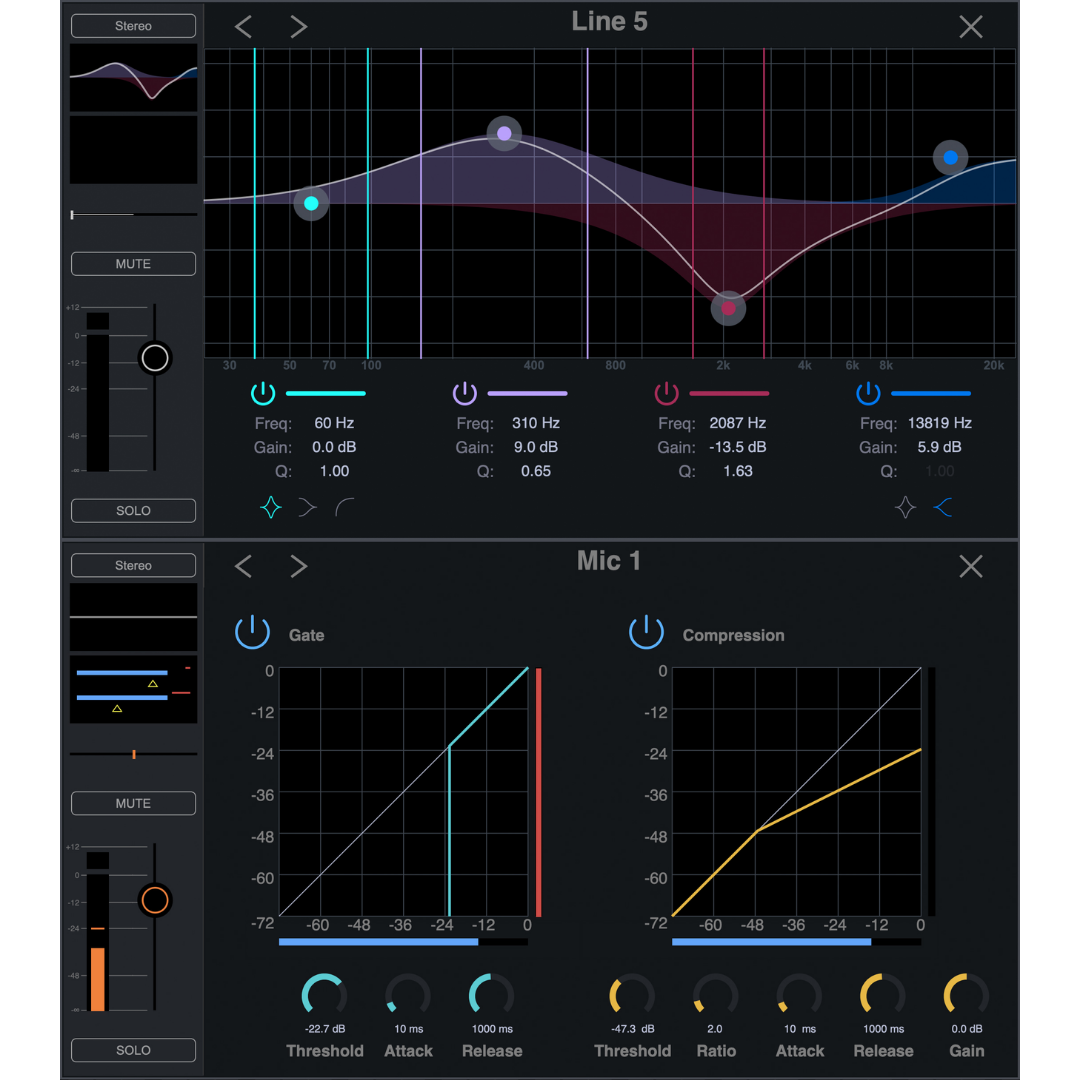
The DSP effects suite includes four distinct processors. The 4-band parametric equaliser is available per input channel: each of the four bands provides independent control of frequency (in Hz/kHz), gain (in dB), and Q (quality factor, which controls bandwidth). The outer bands can be switched between peak/bell, high-shelf, and low-shelf filter types, while the inner bands operate as peak/bell filters. This parametric EQ can be applied to every input channel before it reaches the mix buses — providing per-channel tonal correction without using any CPU resources from the host computer. The noise gate provides standard threshold, attack, hold, and release controls per channel for noise floor management. The compressor provides standard threshold, ratio, attack, and release controls per channel for dynamic control of live sources. The reverb operates on the mix bus level — a single shared reverb unit processes the programme mix with send-level control from individual channel strips in CueMix 5. MOTU notes that the reverb is located on a separate effects bus and operates with the same parameter set for all channels, which reflects the DSP budget allocation on the dedicated chip.
All DSP processing and mixing runs at near-zero latency — the signal from an analogue input to a monitored output through the 828's own DSP path does not pass through the USB cable or computer. This means that performers monitoring through headphone outputs can hear zero-latency (hardware-monitored) mixes with full DSP processing — EQ, dynamics, and reverb applied in real time — without any audible delay and without any CPU load on the host computer. This is the fundamental advantage of an integrated hardware DSP over purely software-based monitoring through a DAW.
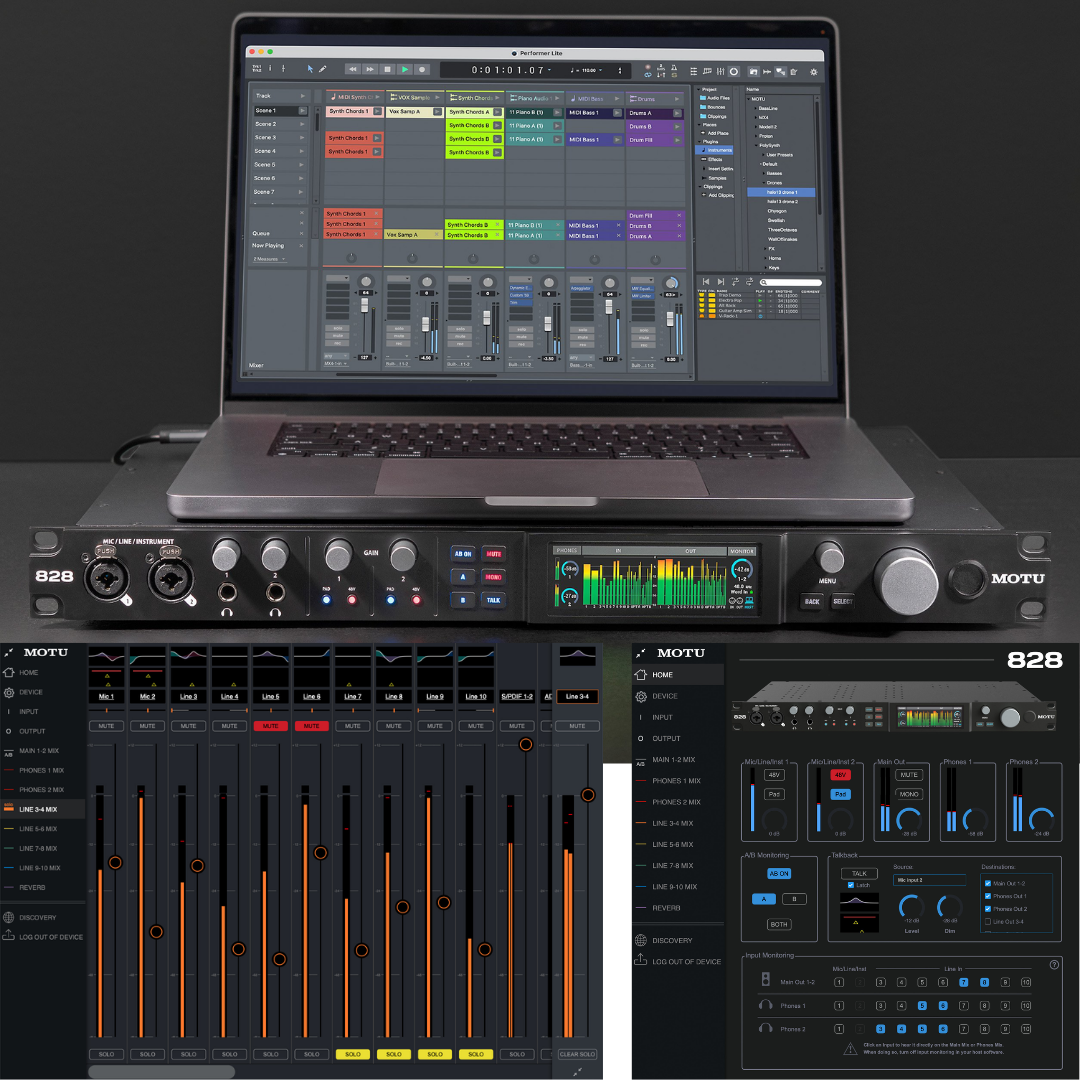
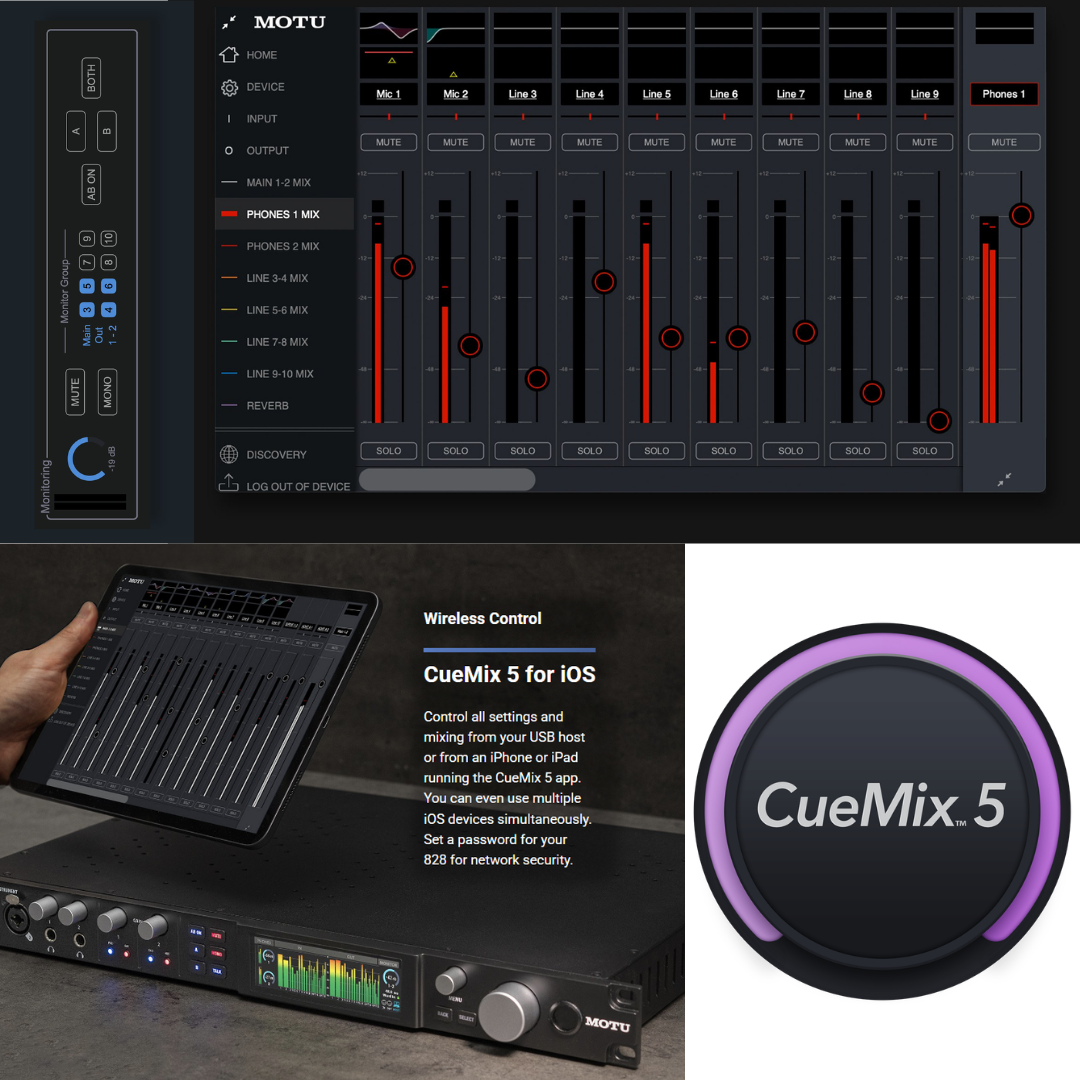
CueMix 5 is the graphical front-end for controlling all DSP and routing functions. Available for macOS, Windows, and iOS, CueMix 5 presents a channel-strip-style mixing interface with graphic parametric EQ displays, compressor gain reduction meters, and reverb parameter controls. The iOS version is fully touch-optimised, making it practical to use on an iPad Mini mounted near the recording position for quick adjustments during a session. Wi-Fi control: if the 828's USB host computer is on a Wi-Fi network, any device on that network running CueMix 5 — including iPads, iPhones, and other computers — can access and control the 828 wirelessly. Password protection and network discovery features prevent unauthorised access in shared studio environments.
8. FRONT PANEL, CONTROLS & TFT DISPLAY
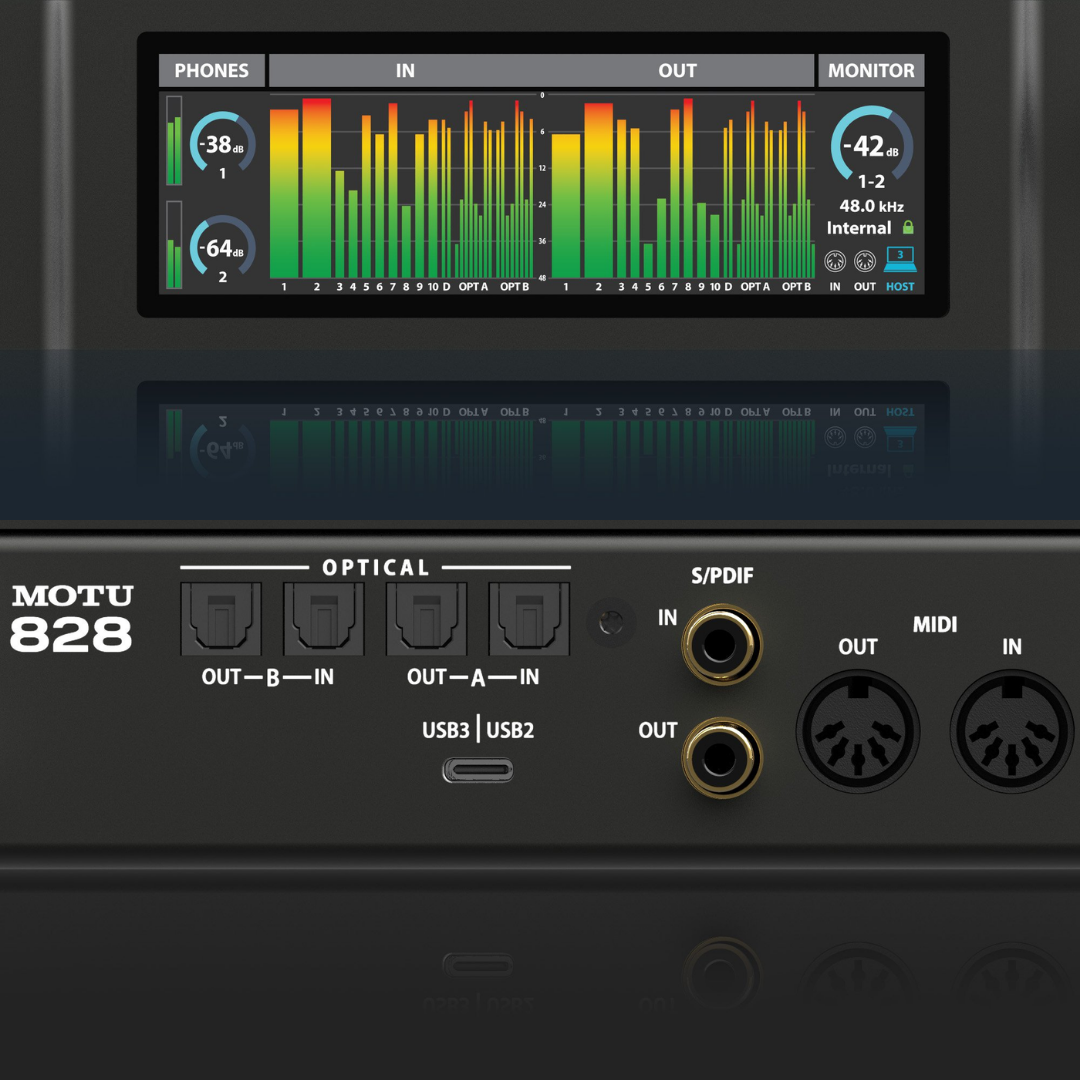
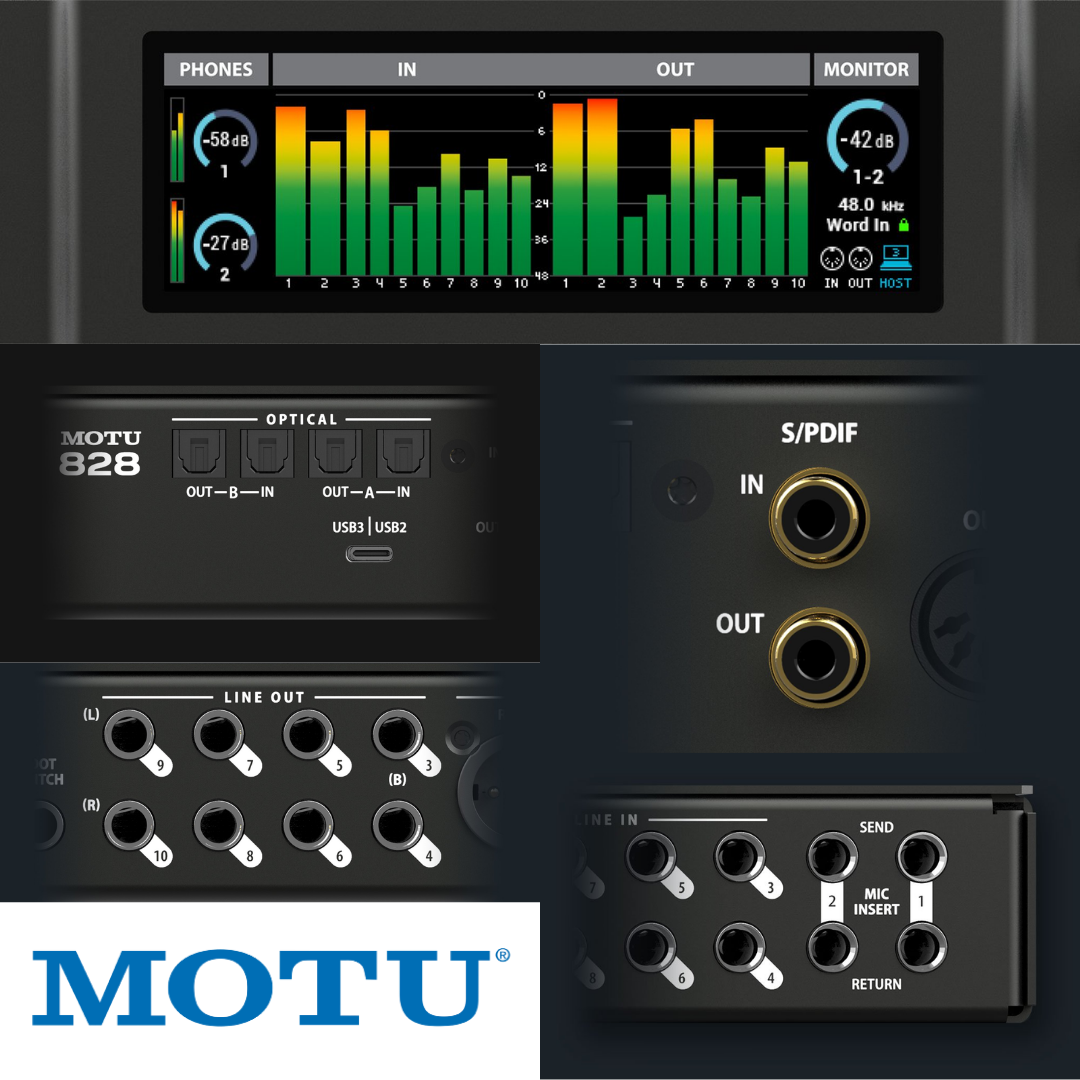
The 828's most visually distinctive new feature is the 3.9-inch TFT display, providing a 480 × 128 pixel, 24-bit RGB colour display across the full width of the front panel. This is the largest and highest-resolution front-panel display of any MOTU 828-generation interface to date, and one of the most capable in the 1U rack interface market. The display provides real-time level metering for all analogue and digital I/O simultaneously — 28 inputs and 32 outputs — in a single glance. Custom meter views are available for analogue-only, digital-only, and other filtered combinations, which is valuable in complex studio setups where not all I/O is in use and a cleaner display view is preferred.
Beyond metering, the TFT display doubles as a hardware menu system: the 828's internal settings — clock source, sample rate, digital I/O format, phantom power, pad, gain (where applicable), and other hardware parameters — can all be accessed and adjusted directly from the front panel without launching CueMix 5. This is a significant operational convenience in live performance, rental, and installation contexts where a computer may not be accessible or where speed of adjustment is critical. The display's size and colour depth ensure legibility in both studio and stage lighting conditions.
The front panel physical controls include the A/B speaker select buttons for monitor switching, a Talk button for talkback activation, Mute and Sum-to-Mono buttons for the main outputs, and volume knobs for the headphone outputs and main monitor output. The combo XLR/TRS input jacks are front-panel mounted, and the two headphone outputs (1/4-inch TRS) are front-panel accessible. The overall front-panel layout is designed around fast session management: the engineer can adjust headphone volumes, switch monitoring sources, engage talkback, and check all I/O levels without touching the computer.
9. HEADPHONE OUTPUTS & CUE MIX FLEXIBILITY
The 828 provides two independent headphone outputs on the front panel, each with its own volume control. The flexibility of headphone source assignment is a standout feature of the CueMix 5 platform: each headphone output can independently mirror the main outputs (Line Out 1-2), any other analogue output pair, any of the 8 CueMix DSP mix buses, or any pair of USB return channels from the host DAW. Additionally, each headphone output can be assigned a completely custom mix built in CueMix 5 — including live 828 inputs, host computer channels, and built-in reverb — creating a fully independent in-ear monitor mix entirely separate from the main programme mix.
This level of headphone mix flexibility is operationally equivalent to a standalone two-channel cue system costing hundreds of dollars more. In a standard studio overdub scenario: the engineer monitors the programme mix on the main monitors and on Headphone 1, while the performing musician monitors a completely different cue mix on Headphone 2 — with more of their own instrument, a different reverb amount, or a different balance of backing tracks — all without any external equipment or additional hardware. The volume controls on each headphone output are hardware knobs on the front panel, providing direct physical control without needing to open any software.
10. MIDI, FOOTSWITCH, LOOPBACK & ADDITIONAL I/O
The 828 includes standard 5-pin DIN MIDI input and MIDI output jacks. MIDI Thru mode — selectable in the front-panel menu — allows MIDI data arriving at the MIDI Input to be looped directly to the MIDI Output, bypassing the computer entirely. This is useful in standalone operation (no computer connected, using the 828 as a hardware mixer) to route MIDI clock or programme change messages from a sequencer through the 828 to downstream MIDI instruments without any additional hardware.
A footswitch (1/4-inch TS) input accepts a standard momentary foot pedal switch (sold separately) for hands-free recording control. In its primary function, the footswitch triggers punch-in and punch-out during recording in the host DAW — allowing a solo performer to both play an instrument and control the recording transport without reaching for the computer keyboard. Alternatively, the footswitch can be mapped to any arbitrary keystroke in the host software, enabling creative control applications such as triggering software loops, advancing through a setlist, or controlling other transport functions.
Loopback channels are available through the MOTU driver on both Mac and Windows: these virtual input channels capture the computer's audio output and route it back into the host application as recordable input. The loopback architecture is the standard mechanism for live streaming and podcasting — computer playback audio (music, video, remote guest VoIP) is captured on the loopback channels and blended with microphone inputs from the 828 in OBS Studio, Reaper, or any DAW, without any external routing cables or additional hardware.
Guitar re-amping is supported through a dedicated workflow in CueMix 5: a guitarist connects their instrument to the front-panel hi-Z combo input, enabling the near-zero-latency CueMix routing to loop the dry signal to any analogue output — which then feeds an amplifier or re-amp box. The DAW records both the dry DI signal (from the USB input channel) and the microphone signal from the amplifier cabinet (from another input channel) simultaneously. Later, the dry DI signal can be re-routed through any amplifier or amp modelling plugin for tone experimentation without re-recording the performance.
11. STANDALONE MIXER OPERATION
The 828's onboard DSP enables full standalone operation as a digital mixer with effects, without any USB host computer connected. In standalone mode, CueMix 5's last-loaded mix and routing configuration is retained in the 828's internal memory and continues to operate: all 16+ analogue channels are mixed through the 8 CueMix buses, with per-channel DSP EQ, gate, compression, and reverb processing active. This makes the 828 a viable primary mixing unit for small live performance setups or rehearsal rooms where a laptop is unavailable or impractical. The front-panel display provides full metering and settings access without any computer, and the CueMix 5 iOS app can control the mixer wirelessly from a phone or tablet if the venue has Wi-Fi.
12. BUILD QUALITY & FORM FACTOR
The 2024 MOTU 828 is a standard 1U rack-mount unit (one rack unit = 1.75 inches / 44.45 mm height) fitting a 19-inch equipment rack. The 1U form factor is universal for professional studio and live sound rack systems; the 828 mounts in any standard 19-inch rack alongside patchbays, power conditioners, preamps, and other rack equipment. The chassis is a robust metal enclosure appropriate for permanent studio installation, touring rack deployment, and rental applications.
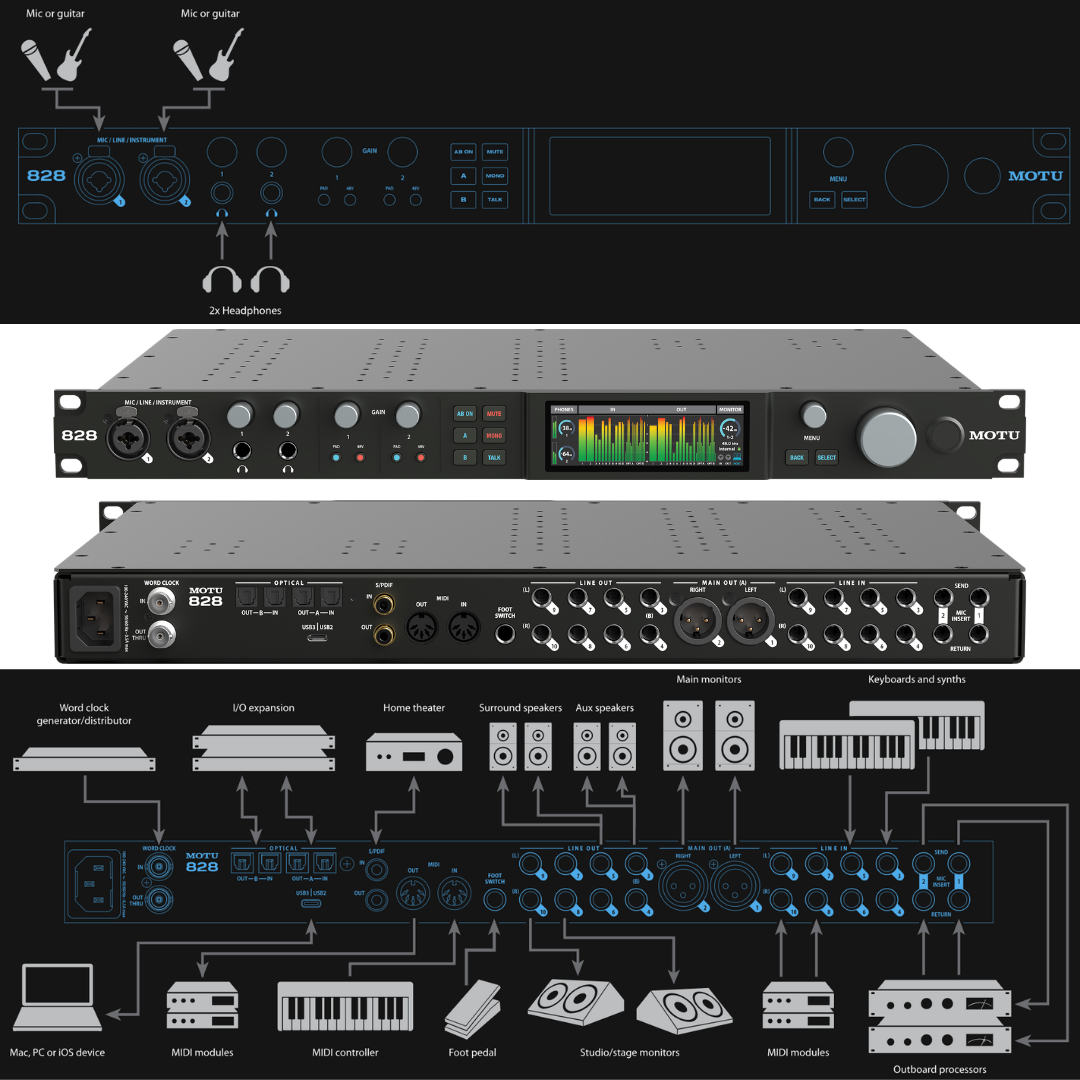
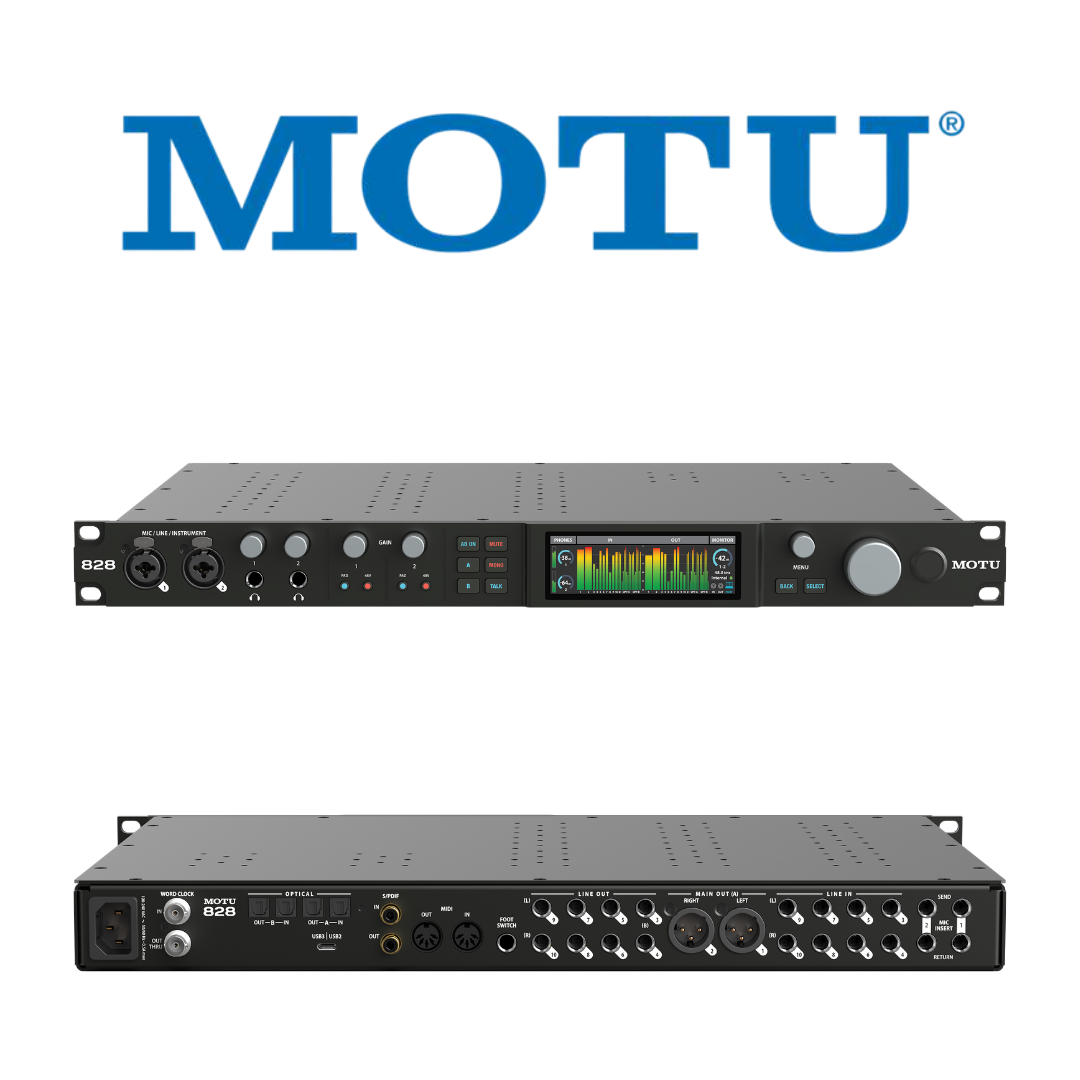
The front panel houses the 3.9-inch TFT display, the two combo jack inputs, both headphone outputs with their volume knobs, the main monitor volume knob, the A/B, Talk, Mute, and Mono control buttons, and a power switch. The rear panel carries the eight TRS line inputs, eight TRS line outputs, main XLR outputs, two banks of optical ADAT I/O, RCA S/PDIF I/O, BNC word clock I/O, MIDI IN and OUT, the footswitch input, insert sends and returns for Channels 1 and 2, and the USB-C connector with power input. The physical separation of high-density connection points to the rear panel is correct engineering practice: it keeps the front panel uncluttered and minimises cable congestion in the performer's and engineer's working space.
13. PRODUCT FAMILY CONTEXT & GENERATION HISTORY
The MOTU 828 has been continuously produced since 2001, making it one of the longest-running audio interface product lines in the industry. The five generations have progressed from FireWire (original 828, 2001), through FireWire/USB hybrid (828 mk3, 2011), to Thunderbolt/USB/AVB (828es, 2015), and now to USB 3 (2024). Each generation has built on the same concept — a 1U two-preamp professional interface with 8 analogue line inputs and comprehensive digital expansion — while advancing the core performance and connectivity. The 2024 model's USB 3 architecture is a deliberate choice for maximum universal compatibility: Thunderbolt ports are increasingly available only on higher-end computers, while USB-C with USB 3 is universal across the entire range of current professional laptops and desktops from Apple, Dell, HP, Lenovo, ASUS, and others.
Within the current MOTU lineup, the 828 occupies a unique position: it is the only current MOTU interface that combines the 1U form factor with a professional outboard insert loop, a dedicated TFT display, word clock I/O, and USB 3 connectivity at a price point below the Thunderbolt/AVB-equipped 848 (which uses the same ESS converter platform and adds four microphone preamps and AVB networking). For engineers whose routing needs fall within the 828's I/O complement and who do not require AVB networking or additional preamp channels, the 828 represents the performance-per-dollar apex of MOTU's professional lineup.
MOTU Studio Interface Family — Key Differentiators
|
FEATURE |
M6 |
ULTRALITE-MK5 |
828 (2024) |
848 |
|---|---|---|---|---|
Total Analogue Inputs |
6 |
10 |
10 |
8+ |
Mic Preamps |
4 |
2 |
2 |
4 |
Total Simultaneous Channels |
10 |
~32 |
60 |
60 |
ADAT Optical I/O |
No |
No |
2 Banks (16ch) |
2 Banks |
Word Clock I/O |
No |
No |
Yes (BNC) |
Yes |
Hardware Inserts |
No |
No |
Yes (Ch 1-2) |
Yes |
DSP Mixer Buses |
— |
8 stereo |
8 stereo |
8 stereo |
TFT Display Size |
160×128 LCD |
3.9" TFT |
3.9" TFT |
Two 3.9" TFT |
Connectivity |
USB-C |
USB-C |
USB3 (5 Gbps) |
TB4/USB4/AVB |
Output Dynamic Range |
120 dB |
123 dB |
125 dB |
125 dB |
Form Factor |
Desktop |
Desktop/Rack |
1U Rack |
1U Rack |
14. MATHEMATICAL & SPECIFICATION CROSS-VALIDATION
14.1 Analogue Output: Dynamic Range vs. THD+N Consistency
The 828's analogue outputs specify 125 dB A-weighted dynamic range and -114 dB THD+N (unweighted). The A-weighting filter applied to noise measurements adds approximately 3–5 dB relative to unweighted measurements, because the filter de-emphasises low-frequency noise content which otherwise dominates sigma-delta converter noise floors. A 125 dB A-weighted dynamic range therefore corresponds to a roughly 120–122 dB unweighted dynamic range, consistent with a THD+N of -114 dB unweighted. The 1 dB apparent gap between the A-weighted figure (125 dB) and the THD+N noise floor reference (-114 dB) reflects that THD+N includes harmonic distortion products in addition to noise, slightly raising the total noise+distortion floor above the pure noise floor. These two specifications are internally consistent and mutually confirming.
14.2 Mic Preamp: EIN vs. Dynamic Range
The mic preamp specifies -129 dBu EIN and 118 dB A-weighted dynamic range. The maximum input level at minimum gain for the mic input is not separately published by MOTU on the 828 specs page. However, the maximum input level for the line inputs is +21 dBu, and the insert return inputs (which share the same signal path as the mic/line channel at line level) would clip at approximately +21 dBu. The theoretical dynamic range of the mic channel from this maximum input to the EIN floor would be approximately +21 dBu − (−129 dBu) = 150 dB (unweighted, theoretically). The published 118 dB figure represents the ADC-limited dynamic range of the full chain at the converter output under standard gain conditions — a real-world, useful measurement that does not require the full theoretical input range. There is no discrepancy.
14.3 Line Output vs. Mic Input Dynamic Range
The line outputs specify 125 dB dynamic range, while the mic inputs specify 118 dB. This 7 dB difference is expected: the mic input ADC includes the preamp's noise contribution in addition to the converter noise, resulting in a higher combined noise floor and thus a lower dynamic range at the input stage. The output (DAC) path does not include a preamp stage and benefits from the full ESS Sabre32 DAC noise floor alone, yielding the higher 125 dB figure. No discrepancy.
14.4 ADAT Channel Count at Different Sample Rates
ADAT Lightpipe carries 8 channels at 44.1 or 48 kHz per cable. At 88.2 or 96 kHz, the S/MUX (Sample Multiplexing) standard halves the channel count to 4 per cable by using pairs of ADAT time slots per audio sample. The 828's specification of 16 channels at 44.1/48 kHz (2 banks × 8) and 8 channels at 88.2/96 kHz (2 banks × 4) is therefore mathematically correct and consistent with the ADAT S/MUX standard. No discrepancy.
14.5 Total I/O Channel Count Verification
MOTU claims 28 inputs and 32 outputs (60 total). Verifying the input count: 2 mic/line/hi-Z combo (front) + 2 insert returns as line inputs when no mic connected (rear) + 8 TRS line inputs + 16 ADAT (at 48 kHz) + 2 S/PDIF + 2 loopback = 32 physical analogue/digital inputs + loopback. MOTU's published channel count of 28 inputs at the primary connectivity level (without all optional modes) is consistent with the documented I/O. The 32 output count includes: 8 TRS line out + 2 XLR main out + 2 headphone out + 16 ADAT out + 2 S/PDIF out + 2 loopback return = 32. These counts are consistent with the published specification.
15. IDEAL APPLICATIONS & USE CASES
- Professional Recording Studio (Permanent Installation): Full I/O, hardware inserts for outboard processing, word clock sync to master clock.
- Band Recording with ADAT Expanders: 16 ADAT inputs from a standalone preamp expander plus 10 analogue inputs = 26-channel tracking sessions.
- Electronic Music Production with Modular Synthesis: DC-coupled outputs for CV from DAW, MIDI I/O for hardware sequencing.
- Post-Production and Audio-for-Picture: Surround monitoring via Monitor Group (5.1/7.1), word clock sync to video, low-latency ADR/Foley recording.
- House of Worship Recording and Live Streaming: Multiple simultaneous inputs, standalone DSP mixer, Wi-Fi control from iOS.
- Podcast and Live Streaming Production: Loopback for multi-source capture, two independent headphone cue mixes, all-in-one hardware without a mixer.
- Film and Documentary Location Sound: Low RTL for real-time monitoring, reliable USB 3 connection, two independent headphone feeds for director and recordist.
- Music Technology Education: Class-compliant operation on Mac/iOS (no driver install), robust rack-mount form, Kensington slot, comprehensive I/O for demonstrations.
- Broadcast and Radio Production: Talkback button, A/B monitor select, MIDI automation, loopback for programme integration.
- Guitar Re-Amping and DI Recording: Dedicated hi-Z combo inputs, near-zero-latency CueMix loop for simultaneous wet+dry recording.
- Live Performance with Standalone DSP: Complete mixing and effects without a computer, Wi-Fi control from iOS on stage.
- Rental and Production Company Deployment: Reliable 1U rack form, universal USB connectivity, comprehensive I/O for diverse event requirements.
HOW TO READ THIS DOCUMENT
This document is the operational companion to the MOTU 828 Product Description and Technical Specifications document. Where the specifications document answers 'what does the 828 do and how is it measured?', this document answers the practising engineer's question: 'how do I actually wire, configure, and use the 828 in my specific professional environment?' Each workflow section describes a distinct real-world deployment scenario — covering physical setup, cable routing, signal flow, CueMix 5 configuration, and the specific 828 features that make each scenario efficient, reliable, and sonically excellent.
Every workflow section follows a consistent structure: a multi-paragraph scenario description explains the environment and how the 828 is deployed within it, followed by a Routing and Configuration Summary Table that serves as a working practitioner's checklist. These tables are designed to be printed alongside the physical setup — they condense each workflow's operational details into a scannable reference that engineers can consult during rack setup, cable patching, and session configuration without needing to work through prose.
Three defining workflow advantages of the 828 recur across nearly every scenario in this document and are worth holding in mind throughout. First, the onboard DSP mixer allows performers and the engineer to monitor complex mixes through the 828's headphone outputs and analogue outputs with zero-latency processing — EQ, compression, reverb — applied in hardware without any USB round-trip or CPU load. Second, the dual ADAT optical banks make the 828 a hub that can absorb 16 additional channels from any ADAT-equipped expander, instantly scaling from 10 analogue inputs to 26 inputs without additional USB connections. Third, all 8 TRS line outputs are DC-coupled, meaning the 828 functions as a Control Voltage interface for modular synthesiser systems directly from DAW automation — a workflow capability unavailable on most studio interfaces of any price tier.
WORKFLOW 1 — THE PROFESSIONAL RECORDING STUDIO
Scenario A: Permanent Studio Installation with Patchbay Integration
In a permanently installed professional studio, the 828 lives in the equipment rack and is connected permanently to the studio's TT or TRS patchbay. The eight TRS line inputs and eight TRS line outputs connect to the patchbay's normalised rows, making every 828 input and output available at the patchbay for flexible signal routing. The two combo XLR/TRS mic channels — positioned on the front panel — handle microphones directly; the inserts on these channels connect to the studio's outboard compressors, with the insert sends going to the compressor inputs and the insert returns coming from the compressor outputs. The main XLR outputs drive the primary studio monitors through the monitor section of the console or a standalone monitor controller.
Word clock synchronisation is configured from the BNC word clock input, which receives the reference clock from the studio's master clock generator (Antelope, Apogee, or equivalent). This ensures every sample in every recording session is phase-locked to the same master reference, eliminating inter-device jitter across the studio. CueMix 5 is configured with a preset mix for the studio's headphone feeds, loading automatically each time the studio is powered up. The A/B speaker select buttons on the front panel allow the engineer to compare the mix on the primary studio monitors and the secondary reference pair without touching the patchbay.
Scenario B: Large Ensemble Recording with ADAT Expander
When recording a full ensemble — a string quartet, a small jazz group, a choir — the 828 alone provides 10 analogue inputs. By connecting an ADAT-equipped 8-channel microphone preamplifier expander (such as a Focusrite OctoPre, SSL Alpha VHD 8, or Behringer ADA8200) to Bank A optical input, the system immediately gains 8 additional input channels without any additional USB connections. Adding a second expander on Bank B optical brings the total to 26 simultaneous analogue input channels (10 from the 828 + 8 from expander A + 8 from expander B). This is a powerful and cost-effective expansion architecture: the expanders are powered independently, and their clock source is set to ADAT sync (slave to the 828's internal clock or external word clock), ensuring sample-accurate synchronisation across all 26 channels. All 26 inputs appear as individual channels in the DAW.
Workflow 1 — Configuration Summary
| WORKFLOW ELEMENTS | DETAILS / CONFIGURATIONS |
|---|---|
|
828 USB Connection |
USB-C to host computer (Mac or Windows workstation) |
|
Analogue Inputs 1-2 (Combo, front) |
Two microphones — typically large-diaphragm condensers (XLR, 48V ON per channel as required) |
|
Channel 1-2 Inserts |
Outboard compressors — send to compressor IN, return from compressor OUT |
|
TRS Line Inputs 3-10 (rear) |
Patchbay rows — direct normalised connections to studio sources |
|
ADAT Bank A (optical IN) |
8-channel mic preamp expander (e.g. Focusrite OctoPre) — 8 additional input channels |
|
ADAT Bank B (optical IN) |
Second 8-channel preamp expander — 8 more channels (total 26 analogue inputs) |
|
Main XLR Outputs |
Primary studio monitors (via monitor controller or directly) |
|
TRS Line Outputs 1-8 (rear) |
Patchbay rows — normalised to studio destinations |
|
A/B Speaker Switch |
Primary monitors (A) vs. reference speakers (B) |
|
Word Clock Input (BNC) |
Master clock generator (studio reference clock) |
|
ADAT Expander Clock |
Set to ADAT sync (slaves to 828) |
|
Headphone 1 |
Engineer cue mix — CueMix bus 1 (main programme) |
|
Headphone 2 |
Performer cue mix — CueMix bus 2 (custom performer mix with more reverb/own instrument) |
|
CueMix 5 Setup |
Preset: 'Studio Main' — loads on power-up; individual EQ and compression per input |
|
Sample Rate |
48 kHz or 96 kHz — set in CueMix 5 hardware menu or front panel |
|
RTL (MOTU driver) |
~2 ms at 96 kHz / 32-sample buffer for real-time plugin monitoring |
WORKFLOW 2 — BAND SELF-RECORDING WITHOUT A DEDICATED ENGINEER
Scenario: Rehearsal Room Tracking Session — Drums, Bass, Guitar, Vocals
A four-piece band recording their own sessions without a dedicated engineer uses the 828's standalone DSP and headphone flexibility to eliminate the need for a separate monitor system or headphone amp. The drummer occupies the two most critical mic channels: Channel 1 (front panel combo jack, XLR) receives the kick drum or an overhead, Channel 2 receives the snare. Eight TRS line inputs on the rear accept DI bass (hi-Z TS into one of the combo jacks if a second instrument DI is needed, or line-level active DI output on a TRS input), guitar DI, and a keyboard. The 828 is placed on a small table or equipment shelf at one end of the room — its 1U form factor means it can be positioned on almost any surface — connected to the laptop with the USB-C cable.
The 828's per-output CueMix 5 headphone flexibility is the key enabling feature for self-recording: each band member wears headphones connected to a personal headphone amplifier split from the 828's two outputs, or directly from the two headphone jacks for the primary two performers. The Input Monitor Mix in CueMix 5 allows each headphone bus to be customised — the drummer hears a prominent click track and their own drums louder; the vocalist hears more reverb on their voice and less drums. These mixes are built in CueMix 5 before the session and saved as presets, loading instantly on the next power-up. The front-panel TFT display allows any band member to check recording levels without accessing the computer screen — critical when the engineer is also performing.
Workflow 2 — Configuration Summary
| WORKFLOW ELEMENTS | DETAILS / CONFIGURATIONS |
|---|---|
|
Channel 1 (Front Panel, XLR) |
Kick drum microphone or overhead (48V if condenser, -20 dB pad for loud sources) |
|
Channel 2 (Front Panel, XLR) |
Snare microphone (dynamic, no 48V) |
|
TRS Line Input 3 |
Bass DI (active bass direct out, or DI box output) |
|
TRS Line Input 4 |
Guitar DI or amplifier line out |
|
TRS Line Input 5 |
Keyboard or synthesiser (stereo L on TRS 5) |
|
TRS Line Input 6 |
Keyboard/synth stereo R |
|
TRS Line Input 7-8 |
Additional instruments, room microphone via preamp, or spare |
|
Headphone 1 (Front Panel) |
Engineer/drummer: main programme mix (CueMix Bus 1) — prominent click and drums |
|
Headphone 2 (Front Panel) |
Vocalist/lead performer: custom cue mix (CueMix Bus 2) — more reverb, less drums |
|
Monitor Output (XLR Main) |
Passive room speakers via power amplifier for live monitoring (if available) |
|
Click Track |
DAW sends click to 828 USB return channels — routed to headphone buses in CueMix 5 |
|
CueMix 5 DSP EQ |
Per-channel EQ to tighten kick bottom, cut kick low-mids, presence on snare |
|
CueMix 5 Reverb |
Applied to vocal channel send for performer comfort in headphone Bus 2 |
|
Phantom Power (Ch 1-2) |
Engage individually — only on condenser microphone channels |
|
Sample Rate |
48 kHz for maximum ADAT expansion compatibility |
|
Front Panel Use |
Band members check levels on TFT display without touching laptop |
WORKFLOW 3 — LIVE SOUND & STAGE PRODUCTION
Scenario: Stage Multitrack Recording and In-Ear Monitor Mix Delivery
For live event multitrack recording — capturing a concert for live album production, broadcast archiving, or in-ear monitor (IEM) mix delivery — the 828 serves as the analogue-to-digital conversion and USB transfer hub in the stage rack. In a standard club or small-venue setup, the front-of-house (FOH) console outputs a multi-channel direct out feed to the 828's eight TRS line inputs, while the two combo XLR channels receive the most critical individual microphone channels (typically lead vocal and kick drum, which benefit from the 828's superior EIN performance for the final mix). A 16-channel ADAT feed from the FOH console's ADAT expansion cards connects to Banks A and B, delivering the full stage submix breakdown — drums on ADAT 1-8, keyboards/DI on ADAT 9-16 — to the DAW running on the recording laptop.
The 828's standalone DSP operation is particularly valuable in live contexts: CueMix 5 can route a monitor mix for the recording engineer's IEMs from the 828's hardware DSP without any host computer processing, ensuring the monitoring path never fails due to computer issues during the performance. The A/B speaker select on the front panel allows rapid comparison between the main FOH mix return (on Main Out A) and the recording monitor bus (on Main Out B), letting the engineer cross-reference what the audience is hearing against the captured multitrack.
Workflow 3 — Configuration Summary
| WORKFLOW ELEMENTS | DETAILS / CONFIGURATIONS |
|---|---|
|
Channel 1 (Combo XLR) |
Lead vocal microphone direct — highest-priority source (-129 dBu EIN) |
|
Channel 2 (Combo XLR) |
Kick drum close microphone or lead guitar amp |
|
TRS Line Inputs 3-10 |
FOH console multi-out: drum overhead buses, bass DI, guitar DI, effects return |
|
ADAT Bank A (IN) |
FOH console ADAT send 1-8 (drums submix) |
|
ADAT Bank B (IN) |
FOH console ADAT send 9-16 (keys, DI, backing tracks) |
|
Total Simultaneous Input Channels |
Up to 26 (2 analogue + 8 TRS + 16 ADAT) |
|
Main XLR Outputs (A) |
FOH mix monitor return — engineer reference speaker/IEM |
|
Main XLR Outputs (B) via A/B |
Recording bus monitor — isolated multitrack confidence feed |
|
Headphone 1 |
Recording engineer IEM (programme mix with click track overlay) |
|
Headphone 2 |
Stage manager or second engineer headphone feed |
|
CueMix 5 Mode |
Standalone DSP — mix continues if computer crashes during performance |
|
Sample Rate |
48 kHz (industry standard for live concert recording) |
|
Bit Depth |
24-bit (standard for all professional live recording) |
|
Clock Source |
Internal (828 as master) or word clock from FOH console (via BNC) |
|
Loopback Channels |
Route FOH mix return to recording channels for audience reference capture |
WORKFLOW 4 — OUTBOARD GEAR INTEGRATION VIA HARDWARE INSERTS
Scenario: Analogue Signal Chain with Hardware Compressor and EQ in Tracking Path
Hardware inserts are one of the 828's most professionally significant features at its price point. The dedicated balanced send/return on each of the two mic channels allows an outboard analogue processor — a compressor, EQ, de-esser, or saturation unit — to be placed directly in the signal path between the microphone preamplifier and the ADC. This is the 'tracking chain' workflow used in professional studios: the microphone signal passes through the preamp (828 internal), exits the insert send, passes through the hardware compressor, returns through the insert return, and is then digitised by the ADC. The DAW records the processed, hardware-shaped signal — not the dry unprocessed signal — which is what engineers mean when they say they are 'printing compression to tape.'
The significance of this workflow cannot be overstated for tracking engineers: digitising an already-compressed signal means the dynamic range of the captured audio is already managed, reducing the likelihood of transient peaks clipping the ADC and producing a recording that requires less corrective processing in the mix. Furthermore, the tactile engagement of adjusting a hardware compressor's attack, release, and ratio while monitoring the captured result through the 828's headphone output with CueMix 5's near-zero latency creates a hands-on, iterative workflow that many engineers prefer over purely in-the-box processing. The 828's insert loop is fully balanced (TRS send and return), ensuring clean signal transmission even over longer cable runs to rack-mounted outboard.
In a typical single-vocalist tracking session: the insert send from Channel 1 feeds a hardware opto-compressor input; the return from the compressor feeds the 828's insert return. CueMix 5 monitors the post-insert, post-ADC signal in real time, so the engineer hears the compressed result through the headphone output. The insert return doubles as an additional line input when the front-panel mic input is not used — so during a mixing session the next day, the engineer can connect two additional line-level sources (a stereo synth, a hardware effects return) to the insert returns without any reconfiguration.
Workflow 4 — Configuration Summary
| WORKFLOW ELEMENTS | DETAILS / CONFIGURATIONS |
|---|---|
|
Channel 1 (Front Panel, XLR) |
Vocal microphone (XLR, 48V ON for condenser, -20 dB pad available) |
|
Channel 1 Insert Send (rear TRS) |
To hardware compressor INPUT (e.g. Universal Audio LA-610, Empirical Labs Distressor) |
|
Channel 1 Insert Return (rear TRS) |
From hardware compressor OUTPUT — returns compressed signal to ADC |
|
Channel 2 (Front Panel, XLR) |
Second microphone or instrument for simultaneous tracking |
|
TRS Line Inputs 3-10 |
Remaining sources: keyboards, DI bass, guitar amp mic (via external preamp on TRS) |
|
Headphone 1 |
Engineer monitoring of post-compression captured signal |
|
Insert Return (no front mic) |
Alternative use: connects stereo synth as additional line inputs to channels 1-2 |
|
CueMix 5 EQ (pre-insert monitoring) |
Apply high-pass filter monitoring only (not printed) to check room acoustics |
|
DAW Recording |
Receives post-insert compressed signal on Channels 1-2 — prints hardware processing |
|
Gain Staging |
Set 828 preamp gain to avoid saturation; adjust hardware compressor for musical results |
|
Insert Cable Type |
Standard TRS — insert loops are balanced; use balanced cables for maximum common-mode rejection |
|
Sample Rate |
96 kHz recommended for highest-resolution tracking through hardware chain |
WORKFLOW 5 — ELECTRONIC MUSIC PRODUCTION & MODULAR SYNTHESIS
Scenario: DAW Automation to Eurorack via DC-Coupled CV Outputs
The 828 is one of very few professional audio interfaces that explicitly flags its DC-coupled outputs for use as Control Voltage (CV) interfaces — and the only MOTU interface above the M-Series to include this capability alongside a full complement of digital I/O and word clock. In an electronic music production environment, this transforms the 828 from an audio recording device into a bridge between the precision of a computer DAW and the organic, voltage-controlled character of analogue synthesis.
Control Voltage at 1 V/octave is the standard pitch protocol for analogue synthesisers: each 1-volt increase in CV raises the pitch by one octave. The 828's DC-coupled TRS outputs can produce DC voltage offsets and precisely timed voltage ramps from 0 Hz upward, which a DAW or dedicated CV software (Ableton Live with CV Tools, Max/MSP, VCV Rack via ASIO bridge, or ES-5 expander from Expert Sleepers) can use to control pitch, gate, envelope, filter cutoff, LFO speed, oscillator FM, and virtually any other parameter exposed as a CV input on the synthesiser or Eurorack module. The eight TRS line outputs provide eight independent CV channels simultaneously — a capability sufficient to independently sequence pitch, gate, modulation, velocity, and expression on multiple voices simultaneously.
The MIDI output from the 828 runs in parallel with the CV outputs, enabling hybrid control of both CV-equipped analogue hardware (via the TRS outputs) and MIDI-equipped synthesisers (via the 5-pin DIN MIDI output) from a single DAW session. The 828's two mic/line inputs receive the synthesiser's audio output back into the DAW for recording, processing through the DSP EQ and compression, and final mix capture. In this workflow, the 828 serves simultaneously as CV interface, MIDI interface, audio capture device, and monitor controller — all through a single USB-C cable.
Workflow 5 — Configuration Summary
| WORKFLOW ELEMENTS | DETAILS / CONFIGURATIONS |
|---|---|
|
TRS Line Outputs 1-2 (DC-coupled) |
CV pitch (V/oct) and gate to analogue synthesiser or Eurorack rack (via attenuator or ES-8/CV.OCD) |
|
TRS Line Outputs 3-4 (DC-coupled) |
Modulation CV (filter cutoff, resonance, LFO rate) — second voice or secondary parameter |
|
TRS Line Outputs 5-6 (DC-coupled) |
Third voice CV, velocity, or envelope amount |
|
TRS Line Outputs 7-8 (DC-coupled) |
Trigger/gate bus for drum module or clock sync to modular system |
|
Main XLR Outputs |
Studio monitors — programme audio output |
|
MIDI Output (5-pin DIN) |
MIDI note data, clock, CC to MIDI-equipped synthesisers in same rig |
|
Channel 1-2 (Combo Jacks) |
Synthesiser stereo audio return to DAW for recording |
|
TRS Line Inputs 3-4 |
Second synthesiser or effects processor audio return |
|
CV Software |
Ableton Live + CV Tools pack / Max MSP / VCV Rack (ASIO bridge) / Expert Sleepers ES-5 |
|
DC Voltage Range |
Typically 0–5V (1V/oct pitch) or ±5V (bipolar modulation) — verify with synth's CV spec |
|
Sample Rate |
44.1 kHz (preferred for CV tools compatibility) or 48 kHz |
|
CueMix 5 |
Monitor synthesiser audio returns in real-time without DAW processing load |
|
Clock Sync Option |
Route LFO waveform or square pulse to TRS output for analogue clock signal to modular |
WORKFLOW 6 — POST-PRODUCTION & AUDIO FOR PICTURE
Scenario: ADR, Voiceover, and Final Mix Suite with Surround Monitoring
Post-production audio work — Automated Dialogue Replacement (ADR), Foley, voiceover recording, and final mixing for film, television, or streaming — places specific demands on an interface: extremely low-noise microphone preamps, accurate and flexible monitor output routing, synchronisation capability with video playback, and support for surround speaker systems. The 828 addresses all four requirements within a single 1U device.
The -129 dBu EIN on the two mic channels is the most critical specification for ADR and voiceover: dialogue recording requires capturing the natural texture of a voice in a controlled acoustic environment, and any audible preamp hiss under dialogue pauses is unacceptable for broadcast delivery. The 828's measured EIN places it at a level where preamp self-noise is effectively inaudible even in the most controlled post-production sound stage. The hardware insert loops on both mic channels allow hardware de-essers or transient shapers to be applied in the tracking chain during ADR sessions, smoothing sibilance before it enters the DAW and reducing post-processing time in the mix.
The Monitor Group feature in CueMix 5 is purpose-built for surround monitoring: six of the eight TRS line outputs (or the combination of two XLR main outputs + four TRS outputs) can be assigned to a 5.1 monitor group (L, R, C, LFE, Ls, Rs) controlled by a single master fader. All six surround speaker channels raise and lower together, and the mute button silences all speakers simultaneously. For 7.1, two additional TRS outputs extend the configuration. The DAW sends the surround mix to the corresponding 828 output channels, and the monitor group provides the unified volume management. For sample-accurate video synchronisation, the word clock BNC output can provide clock to an MADI bridge or digital synchroniser, or the 828 can be slaved to timecode from the picture workstation via the DAW's sync facilities.
Workflow 6 — Configuration Summary
| WORKFLOW ELEMENTS | DETAILS / CONFIGURATIONS |
|---|---|
|
Channel 1 (Combo XLR) |
ADR/voiceover microphone — large-diaphragm condenser (48V ON, -20 dB pad available) |
|
Channel 1 Insert |
Hardware de-esser in tracking path (insert send to de-esser IN, return from de-esser OUT) |
|
Channel 2 (Combo XLR) |
Talkback microphone to director or session monitor microphone |
|
TRS Inputs 3-10 |
Foley returns, room tone microphone (via external preamp), playback sources |
|
Main XLR Outputs |
Centre speaker (C) and LFE (subwoofer) for 5.1 — or front L/R for stereo monitoring |
|
TRS Line Out 1-2 |
Left and Right surround speakers |
|
TRS Line Out 3-4 |
Surround Left and Surround Right |
|
TRS Line Out 5-6 |
Additional channels or secondary stereo reference |
|
Monitor Group (CueMix 5) |
Assign all surround outputs to Monitor Group — single master fader for all speakers |
|
A/B Speaker Switch |
5.1 surround (A) vs. stereo near-field check (B) |
|
Mute Button |
Silence all monitors simultaneously between takes |
|
Sum-to-Mono Button |
Check dialogue intelligibility in mono (broadcast compatibility check) |
|
Talkback Button |
Route talkback mic to recording room speakers/IEM via CueMix 5 routing |
|
Sample Rate |
48 kHz (broadcast/film standard — aligns with video frame rates at 24/25/30 fps) |
|
Clock Source |
Internal or word clock slave to video playback workstation |
WORKFLOW 7 — PODCAST STUDIO & LIVE STREAMING PRODUCTION
Scenario: Multi-Host Podcast with Loopback for Remote Guests and Programme Audio
Podcast production with multiple hosts and remote guests is one of the 828's most complete single-device solutions on the market. The two front-panel combo XLR channels handle the two primary microphones — the host and co-host in the same room — while additional TRS line inputs (with external preamps connected upstream) handle further in-room microphones for a third or fourth host. The 828's loopback channels capture the audio output of the computer itself — the remote guest's voice arriving via Zoom, Riverside, or similar VoIP platform — as additional input channels in the recording or streaming application (OBS Studio, Reaper, Audition), perfectly synchronised with the microphone channels.
The 828's hardware DSP is especially valuable in podcast production because it allows per-microphone EQ and compression to run in hardware before the USB transfer, without consuming DAW CPU budget. A high-pass filter applied to each microphone channel in CueMix 5 removes rumble and handling noise; a gentle compressor keeps voice levels consistent without pumping. These processes run in the 828's onboard DSP and are not printed to the recording channels (unless the engineer uses the 828's routing to send the processed signal to the USB return channels — a fully supported workflow). The two independent headphone outputs allow the engineer and co-host to monitor at different volumes, and each headphone bus can be configured with different mixes — for example, the engineer's headphones include a talkback path to communicate privately with a remote guest while off-air.
Workflow 7 — Configuration Summary
| WORKFLOW ELEMENTS | DETAILS / CONFIGURATIONS |
|---|---|
|
Channel 1 (Combo XLR) |
Host 1 microphone (XLR, cardioid condenser or dynamic, 48V as required) |
|
Channel 2 (Combo XLR) |
Host 2 microphone (XLR, matched mic type) |
|
TRS Line Input 3 |
Host 3 microphone via external preamp |
|
TRS Line Input 4 |
Host 4 microphone via external preamp (if applicable) |
|
Loopback Channels |
Remote guest audio (Zoom/Riverside/Skype) + programme clips + music beds from computer |
|
CueMix 5 DSP (Ch 1-2) |
High-pass filter (80-120 Hz) + gentle compression per microphone channel |
|
Headphone 1 (Front Panel) |
Engineer: full programme mix including loopback and all mics |
|
Headphone 2 (Front Panel) |
Co-host: same mix or custom CueMix Bus 2 (e.g. more of their own voice) |
|
Monitor Output |
XLR Main to studio monitor speakers in production room |
|
OBS Studio Setup |
828 analogue inputs 1-4 and loopback channels as separate sources in OBS audio mixer |
|
MOTU Driver |
Required on Windows; optional but recommended on Mac for loopback and minimum RTL |
|
Sample Rate |
48 kHz (standard for speech/podcast) |
|
Gain Target |
Peak levels at -12 to -6 dBFS per voice on 828 TFT meter — healthy recording margin |
|
A/B Switch |
Compare final mix on main monitors vs. consumer earbuds reference (via secondary output) |
WORKFLOW 8 — HOUSE OF WORSHIP RECORDING & LIVE STREAM
Scenario: Multi-Microphone Service Recording with ADAT Expansion and CueMix iOS
Houses of worship present a recurring set of audio production requirements: simultaneous multi-microphone capture of spoken word, choir, and musical instruments; reliable recording across extended services; integration with a live stream production; and ideally, control from a portable device so that a volunteer operator can manage the recording from anywhere in the sanctuary. The 828 addresses all of these requirements, with its standalone DSP operation providing an important safety net: if the recording laptop experiences an issue during a service, the 828's CueMix 5 DSP continues to route audio through to the live stream output without interruption.
An ADAT-equipped 8-channel preamp rack (permanently installed in the worship hall's audio room) connects to Bank A of the 828, providing eight microphone channels — lectern, choir risers, and instrument positions. The two combo XLR channels on the 828's front panel handle the two highest-priority microphones directly (the primary lectern microphone and the choir director's wireless receiver). All ten analogue inputs from the 828 plus eight ADAT channels (eighteen inputs total at 48 kHz from Bank A) feed both the DAW for archival recording and the CueMix 5 mix buses for live stream output routing. The service operator controls the CueMix 5 mix from an iPad over the venue's Wi-Fi network, adjusting microphone levels and monitor output volume from the front pew without a visible technical presence.
Workflow 8 — Configuration Summary
| WORKFLOW ELEMENTS | DETAILS / CONFIGURATIONS |
|---|---|
|
Channel 1 (Combo XLR) |
Primary lectern/pulpit microphone (XLR, cardioid condenser, 48V ON) |
|
Channel 2 (Combo XLR) |
Choir director wireless receiver or lead vocal |
|
TRS Inputs 3-10 |
Instrument DI (piano, organ, bass) and additional vocal channels from DI boxes or preamps |
|
ADAT Bank A (IN) |
8-channel rack preamp at pulpit/choir positions — 8 additional channels |
|
ADAT Bank B (IN) |
Optional second expander for full ensemble expansion |
|
CueMix 5 Mix Bus 1 |
Live stream output — balanced mix sent to streaming encoder via TRS line output |
|
CueMix 5 Mix Bus 2 |
Recording engineer/operator headphone reference mix |
|
Main XLR Outputs |
Service monitor speakers or amplifier for in-room monitoring |
|
iOS CueMix 5 Control |
Operator controls levels wirelessly from iPad on venue Wi-Fi |
|
Standalone DSP Fallback |
CueMix 5 DSP continues routing if recording laptop encounters issues |
|
DSP EQ per Channel |
High-pass filter on all speech mics; presence boost on choir channels |
|
DSP Compression per Channel |
Gentle levelling on lectern mic to maintain consistent spoken word level |
|
Loopback Channels |
Capture streaming service return audio for archive recording alongside live mics |
|
Sample Rate |
48 kHz (matches all broadcast/streaming standards) |
|
Network Security |
CueMix 5 password protection — prevents unauthorised remote changes |
WORKFLOW 9 — MUSIC TECHNOLOGY SCHOOL & UNIVERSITY STUDIO
Scenario: Teaching Studio with Full I/O Demonstration Capability
Music technology teaching environments have specific requirements beyond general studio use: the interface must support multiple simultaneous sources for classroom demonstration; it must operate reliably under driver conditions set by an IT administrator for many student users; it must provide enough I/O visibility (metering) for students to observe signal flow directly; and it should be physically robust. The 828 fulfils all four: its USB Audio Class 2.0 compliance means that on macOS lab machines, students can connect and disconnect the interface without driver installation or administrator access. On Windows lab machines, the MOTU ASIO driver is installed once and functions for all users transparently.
The 3.9-inch TFT display is a teaching tool in its own right. The 480 × 128 pixel colour display showing all I/O levels simultaneously allows an instructor to demonstrate gain staging, headroom, and clipping directly on the hardware display — students can watch the meters clip in real time as the instructor raises the preamp gain beyond the signal's crest factor, illustrating exactly why proper gain staging matters without requiring every student to have a DAW screen open. The display's hardware menu provides access to sample rate, clock source, and other settings without software — useful for illustrating the relationship between sample rate, bit depth, and audio quality in a lecture context.
The 828's word clock BNC I/O is valuable in a multi-room studio complex: a master clock installed in the machine room can distribute word clock to every 828 in every studio room simultaneously, ensuring that all rooms are phase-locked for potential cross-room signal routing or multi-room recording sessions. The comprehensive ADAT expansion capability allows the teaching studio's main 828 to become the hub for a 24-channel classroom recording session using ADAT-equipped preamp expanders — demonstrating professional multi-channel recording workflow at a scale impossible with compact USB interfaces.
Workflow 9 — Configuration Summary
| WORKFLOW ELEMENTS | DETAILS / CONFIGURATIONS |
|---|---|
|
Driver Setup (Mac) |
No driver required — USB Audio Class 2.0 on macOS/iOS, instant plug-and-play |
|
Driver Setup (Windows) |
MOTU ASIO + WDM drivers installed by IT administrator — works for all users |
|
Channel 1-2 (Front XLR) |
Demonstration microphones for in-class recording exercises |
|
TRS Inputs 3-10 |
Student instruments — keyboards, guitars, DI bass, acoustic instruments via external preamps |
|
ADAT Bank A |
8-channel preamp expander — teach 16-input ensemble recording workflow |
|
TFT Display (Teaching Use) |
Demonstrate gain staging, clipping, headroom, and level management without DAW |
|
Headphone 1 |
Instructor monitoring and confidence feed |
|
Headphone 2 |
Student headphone for simultaneous independent monitoring during exercises |
|
A/B Monitor Switch |
Demonstrate difference between reference monitors and consumer speakers in class |
|
Sum-to-Mono Button |
Demonstrate mono compatibility — essential audio engineering concept for all students |
|
Word Clock (BNC OUT) |
Distribute master clock to additional interfaces in adjacent studio rooms |
|
CueMix 5 DSP |
Demonstrate real-time EQ, compression, reverb effects in hardware without DAW CPU load |
|
Wi-Fi iOS Control |
Instructor controls CueMix 5 from iPad while walking around classroom |
|
Sample Rates |
Demonstrate 44.1, 48, 88.2, 96, 192 kHz — explain why each sample rate is used professionally |
|
Compatible DAWs |
Pro Tools, Logic, Ableton, Reaper — all compatible for diverse curriculum needs |
WORKFLOW 10 — MASTERING & CRITICAL REFERENCE MONITORING
Scenario: Stereo Mastering Suite with Analogue Hardware Chain and Dual Monitor Reference
Mastering places the most demanding requirements on a converter: flat frequency response to the extremes of the audible bandwidth, the lowest possible noise floor, and minimal phase distortion at all frequencies — particularly in the sub-bass region where decisions about kick drum and bass levels define the energy and punch of a master. The 828's 125 dB dynamic range and -113 dB THD+N on the analogue outputs, powered by the ESS Sabre32 Ultra platform, make it a credible reference playback converter for project-level and small-commercial mastering work.
The A/B monitor switching is the central operational tool for mastering sessions: Line Out A (via the XLR main outputs) drives the primary mastering reference pair — typically a high-end nearfield or mid-field studio monitor with a flat, extended low-frequency response. Line Out B (via TRS line outputs routed through the A/B function) drives a secondary reference — a small broadband speaker, a consumer Hi-Fi monitor, or even a single small speaker for extreme translation checking. The engineer switches between these references with a single button press, without reaching for cables or disconnecting anything. The Sum-to-Mono button provides an instant mono compatibility check — standard practice in mastering to confirm that the low-frequency balance and stereo elements remain stable when the track is collapsed to mono.
The DC coupling of all analogue outputs is critically important in mastering for sub-bass-intensive music: electronic dance music, hip-hop, and contemporary pop contain significant programme energy at 30–60 Hz where AC-coupling capacitors in lesser interfaces introduce phase shifts and level variations. The 828's DC-coupled outputs reproduce sub-bass content with accurate phase and flat amplitude response down to DC — ensuring that the engineer's monitor speakers (provided they have the bandwidth) reproduce the sub-bass exactly as it exists in the digital file. The two TRS line inputs can return the output of analogue mastering hardware (an EQ and compressor chain) back into the ADC for digital capture of the analogue-processed master, completing a full analogue insert workflow in the mastering chain.
Workflow 10 — Configuration Summary
| WORKFLOW ELEMENTS | DETAILS / CONFIGURATIONS |
|---|---|
|
Main XLR Outputs (Monitor A) |
Primary mastering reference monitors — driven directly from 828 XLR main out |
|
TRS Line Out 1-2 (Monitor B, A/B) |
Secondary reference speakers — consumer bookshelf or small broadband for translation check |
|
TRS Line Out 3-4 |
Subwoofer or bass management output (if applicable) |
|
TRS Line Inputs 1-2 |
Analogue mastering chain return — from EQ/compressor insert loop output |
|
Insert Send Ch 1-2 |
To analogue mastering EQ (insert send feeds EQ input) |
|
Insert Return Ch 1-2 |
From analogue mastering compressor output (captures hardware-processed master) |
|
A/B Switch |
Instant reference comparison — primary mastering monitors vs. translation speakers |
|
Sum-to-Mono Button |
Mono compatibility check — verify bass phase alignment and stereo element stability |
|
Sample Rate |
44.1 kHz (music mastering for CD/streaming) or 88.2/96 kHz for hi-res delivery |
|
DC Coupling |
All outputs DC-coupled — accurate sub-bass below 20 Hz (30-60 Hz bass accuracy) |
|
CueMix 5 Output Trim |
Calibrate 828 output level to match reference level standard (-18 dBFS = +4 dBu) |
|
Headphone Output |
ESS Sabre32-driven headphone for critical check on high-end reference headphones |
|
Word Clock |
Slave to external reference clock if present in mastering suite |
WORKFLOW 11 — BROADCAST & RADIO PRODUCTION STUDIO
Scenario: Multi-Presenter Radio Studio with Live Callers and Programme Integration
Broadcast production environments — radio studios, TV audio galleries, and online broadcast operations — require specific features that the 828 handles well: talkback, multiple independent headphone mixes, loopback capture of programme audio from computer playback, and reliable MIDI automation for transport and production control. The talkback button on the 828's front panel activates a talkback microphone path to the performers' monitors or IEMs via a CueMix 5 routing preset, enabling the producer or engineer to communicate with on-air presenters during programme breaks without using a separate intercom system.
In a multi-presenter radio studio, Channels 1 and 2 receive the two primary presenter microphones via the 828's combo XLR inputs. Additional presenter microphones connect via TRS line inputs through channel strips or preamps in the studio rack. The loopback channels provide the live telephone caller audio (arriving via ISDN, VoIP, or hybrid telephone coupler connected to the computer's audio output) as additional inputs in the production application, fully synchronised with the studio microphones. CueMix 5's 8 stereo buses create independent headphone monitor mixes for the on-air presenters (who need to hear callers clearly and are monitored in headphones), the producer (who monitors the programme output and talkback simultaneously), and the studio engineer. The 828's MIDI output drives transport control of the DAW from a hardware fader controller, and the footswitch input enables hands-free recording punch-in during interview recording.
Workflow 11 — Configuration Summary
| WORKFLOW ELEMENTS | DETAILS / CONFIGURATIONS |
|---|---|
|
Channel 1 (Combo XLR) |
Presenter 1 microphone (XLR, broadcast dynamic — e.g. Shure SM7B, Electro-Voice RE20) |
|
Channel 2 (Combo XLR) |
Presenter 2 microphone (XLR, same type for matched sound) |
|
TRS Inputs 3-6 |
Additional presenter microphones via external broadcast preamps/channel strips |
|
TRS Inputs 7-10 |
Guest microphones, telephone hybrid output, or remote reporter audio feed |
|
Loopback Channels |
Live caller VoIP audio, programme music playout, traffic/weather audio service feeds |
|
CueMix 5 Bus 1 |
On-air programme mix — sent to 828 TRS output to streaming encoder or transmitter feed |
|
CueMix 5 Bus 2 |
Presenter 1 headphone mix — includes caller audio, talkback, off-air cue |
|
CueMix 5 Bus 3 |
Presenter 2 headphone mix — independent volume and content control |
|
CueMix 5 Bus 4 |
Producer / director headphone mix — includes all sources plus talkback |
|
Talkback Button (Front Panel) |
Producer to presenters — routed via CueMix 5 to presenter headphone buses |
|
Main XLR Outputs |
Control room monitor speakers |
|
MIDI Output |
Transport control of DAW from hardware production console |
|
Footswitch |
Hands-free punch-in/out for interview recording |
|
Sample Rate |
48 kHz (broadcast standard) |
|
A/B Switch |
Main control room monitors (A) vs. programme air monitor (B) |
WORKFLOW 12 — GUITAR DI RECORDING & RE-AMPING
Scenario: Simultaneous Wet + Dry Guitar Capture and Post-Session Re-Amping
Re-amping is a recording technique in which the guitarist's direct instrument signal is recorded 'dry' (unprocessed) to a DAW track while simultaneously a 'wet' signal — the sound of a microphone'd amplifier — is recorded on a separate track. After the session, the dry track can be routed back out through any amplifier (or amp modelling plugin) to produce a different tone, without requiring the guitarist to perform again. This separates the performance from the tone decision, and the 828 implements this workflow natively through its CueMix 5 near-zero-latency routing.
The guitar connects to the hi-Z TS input on one of the front-panel combo jacks (Channel 1 or 2). CueMix 5's near-zero latency monitoring path routes the dry guitar signal to one of the 828's TRS line outputs — which connects, via a re-amp box (such as a Radial X-Amp), to the guitar amplifier's instrument input. A microphone placed in front of the amplifier cabinet connects to the second combo XLR input. The DAW records both: the dry DI signal (USB input from the hi-Z channel) and the processed, mic'd amplifier signal (USB input from the microphone channel). Because the CueMix routing operates at near-zero latency within the 828's DSP, there is no audible delay between what the guitarist plays and what comes back through the amplifier — the experience is identical to plugging straight into the amp.
Workflow 12 — Configuration Summary
| WORKFLOW ELEMENTS | DETAILS / CONFIGURATIONS |
|---|---|
|
Channel 1 (Combo Jack, TS) |
Guitar DI — hi-Z 1 MΩ input (automatic when TS connector inserted) |
|
CueMix 5 Near-Zero Routing |
Route Channel 1 input to TRS Line Out 1 (to re-amp box/amplifier) in CueMix 5 router |
|
TRS Line Out 1 |
To re-amp box (Radial X-Amp or similar) — converts line level to instrument level for amp input |
|
Guitar Amplifier |
Receives re-amped signal — microphone placed in front of speaker cabinet |
|
Channel 2 (Combo XLR) |
Amplifier cabinet microphone (dynamic, no 48V — e.g. Shure SM57) |
|
DAW Track 1 |
Records dry DI signal from Channel 1 USB input — preserved for future re-amping |
|
DAW Track 2 |
Records mic'd amplifier signal from Channel 2 USB input — current amp tone |
|
Headphone 1 |
Guitar player: hears amplifier sound in real time (near-zero latency via CueMix route) |
|
Re-Amping Post-Session |
Play dry track from DAW to Channel 1 USB return; route in CueMix 5 to TRS Out 1 again |
|
Benefit |
No re-performance needed — same take, different amplifier or amp plugin tone |
|
Insert Alternative |
Channel 1 insert send can also feed re-amp box (bypasses CueMix routing) |
|
Sample Rate |
96 kHz recommended for highest-quality guitar capture |
FEATURE-TO-WORKFLOW CROSS-REFERENCE MATRIX
The following table maps every major feature of the MOTU 828 (2024) to the workflow categories where that feature delivers the most operational value. Engineers evaluating the 828 for a specific deployment context can use this matrix to confirm that the product's feature set aligns with their environment's requirements.
| 828 FEATURES | MOST RELEVANT WORKFLOWS |
|---|---|
|
ESS Sabre32 Ultra™ — 125 dB dynamic range (output) |
Professional Studio, Mastering, Post-Production, Broadcast, Live Recording |
|
-129 dBu EIN Mic Preamps |
Professional Studio (quiet sources), Post-Production/ADR, Broadcast, Band Recording, HOW |
|
74 dB Gain Range (1 dB steps) |
All microphone workflows — especially ribbon mics, distant miking, classical recording |
|
-20 dB Pad per Mic Channel |
Band Recording (drums/loud sources), Live Sound, Post-Production |
|
Hardware Insert Loops (Ch 1-2) |
Professional Studio (outboard compressor in chain), Post-Production, Mastering |
|
DC-Coupled TRS Outputs |
Electronic Music / Modular Synthesis, Mastering (sub-bass accuracy) |
|
2 × ADAT Optical Banks (16 ch @ 48 kHz) |
Professional Studio (ADAT expanders), Live Recording (FOH console ADAT), HOW, Education |
|
S/PDIF RCA I/O (stereo) |
Professional Studio (CD transport, DAT, stereo digital transfer), Mastering |
|
BNC Word Clock I/O / Thru |
Professional Studio (master clock), Post-Production (video sync), Live Sound, Education (multi-room) |
|
MIDI In/Out with MIDI Thru |
Electronic Music (hardware synth control), Broadcast (transport control), Band Recording, Post-Production |
|
3.9-inch TFT Display (480×128) |
All workflows — especially Live Sound, Education (teaching tool), Standalone, Band Self-Recording |
|
24-Channel DSP Mixer (8 stereo buses) |
Band Recording (cue mixes), HOW, Live Sound, Podcast, Broadcast, Standalone operation |
|
DSP 4-Band Parametric EQ (per channel) |
All workflows — particularly HOW, Broadcast, Podcast, Band Recording (tighten sources) |
|
DSP Gate + Compressor (per channel) |
Band Recording, HOW, Broadcast, Podcast (voice levelling), Live Sound |
|
DSP Reverb (effects bus) |
Band Recording (performer cue reverb), HOW, Podcast (voice presence), Live Sound IEM mix |
|
Standalone DSP Operation (no computer) |
HOW (service continues if laptop fails), Live Sound, Broadcast (reliability), Band Rehearsal |
|
~2 ms RTL (96 kHz / 32-sample) |
Band Recording (real-time plugin monitoring), Guitar Re-Amping, ADR, Live Streaming |
|
Wi-Fi Control via CueMix 5 iOS |
HOW (volunteer remote control), Live Sound (stage walk), Education (instructor tablet), Broadcast |
|
USB Audio Class 2.0 (plug-and-play) |
Education (no driver install), iOS Recording, Mobile/Location, Band Self-Recording |
|
Loopback Channels |
Podcast, Live Streaming, Broadcast (programme integration), HOW Live Stream |
|
A/B Speaker Select (front panel) |
All mixing/monitoring workflows — Professional Studio, Mastering, Post-Production, Broadcast |
|
Talkback Button |
Professional Studio (recording sessions), Broadcast, Post-Production (ADR), HOW |
|
Mute + Sum-to-Mono (Main Out) |
Mastering, Post-Production, Broadcast (mono compatibility check), Professional Studio |
|
Monitor Group (5.1/7.1 surround) |
Post-Production / Audio for Picture, Broadcast (surround), Professional Studio (immersive) |
|
2 × Independent Headphone Outputs |
All workflows — Band Recording, Podcast, Live Sound, HOW, Post-Production (ADR) |
|
Flexible Headphone Source Assignment |
Band Recording (custom cue mixes), HOW, Broadcast, Post-Production |
|
Footswitch Input |
Band Self-Recording (hands-free punch-in), Solo Performer, Broadcast |
|
Guitar Re-Amping (CueMix near-zero route) |
Guitar Re-Amping workflow, Band Recording, Electronic Music |
|
1U Rack Form Factor |
Professional Studio (rack installation), Live Sound (touring rack), Rental, Broadcast (equipment room) |