
MOTU M6 6x4 USB-C Audio Interface
PRICE - Rs. 54,000
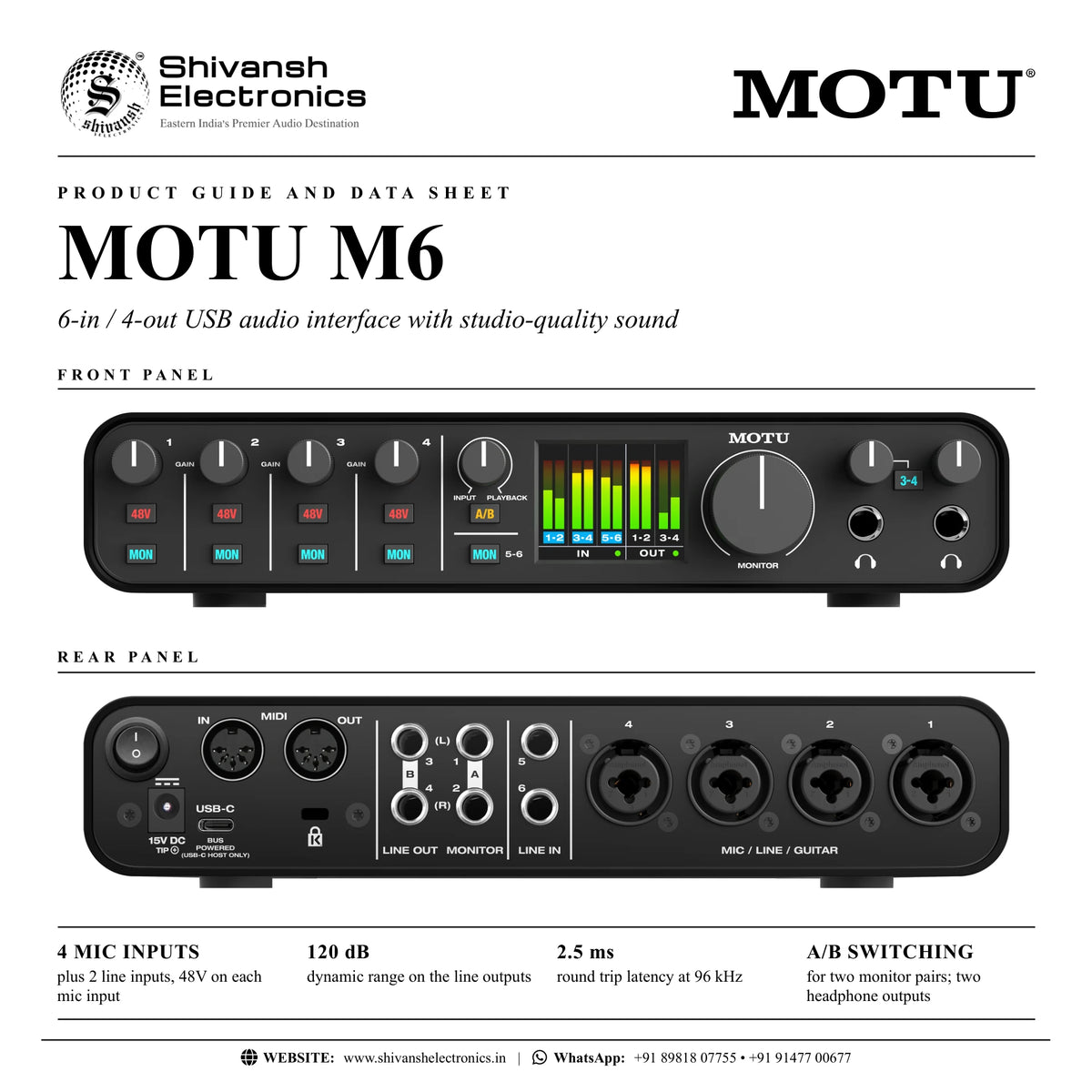
MOTU M6 6-in / 4-out USB-C audio interface with four mic preamps, ESS Sabre32 Ultra DAC, 120 dB dynamic range, A/B monitor switch and colour LCD. Available in India from Shivansh Electronics, Kolkata, West Bengal, India.
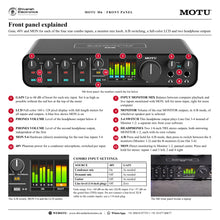
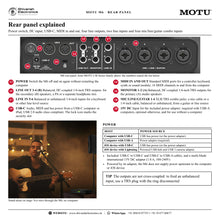
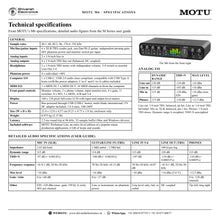
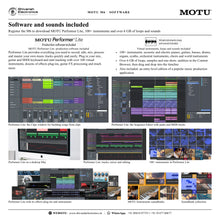
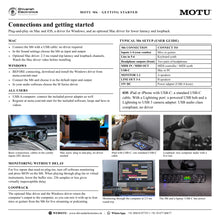
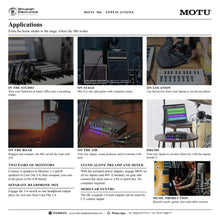
VISUAL GUIDE — See Every Photo, Spec & Setup Step (PDF)
Free Pan-India Delivery: Enjoy free delivery within 4–7 days of receiving your payment, subject to PIN code serviceability. We work with all major courier and logistics providers, including Blue Dart, Delhivery, Shree Maruti, DHL, Allcargo Gati, and many more, to ensure reliable and timely deliveries.
General
| Type | 6‑in / 4‑out USB audio interface |
| DAC technology | ESS Sabre32 Ultra™ (outputs and headphone outputs) |
| Sample rates | 44.1, 48, 88.2, 96, 176.4, 192 kHz |
| Computer connection | 1 x USB‑C, USB 2.0 audio class compliant (compatible with USB Type‑A hosts with the DC adapter) |
| Round‑trip latency | 2.5 ms (32‑sample buffer at 96 kHz), Mac and Windows drivers |
| Power | USB bus powered from USB‑C hosts; included 15V DC adapter (1.0 A max, 100‑240V, US/Japan, EU, UK and Australia blades); power switch |
Inputs and outputs
| Mic / line / guitar inputs | 4 x XLR/TRS combo jacks; independent preamp gain (up to 60 dB), 48V phantom power and MON switch per input |
| Line inputs | 2 x 1/4‑inch TRS (balanced or unbalanced), MON switch for inputs 5‑6 |
| Line outputs | 4 x 1/4‑inch TRS line out (balanced, DC‑coupled): Monitor Out 1‑2 and Line Out 3‑4 |
| Headphone outputs | 2 x 1/4‑inch TRS stereo, independent volume; 3‑4 switch for monitoring Line Out 3‑4 |
| MIDI | 1 x MIDI IN, 1 x MIDI OUT (16 channels to/from the computer) |
| Phantom power | 4 x individual +48V |
Audio performance
| Line output | |
|---|---|
| Connector | 1/4‑inch TRS, balanced, tip hot |
| Dynamic range (A‑weighted) | 120 dB |
| THD+N (unweighted) | -110 dB |
| Max level | +16 dBu |
| Line input | |
| Connector | 1/4‑inch TRS, balanced/unbalanced, tip hot |
| Dynamic range (A‑weighted) | 115 dB |
| THD+N (unweighted) | -107 dB |
| Max level | +18 dBu |
| Mic input | |
| Connector | XLR, balanced, pin 2 hot |
| Dynamic range (A‑weighted) | 115 dB |
| THD+N (unweighted) | -129 dBu EIN |
| Max level | +10 dBu (min. gain) |
| Headphone | |
| Connector | 1/4‑inch TRS stereo |
| Dynamic range (A‑weighted) | 115 dB |
| THD+N (unweighted) | -110 dB |
| Max level | +12.5 dBu |
Front panel
| Inputs | 4 x XLR/TRS combo jacks |
| Controls | 4 x input gain, input monitor mix, monitor volume, 2 x headphone volume |
| Switches | 4 x 48V, 5 x MON, 1 x A/B, 1 x 3‑4 |
| Display | 160 x 128 pixel full‑colour LCD with input and output meters |
| Headphones | 2 x 1/4‑inch TRS stereo |
Physical
| Dimensions (W x D x H) | 23.4 x 12.0 x 4.57 cm (9.21 x 4.75 x 1.8 in), enclosure only |
| Weight | 0.975 kg (2.15 lb) |
| Construction | Rugged metal: extruded case, faceplates and knobs; security slot |
System requirements
| Mac | macOS 12 or later; Apple silicon and Intel; 8 GB+ RAM recommended; plug‑and‑play or with the optional MOTU driver |
| Windows | Windows 11 23H2 or later; x86‑64 and ARM64 PCs; 8 GB+ RAM recommended; MOTU ASIO / Wave driver |
| iOS | USB audio class compliant, no driver required |
| Software | Core Audio, ASIO and Wave compatible: works with virtually all recording software |
Included software
| Production | MOTU Performer Lite, Ableton Live Lite |
| Instruments | 100+ virtual instruments in Performer Lite |
| Sounds | 6 GB+ of loops, samples and one‑shots from Big Fish Audio, LucidSamples, Loopmasters and MOTU |
| Warranty | Two years |
Product overview
The MOTU M6 is a 6-in / 4-out USB-C audio interface for Mac, Windows and iOS with four mic inputs, built around three strengths: studio-grade audio quality, ultra-low latency and full-colour metering.
Four combo inputs take a microphone, a line source or a guitar, each with its own gain, 48V phantom power and direct-monitor switch, and two balanced line inputs add a keyboard. Four balanced, DC-coupled outputs feed your studio monitors, with A/B switching between two speaker pairs. Two headphone outputs have their own volume, and MIDI in/out connects a keyboard or synth. The M6 runs on USB-C bus power or the included international DC adapter, even with no computer connected, in a rugged metal case.
| Output dynamic range | 120 dB |
| Mic preamps with 48V | 4 |
| Round-trip latency | 2.5 ms |
| Max sample rate | 192 kHz |
Key features
- ESS Sabre32 Ultra™ DAC technology on the outputs and both headphone outputs, the same converter technology used in interfaces costing thousands
- Measured 120 dB dynamic range on the balanced 1/4-inch outputs
- Four ultra-clean mic preamps with a measured -129 dBu EIN and up to 60 dB of gain
- 2.5 ms round-trip latency (32-sample buffer at 96 kHz) with MOTU's Mac and Windows drivers
- Full-colour LCD with level meters for every input and output, unique in its class
- Hardware direct monitoring on all six inputs, mono or stereo, with an input monitor mix knob
- A/B monitor switch, the only one in its class, to compare a mix on two pairs of speakers
- Two ESS-driven headphone outputs, one with a 3-4 button for a separate mix
- Loopback channels for live streaming and podcasting
- MIDI in/out, 16 channels to and from the computer
- USB-C bus power or included DC adapter for stand-alone operation; power switch, metal case and security slot
Audio quality
The M6 is equipped with ESS Sabre32 Ultra™ DAC technology for a measured 120 dB dynamic range on its main outputs. ESS converters also drive both headphone outputs, which rival dedicated headphone amplifiers. Ultra-clean preamp circuits measure -129 dBu EIN on all four mic inputs.
Speed and monitoring
MOTU's USB drivers deliver 2.5 ms round-trip latency for playing through software effects in real time. For zero-latency monitoring, press MON on any input (press and hold for stereo), including the keyboard on inputs 5-6, and set the balance against computer playback with the input monitor mix knob.
A/B monitor switching
Connect your main monitors to Monitor Out 1-2 and a second pair to Line Out 3-4, then hold the A/B button to enter A/B mode. A quick press switches between the two pairs, so you can check a mix on different speakers instantly.
Two headphone outputs
Both headphone outputs have independent volume and mirror Monitor Out 1-2. Press the 3-4 button and one output follows Line Out 3-4 instead, giving a performer a completely separate mix from your software.
Stand-alone operation
With the included multi-blade international DC power adapter, the M6 works with the computer switched off or disconnected: engage MON on the inputs and use it as a preamp and basic mixer feeding a PA or patch bay.
Streaming and podcasting with loopback
The M6 driver adds loopback channels that send your computer's audio back into the computer. Mix it with up to four mics or guitars in your streaming or podcasting software and broadcast the combined mix in real time.
Software included
Register your M6 to download MOTU Performer Lite (100+ virtual instruments and dozens of effects plug-ins), Ableton Live Lite, and over 6 GB of loops, samples and one-shots from Big Fish Audio, LucidSamples, Loopmasters and MOTU.
In the box
- MOTU M6 audio interface
- USB-C to USB-C cable
- USB-C to USB-A cable
- Multi-blade international 15V DC power adapter
- Safety instruction sheet
- Software, instruments and sounds available after product registration
Two-year MOTU warranty. Works with virtually all Core Audio, ASIO and Wave-compatible audio software.
MOTU M6: frequently asked questions
Does the MOTU M6 need a driver?
No driver is needed on Mac or iOS: the M6 is USB audio class compliant. MOTU's optional Mac driver adds the 2.5 ms low-latency performance and loopback. On Windows, install the MOTU M Series driver.
How is the M6 powered?
From a USB-C computer or iPad it runs on bus power. With a USB Type-A computer, or with no computer at all, use the included DC power adapter.
Can four people record a podcast on the M6?
Yes. Four mic inputs with individual 48V, two headphone outputs and loopback cover a four-person show with computer audio.
What sample rates does it support?
44.1, 48, 88.2, 96, 176.4 and 192 kHz.
Where can I buy the MOTU M6 in India?
The MOTU M6 is available from Shivansh Electronics, Kolkata, West Bengal, India, with delivery across India.
Workflow 1: Recording a band or drum kit
Capture up to four mics at once, plus a stereo keyboard, in a home or project studio.
Connections
| Connect | To |
|---|---|
| Drum or band mics (XLR) | Inputs 1‑4; press 48V for condenser mics |
| Keyboard (stereo, 1/4‑inch) | Line inputs 5‑6 |
| Studio monitors | Monitor Out 1‑2 |
| Headphones | Headphone outputs 1 and 2 |
| Computer | USB‑C (bus powered) |
Setup
- Install the MOTU driver on Windows (optional on Mac) and select the M6 in your recording software.
- Set each of the four preamps while watching the LCD meters; keep peaks out of the red.
- Arm six tracks and record at up to 192 kHz, using a 32-sample buffer for the lowest latency.
- Give the drummer and engineer their own headphone volume on the two outputs.
Tip: Register the M6 to download Performer Lite, Ableton Live Lite, 100+ instruments and 6 GB of loops.
Workflow 2: Four-person podcast and live streaming
A round-table podcast or live stream with up to four mics and audio from the computer.
Connections
| Connect | To |
|---|---|
| Host and guest mics | Inputs 1‑4 |
| Headphones | Headphone outputs 1 and 2 |
| Computer | USB‑C |
Setup
- Install the MOTU driver to enable the loopback channels.
- In your streaming or podcasting app, select the four M6 inputs and the loopback channels.
- Set each mic's gain on the LCD meters, then balance voices against computer audio in the app.
- Press MON on all four inputs so everyone hears themselves with zero latency.
Tip: Loopback captures everything the computer plays, so call guests, music beds and sound effects reach the stream with your voices.
Workflow 3: Mixing with A/B speaker switching
Check how a mix translates by switching between two pairs of studio monitors at the press of a button.
Connections
| Connect | To |
|---|---|
| Main (A) studio monitors | Monitor Out 1‑2 |
| Second (B) monitors | Line Out 3‑4 |
| Headphones | Headphone output |
| Computer | USB‑C |
Setup
- Play your mix through Monitor Out 1-2 in your software.
- Press and hold the A/B button to enter A/B mode.
- Press A/B briefly to switch between the A and B speakers; the monitor volume knob sets the active pair.
- Press and hold A/B again to return Line Out 3-4 to independent use.
Workflow 4: Live performance with a separate monitor mix
Mix live vocals, guitar and keys with computer tracks, and give a performer their own headphone mix.
Connections
| Connect | To |
|---|---|
| Vocal mics | Inputs 1‑2 |
| Guitars | Inputs 3‑4 |
| Keyboard | Line inputs 5‑6 |
| PA system or mixer | Monitor Out 1‑2 (balanced) |
| Performer headphones | Headphone output with the 3‑4 button engaged |
| Laptop | USB‑C |
Setup
- Route backing tracks and live inputs to outputs 1-2 in your performance software.
- Build a separate click or cue mix on outputs 3-4.
- Press the 3-4 button so that headphone output plays the cue mix, each with its own volume.
- Set levels on the LCD meters during soundcheck; use the power switch between sets.
Workflow 5: Stand-alone preamp and mixer
Use the M6 without a computer to monitor live inputs or feed mics and instruments into a PA or patch bay.
Connections
| Connect | To |
|---|---|
| Mics or instruments | Inputs 1‑4 |
| Keyboard or line source | Line inputs 5‑6 |
| PA or patch bay | Monitor Out 1‑2 |
| Included DC power adapter | DC power input |
Setup
- Connect the included DC power adapter; no computer is needed.
- Engage MON on all six inputs, plus 48V where condenser mics need it.
- Adjust each preamp gain while watching the LCD meters.
- Set the level to the PA with the monitor volume knob, and listen on headphones.
Workflow 6: Mobile and location recording
Record on the move with laptop bus power, or straight into an iPad or iPhone with USB-C.
Connections
| Connect | To |
|---|---|
| Mics or instruments | Inputs 1‑4 |
| Headphones | Headphone outputs |
| USB‑C laptop | Included USB‑C to USB‑C cable (bus power) |
| iPad or iPhone with USB‑C | Included USB‑C to USB‑C cable |
| USB Type‑A computer | Included USB‑C to USB‑A cable, with the DC adapter |
Setup
- Connect the M6 to a USB-C laptop or iOS device: it powers from the USB-C port.
- On iOS the M6 is class compliant: plug in and select it in your recording app.
- Monitor on headphones with MON for zero-latency listening.
- Pack it away in its rugged metal case for the next session.