ALLEN & HEATH DX168
PRICE ON ENQUIRY
Allen & Heath DX168 rugged 16 in / 8 out 96 kHz stagebox expander for dLive, Avantis, SQ, Qu and AHM, with rubber bumpers and carry handle. Available in India from Shivansh Electronics, Kolkata, West Bengal, India.
VISUAL GUIDE — See Every Photo, Spec & Setup Step (PDF)
PRICE ON ENQUIRY. For the price, exclusive offers, delivery timelines, or any other information, please Contact / WhatsApp +91 89818 07755 / +91 91477 00677. We will gladly share a personalised quotation for Shivansh Electronics, Kolkata, West Bengal, India. All payments are processed securely through Razorpay, our trusted payment gateway.
General
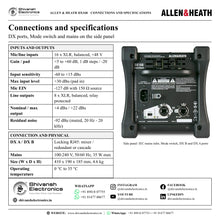
| Type | 16 in / 8 out 96 kHz portable expander |
| Compatible with | dLive, Avantis, SQ / SQ+, Qu (96 kHz models), AHM audio matrix processors |
| Format | Rugged stagebox: robust steel chassis, rubber bumpers, carry handle; horizontal or vertical placement |
| Sample rate | 96 kHz |
| Distance from mixer | Up to 100 m, single Cat5e cable |
| Preamp control | From the mixing system; all mic preamps scene recallable |
| Firmware | Updated automatically by the mixing system |
| Options | 4U 19-inch rack mounting kit; padded dust cover |
Inputs
| XLR mic/line inputs | 16, balanced, +48 V phantom power |
| Phantom power indication | LED per input socket |
| Mic/line preamp | Fully recallable |
| Input sensitivity | -60 to +15 dBu |
| Analogue gain | +5 to +60 dB, 1 dB steps |
| Pad | -20 dB active pad |
| Maximum input level | +30 dBu (pad in) |
| Input impedance | >4 kΩ (pad out), >10 kΩ (pad in) |
Mic/line channel (22 Hz - 22 kHz, direct out at unbalanced out)
| Mic EIN | -127 dB with 150 Ω source |
| Noise, unity gain (pad in) | -90 dBu |
| Noise, low gain (5 dB, pad out) | -96 dBu |
| Noise, mid gain (30 dB, pad out) | -90 dBu |
| THD+N, unity gain (pad in) | 0.003 %, -88 dBu at 1 kHz, 0 dBu output |
| THD+N, low gain (5 dB, pad out) | 0.002 %, -93 dBu at 1 kHz, 0 dBu output |
| THD+N, mid gain (30 dB, pad out) | 0.003 %, -88 dBu at 1 kHz, 0 dBu output |
Outputs
| XLR outputs | 8, balanced, relay protected |
| Output impedance | <75 Ω |
| Nominal output | +4 dBu = 0 dB meter reading |
| Maximum output level | +22 dBu |
| Residual output noise | -92 dBu (muted, 20 Hz - 20 kHz) |
DX connection
| DX A | Locking RJ45 port, to the mixer or upstream DX expander |
| DX B | Locking RJ45 port, for redundant connection or daisy-chaining to a downstream DX expander |
| Mode switch | Cascade or redundant |
| Redundant mode | Full redundant connection to a dLive S Class Surface or MixRack |
| Cascade mode | Series connection of two units with a single cable to the mixing system; up to 2 DX expanders on each DX port |
Power
| Mains power | 100-240 V, 50/60 Hz, 35 W max |
| Mains connection | Earthed 3-pin IEC inlet on the rear panel |
Physical
| Operating temperature | 0 °C to 35 °C (32 °F to 95 °F) |
| Dimensions (W x D x H) | 410 x 190 x 185 mm (16.1 x 7.5 x 7.3 in) |
| Weight | 4.6 kg (10.1 lbs) |
Product overview
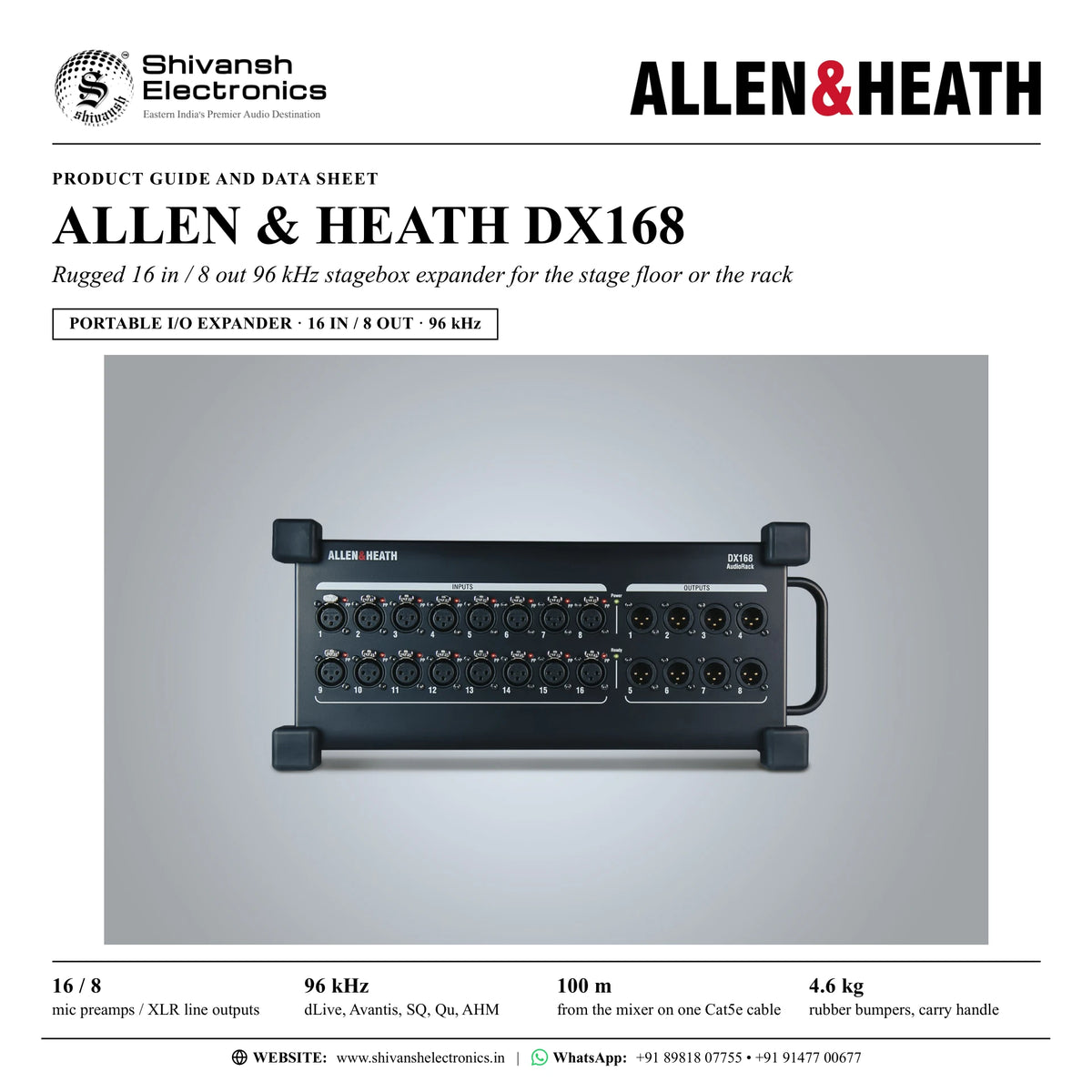
The Allen & Heath DX168 is a rugged, 96 kHz portable expander with 16 mic/line inputs and 8 line outputs that adds remote I/O to dLive, Avantis, SQ and Qu systems and to AHM audio matrix processors.
DX168 is a stagebox-format expander: 16 recallable mic/line preamps with up to +60 dB of gain, a -20 dB pad for line level sources and individually configured +48 V phantom power with an LED on every input, plus 8 balanced, relay-protected line outputs on XLR. It connects to the mixer, or to an upstream DX expander, with a single Cat5e cable of up to 100 m on a locking RJ45 DX port, and that cable carries both the digital audio and the control signals. All mic preamps are controlled and scene recalled by the mixing system.
The robust steel chassis has hard-wearing rubber bumpers and a sturdy carry handle, so the DX168 can be placed directly on the stage floor during performances, horizontally or vertically. At 4.6 kg it brings the convenience and portability needed in rental, education, houses of worship and many other environments. For fixed or touring racks, an optional 4U rack mounting kit fits it in a 19-inch rack or case, and an optional padded dust cover is available.
A second locking RJ45 port, DX B, and a mechanical Mode switch add flexibility. In redundant mode the unit makes a full redundant, dual-cable connection to a dLive S Class MixRack or Surface; in cascade mode DX B daisy-chains a downstream DX expander, with up to 2 DX expanders on each DX port. An SQ with two DX168 has 32 remote inputs and 16 remote outputs, and with a DX Hub up to eight DX168 give 128 remote inputs and 64 remote outputs, with just one cable between front of house and stage.
It is plug-and-play: there is nothing to configure, and firmware updates are handled automatically by the mixer. DX168 works with dLive on DX ports, a DX Link card or a DX Hub, and with Avantis, SQ / SQ+, the 96 kHz Qu models and AHM processors through SLink.
| Mic preamps / XLR line outputs | 16 / 8 |
| Portable stagebox expander | 96 kHz |
| From the mixer on one Cat5e cable | 100 m |
| Rubber bumpers and carry handle | 4.6 kg |
Key features
- 16 mic/line preamps on XLR: +5 to +60 dB gain in 1 dB steps and a -20 dB active pad
- Individually configured +48 V phantom power with a phantom power LED per input
- 8 balanced line outputs on XLR, relay protected
- 96 kHz remote I/O for dLive, Avantis, SQ / SQ+, 96 kHz Qu models and AHM processors
- Rugged stagebox: robust steel chassis, hard-wearing rubber bumpers and a sturdy carry handle
- Placed on the stage floor horizontally or vertically
- Optional 4U 19-inch rack mounting kit and optional padded dust cover
- Up to 100 m from the mixer on a single Cat5e cable
- Locking RJ45 DX A and DX B ports with Lnk/Err LEDs; Power and Ready LEDs on the front
- Redundant mode: dual-cable connection to a dLive S Class MixRack or Surface
- Cascade mode: up to 2 DX expanders daisy-chained on each DX port
- Plug-and-play: preamps controlled and recalled by the mixer, firmware updated automatically
Made for
- Live stages, with the unit placed on the stage floor during performances
- Rental inventories
- Education
- Houses of worship
- dLive systems, on DX ports, a DX Link card or a DX Hub
- Avantis, SQ / SQ+, 96 kHz Qu and AHM systems
- 19-inch racks and cases with the optional rack kit
In the box
- DX168 16 in / 8 out portable expander
Connections
- 16 x XLR mic/line inputs, balanced, +48 V phantom power, phantom power LED per input
- 8 x XLR line outputs, balanced, relay protected
- DX A: locking RJ45 port to the mixer or upstream DX expander, Lnk/Err LED
- DX B: locking RJ45 port for redundant connection or daisy-chaining, Lnk/Err LED
- Mode switch: cascade or redundant
- AC mains: earthed IEC inlet, 100-240 V, 50/60 Hz, 35 W max
- Power and Ready indicators on the front panel
Allen & Heath DX168: frequently asked questions
Which mixers does the DX168 work with?
dLive, Avantis, SQ / SQ+, the 96 kHz Qu models and AHM audio matrix processors. On dLive it connects to DX ports, a DX Link card or a DX Hub; Avantis, SQ, Qu and AHM connect it through SLink.
Can the DX168 sit on the stage floor?
Yes. Its rugged design with hard-wearing rubber bumpers lets it be placed directly on the stage floor during performances, horizontally or vertically, and the sturdy carry handle makes it easy to move.
Can it be mounted in a rack?
Yes, with the optional 4U rack mounting kit, which allows installation in 19-inch racks or cases. An optional padded dust cover is also available.
How many DX168 can I connect?
In cascade mode 2 DX expanders can be daisy-chained on each DX port: an SQ with two DX168 has 32 remote inputs and 16 remote outputs. A DX Hub takes up to eight DX168 for 128 remote inputs and 64 remote outputs, on one cable to the mixer.
Does it need any setting up?
No. It is plug-and-play: connect it to the mixer and it is ready to go, with firmware updates handled automatically by the mixer.
Where can I buy the Allen & Heath DX168 in India?
The Allen & Heath DX168 is available from Shivansh Electronics, Kolkata, West Bengal, India, with delivery across India.
Workflow 1: Front of house with one stage box
Live sound engineers mixing bands and events on SQ, Avantis or Qu.
Connections
| Connect | To |
|---|---|
| Stage microphones and line sources | DX168 XLR inputs 1-16 |
| DX168 DX A | Mixer SLink port, one Cat5e cable up to 100 m |
| DX168 XLR outputs 1-8 | Stage monitors and amplifiers |
Setup
- Carry the DX168 in by its handle and place it on the stage floor.
- Run one Cat5e cable of up to 100 m from DX A to the mixer's SLink port.
- Power it from mains; the mixer handles firmware updates automatically.
- Set gain, pad and +48 V for each input from the mixer and patch the 8 outputs.
- Store the preamp settings in the scene.
Tip: A phantom power LED on every input shows the 48 V status on stage.
Workflow 2: Two stage boxes on one cable
Bands and events that need more inputs on stage.
Connections
| Connect | To |
|---|---|
| SQ SLink port | First DX168 DX A |
| First DX168 DX B | Second DX168 DX A |
Setup
- Set the Mode switch to cascade.
- Connect the first DX168 to the SQ and the second DX168 to its DX B port.
- Patch the 32 remote inputs and 16 remote outputs on the SQ.
Tip: SQ + 2 x DX168 gives 32 remote inputs and 16 remote outputs.
Workflow 3: Large stage with a DX Hub
Productions that want up to 128 remote sockets with one cable to front of house.
Connections
| Connect | To |
|---|---|
| Mixer SLink port | DX Hub, one cable between front of house and stage |
| DX Hub DX sockets 1-4 | Up to 2 DX168 per socket |
Setup
- Place the DX Hub on stage.
- Connect up to 2 DX168 to each of its 4 DX sockets, 8 units in total.
- Run one cable from the DX Hub to the mixer.
- Patch the inputs you need from up to 128 remote sockets.
Tip: SQ + DX Hub + 8 x DX168 gives 128 remote inputs and 64 remote outputs; SQ mixes up to 48 inputs at once.
Workflow 4: Redundant dLive stage link
dLive users who need a dual-cable connection to the stage I/O.
Connections
| Connect | To |
|---|---|
| DX168 DX A | DX port on a dLive S Class MixRack or Surface |
| DX168 DX B | Second DX port on the same dLive hardware |
Setup
- Set the Mode switch to redundant.
- Connect DX A and DX B to the dLive hardware with two Cat5e cables.
- Patch and recall the preamps from the dLive system.
Tip: A pair of DX Link card ports can also take one DX expander in redundant mode, using 2 cables.
Workflow 5: Rental and touring rack
Rental companies and touring crews with Allen & Heath stock.
Connections
| Connect | To |
|---|---|
| DX168 with the optional 4U rack kit | 19-inch rack or case |
| DX168 DX A | Avantis SLink port |
Setup
- Fit the optional rack mounting kit and install the DX168 in a 4U space of a 19-inch rack or case.
- Connect DX A to the Avantis SLink port with one Cat5e cable.
- Use the same DX168 with dLive, SQ, Qu or AHM systems on other jobs.
- Protect it between jobs with the optional padded dust cover.
Tip: The SLink connection on Avantis connects to the entire range of Allen & Heath audio expander hardware.
Workflow 6: Schools and houses of worship
Education and worship venues with a Qu or SQ mixer.
Connections
| Connect | To |
|---|---|
| Qu SLink port (96 kHz Qu models) or SQ SLink port | DX168 DX A |
| Microphones and instruments on stage | DX168 XLR inputs |
| DX168 XLR outputs | Stage monitors or amplifiers |
Setup
- Connect the DX168 to the mixer's SLink port with one Cat5e cable.
- Place it on the stage or platform floor, horizontally or vertically.
- Set the preamps from the mixer and store them in a scene for each service or event.
- Move it by the carry handle when the room is set up differently.
Tip: Firmware updates are handled automatically by the mixer, so there is nothing to configure.