
ALLEN & HEATH Xone:PX5
PRICE ON ENQUIRY
Allen & Heath Xone:PX5 4+1 channel analogue DJ mixer with Xone:FX, Xone filter, 20-channel 96 kHz USB soundcard, MIDI clock and X:LINK. Available in India from Shivansh Electronics, Kolkata, West Bengal, India.
VISUAL GUIDE — See Every Photo, Spec & Setup Step (PDF)
PRICE ON ENQUIRY. For the price, exclusive offers, delivery timelines, or any other information, please Contact / WhatsApp +91 89818 07755 / +91 91477 00677. We will gladly share a personalised quotation for Shivansh Electronics, Kolkata, West Bengal, India. All payments are processed securely through Razorpay, our trusted payment gateway.
General
| Model | Xone:PX5 |
| Type | Analogue |
| Channels | 4 + 1 |
| EQ | 3-band / total kill (CH 1 - 4 + CH A) |
| Headroom | 20 dB |
USB soundcard
| Channels | 20 (10 in / 10 out) |
| Standard | USB2 / class compliant |
| Resolution | 24-bit / 96 kHz |
| MIDI over USB | 1 x MIDI in, 1 x MIDI out |
Inputs
| Line inputs | 4 x RCA (CH 1 - 4); 1 x 1/4" TRS (CH A), mono / stereo |
| Phono inputs | 4 x RCA (CH 1 - 4); LN / PH switch for DVS |
| USB inputs | 5 x USB (CH 1 - 4 + CH A) |
| Mic input | 1 x XLR |
| Earth ground terminals | x 2 |
Outputs
| Master output | 1 x XLR (balanced) |
| Master 2 output | 1 x RCA (unbalanced) |
| Booth output | 1 x 1/4" TRS |
| Record output | 1 x RCA (unbalanced) |
| Master insert | 1 x 1/4" TRS |
| Headphones | 1 x 1/4", 1 x 3.5 mm; split cue monitoring |
FX and filter
| Send / return I/O | 1 x 1/4" TRS send; 1 x 1/4" TRS return; 1 x LN / Hi-Z switch |
| Internal Xone:FX | Yes |
| Hybrid FX mode | Yes (Internal < Dual > External) |
| FX send | 1 x pre / post selectable (CH 1 - 4 + CH A) |
| Filter | 1 x VCF filter: HPF / BPF / LPF, adjustable frequency and resonance, assignable CH 1 - 4 + CH A + external return |
Faders and meters
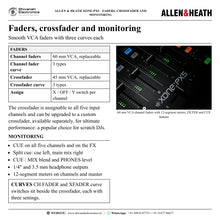
| Channel faders | 60 mm VCA / replaceable |
| Channel meters | 12-segment LED |
| Channel fader curve | 3 types |
| Crossfader | 45 mm VCA / replaceable / custom crossfader compatible |
| Crossfader curve settings | 3 types |
MIDI and control
| MIDI Sync / Out | 1 x 5-pin DIN; DIN offset control |
| MIDI clock | Send + receive; start / stop / pause / tempo bend (-/+) |
| MIDI assignable | Yes (MIDI CC / MIDI notes); MIDI channel number changeable |
| BPM detection | Auto / manual / tap tempo |
| X-Link | 1 x RJ45 |
Power
| AC mains | 100 to 240 V AC, 50/60 Hz |
| Consumption | 35 W max |
| Mains adaptor | 3-pin IEC socket with cable clamp; built-in power supply, mains switch |
| Fuse rating | 250 V AC T1AL 20 mm |
Physical
| Size without box (W x D x H) | 320 x 375.6 x 110 mm (12.6 x 14.8 x 4.3 in) |
| Weight without box | 5.2 kg (11.5 lbs) |
| Size with box (W x D x H) | 450 x 530 x 190 mm (17.7 x 20.9 x 7.5 in) |
| Weight with box | 6.6 kg (14.6 lbs) |
Product overview
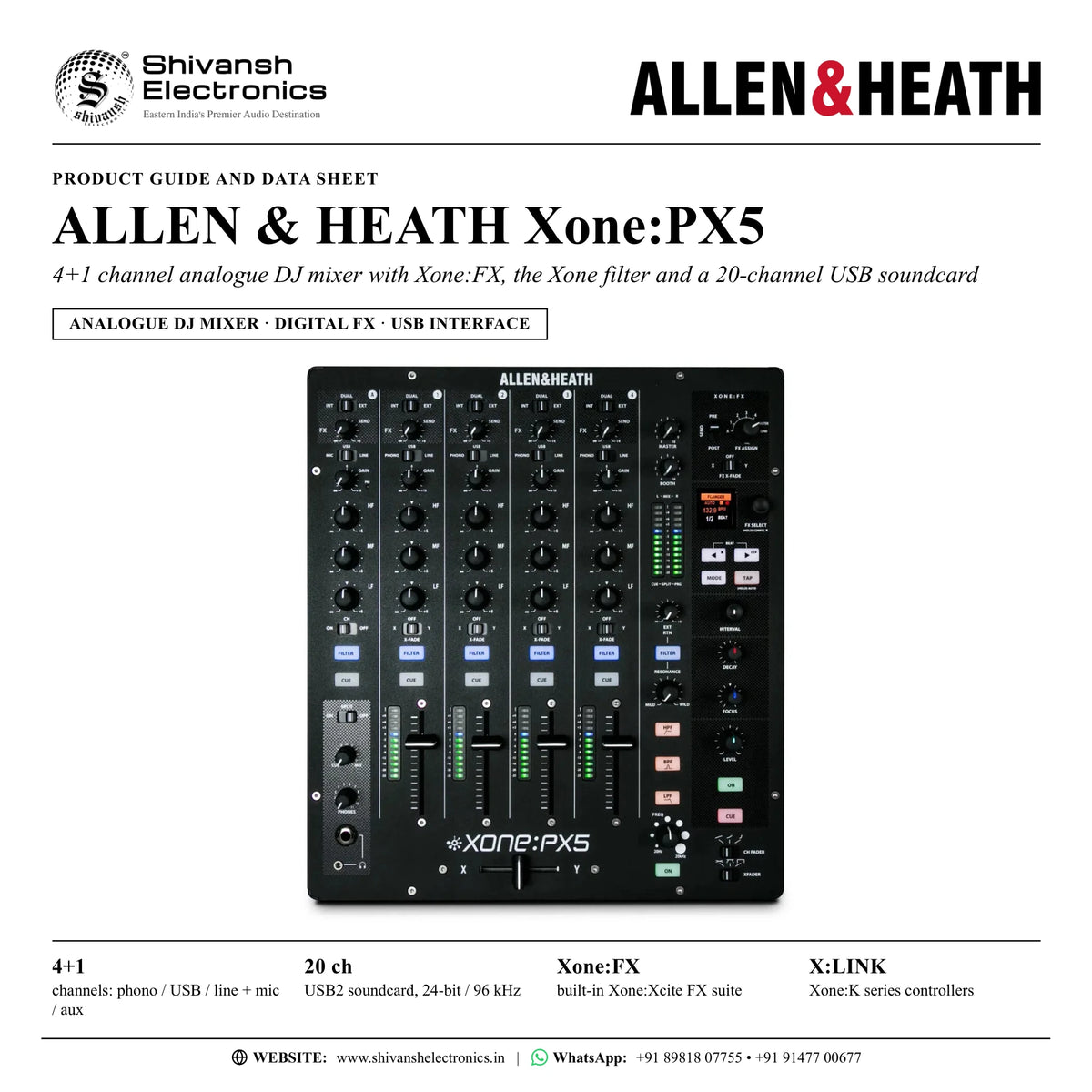
The Allen & Heath Xone:PX5 is a 4+1 channel analogue DJ mixer with digital FX and a USB interface, combining the signature warm analogue Xone sound with digital connectivity to breathe life and soul into electronic music performance.
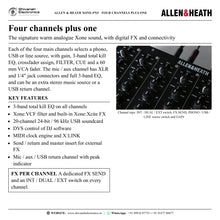
Four fully featured channels each select a phono, USB or line source, and a flexible mic / aux channel with XLR and 1/4" jack connectors and full 3-band EQ can serve as an extra stereo music source or a USB return channel when no mic is used. Every channel has 3-band total kill EQ, a dedicated FX send and a 3-position INT / DUAL / EXT switch that sends it to the internal FX, the external FX or both.
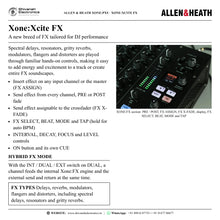
The built-in Xone:Xcite FX suite is a new breed of FX tailored for DJ performance: spectral delays, resonators, gritty reverbs, modulators, flangers and distorters, played through familiar hands-on controls for interval, decay, focus and level, with beat and tap tempo controls, an on / off button and its own cue. The FX engine works as an insert effect on any input channel or the master, or as a send effect, pre or post fade, which can also be assigned to the crossfader. A hybrid FX mode combines the internal and external send and return FX for more advanced processing.
External FX hardware connects through 1/4" TRS send and return with a Line / Hi-Z switch for legacy hardware, and the master 1/4" TRS insert takes external effects or dynamics processing. The legendary Xone filter offers HPF, BPF and LPF with resonance and frequency sweep, and can also process the aux channel and the external return.
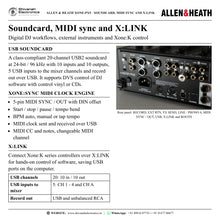
The internal 20-channel (10 in / 10 out) 24-bit / 96 kHz USB2 soundcard is class compliant and integrates the PX5 into digital DJ workflows, including DVS control of DJ software with control vinyl or CDs. The Xone:Sync MIDI clock engine sends start / stop messages and syncs drum machines and synthesisers over the 5-pin MIDI Sync / Out, with MIDI clock also sent and received over USB, while X:LINK connects Xone:K series controllers for hands-on control of software, saving USB ports on the computer.
| Channels: phono / USB / line + mic / aux | 4+1 |
| USB2 soundcard, 24-bit / 96 kHz | 20 ch |
| Built-in Xone:Xcite FX suite | Xone:FX |
| Pro standard headroom | 20 dB |
Key features
- 4+1 channel analogue mixer with 3-source phono / USB / line inputs on channels 1 - 4
- 3-band total kill EQ on all channels
- Classic Xone:VCF filter: HPF, BPF, LPF with frequency and resonance, assignable to every channel and the external return
- Internal Xone:FX engine with the Xone:Xcite FX suite: insert, send and hybrid modes
- 20-channel 24-bit / 96 kHz USB2 soundcard, class compliant, 10 in / 10 out
- DVS ready: DVS control of DJ software with control vinyl or CDs; LN / PH switch for DVS
- Send / return and master insert connections for external FX, Line or Hi-Z
- Dedicated mic / aux input / USB return channel with peak level indicator
- Xone:Sync MIDI clock engine: 5-pin MIDI Sync / Out, MIDI clock over USB, auto / manual / tap BPM
- X:LINK for plug n' play connection to Xone:K series controllers
- Record out on USB and unbalanced RCA; master 2 and booth outputs
- Replaceable 60 mm VCA channel faders and 45 mm VCA crossfader, 3 curves each; crossfader upgradable to a custom crossfader
Made for
- Electronic music performance
- Digital DJ workflows with a computer
- DVS with control vinyl or CDs
- Classic vinyl and CD / media player setups
- Setups with external FX hardware
- Hybrid setups with drum machines, synthesisers and Xone:K controllers
In the box
- Xone:PX5 mixer
Connections
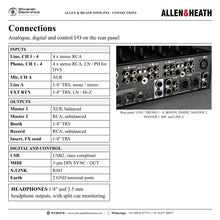
- 4 x stereo LINE inputs, RCA (CH 1 - 4)
- 4 x stereo PHONO inputs, RCA (CH 1 - 4), with LN / PH switch for DVS
- LINE A input, 1/4" TRS, mono / stereo (CH A)
- MIC input, XLR (CH A)
- MASTER 1 output, balanced XLR
- MASTER 2 output, unbalanced RCA
- BOOTH output, 1/4" TRS
- RECORD output, unbalanced RCA
- Master INSERT, 1/4" TRS
- FX SEND and EXT RTN, 1/4" TRS, with LN / Hi-Z switch
- MIDI SYNC / OUT, 5-pin DIN
- USB2 port for the 20-channel soundcard and MIDI
- X:LINK, RJ45
- Headphones: 1/4" and 3.5 mm
- 2 earth ground terminals
- AC mains: 3-pin IEC socket with cable clamp and power switch
Allen & Heath Xone:PX5: frequently asked questions
Can I use the Xone:PX5 with DJ software?
Yes. The internal 20-channel 24-bit / 96 kHz USB2 soundcard is class compliant, with 5 USB inputs to the mixer (channels 1 - 4 and channel A) and record out over USB. It supports DVS control of DJ software, with control vinyl or CDs to control and scratch digital audio files stored on the computer.
What effects are built in?
The Xone:Xcite FX suite: performance-focused delays, reverbs, modulators, flangers and distorters, including spectral delays, resonators and gritty reverbs. They run as an insert on any channel or the master, or as a pre / post fade send, and a hybrid mode combines them with external send and return FX.
How do I connect external effects or processors?
Use the 1/4" TRS FX SEND and EXT RTN with the Line / Hi-Z switch, and set the INT / DUAL / EXT switch on each channel. The master 1/4" TRS INSERT takes external effects or dynamics processing on the main mix.
Can it sync drum machines and synthesisers?
Yes. The Xone:Sync MIDI clock engine sends clock and start / stop / pause / tempo bend from the 5-pin MIDI Sync / Out, with DIN offset control and auto, manual or tap BPM. External instruments can be connected to the 1/4" jack inputs (mono / stereo), and MIDI clock is also sent and received over USB.
What is X:LINK?
X:LINK is an RJ45 connection for plug n' play use of Xone:K series controllers with the Xone:PX5, giving hands-on control of software while saving USB ports on the computer.
Where can I buy the Allen & Heath Xone:PX5 in India?
The Allen & Heath Xone:PX5 is available from Shivansh Electronics, Kolkata, West Bengal, India, with delivery across India.
Workflow 1: Classic vinyl
Vinyl DJs on two to four turntables.
Connections
| Connect | To |
|---|---|
| Turntables | PHONO inputs, RCA (CH 1 - 4) |
| Turntable earth leads | GND earth terminal posts (2 posts, up to 4 turntables) |
| MASTER 1, balanced XLR | Main sound system |
| BOOTH, 1/4" TRS | Booth monitors |
Setup
- Set the source switch of each channel to PHONO and set GAIN with CUE and the 12-segment meter.
- Assign the decks to the X or Y side of the crossfader with the X-FADE switches.
- Mix with the 3-band total kill EQ and the Xone filter.
- Set MASTER and BOOTH levels.
Tip: The crossfader and the channel faders each have three curve settings.
Workflow 2: CD / media players with an FX unit
DJs on digital players who add their own effects hardware.
Connections
| Connect | To |
|---|---|
| CD / media players | LINE inputs, RCA |
| FX SEND, 1/4" TRS | External FX unit input |
| External FX unit output | EXT RTN, 1/4" TRS (LN / Hi-Z switch) |
Setup
- Set the channels to LINE.
- Set the EXT RTN LN / Hi-Z switch to suit the effects hardware.
- Set each channel's INT / DUAL / EXT switch to EXT and turn up its FX SEND.
- Blend the return with the EXT RTN level control, and press FILTER under it to filter the return.
Tip: DUAL sends a channel to the internal Xone:FX and the external effects at the same time.
Workflow 3: Vinyl plus a laptop over USB
DJs mixing turntables with tracks from a computer.
Connections
| Connect | To |
|---|---|
| Turntable | PHONO input, RCA |
| Computer with DJ software | USB port (20-channel soundcard) |
| Media player | LINE input, RCA |
Setup
- Connect the computer to the USB port; the soundcard is class compliant.
- Set the channels playing from the computer to USB and the decks to PHONO or LINE.
- Use the mic / aux channel as a USB return or an extra stereo source when no mic is used.
- Record the mix over USB or from the RCA record output.
Tip: The soundcard runs at 24-bit / 96 kHz with 10 inputs and 10 outputs.
Workflow 4: DVS with control vinyl or CDs
DJs scratching digital files with control vinyl or CDs.
Connections
| Connect | To |
|---|---|
| Turntables or CD players with control media | PHONO / LINE inputs, RCA |
| Xone:PX5 USB | Computer running DJ software |
Setup
- Connect the decks to the PHONO or LINE inputs and set the rear LN / PH switch for DVS as required.
- Connect the computer to the USB port and set up the soundcard routing in the DJ software.
- Play the control vinyl or CDs to control and scratch the digital audio files.
- Mix the returning tracks on the PX5 channels with EQ, filter and FX.
Tip: The phono inputs have an LN / PH switch for DVS on every channel.
Workflow 5: Hybrid setup with MIDI sync and Xone:K controllers
Performers adding drum machines, synthesisers and controllers.
Connections
| Connect | To |
|---|---|
| MIDI SYNC / OUT, 5-pin DIN | Drum machine or synthesiser MIDI input |
| Drum machine or synthesiser audio | LINE A 1/4" jack inputs, mono / stereo |
| X:LINK, RJ45 | Xone:K series controller |
Setup
- Set the BPM with auto detection, manual entry or tap tempo.
- Start and stop the external instruments from the MIDI clock engine; adjust DIN offset and tempo bend.
- Bring the instruments in on channel A with its 3-band EQ.
- Use the Xone:K controller over X:LINK for hands-on control of the software.
Tip: X:LINK saves USB ports on the computer.
Workflow 6: Club installation with master processing
Venues running the PX5 into a house system.
Connections
| Connect | To |
|---|---|
| MASTER 1, balanced XLR | House PA system |
| MASTER 2, RCA | Second system or zone |
| INSERT, 1/4" TRS | Dynamics processor or external effect |
| RECORD, RCA | Recorder |
Setup
- Connect the balanced XLR master output to the house system and MASTER 2 to a second destination.
- Patch a dynamics processor into the master insert.
- Feed the DJ monitors from the 1/4" TRS booth output with its own level control.
- Record the mix from the RCA record output or over USB.
Tip: The master insert can be used for external effects and dynamic processing.