


ART HeadAmp 6
MRP - Rs. 24,412
ART HeadAmp 6: 6-channel 1U headphone amplifier, 18 headphone outputs, aux input with balance per channel, LED meters, XLR / 1/4 inch inputs with thru. Available in India from Shivansh Electronics, Kolkata, West Bengal, India.
VISUAL GUIDE — See Every Photo, Spec & Setup Step (PDF)
The price shown is the MAXIMUM RETAIL PRICE (MRP), inclusive of all taxes. For the best price, exclusive offers and discounted rates, delivery timelines, or any other information, please DM us or call +91 89818 07755 / +91 91477 00677. We will gladly share an exclusive coupon code that you can apply at checkout. All payments are processed securely through Razorpay, our trusted payment gateway partner.
Specifications
| Type | 6‑channel stereo headphone amplifier, 1U rackmount |
| Input connections | XLR‑F balanced (2), 1/4 inch balanced (9) |
| Output connections | XLR‑M balanced (2), 1/4 inch balanced (2), 1/4 inch stereo headphone (18) |
| Input impedance | 40 kΩ main; 10 kΩ direct; 15 kΩ aux in |
| Output impedance | < 12 Ω (headphones) |
| Maximum input level | +21 dBu (all inputs) |
| Maximum output level | 150 mW (600 Ω headphones); 500 mW (32 Ω headphones); 150 mW (8 Ω headphones) |
| Maximum gain | 22 dB |
| Total harmonic distortion | < 0.01 % typical |
| Signal to noise ratio | > 90 dB typical |
| Dynamic range | > 101 dB typical |
| CMRR | > 40 dB |
| Phase shift | < 10 degrees, 20 Hz - 20 kHz |
| Power requirements | 120 V AC, 50‑60 Hz, or 230 V AC, 50 Hz; 15 W |
| Reference | 0 dBu = 0.775 V AC RMS |
Physical
| Dimensions (H x W x D) | 44.5 x 483 x 152 mm (1.75 x 19 x 6 inch) |
| Weight | 2.4 kg (5.3 lb) |
| Enclosure | Rack‑mountable steel and aluminium, 1U |
Product overview
The ART HeadAmp 6 is a six-channel stereo headphone amplifier with three outputs per channel, so up to eighteen sets of headphones can be connected simultaneously.
Each channel features an independent auxiliary input with a balance control, so it is easy to dial in a "more me" mix, and switches that mute the left or right signal and sum the channel to mono give listeners the control to hear exactly what they need. LED meters with clipping indicators for the main signal bus and each output channel confirm signal activity at a glance. The rear panel has balanced XLR and 1/4 inch inputs, with Thru connectors to chain multiple units for even more outputs, and a Direct input on the front panel overrides the rear signal so you can switch sources without getting behind the rack. The HeadAmp 6 offers the most outputs of any ART headphone amplifier and is ideal for working with large ensembles.
| With aux input and balance / mix | 6 channels |
| Of headphones, 3 outputs per channel | 18 pairs |
| Into 32 Ω headphones | 500 mW |
| Rackmount | 1U |
Key features
- 6 output channels with independent high-power headphone amplifiers
- Stereo XLR and 1/4 inch balanced inputs with matching Thru jacks
- 1/4 inch Direct In on the front panel overrides the rear inputs
- 3 x 1/4 inch headphone outputs per channel: one front, two rear
- Supports up to 18 pairs of headphones
- Aux In with main / aux balance per channel
- Mute L, Mute R and Mono switches per channel
- LED meters with clip indicators: eight-segment on the main bus, four-segment per channel
- 1U rackmount steel and aluminium enclosure
Personal mixes per channel
The Balance control of each channel has two functions. With nothing in the channel's Aux In jack it sets the left / right balance of the main signal bus feed. With a plug inserted it becomes a mix control between the main bus and the stereo aux input, so a return of only a musician's own vocal microphone can be used as a "more me" control, heard only in that channel's headphones. The Mute L, Mute R and Mono switches then select stereo, right channel only in mono or left channel only in mono, after the balance / mix and level sections.
Inputs, thru and direct in
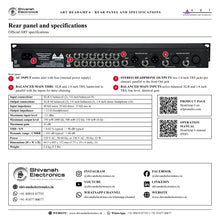
The rear Balanced Main Inputs (XLR and 1/4 inch TRS) are active balanced line level inputs with identical gain, and the Balanced Main Thru jacks are hardwired in parallel with them for daisy-chaining multiple HeadAmp 6 units. The front 1/4 inch TRS Direct In is a stereo unbalanced input that overrides the rear inputs when used, for temporarily inserting a different source or connecting another headphone output.
Outputs and metering
Each channel has a front Out jack and two identical rear stereo TRS jacks wired in parallel, usable together to drive headphones or feed additional headphone amplifiers in a distributed audio network. The HeadAmp 6 is optimised for typical headphone loads of 32 to 600 Ω, delivering 500 mW into 32 Ω and 150 mW into 600 Ω. The master volume with its eight-segment meter sets the main bus, and each channel's Level control and four-segment meter set and show its output.
Applications
ART's manual shows the HeadAmp 6 distributing a mixing console's main stereo monitor mix to headphones on the front and rear outputs, with the Thru jacks feeding a second HeadAmp 6 for even more listeners: recording studios, rehearsal rooms and large ensembles.
In the box
- HeadAmp 6 headphone amplifier
- Power cord
ART HeadAmp 6: frequently asked questions
How many headphones can it drive?
Up to eighteen: six channels with one front and two rear 1/4 inch outputs each.
What is the "more me" function?
Plug a signal, such as a musician's own vocal, into a channel's Aux In; the Balance control then mixes it with the main bus for that channel only.
Can I link several units?
Yes. The rear Balanced Main Thru jacks (XLR and 1/4 inch) daisy-chain the main input signal to further HeadAmp 6 units.
What mains voltage does it use?
ART specifies 120 V AC, 50-60 Hz, or 230 V AC, 50 Hz, 15 W. Connect it only to mains of the type marked on the rear panel.
Where can I buy the ART HeadAmp 6 in India?
The ART HeadAmp 6 is available from Shivansh Electronics, Kolkata, West Bengal, India, with delivery across India.
Workflow 1: Headphone distribution from a mixing console
Studios and rehearsal rooms with a band on headphones.
Connections
| Connect | To |
|---|---|
| Console main stereo monitor mix | Balanced Main Inputs (XLR or 1/4 inch) |
| Headphones | Front Out and rear Stereo Headphone Outputs |
Setup
- Start with Master Volume and Level fully counterclockwise, Balance at 12 o'clock and all switches out.
- Raise Master Volume until the green and yellow LEDs light, avoiding the red clip LED.
- Set each channel's Level for its headphones.
Tip: A strong main bus lets the channels run with less gain for better signal-to-noise ratio.
Workflow 2: "More me" mix for a vocalist
Singers who need more of their own voice.
Connections
| Connect | To |
|---|---|
| Direct out of the vocal microphone channel | Aux In of the singer's channel |
Setup
- Plug the vocal signal into that channel's Aux In.
- Use the Balance control to mix the vocal with the main bus.
Tip: The aux signal must be in phase with the main bus to add rather than cancel the vocal.
Workflow 3: Chaining two HeadAmp 6 units
Large ensembles needing more than 18 headphones.
Connections
| Connect | To |
|---|---|
| Unit 1 Balanced Main Thru | Unit 2 Balanced Main Inputs |
Setup
- Connect the Thru jacks of the first unit to the inputs of the next.
- Set the second unit's master and channel levels.
Tip: Daisy-chaining works only with the rear panel connectors, not the front Direct In.
Workflow 4: Quick source change
Engineers who need to play a reference without re-patching the rack.
Connections
| Connect | To |
|---|---|
| Stereo source (1/4 inch TRS) | Front Direct In |
Setup
- Plug the source into Direct In: it overrides the rear inputs.
- Remove the plug to return to the rear inputs.
Tip: The Direct In feeds only this unit, not the Thru outputs.
Workflow 5: Mono monitoring per listener
Players who want one side of a stereo mix.
Connections
| Connect | To |
|---|---|
| Channel switches | Mute L / Mute R / Mono |
Setup
- Press Mute L and Mono for the right channel only in mono.
- Press Mute R and Mono for the left channel only in mono.
Tip: All switches out gives stereo.
Workflow 6: Feeding further headphone amplifiers
Distributed audio networks in larger facilities.
Connections
| Connect | To |
|---|---|
| Rear Stereo Headphone Output | Additional headphone amplifier input |
Setup
- Use a rear output of a channel as a feed.
- Set that channel's Level for the following amplifier.
Tip: ART names the HeadAmp 4 as an additional headphone amp.


