
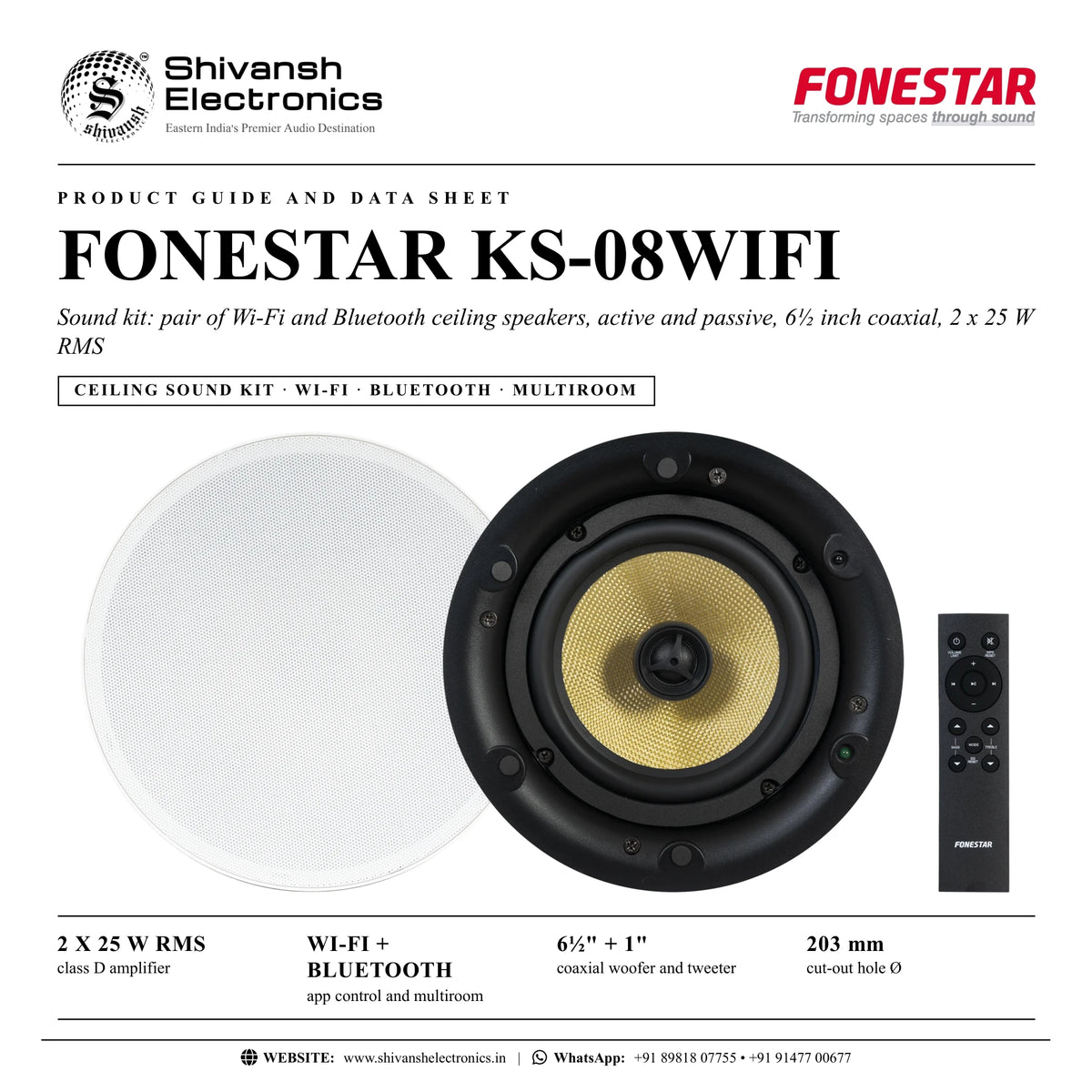




FONESTAR KS-08WIFI
PRICE ON ENQUIRY
FONESTAR KS-08WIFI pair of Wi-Fi and Bluetooth ceiling speakers, 6½ inch coaxial, 2 x 25 W RMS, app control, multiroom, remote. Available in India from Shivansh Electronics, Kolkata, West Bengal, India.
VISUAL GUIDE — See Every Photo, Spec & Setup Step (PDF)
PRICE ON ENQUIRY. For the price, exclusive offers, delivery timelines, or any other information, please DM us or call +91 89818 07755 / +91 91477 00677. We will gladly share a personalised quotation for Shivansh Electronics, Kolkata, West Bengal, India. All payments are processed securely through Razorpay, our trusted payment gateway partner.
Audio
| Bluetooth | Bluetooth 5.3; transmission distance 10 m |
| Amplifier | 2 x 25 W RMS |
| Speakers | Coaxial: 6½ inch woofer, kevlar, and 1 inch tweeter (active and passive) @ 8 Ω |
| Response | 80‑20,000 Hz |
| Inputs | 1 x stereo aux, 3.5 mm jack, 1 V RMS; 1 x RJ‑45 Ethernet (Ethernet data connection) |
| S/N ratio | ≤ 92 dB |
Build
| Colour | White |
| Power supply | 24 V DC, 3 A with adapter included |
| Loudspeaker dimensions | 230 mm Ø x 160 mm depth |
| Cutting hole | 203 mm Ø |
| Weight | 4 kg |
| Accessories | 5 m speaker cable; remote control; batteries for remote control |
Product overview
The FONESTAR KS-08WIFI is a Wi-Fi and Bluetooth sound kit with a pair of ceiling speakers, one active with a 2 x 25 W RMS class D amplifier and one passive, each with a 6½ inch coaxial woofer and 1 inch tweeter.
An ideal sound kit for home and professional audio installations: offices, medium sized rooms, kitchens, waiting rooms and clinics. Stream music directly via Bluetooth, or via Wi-Fi with the control app for smartphones and tablets, which connects to online music services and internet radio. Send the same music to several speakers in multiroom mode or play different programmes in each, with a separate volume and name for each speaker. An auxiliary input adds another source, and the frameless low-profile grille suits any ceiling.
| Class D amplifier | 2 x 25 W RMS |
| App control, multiroom | Wi‑Fi + Bluetooth |
| Coaxial woofer and tweeter | 6½" + 1" |
| Cut‑out hole Ø | 203 mm |
Key features
- Pair of ceiling speakers, active and passive, coaxial 6½ inch woofer and 1 inch tweeter @ 8 Ω
- 2 x 25 W RMS class D amplifier
- Wi-Fi receiver with app for smartphones and tablets: online music services and internet radio
- Bluetooth 5.3 receiver, 10 m
- Multiroom function over Wi-Fi or Ethernet cable
- Stereo auxiliary input (3.5 mm jack, 1 V RMS) and RJ-45 Ethernet port
- Remote control with bass, treble, volume and volume limit
- Frameless, low-profile grille, white
- Response 80-20,000 Hz, S/N ratio up to 92 dB
Wi-Fi with app control
Connect the active speaker to the local network by Wi-Fi or cable, then use the app to choose online radio, music services, music stored on your phone or the AUX input. Music keeps playing while you take calls or use other apps, without notifications on the speakers.
Multiroom
Group several KS-08WIFI kits so they play the same audio at the same time, or play different programmes in each room. One speaker is the main speaker; the others join it over Wi-Fi (within about 5-7 m of the main speaker) or over Ethernet cable.
Bluetooth and remote
Pair a phone directly via Bluetooth. The remote control sets volume, bass and treble, switches mode (Wi-Fi, AUX, Bluetooth) and, with a long press, limits the volume to 50 %.
In the box
- Active ceiling speaker with Wi-Fi and Bluetooth receiver and amplifier
- Passive ceiling speaker
- 5 m speaker cable
- Remote control
- Batteries for the remote control
- 24 V DC, 3 A power adapter
FONESTAR KS-08WIFI: frequently asked questions
Does the KS-08WIFI need an amplifier?
No. The active speaker has a 2 x 25 W RMS class D amplifier that also drives the passive speaker.
Can it work over a wired network?
Yes, through the RJ-45 Ethernet port, after the speaker has been set up on the Wi-Fi network; Wi-Fi always has priority.
What size hole does each speaker need?
A 203 mm Ø cut-out; each speaker measures 230 mm Ø x 160 mm depth.
Where can I buy the FONESTAR KS-08WIFI in India?
The FONESTAR KS-08WIFI is available from Shivansh Electronics, Kolkata, West Bengal, India, with delivery across India.
Workflow 1: Home living room
Music from online services and internet radio.
Connections
| Connect | To |
|---|---|
| Home router | Wi‑Fi |
| Passive speaker | R SPEAKER OUT |
Setup
- Install both speakers in the ceiling.
- Set up the Wi-Fi network from the app.
- Choose online radio or a music service.
- Set volume, bass and treble.
Tip: Keep the phone and speaker near the router during setup.
Workflow 2: Multiroom home
Same music in kitchen, lounge and terrace room.
Connections
| Connect | To |
|---|---|
| Router | Wi‑Fi or Ethernet |
| Further KS‑08WIFI kits | Multiroom group |
Setup
- Set up each kit one at a time.
- Choose the main speaker in the app.
- Add the other speakers to the group.
- Play the same programme everywhere.
Tip: Over Wi-Fi the secondary speakers must be within about 5-7 m of the main speaker.
Workflow 3: Office
Background music across several rooms.
Connections
| Connect | To |
|---|---|
| Office network | Ethernet RJ‑45 |
Setup
- Set up Wi-Fi first.
- Connect the speakers by Ethernet cable.
- Group them in the app.
- Set a separate volume for each room.
Tip: Cable multiroom extends the range.
Workflow 4: Clinic waiting room
Calm music for patients.
Connections
| Connect | To |
|---|---|
| Smartphone | Bluetooth |
Setup
- Pair the phone via Bluetooth.
- Long-press power to limit the volume to 50 %.
- Start playback.
- Adjust the treble for speech clarity.
Tip: Notifications are not played on the speakers in Wi-Fi mode.
Workflow 5: Kitchen
Music while cooking.
Connections
| Connect | To |
|---|---|
| Smartphone or tablet | Wi‑Fi app or Bluetooth |
Setup
- Install the kit in the ceiling.
- Select Wi-Fi or Bluetooth with MODE.
- Choose the music.
- Use the remote for volume.
Tip: The low-profile grille blends into the ceiling.
Workflow 6: Meeting room
Audio from a computer or mixer.
Connections
| Connect | To |
|---|---|
| Line output of the source | AUX IN, 3.5 mm jack |
Setup
- Connect the source to AUX IN.
- Press MODE for AUX.
- Start playback.
- Set the level with the remote.
Tip: AUX input accepts 1 V RMS.


