






GENELEC 7380A
MRP - Rs. 10,07,000
GENELEC 7380A SAM studio subwoofer: 381 mm driver, 800 W, 16 Hz, 119 dB SPL, 7.1 bass management, AES/EBU, GLM calibration. Available in India from Shivansh Electronics, Kolkata, West Bengal, India.
VISUAL GUIDE — See Every Photo, Spec & Setup Step (PDF)
The price shown is the MAXIMUM RETAIL PRICE (MRP), inclusive of all taxes. For the best price, exclusive offers and discounted rates, delivery timelines, or any other information, please DM us or call +91 89818 07755 / +91 91477 00677. We will gladly share an exclusive coupon code that you can apply at checkout. All payments are processed securely through Razorpay, our trusted payment gateway partner.
System
| Type | Smart Active (SAM) studio subwoofer |
| Lower cut‑off (-6 dB) | 16 Hz |
| Upper cut‑off (-6 dB) | Main channels 100 Hz LFE 120 Hz |
| Maximum short‑term SPL | ≥119 dB (sine wave averaged 30 to 85 Hz, half space, 1 m) |
| Maximum peak SPL | ≥123 dB (random pink noise, half space, 1 m) |
| Harmonic distortion (100 dB SPL, 1 m, half space, 30 to 85 Hz) | 2nd ≤1 % 3rd ≤2 % |
| Self‑generated noise | ≤5 dB(A) at 1 m on axis |
| Driver | 381 mm (15 in) cone |
| Enclosure | Laminar Spiral Enclosure (LSE), reflex port |
Signal processing
| Crossover | Centralised: input low‑pass 85 Hz, output high‑pass 85 Hz Distributed (GLM): input low‑pass 50‑100 Hz, outputs unfiltered |
| LFE cut‑off | 120 Hz |
| Midband rejection | ≥50 dB above 400 Hz |
| Bass Roll‑Off | 0 to -12 dB at 20 Hz in 4 dB steps |
| Phase matching | 90° steps with switches, 15° steps with GLM |
| Room compensation | 20 parametric notch filters (GLM) |
| System calibration | GLM AutoCal, GLM manual, stand‑alone |
Connections
| Analogue | 7.1 channel IN/OUT, Link IN/OUT; XLR, balanced 10 kΩ |
| Maximum analogue input | +24 dBu |
| Analogue sensitivity | -6 dBu for 100 dB SPL at 1 m; adjustment range +48 to -6 dBu |
| Digital | AES/EBU single wire, XLR female in, XLR male thru out, 110 Ω; 16‑24 bits, 32‑192 kHz |
| Digital sensitivity | -30 dBFS for 100 dB SPL at 1 m; 48 dB maximum attenuation; +6, +12, +18 dB gain (GLM) |
| Bypass | 6.3 mm TRS/TS jack for a contact switch |
| Control network | Proprietary GLM network, 2 x RJ45 (CAT5) |
Amplifier and power
| Amplifier | 800 W Class D (short‑term; long‑term output limited by driver protection) |
| Amplifier THD at nominal output | ≤0.01 % |
| Mains voltage | 100‑240 V AC, 50/60 Hz |
| Power consumption | ISS standby ≤2 W Idle 40 W Full output (peak) 600 W |
Physical
| Dimensions (H x W x D) | 685 x 718 x 492 mm (27 x 28 1/4 x 19 3/8 in) |
| Weight | 69 kg (152 lb) |
| Operating environment | Indoor, 15‑35 °C, 20‑80 % relative humidity |
| Product code | 7380AP |
| Warranty | 2 years parts and labour, extended to 5 years with free registration |
| Colour options | Black |
Product overview
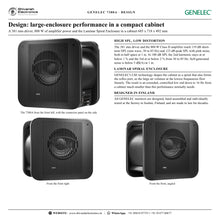
The GENELEC 7380A is a high-SPL Smart Active (SAM) studio subwoofer that delivers power, clarity and flexibility in equal measure, with a 381 mm driver, an 800 W Class D amplifier, 7.1 bass management, AES/EBU connectivity and GLM room calibration.
Providing a level of performance normally associated with much larger enclosures, the 7380A offers high power and high SPL, an extended low-distortion response down to 16 Hz and flexible bass management options. Comprehensive connectivity makes it equally at home in stereo or multichannel environments, perfect for music, post-production, film and broadcast work that demands powerful, dependable low-frequency reproduction in a surprisingly compact form. GENELEC GLM software configures, calibrates and controls every monitor and subwoofer in the system, and the 7380A can also be set up completely with its own controls. All GENELEC monitors are designed, hand assembled and individually tested at the factory in Iisalmi, Finland.
| Maximum short‑term SPL | 119 dB |
| Low cut‑off (-6 dB) | 16 Hz |
| Driver | 381 mm |
| Class D amplifier | 800 W |
Key features
- 381 mm (15 in) driver in a Laminar Spiral Enclosure (LSE), driven by an 800 W Class D amplifier
- 16 Hz low cut-off (-6 dB); upper cut-off 100 Hz main channels / 120 Hz LFE
- 119 dB short-term and 123 dB peak SPL; 2nd harmonic ≤1 % at 100 dB SPL
- Seven analogue XLR inputs and outputs (7.1), LFE in and out, Link in and out
- AES/EBU input and bit-for-bit thru output, 32 to 192 kHz, with digital LFE selection
- Centralised (fixed 85 Hz) or distributed (50 to 100 Hz, GLM) bass management
- GLM AutoCal: 20 parametric room compensation filters, level, distance and phase alignment
- Stand-alone controls: Bass Roll-Off, phase, digital LFE, LFE +10 dB, level, 85 Hz test tone, stored settings
- Bypass input for a contact switch
- Intelligent Signal Sensing (ISS): power save mode below 2 W
High SPL, low distortion
The 381 mm driver and 800 W amplifier reach 119 dB short-term SPL and 123 dB peak SPL in half space at 1 m. At 100 dB SPL the 2nd harmonic stays at or below 1 % and the 3rd at or below 2 % from 30 to 85 Hz, and self-generated noise is below 5 dB(A).
Configure, calibrate and control
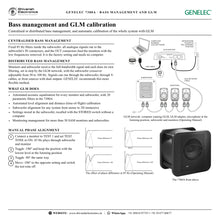
GLM gives access to advanced system auto-calibration and management: automated equalisation for every monitor and subwoofer, level alignment, distance calibration and subwoofer alignment for any system from stereo to complex 3D immersive set-ups. Settings can be stored in the subwoofer and recalled with the STORED switch. Calibration uses the free GLM software with either the 9320A SAM Reference Controller or the GLM Calibration Kit, both available separately.
Flexible connectivity
Seven analogue channels with LFE and Link connections handle 7.1 analogue systems, and the AES/EBU input takes stereo digital audio, with a thru output for further subwoofers or for a 2.1 digital stereo system. Multichannel AES/EBU up to 7.1 is possible with the GENELEC 9301A interface. Several 7380A subwoofers can be chained digitally or through the Link and LFE connectors for even higher SPL.
In the box
- 1 x GENELEC 7380A subwoofer
- 1 x mains cable (1.8 m)
- 1 x RJ45 cable (5 m)
- 1 x operating manual
GLM calibration uses the free GLM software with the 9320A SAM Reference Controller or the GLM Calibration Kit (sold separately).
GENELEC 7380A: frequently asked questions
Can the 7380A be used without a computer?
Yes. It can be set up completely with its built-in controls and fixed 85 Hz crossover, including a built-in 85 Hz test tone for phase alignment. GLM adds full room compensation with 20 parametric filters.
How many channels does it bass-manage?
Seven analogue main channels plus LFE (7.1), and stereo AES/EBU; with the GENELEC 9301A interface, multichannel AES/EBU up to 7.1.
Can several 7380A subwoofers be combined?
Yes. Chain them through AES/EBU OUT to IN, or LINK OUT to LINK IN and LFE OUT to LFE IN. Close together, two give +6 dB, three +9.5 dB and four +12 dB.
Where can I buy the GENELEC 7380A in India?
The GENELEC 7380A is available from Shivansh Electronics, Kolkata, West Bengal, India, with delivery across India.
Workflow 1: Calibrated stereo or surround system with GLM
Integrate the 7380A with SAM monitors and let GLM align everything.
Connections
| Connect | To |
|---|---|
| Main channels | IN 1‑7 (XLR) |
| Monitors | OUT 1‑7 |
| LFE | LFE IN |
| GLM adapter and monitors | GLM NETWORK (RJ45) |
Setup
- Switch everything off, connect audio and daisy-chain the GLM network.
- Place the 7380A near the front wall, slightly off the centre line.
- Put the GLM microphone at ear height at the listening position and run the GLM set-up.
- Store the settings in the subwoofer; set STORED to ON to use them without a computer.
Tip: Choose distributed bass management in GLM to set the crossover from 50 to 100 Hz.
Workflow 2: Stand-alone set-up with the built-in controls
Set up quickly without a computer using the fixed 85 Hz crossover.
Connections
| Connect | To |
|---|---|
| Each channel | IN, then OUT to its monitor |
| One monitor | OUT 1 / TEST 1 |
Setup
- Route each signal cable to the subwoofer first, then from OUT to the monitor.
- Match the levels with the rotary control and LEVEL switches (pink noise around 40 Hz and 1 kHz).
- Switch TEST TONE on and align the phase with the -180° and -90° switches.
- Set the Bass Roll-Off for the position and switch the test tone off.
Tip: There is a slight delay before a switch change takes effect; this is normal.
Workflow 3: 2.1 digital stereo system
Monitor a stereo AES/EBU signal with the subwoofer and two monitors.
Connections
| Connect | To |
|---|---|
| AES/EBU source | DIGITAL IN |
| Monitors | DIGITAL OUT (thru), daisy‑chained |
Setup
- Connect the AES/EBU source to DIGITAL IN.
- Feed the monitors from the bit-for-bit DIGITAL OUT.
- Calibrate with GLM, or set level and phase manually.
- Use DIGITAL LFE and LFE CHANNEL A/B if one subframe carries the LFE.
Tip: In stand-alone mode a valid AES/EBU clock takes priority over the analogue inputs.
Workflow 4: High-SPL subwoofer chain
Combine several 7380A subwoofers for large rooms or film mixing.
Connections
| Connect | To |
|---|---|
| Analogue | LINK OUT to LINK IN, LFE OUT to LFE IN |
| Digital | AES/EBU OUT to AES/EBU IN |
Setup
- Chain the subwoofers analogue or digitally.
- Calibrate the chain with GLM AutoCal; no switch settings are needed.
- Without GLM, calibrate each subwoofer alone, then align the phase one by one.
- Reduce all levels to match the monitors: two subwoofers close together give +6 dB.
Tip: Far apart, expect about 3 dB more per doubling of subwoofers.
Workflow 5: Multichannel AES/EBU with the 9301A
Monitor digital multichannel audio up to 7.1 with LFE.
Connections
| Connect | To |
|---|---|
| GENELEC 9301A interface | DIGITAL IN of the 7380A |
| Four AES/EBU feeds | 9301A inputs |
Setup
- Connect the 9301A to the subwoofer's digital input.
- Connect the multichannel AES/EBU signals to the 9301A.
- Set the input type in the GLM group.
- Calibrate the system with GLM.
Tip: The 9301A expands the subwoofer to four AES/EBU inputs.
Workflow 6: Bass management bypass check
Compare the mix with and without the bass management during a session.
Connections
| Connect | To |
|---|---|
| Contact switch on a 6.3 mm plug | BYPASS jack |
Setup
- Connect the switch to the BYPASS jack (stand-alone set-up).
- Close it: tip to sleeve activates the bypass.
- The outputs now carry exact copies of the inputs and the subwoofer plays only the LFE.
- Open the switch to return to normal bass management.
Tip: With GLM, the bypass is available in the software instead.


