

GRACE DESIGN SB-CMB
PRICE ON ENQUIRY
GRACE DESIGN SB-CMB centre mount bridge for Spacebar SB-30 / SB-66: adds a centre mic that follows the bar, 3-13.5 cm adjustment. Available in India from Shivansh Electronics, Kolkata, West Bengal, India.
VISUAL GUIDE — See Every Photo, Spec & Setup Step (PDF)
PRICE ON ENQUIRY. For the price, exclusive offers, delivery timelines, or any other information, please DM us or call +91 89818 07755 / +91 91477 00677. We will gladly share a personalised quotation for Shivansh Electronics, Kolkata, West Bengal, India. All payments are processed securely through Razorpay, our trusted payment gateway partner.
Specifications
| For | Spacebar SB‑30 and SB‑66 (30 cm or 66 cm bar) |
| Mic position | 3 cm to 13.5 cm front to back |
| Clamp | 24 mm thumb nut |
| Mounting | 2 x 1/4‑20 x 1‑3/4" socket head cap screws |
| Tool | 3/16" hex wrench (included) |
Parts (official parts list)
| E427 | Centre mount bridge |
| E426 | Centre mount mic holder |
| H514 / H515 | 5/8‑27 threaded boss / 24 mm nut |
| E405 | 24 mm nut, 10‑32 thread |
| H494 | 1/4" x 1" spacers (2) |
| H489 / H493 | 1/4‑20 x 1‑3/4" cap screws and washers (2 each) |
Versions
| Standard | 5/8‑27 mic mount threads |
| BSW | 3/8‑16 British Standard Whitworth |
Product overview
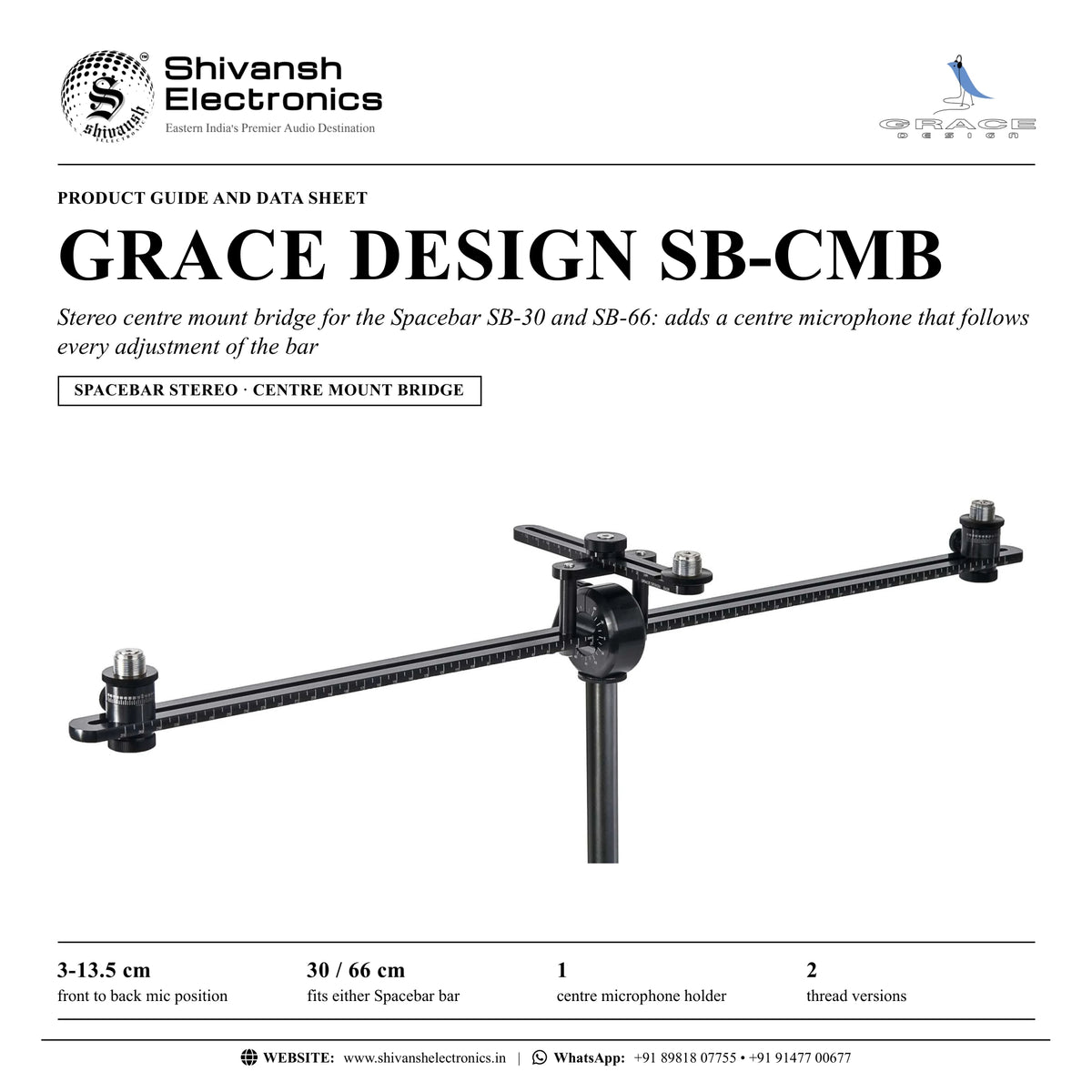
The GRACE DESIGN SB-CMB is the stereo centre mount bridge for the Spacebar SB-30 and SB-66 kits: it adds a centre microphone that follows every z-axis adjustment made to the Spacebar.
The SB-CMB mounts to the horizontal bar so that the centre microphone follows any z-axis adjustment of the Spacebar; either the 30 cm or the 66 cm bar can be used. A 24 mm thumb nut clamps the mic holder bar, and loosening it lets the mic holder front to back position be adjusted from 3 cm to 13.5 cm on an engraved centimetre scale.
| Front to back mic position | 3‑13.5 cm |
| Fits either Spacebar bar | 30 / 66 cm |
| Centre mic holder | 1 |
| Thread versions | 2 |
Key features
- Centre microphone mount for SB-30 and SB-66 kits
- Follows every z-axis adjustment of the Spacebar
- Front to back position 3 cm to 13.5 cm with engraved centimetre scale
- 24 mm thumb nut for quick adjustment
- Mounts with two 1/4-20 socket head cap screws; 3/16" hex wrench included
- Standard 5/8-27 or BSW 3/8-16 mic mount threads
Mounting
The bridge is fixed to the horizontal bar with two 1/4-20 x 1-3/4" socket head cap screws, tightened with the 3/16" hex wrench included in the kit.
In the box
- SB-CMB centre mount bridge with centre mount mic holder
- 2 x 1/4-20 x 1-3/4" socket head cap screws with washers
- 3/16" hex wrench
Available versions
- Standard 5/8-27 mic mount threads
- BSW 3/8-16 (British Standard Whitworth) mic mount threads
GRACE DESIGN SB-CMB: frequently asked questions
Which Spacebar kits does it fit?
The SB-30 and SB-66 stereo kits: either the 30 cm or the 66 cm bar can be used.
How far can the centre mic be moved?
From 3 cm to 13.5 cm front to back, set with the 24 mm thumb nut.
Is a tool needed?
Yes, a 3/16" hex wrench, which is included with the SB-CMB kit.
Where can I buy the GRACE DESIGN SB-CMB in India?
The GRACE DESIGN SB-CMB is available from Shivansh Electronics, Kolkata, West Bengal, India, with delivery across India.
Workflow 1: Three-microphone array on the Spacebar
Recordists adding a centre microphone to a stereo pair.
Connections
| Connect | To |
|---|---|
| SB‑CMB | SB‑30 or SB‑66 horizontal bar |
| Centre microphone | SB‑CMB mic holder |
Setup
- Fix the bridge to the bar with the two socket head cap screws.
- Tighten with the 3/16" hex wrench.
- Mount the centre microphone.
- Set its front to back position (3-13.5 cm) and tighten the thumb nut.
Tip: The centre mic follows every z-axis adjustment of the Spacebar.
Workflow 2: Fine positioning of the centre mic
Engineers balancing the centre image.
Connections
| Connect | To |
|---|---|
| Centre microphone | SB‑CMB |
Setup
- Loosen the 24 mm thumb nut.
- Slide the mic holder bar forward or back on its centimetre scale.
- Listen and adjust.
- Tighten the thumb nut and note the value.
Tip: The engraved scale makes the position repeatable.
Workflow 3: Choir or ensemble with a centre fill
Live and location recording.
Connections
| Connect | To |
|---|---|
| Spacebar with SB‑CMB | Tall stand |
Setup
- Set the outer pair angle and spacing.
- Add the centre mic.
- Tilt the whole bar towards the ensemble.
- Check all three channels.
Tip: Tilting the bar also tilts the centre microphone.
Workflow 4: Switching between bars
Owners of both 30 cm and 66 cm bars.
Connections
| Connect | To |
|---|---|
| SB‑CMB | 30 cm or 66 cm bar |
Setup
- Remove the two cap screws.
- Change the bar.
- Refit the bridge.
- Re-set the centre position.
Tip: Either the 30 cm or the 66 cm bar can be used.
Workflow 5: Repeatable session recall
Studios recording the same ensemble regularly.
Connections
| Connect | To |
|---|---|
| Spacebar | Stand |
Setup
- Read the outer pair spacing and angles.
- Read the centre mic position.
- Log the values.
- Restore them next session.
Tip: All positions are read from engraved scales.
Workflow 6: Thread version choice
Users with microphone clips of different threads.
Connections
| Connect | To |
|---|---|
| Mic clip | SB‑CMB thread |
Setup
- Check the clip thread.
- Choose the standard 5/8-27 or BSW 3/8-16 version.
- Thread the clip on.
- Lock it in place.
Tip: Both thread versions are available.