

IZOTOPE Equinox
PRICE - Rs. 31,872
iZotope Equinox immersive reverb plug-in for post and music: adaptive unmasking, 1,250+ presets, mono to 9.1.6, Freeze, Chorus and Gate. Available in India from Shivansh Electronics, Kolkata, West Bengal, India.
VISUAL GUIDE — See Every Photo, Spec & Setup Step (PDF)
The price shown is inclusive of all taxes. Contact / WhatsApp +91 89818 07755 / +91 91477 00677 to check if any offers or additional discounts are available. If available, we will gladly share a coupon code that you can apply at checkout for the best price. All payments are processed securely through Razorpay, our trusted payment gateway partner.
Product
| Product type | Immersive surround reverb plug-in |
| Category | Reverb: post production and immersive audio |
| Reverb engines | Legendary algorithmic engines, hyper-realistic and creative |
| Unmasking | Dynamic adaptive unmasking |
| Presets | Over 1,250, with keyword search and saving |
| Tone | Global tone control (tilt EQ on the reverb signal) |
| Surround | Balance tab for adjusting and automating the reverb |
| Creative functions | Freeze, Chorus, Gate, tempo sync, tail suppression |
| Delivery | Download, available immediately |
Formats and compatibility
| Plug-in formats | AAX, AU, VST3 |
| Architecture | 64-bit only |
| Channel formats | Mono, Stereo, LRC, LCR, LRS, Quad, LCRS, 5.0, 5.1, 7.0, 7.1 |
| Immersive formats | 7.0.2, 7.0.4, 7.1.2, 7.1.4; 9.0.6 and 9.1.6 in compatible hosts |
| Documentation | Online user manual and release notes |
| System requirements | Full system requirements and supported hosts are confirmed with your quotation |
Licence options
| Full Licence | 36005 |
| Crossgrade from any paid iZotope product | 36011 |
| Crossgrade options for owners of qualifying reverb products | 36013, 36017 (see the variant list) |
| Education Licence (EDU) | 36095 |
Product overview
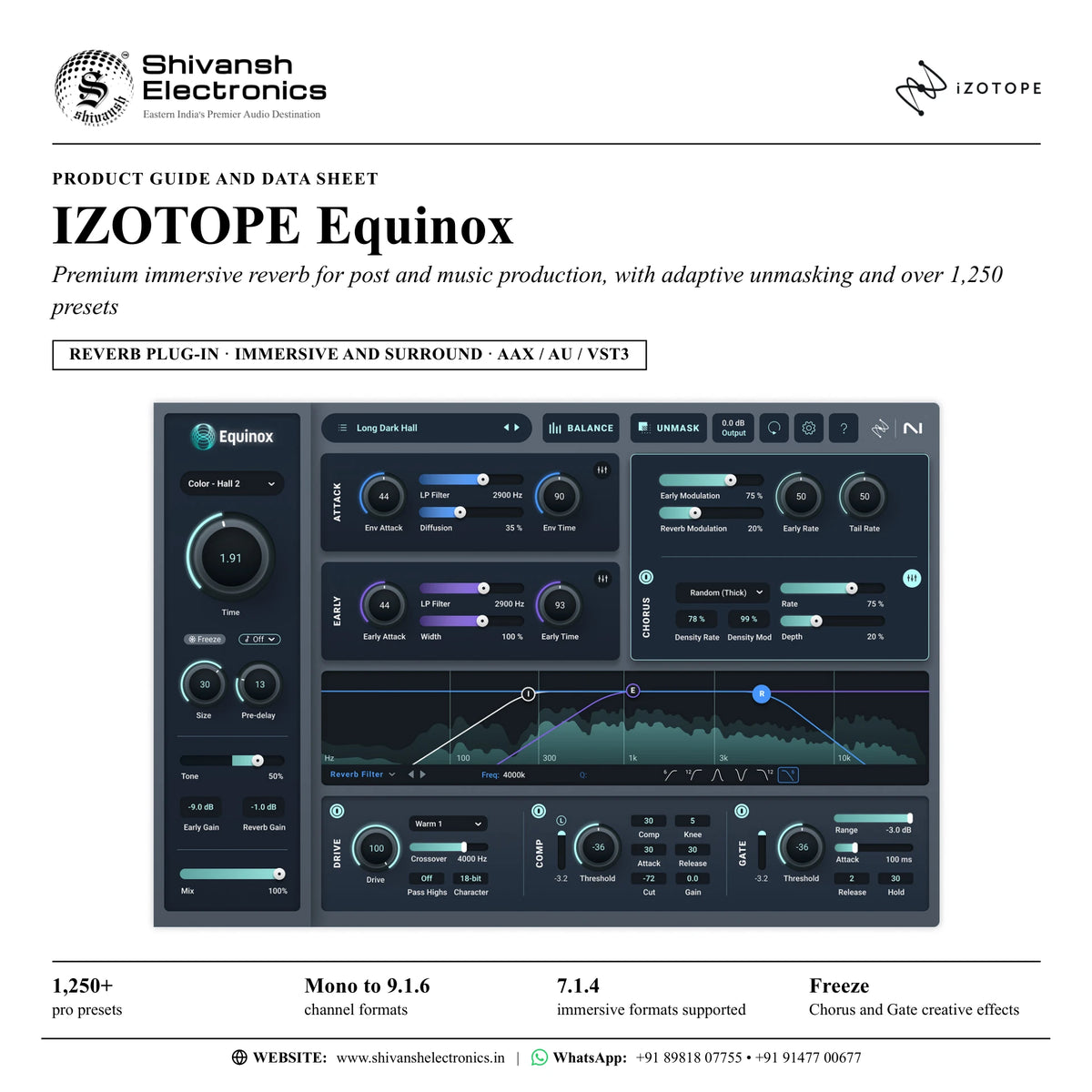
iZotope Equinox is a premium reverb plug-in for post and music production that crafts immersive depth, life and clarity, fusing legendary algorithmic reverb engines with iZotope adaptive unmasking technology.
Elevate every scene, song and sound: transport, transcend and transform with a spectrum of sonic possibilities, comprehensive controls and lightning-fast workflows. An industry first in immersive and surround reverb, Equinox keeps your mixes crystal clear and works in channel formats from mono up to 9.1.6, including immersive formats such as 7.0.2, 7.1.2 and 7.1.4.
Its legendary reverb engines bring both hyper-realistic and creative reverb sounds into a single plug-in. Place instruments, dialogue and more into a real space, or get creative and take them into new worlds. Dynamic adaptive unmasking carves out space for your reverb, keeping dialogue present and vocals and lead instruments up front.
Flexible and customisable, with advanced controls, macro tone settings and over 1,250 pro presets in an all-new preset browser, Equinox is your blueprint for realistic reflections, eccentric experiments and everything in between. The Balance tab adjusts and automates your reverb in surround formats, the global tone control makes the reverb darker or brighter in one move, and creative functions such as Freeze, Chorus and Gate make your reverb more unique.
| Pro presets with keyword search | 1,250+ |
| Supported channel formats | Mono to 9.1.6 |
| Immersive formats, incl. 7.0.2 and 7.1.2 | 7.1.4 |
| Creative functions: Freeze, Chorus, Gate | 3 |
Key features
- Legendary reverb engines: hyper-realistic and creative reverb sounds in one plug-in
- Dynamic adaptive unmasking keeps dialogue present and vocals and lead instruments up front
- Over 1,250 presets with an all-new browser: search by multiple keywords and save presets for later
- Advanced controls to sculpt the perfect space for any project
- Balance tab to adjust and automate your reverb in surround formats
- Global tone control: a simple tilt EQ on the reverb signal for a darker or brighter sound
- Creative effects: Freeze for infinite drones, Chorus and Gate
- Tempo sync and tail suppression so the reverb sits musically in the mix
- Immersive and surround channel formats from mono to 9.1.6
- One-click import of preset libraries from the earlier reverb plug-ins whose engines Equinox mirrors
Made for
- Post production: dialogue, ADR, SFX and score
- Music production: vocals, guitars and instruments
- Immersive and surround mixing
- Sound design for film and TV
- Podcasting and spoken word
- Professionals and beginners alike, thanks to over 1,250 presets
What's included
- Equinox software licence (download, available immediately)
- Over 1,250 pro presets
- Plug-in formats AAX, AU and VST3 (64-bit)
- Online user manual and release notes
Licence options
- Full licence (36005): the complete Equinox licence
- Crossgrade from any paid iZotope product (36011): for owners of a paid iZotope product
- Crossgrade options for owners of qualifying reverb products (36013, 36017): see the variant list for the qualifying products
- Education licence (EDU) (36095): for eligible students and teachers
iZotope Equinox: frequently asked questions
Is Equinox for beginners or for professionals?
Equinox is primarily a professional-grade tool, but it is accessible to all skill levels thanks to over 1,250 professional presets. Professionals can use advanced multichannel balancing, while beginners can use broad-stroke global tone settings.
Which immersive and surround formats does Equinox support?
Equinox offers comprehensive support for immersive formats, including 7.0.2, 7.1.2 and 7.1.4, and supports formats up to 9.1.6 in compatible hosts. It also covers mono, stereo, LCR, quad, 5.0, 5.1, 7.0, 7.1 and more.
What does adaptive unmasking do?
It dynamically carves out space for your reverb, so your mix stays clean and focused: dialogue stays present and vocals and lead instruments stay up front.
Can I bring my existing reverb presets into Equinox?
Yes. Equinox mirrors its reverb engines one to one, and owners of the earlier reverb plug-ins built on those engines can save their custom patches as user presets and import their entire preset libraries into Equinox in one click.
What creative effects are included?
Freeze for infinite drones, Chorus and Gate, plus tempo sync and tail suppression so your reverb sits musically in the mix.
Where can I buy iZotope Equinox in India?
iZotope Equinox is available from Shivansh Electronics, Kolkata, West Bengal, India, delivered as a software licence anywhere in India.
Workflow 1: ADR into realistic scene dialogue
Post-production mixers and dialogue editors.
Connections
| Connect | To |
|---|---|
| Dialogue / ADR track | Equinox insert |
| Equinox output | Dialogue bus |
Setup
- Insert Equinox on the ADR track.
- Search the preset browser for a realistic space that matches the scene.
- Turn on adaptive unmasking to keep the dialogue present.
- Fine-tune with the advanced controls and the global tone control.
Tip: Unmasking keeps the dialogue clear while the reverb places it in the scene.
Workflow 2: Depth for vocals and instruments
Music producers and mix engineers.
Connections
| Connect | To |
|---|---|
| Vocal or guitar track | Equinox insert |
| Equinox output | Mix bus |
Setup
- Pick a preset as a starting point.
- Use adaptive unmasking to keep vocals and lead instruments up front.
- Make the reverb darker or brighter with the global tone control.
- Use tempo sync and tail suppression so the reverb sits musically.
Tip: Save your favourite settings as presets for later.
Workflow 3: Immersive and surround mixing
Mixers working in surround and immersive formats.
Connections
| Connect | To |
|---|---|
| Surround or immersive bus (up to 9.1.6) | Equinox insert |
| Equinox output | Immersive master |
Setup
- Insert Equinox on a bus in the channel format of your session, such as 5.1 or 7.1.4.
- Choose a preset or build the space with the advanced controls.
- Open the Balance tab to adjust the reverb across the channels.
- Automate the balance for movement through the scene.
Tip: Formats up to 9.1.6 are supported in compatible hosts.
Workflow 4: Ethereal space for SFX and score
Sound designers and composers.
Connections
| Connect | To |
|---|---|
| SFX or score stem | Equinox insert |
| Equinox output | Stem bus |
Setup
- Choose a creative preset to take the sound into a new world.
- Add Chorus for movement in the tail.
- Sculpt the space with the advanced controls.
- Balance the result with the global tone control.
Tip: Combine realistic reflections and eccentric experiments in one plug-in.
Workflow 5: Infinite drones with Freeze
Sound designers for film, TV and music.
Connections
| Connect | To |
|---|---|
| Sound design recording | Equinox insert |
| Freeze automation | Equinox Freeze |
Setup
- Insert Equinox on the sound design track.
- Play the sound and engage Freeze to hold the reverb as an infinite drone.
- Shape the result with Gate.
- Bring the drone in and out with automation.
Tip: Freeze, Chorus and Gate are 'unnatural' functions made for creative reverb.
Workflow 6: Bring your preset library along
Owners of the earlier reverb plug-ins whose engines Equinox mirrors.
Connections
| Connect | To |
|---|---|
| Earlier reverb plug-in patches | User presets |
| User preset library | Equinox preset browser |
Setup
- Save your custom patches as user presets in the earlier plug-ins.
- Import the entire preset libraries into Equinox in one click.
- Search them by keyword in the new browser.
- Add adaptive unmasking and global tone control to your old favourites.
Tip: Equinox mirrors those reverb engines one to one.