





MOTU 828
OFFER PRICE - Rs. 1,19,000
MOTU 828 28 x 32 USB3 audio interface with 60 channels, DSP mixing, effects, mic inserts and 125 dB output dynamic range. Available in India from Shivansh Electronics, Kolkata, West Bengal, India.
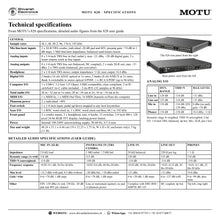
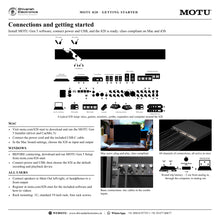
VISUAL GUIDE — See Every Photo, Spec & Setup Step (PDF)
Free Pan-India Delivery: Enjoy free delivery within 4–7 days of receiving your payment, subject to PIN code serviceability. We partner with all major courier and logistics providers, including Blue Dart, Delhivery, Shree Maruti, DHL, Allcargo Gati, and many more, to ensure reliable and timely deliveries.
General
| Type | 28‑in / 32‑out USB3 audio interface with DSP mixing and effects |
| DAC technology | ESS Sabre32 Ultra™ |
| Sample rates | 44.1, 48, 88.2, 96, 176.4, 192 kHz |
| Computer connection | 1 x USB‑C 3.2 Gen 1 (5 Gbps), USB 2 compatible, USB audio class compliant; compatible with USB Type‑A with a C‑to‑A cable |
| Round‑trip latency | Approx. 2 ms (32‑sample buffer at 96 kHz) |
| Power | Internal 100‑240V autoswitching supply, 50‑60 Hz, 0.5A max; latching power button |
Total audio I/O
| 1x rates (44.1/48 kHz) | |
|---|---|
| Inputs | 28 |
| Outputs | 32 |
| Total | 60 |
| 2x rates (88.2/96 kHz) | |
| Inputs | 20 |
| Outputs | 24 |
| Total | 44 |
| 4x rates (176.4/192 kHz) | |
| Inputs | 10 |
| Outputs | 14 |
| Total | 24 |
Inputs and outputs
| Mic / line / instrument inputs | 2 x XLR/TRS combo jacks; individual -20 dB pad and 48V; +74 dB preamp gain in 1 dB steps; 1 megohm on line/instrument; independent balanced send/return inserts |
| Analog inputs | 8 x 1/4‑inch TRS line in (balanced/unbalanced), +20 dB digital gain each; 2 x insert returns also work as balanced line inputs |
| Analog outputs | 8 x 1/4‑inch TRS line out (balanced, DC‑coupled); 2 x male XLR main out; 2 x 1/4‑inch TRS sends (balanced) |
| Headphone outputs | 2 x 1/4‑inch TRS stereo, independent volume |
| Optical | 2 banks: 16 ch ADAT at 1x rates, 8 ch S/MUX at 2x rates; Bank A switchable to stereo TOSLink |
| S/PDIF | 1 x stereo S/PDIF I/O on RCA (up to 96 kHz) |
| Word clock | 1 x BNC in, 1 x BNC out/thru; all sample rates from 44.1 to 192 kHz |
| MIDI | 1 x MIDI IN, 1 x MIDI OUT/THRU; 16 channels to/from the computer |
| Foot switch | 1 x 1/4‑inch input; pedal up/down mappable to any host keystrokes |
| Phantom power | 2 x individual +48V |
Audio performance
| Line input | |
|---|---|
| Connector | 1/4‑inch TRS, balanced, tip hot |
| Dynamic range (A‑weighted) | 120 dB |
| THD+N (unweighted) | -114 dB (0.0002%) |
| Max level | +21 dBu |
| Line output | |
| Connector | 1/4‑inch TRS, balanced, tip hot |
| Dynamic range (A‑weighted) | 125 dB |
| THD+N (unweighted) | -114 dB (0.0002%) |
| Max level | +21 dBu |
| Mic input | |
| Connector | XLR, balanced, pin 2 hot |
| Dynamic range (A‑weighted) | 118 dB |
| THD+N (unweighted) | -114 dB; EIN -129 dBu |
| Max level | 0 dBu (without pad); preamp gain +74 dB |
| Headphone | |
| Connector | 1/4‑inch TRS stereo |
| Dynamic range (A‑weighted) | 118 dB |
| THD+N (unweighted) | -110 dB (0.0003%) |
| Max level | 14.4 dBu; output impedance less than 1 ohm |
Mixing and processing
| Mixer | DSP‑driven 24‑input digital mixer, 8 stereo busses; separate mixes for all analog output pairs and both headphones |
| Effects | Reverb, 4‑band EQ, gate, compression |
| Gain and trim | Precision boost for analog inputs and trim for analog outputs in 1 dB steps; phase invert per analog input |
| Control room | Talkback, A/B speaker select, Monitor Group for up to ten analog outputs (5.1/7.1) |
| Extras | Loopback, optical expander mode, guitar re‑amping, DC‑coupled outputs for CV |
| Remote control | CueMix 5 for Mac, Windows and iOS; Wi‑Fi control from multiple devices via a USB‑connected computer, with network discovery and password protection |
Front panel
| Inputs | 2 x XLR/TRS combo jacks |
| Controls | 2 x mic/instrument gain, 2 x headphone volume, 1 x menu navigation, 1 x large main volume |
| Switches | 12: 2 x 48V, 2 x pad, 6 x control room, 2 x navigation |
| Display | 3.9‑inch 480 x 128 pixel 24‑bit RGB TFT |
| Headphones | 2 x 1/4‑inch TRS stereo |
| Power | Latching power button |
Physical
| Dimensions (W x D x H) | 48.26 x 31.1 x 4.44 cm (19 x 12.25 x 1.75 in), enclosure only |
| Weight | 5 kg (11 lb) |
| Construction | 1U rack‑mount, rugged steel |
System requirements
| Mac | macOS 12 or later; Apple silicon and Intel; 8 GB+ RAM recommended; with driver or USB class compliant |
| Windows | Windows 11 23H2 or later; x86‑64 and ARM64 PCs; 8 GB+ RAM recommended; MOTU ASIO / Wave driver |
| iOS | USB audio class compliant, no driver required |
| Software | Core Audio, ASIO and Wave compatible: works with virtually all recording software |
Included software
| Control | CueMix 5 (Mac, Windows, iOS) |
| Production | MOTU Performer Lite (100+ virtual instruments), Ableton Live Lite |
| Sounds | 6 GB of loops and sounds from Big Fish Audio, LucidSamples, Loopmasters and MOTU |
| Warranty | Two years |
Product overview
The MOTU 828 is a 28-in / 32-out USB3 audio interface for Mac, Windows and iOS, with DSP mixing, effects and superb analog audio quality in a rugged 1U rack unit.
The completely redesigned 828 builds on 22 years of the 828 line. Two front-panel combo inputs with dedicated send/return inserts, eight balanced line inputs and outputs, XLR main outputs, two headphone outputs, two banks of optical I/O, RCA S/PDIF, word clock, MIDI and a foot switch input give you 60 simultaneous channels. Control room features and a 3.9-inch colour display put the whole session at your fingertips.
| Simultaneous audio channels | 60 |
| Output dynamic range | 125 dB |
| Mic input EIN | -129 dBu |
| Round-trip latency | 2 ms |
Key features
- 28 x 32 USB3 audio interface: 5 Gbps USB-C, compatible with USB 2, up to 60 audio channels
- ESS Sabre32 Ultra™ DAC technology for a measured 125 dB dynamic range on the line outputs
- Advanced mic channels: -114 dB THD+N, 118 dB dynamic range and -129 dBu EIN, with +74 dB gain, -20 dB pad, 48V and phase invert
- Send/return inserts on both mic channels; the returns double as extra line inputs
- Round-trip latency as low as 2 ms (32-sample buffer at 96 kHz) with MOTU's drivers
- 3.9-inch 480 x 128 pixel colour display with metering for all analog and digital I/O
- DSP mixing: 24-input mixer with 8 stereo busses, reverb, 4-band EQ, gate and compression
- Control room: talkback, A/B speaker select and a Monitor Group for surround
- Two headphone outputs with independent volume and mixes
- Two optical banks, RCA S/PDIF, word clock in/out/thru, MIDI in/out/thru and foot switch input
- Wi-Fi control from CueMix 5 on multiple mobile devices, with password protection
- Plug-and-play on Mac and iOS: USB audio class compliant, no driver required
Audio quality
ESS Sabre32 Ultra™ DAC technology delivers a measured 125 dB dynamic range and extremely low distortion on the line outputs. The mic channels capture sources in their most natural form, and each combo jack also provides a hi-Z guitar input for DI tracking and re-amping.
Inserts and extra line inputs
Each mic input has a dedicated, fully balanced analog send/return loop for compressors and other outboard gear, in mono or stereo. When nothing is plugged into a mic input, its return works as an extra line input with the same signal path as the other eight line inputs.
Control room and surround monitoring
Use the front-panel talkback switch, compare mixes on two sets of monitors with A/B select, and control a 5.1 or 7.1 speaker system from a single fader with the Monitor Group, which can include any analog outputs you choose.
Mixing, effects and wireless control
The on-board DSP gives every analog output pair, including both headphone outputs, its own mix of live inputs and computer channels, with reverb, EQ, gate and compression. Control everything from CueMix 5 on Mac, Windows or iOS; with the 828 connected to a computer on your Wi-Fi network, several phones and tablets can control it at once.
Digital and studio connectivity
Two optical banks carry 16 channels of ADAT at 44.1/48 kHz or 8 channels of S/MUX at 88.2/96 kHz, with stereo TOSLink on Bank A, and the 828 can also work as an optical expander. RCA S/PDIF, BNC word clock, MIDI with Thru mode, a foot switch input and DC-coupled outputs for modular CV complete the studio.
Software included
Download CueMix 5 with the driver installer, and register your 828 to download MOTU Performer Lite (100+ virtual instruments and dozens of effects plug-ins), Ableton Live Lite and over 6 GB of loops, samples and one-shots from Big Fish Audio, LucidSamples, Loopmasters and MOTU.
In the box
- MOTU 828 audio interface
- USB-C-to-C cable (IF-certified USB 3.2 Gen 1, 2 m)
- IEC power cord
- Printed user guide
- Getting Started card
- Software, instruments and sounds available after product registration
Two-year MOTU warranty. Works with virtually all Core Audio, ASIO and Wave-compatible audio software.
MOTU 828: frequently asked questions
Does the 828 need a driver?
No driver is needed on Mac or iOS: the 828 is USB audio class compliant. MOTU's drivers add ultra-low latency and loopback; on Windows, install the MOTU Gen 5 driver, which includes CueMix 5.
Does the 828 work with USB 2 computers?
Yes. It connects over 5 Gbps USB3 and is compatible with USB 2, and works with USB Type-A ports through a C-to-A cable.
Can I connect it to an iPad?
Yes. Connect directly over USB-C, or through a standard camera connection kit for Lightning, with no driver required.
Can the 828 be used without a computer?
Yes. It operates as a stand-alone mixer with on-board effects, and its built-in power supply works from 100-240V.
What sample rates does it support?
44.1, 48, 88.2, 96, 176.4 and 192 kHz.
Where can I buy the MOTU 828 in India?
The MOTU 828 is available from Shivansh Electronics, Kolkata, West Bengal, India, with delivery across India.
Workflow 1: Professional studio tracking with outboard gear
Track vocals and instruments through your favourite compressor or EQ using the 828's mic channel inserts.
Connections
| Connect | To |
|---|---|
| Vocal mic | Front input 1; 48V for a condenser |
| Outboard compressor | Input 1 send to the compressor input; compressor output to return 1 |
| Keyboards, synths, drum machines | Line inputs 1‑8 |
| Studio monitors | XLR main outputs |
| Computer | USB‑C (included C‑to‑C cable) |
Setup
- Install the MOTU driver and CueMix 5 on Windows (optional on Mac) and select the 828 in your recording software.
- Set mic gain, pad and 48V on the front panel while watching the colour display.
- Process the mic through the outboard unit on the insert, then record the result.
- Record at up to 192 kHz; use a 32-sample buffer at 96 kHz for about 2 ms round-trip latency.
Tip: With no mic connected, the insert returns act as two extra line inputs.
Workflow 2: Mixing with A/B monitors and surround
Mix in stereo or surround, compare two sets of monitors and talk to the performers from the control room.
Connections
| Connect | To |
|---|---|
| Main monitors | XLR main outputs |
| Second monitor pair | Line outputs (B speakers) |
| 5.1 or 7.1 speakers | Line outputs 1‑6 (or 1‑8) |
| Talkback mic | Front input 2 |
| Headphones | Headphone outputs 1‑2 |
Setup
- Assign the A and B monitor pairs in CueMix 5 and switch between them with the front-panel A/B buttons.
- For surround, add the speaker outputs to the Monitor Group to control them all with one fader.
- Use the front-panel talk button to speak to the performers' headphone mixes.
- Watch levels on the display's customisable meter views while setting final loudness.
Workflow 3: Live streaming and podcasting
Stream or record a show that mixes live mics and instruments with audio from the computer.
Connections
| Connect | To |
|---|---|
| Host and guest mics | Front inputs 1‑2 |
| Extra sources | Line inputs |
| Two sets of headphones | Headphone outputs 1‑2 |
| Computer | USB‑C |
Setup
- Install the MOTU driver to enable the loopback channels.
- In your streaming or podcasting app, select the 828 inputs and the loopback channels.
- Create a separate mix for each headphone output so host and guest hear what they need.
- Add EQ, gate and compression to the voices from the on-board DSP.
Tip: Loopback returns the computer's output together with your live 828 inputs, ready to stream.
Workflow 4: Expanding with optical: more mic inputs
Add up to 16 extra inputs over the two optical banks, for example with two MOTU OctaLite expanders.
Connections
| Connect | To |
|---|---|
| First optical expander | Optical IN A |
| Second optical expander | Optical IN B |
| Digital mixer or processor (alternative) | Optical A or B in/out, or S/PDIF RCA |
| Word clock devices | BNC word clock in/out |
| Computer | USB‑C |
Setup
- Set the optical banks to ADAT in CueMix 5.
- Match the sample rate on all devices; 16 channels are available at 44.1/48 kHz, 8 at 88.2/96 kHz.
- Choose a clock source so all units are in sync, using optical or word clock.
- Record the new channels alongside the 828's own inputs.
Tip: The 828 can also work the other way, as an optical expander for another device, in Optical Expander mode.
Workflow 5: Stage mixing and backing tracks
Mix a live show with backing tracks and separate monitor mixes, controlled from a laptop or iPad.
Connections
| Connect | To |
|---|---|
| Vocal mics or guitars | Front inputs 1‑2 |
| Keyboards and instruments | Line inputs 1‑8 |
| PA system | XLR main outputs |
| Stage monitors | Line output pairs (one mix each) |
| Laptop or iPad | USB‑C (Lightning with a camera connection kit) |
Setup
- Play backing tracks from the laptop or iPad and mix them with the live inputs in CueMix 5.
- Give each line output pair its own monitor mix for the performers.
- Add reverb, EQ and compression from the on-board DSP during soundcheck.
- Adjust the mixes from CueMix 5 on a phone or tablet over Wi-Fi during the show.
Tip: The built-in 100-240V power supply needs only the included IEC cord.
Workflow 6: Guitar re-amping and hands-free punch-in
Guitarists recording a DI track and a mic'd amp together, with a foot switch for punch-ins.
Connections
| Connect | To |
|---|---|
| Guitar | Front input 1 (hi‑Z 1/4‑inch) |
| Guitar amp | A line output (with a re‑amp adapter if needed) |
| Mic on the amp | Front input 2 |
| Foot switch | Foot switch input |
| Computer | USB‑C |
Setup
- In CueMix 5, loop input 1 to the line output feeding the amp with near-zero latency.
- Map the foot switch to your recording software's punch-in and punch-out keystrokes.
- Record the dry guitar and the mic'd amp simultaneously, punching in hands-free.
- Re-amp the dry track later without re-plugging any cables.


