


NEUMANN Monitor Alignment Kit 2 EU
MRP - Rs. 1,19,900
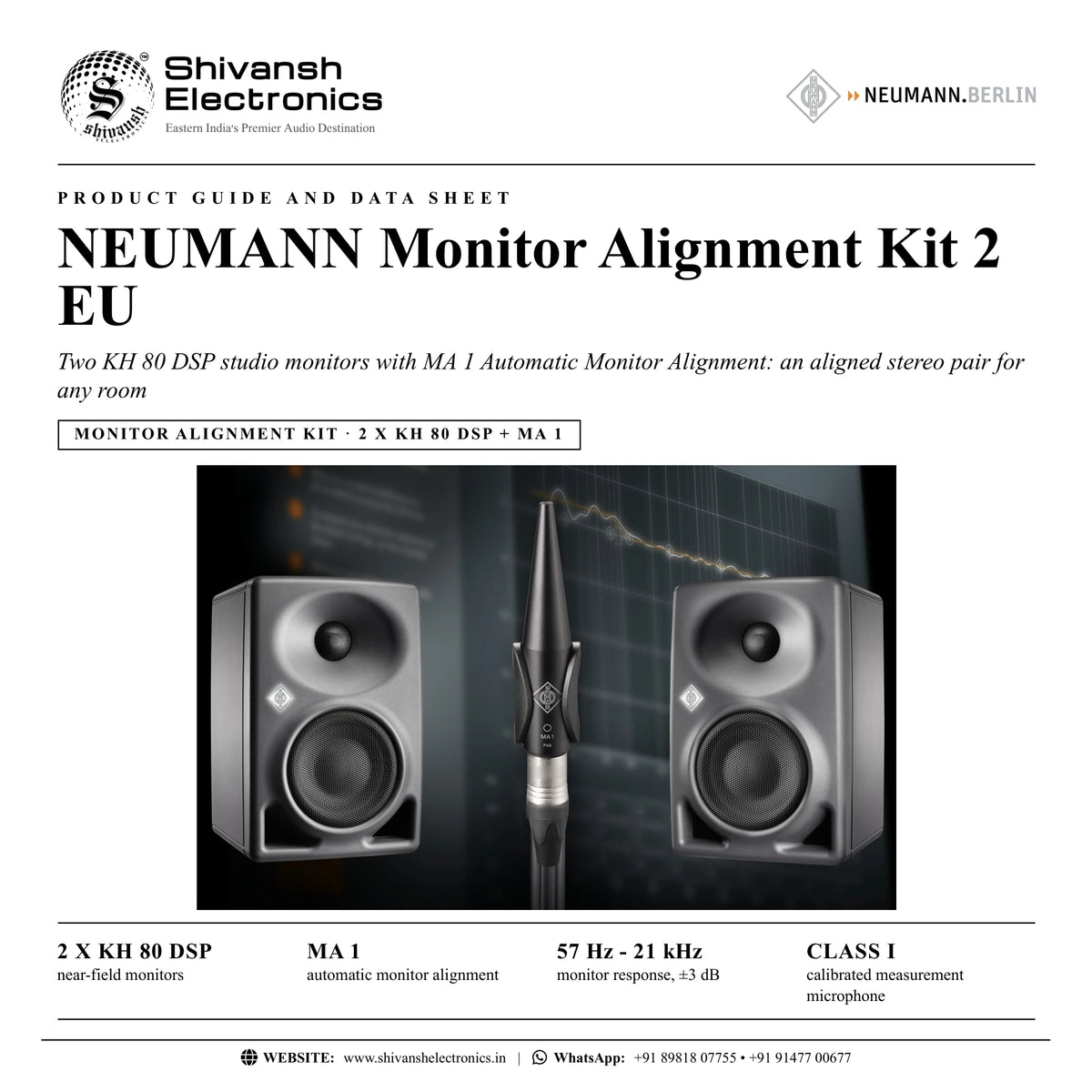
NEUMANN Monitor Alignment Kit 2 EU: two KH 80 DSP studio monitors with MA 1 Automatic Monitor Alignment, an aligned stereo pair for any room. Available in India from Shivansh Electronics, Kolkata, West Bengal, India.
VISUAL GUIDE — See Every Photo, Spec & Setup Step (PDF)
The price shown is the MAXIMUM RETAIL PRICE (MRP), inclusive of all taxes. For the best price, exclusive offers and discounted rates, delivery timelines, or any other information, please DM us or call +91 89818 07755 / +91 91477 00677. We will gladly share an exclusive coupon code that you can apply at checkout. All payments are processed securely through Razorpay, our trusted payment gateway partner.
KH 80 DSP A G EU studio monitor (2 pieces)
| Type | Ultra‑compact DSP‑controlled bi‑amplified near‑field monitor |
| Free‑field frequency response ±3 dB | 57 Hz - 21 kHz |
| Max. SPL (half space, 3 % THD, 1 m) | 108.8 dB SPL |
| Analogue input | XLR / 6.3 mm jack, electronically balanced |
| Crossover | 1.8 kHz, 48 dB/oct |
| Amplifiers | 120 W woofer; 70 W tweeter |
| Drivers | 100 mm (4") woofer; 25 mm (1") tweeter |
| Mains | 100‑240 V, 50/60 Hz |
| Dimensions (H x W x D) | 233 x 154 x 194 mm |
| Weight | 3.5 kg |
| Finish | Metallic anthracite (RAL 7021) / black (RAL 9005) |
Kit
| Kit | Monitor Alignment Kit 2 EU |
| Cat. No. | 509136 |
| Contents | 2 x KH 80 DSP A G EU studio monitors; 1 x MA 1 Automatic Monitor Alignment (MA 1 measurement microphone with SG 105 stand mount; software as free download) |
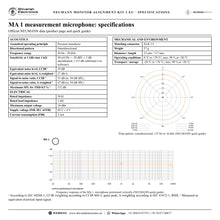
MA 1 measurement microphone: acoustics
| Acoustical operating principle | Pressure transducer |
| Directional pattern | Omnidirectional |
| Frequency range | 20 Hz - 20 kHz |
| Sensitivity at 1 kHz into 1 kΩ | 30 mV/Pa = -30 dBV ± 3 dB uncalibrated; ± 0.5 dB calibrated (via software) |
| Equivalent noise level, CCIR | 39 dB |
| Equivalent noise level, A‑weighted | 27 dB‑A |
| Signal‑to‑noise ratio, CCIR (re. 94 dB SPL) | 55 dB |
| Signal‑to‑noise ratio, A‑weighted (re. 94 dB SPL) | 67 dB |
| Maximum SPL for THD 0.5 % | 132 dB |
Electrical
| Rated impedance | 50 Ω |
| Rated load impedance | 1 kΩ |
| Maximum output voltage | 10 dBu |
| Supply voltage (P48, IEC 61938) | 48 V ± 4 V |
| Current consumption (P48, IEC 61938) | 3 mA |
Mechanical and environment
| Matching connector | XLR 3 F |
| Weight | 37 g |
| Diameter | 23 mm |
| Length | 117 mm |
| Operating conditions | 0 °C to +70 °C; max. 90 % at +20 °C |
| Transport / storage conditions | -20 °C to +70 °C; max. 90 % at +20 °C |
System requirements (stereo)
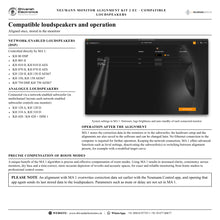
| Loudspeakers | 1 pair of KH network‑enabled loudspeakers, or 1‑2 KH network‑enabled subwoofers with a pair of KH network‑enabled or KH analogue loudspeakers |
| Audio interface | 1 balanced analogue mic input with 48 V phantom power; outputs at least equal to the number of network‑enabled loudspeakers and subwoofers |
| Network | Switch (IPv6) with a free socket for every loudspeaker and subwoofer, connected from its Primary network socket |
| Computer | 64‑bit operating system; screen resolution 1280 x 720 px or higher |
| Software | MA 1 Automatic Monitor Alignment (free download via the Neumann product registration) |
Notes
| Noise and S/N | According to IEC 60268‑1; CCIR weighting according to CCIR 468‑3, quasi peak; A‑weighting according to IEC 61672‑1, RMS |
| Maximum SPL | Measured as equivalent electrical input signal |
Product overview
The NEUMANN Monitor Alignment Kit 2 EU combines a stereo pair of ultra-compact KH 80 DSP near-field monitors with the MA 1 Automatic Monitor Alignment: individually calibrated measurement microphone and alignment software for an optimally aligned frequency response, time of arrival and level.
The KH 80 DSP is network-enabled: MA 1 measures the pair in your room and stores the alignment directly in the DSP of both monitors, for an optimally aligned frequency response, time of arrival and level at the listening position. EU denotes the version of the KH 80 DSP A G with the EU mains cable.
| Near‑field monitors | 2 x KH 80 DSP |
| Monitor response, ±3 dB | 57 Hz - 21 kHz |
| Max. SPL per monitor | 108.8 dB |
| Calibrated measurement microphone | Class I |
Key features
- Algorithms derived from decades of experience in aligning reference monitoring systems
- Individually calibrated Class I measurement microphone, specifically developed for MA 1
- Room-adaptive target curve, adjustable to your needs
- Precise and effective compensation of room modes
- Aligns frequency response, time of arrival and level
- Alignment data stored and processed in the DSP-powered loudspeakers: no plug-in, no special audio driver
- Kit contents: 2 x KH 80 DSP A G EU studio monitors; 1 x MA 1 Automatic Monitor Alignment
What the kit contains
- 2 x KH 80 DSP A G EU studio monitors
- 1 x MA 1 Automatic Monitor Alignment (MA 1 measurement microphone with SG 105 stand mount; software as free download)
How MA 1 works
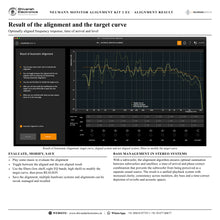
The performance of each monitor in the listening environment is gathered in a guided process, with no special acoustics knowledge required: connect the KH monitors to the outputs and the MA 1 microphone to the input of your audio interface, and connect the network-enabled monitors to the computer through a standard Ethernet switch supporting IPv6. From the measurement data the software ascertains the room's acoustic properties and generates the correction parameters according to a room-specific target curve, which you can modify to your needs.
Stored in the monitors
Unlike conventional correction software, MA 1 is an integrated solution designed specifically for Neumann studio monitors. All alignment parameters are stored and processed in the network-enabled monitors, so once aligned there are no plug-ins and no driver issues. Keeping the network connection, the MA 1 software offers advanced functions such as level settings, deactivating the subwoofer(s) or switching between alignment presets.
Bass management and phase linearisation
With a subwoofer, the alignment algorithm ensures optimal summation between subwoofers and satellites: a time-of-arrival and phase-correct combination that prevents the subwoofer from being perceived as a separate sound source. For analogue Neumann monitors connected to a KH network-enabled subwoofer, MA 1 also linearises the phase response, for increased accuracy in tonality, impulse reproduction and stereo localisation.
In the box
- 2 x KH 80 DSP A G EU studio monitors
- 1 x MA 1 Automatic Monitor Alignment (MA 1 measurement microphone with SG 105 stand mount; software as free download)
NEUMANN Monitor Alignment Kit 2 EU: frequently asked questions
What does the Monitor Alignment Kit 2 EU contain?
2 x KH 80 DSP A G EU studio monitors; 1 x MA 1 Automatic Monitor Alignment (MA 1 measurement microphone with SG 105 stand mount; software as free download) (Cat. No. 509136).
Do I need anything else to run the alignment?
A computer with the free MA 1 software, an audio interface with a balanced mic input with 48 V phantom power and enough outputs, and a network switch with a free socket for each network-enabled loudspeaker and subwoofer.
Is a plug-in needed after the alignment?
No. The alignment is stored and processed in the DSP of the loudspeakers; no Ethernet connection to the computer is required for further operation.
Where can I buy the NEUMANN Monitor Alignment Kit 2 EU in India?
The NEUMANN Monitor Alignment Kit 2 EU is available from Shivansh Electronics, Kolkata, West Bengal, India, with delivery across India.
Workflow 1: Aligning a stereo pair in a home studio
Producers with a pair of network-enabled KH monitors.
Connections
| Connect | To |
|---|---|
| MA 1 on its SG 105 stand mount | Microphone stand at the listening position |
| MA 1 (XLR) | Audio interface mic input, 48 V on |
| Each monitor's Primary network socket | Network switch, switch to computer |
Setup
- Install the MA 1 software and select the network interface.
- Select the monitors and assign Left and Right.
- Place the MA 1 at ear height, forming an equilateral triangle with the tweeters.
- Run the guided measurement and evaluate the result with music.
Tip: Mark the microphone stand position on the floor so later re-measurements use the same spot.
Workflow 2: Stereo system with subwoofer
Rooms where a KH subwoofer adds the low end.
Connections
| Connect | To |
|---|---|
| Audio interface outputs | Monitors and subwoofer |
| Network switch | Monitors, subwoofer and computer |
Setup
- Choose stereo with bass management in MA 1.
- Measure the satellites and the subwoofer from the listening position.
- Let MA 1 calculate the time-of-arrival and phase-correct combination.
- Toggle aligned / not aligned to hear the difference.
Tip: The subwoofer is then no longer perceived as a separate sound source.
Workflow 3: Analogue KH monitors with a network-enabled subwoofer
Owners of analogue KH 120, KH 310 or KH 420 monitors.
Connections
| Connect | To |
|---|---|
| Subwoofer outputs | Analogue KH monitors |
| Subwoofer network socket | Switch and computer |
Setup
- Connect the analogue monitors to the outputs of the network-enabled subwoofer.
- Select the system in MA 1.
- Measure and align.
- Enjoy phase linearisation of the monitors' built-in crossovers.
Tip: The network-enabled subwoofer processes the alignment for the whole system.
Workflow 4: Modifying the target curve
Engineers who prefer a personal tonal balance.
Connections
| Connect | To |
|---|---|
| Computer with MA 1 | Network switch |
Setup
- Open the result page after the alignment.
- Use the low shelf, EQ bands or high shelf to modify the target curve.
- Press REALIGN to apply it.
- Save it as a separate alignment preset.
Tip: Several alignments can be saved and recalled for different tasks.
Workflow 5: Several rooms or systems
Studios with more than one monitoring system.
Connections
| Connect | To |
|---|---|
| MA 1 microphone | Interface in each room |
Setup
- Create a hardware system per room in MA 1.
- Measure and align each one.
- Save the systems and alignments.
- Recall them whenever a setup changes.
Tip: Hardware setups and alignments are stored in the software as well as in the monitors.
Workflow 6: Upgrading to surround and immersive
Rooms moving from stereo to Quad, 5.1, 7.1, 5.1.4 or 7.1.4.
Connections
| Connect | To |
|---|---|
| MA 1 and network‑enabled KH monitors | Network switch |
Setup
- Activate the Multichannel Extension licence key in MA 1 (v2.0 or later).
- Define the loudspeaker layout.
- Assign every monitor and subwoofer to its position.
- Run the guided multichannel measurement.
Tip: Up to 4 subwoofers can be included.