

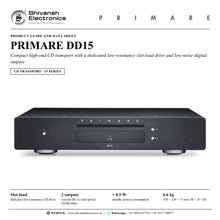


PRIMARE DD15
PRICE ON ENQUIRY
Primare DD15 compact CD transport: dedicated low-resonance slot-load drive, low-noise coaxial and optical outputs, C25 remote, RS232 and trigger. Available in India from Shivansh Electronics, Kolkata, West Bengal, India.
VISUAL GUIDE — See Every Photo, Spec & Setup Step (PDF)
PRICE ON ENQUIRY. For the price, exclusive offers, delivery timelines, or any other information, please Contact / WhatsApp +91 89818 07755 / +91 91477 00677. We will gladly share a personalised quotation for Shivansh Electronics, Kolkata, West Bengal, India. All payments are processed securely through Razorpay, our secure payment gateway.
CD transport
| Type | CD transport, 15 Series |
| Mechanism | Dedicated low-resonance slot-load CD drive |
| PCM sample rate | 44.1 kHz |
Outputs
| Digital outputs | 1 × coaxial (RCA); 1 × optical (TOSLINK) |
Control
| Remote control | C25 system remote control (IR) |
| RS232 | Outboard system control port |
| IR | 3.5 mm in / out |
| 12 V trigger | 3.5 mm in / out |
General
| Power supply | Custom linear supply with switch-mode standby supply |
| Power consumption | Standby < 0.5 W; operating 2 W < 30 W |
| Dimensions (W × D × H) | 350 × 329 × 73 mm with buttons and connectors; 350 × 310 × 73 mm without buttons and connectors |
| Weight | 6.6 kg |
| Colour | Black or titanium |
Versions
| DD15-BLACK | Black |
| DD15-TITANIUM | Titanium |
Product overview
The Primare DD15 is a compact high-end CD transport from the 15 Series, using a dedicated low-resonance slot-load CD drive and a low-noise digital output to bring disc playback to virtually any system with a digital-to-analogue converter.
A CD transport plays the disc and delivers the digital signal, leaving the digital-to-analogue conversion to the converter of your choice. The DD15 is designed to provide the lowest-noise digital signal from compact discs for any high-performance DAC, such as those found in the Primare I15 Prisma integrated amplifier and the SC15 Prisma preamplifier and network player, and its compact cabinet makes it the perfect match for both.
At its heart is a slot-load disc drive originally developed for the transportation industry: extremely reliable and well isolated from external and internal vibrations, for long life and low noise. A custom linear power supply is combined with a switch-mode standby supply that is turned off during playback to minimise noise, delivering on demand the precise power needed.
The DD15 follows Primare's Practical Design Approach: thoroughly implemented power supplies and artfully crafted ultra-short signal paths, built on 2- and 4-layer double-sided circuit boards with surface-mount components wherever possible, for fewer, higher-quality parts, lower distortion and higher electrical efficiency. Coaxial and optical digital outputs connect it to a DAC, a digital preamplifier or a surround processor.
The essentially three-quarter-size 15 Series cabinet is sized to fit into any living environment, the Scandinavian idea of lagom: not too much, not too little, everything in balance, proportion and harmony. In the most complete 15 Series system the DD15 joins the SC15 Prisma preamplifier and network player, the I15 integrated amplifier and the R15 MM/MC phono preamplifier, for the best performance from analogue and digital sources with the most connection options.
| Dedicated low-resonance CD drive | Slot-load |
| Coaxial (RCA) and optical (TOSLINK) | 2 outputs |
| Standby power consumption | < 0.5 W |
| 350 × 329 × 73 mm (W × D × H) | 6.6 kg |
Key features
- Compact high-end CD transport for virtually any system with a DAC
- Dedicated low-resonance slot-load CD drive, reliable and well isolated from vibration
- Low-noise digital output: 1 × coaxial (RCA) and 1 × optical (TOSLINK)
- Custom linear power supply; switch-mode standby supply turned off during playback
- Ultra-short signal paths on 2- and 4-layer boards with surface-mount components
- Perfect match for the I15 Prisma and SC15 Prisma with their built-in DACs
- C25 system remote control with track entry, repeat, 4X scan and display options
- RS232, IR in/out and 12 V trigger in/out for system control
- Auto resume, front-panel lock, auto-dim and auto-standby settings
- Compact three-quarter-size 15 Series cabinet in black or titanium
Made for
- Systems with a separate DAC, digital preamplifier or integrated amplifier with a digital input
- Pairing with the Primare I15 Prisma integrated amplifier or SC15 Prisma preamplifier and network player
- Complete Primare 15 Series systems
- Home theatres, through the coaxial or optical output into a surround processor
- Listeners with a CD collection who want a dedicated, compact disc transport
In the box
- DD15 CD transport
- Mains cable
- IR cable
- Trigger cable
- C25 remote control with batteries
- AC Polarity Pen
Connections
- Digital outputs: 1 × coaxial (RCA), 1 × optical (TOSLINK)
- RS232 outboard system control port
- IR in / out, 3.5 mm
- 12 V trigger in / out, 3.5 mm
- Mains inlet with power switch on the back panel
Finishes
- Black
- Titanium
Primare DD15: frequently asked questions
What is a CD transport?
A CD transport plays the disc and sends the digital signal out, without its own digital-to-analogue conversion. The DD15 connects through its coaxial or optical digital output to a DAC, a digital preamplifier, an integrated amplifier with a digital input or a surround processor.
Which Primare products does it pair with?
Primare designed the DD15 to feed high-performance DACs such as those in the I15 Prisma integrated amplifier and the SC15 Prisma preamplifier and network player, and its compact 15 Series cabinet matches them.
How do discs load?
The DD15 uses a slot-load drive: insert the CD into the slot with the label facing upwards, then press play on the front panel or the C25 remote. Press and hold the stop / open button to eject the disc.
Can it switch my amplifier on and off?
Yes. Connect the supplied trigger cable from the DD15 TRIG OUT to the I15 TRIG IN and set the I15 to TRIG ON; the amplifier then switches on and to standby with the DD15. An RS232 port and IR in/out are also provided for control systems.
Where can I buy the Primare DD15 in India?
The Primare DD15 is available from Shivansh Electronics, Kolkata, West Bengal, India, with delivery across India.
Workflow 1: CD transport into the I15 Prisma
Listeners with a compact Primare 15 Series system who want the best from their CDs.
Connections
| Connect | To |
|---|---|
| DD15 coaxial or optical output | I15 Prisma digital input |
| DD15 TRIG OUT | I15 TRIG IN |
| I15 Prisma speaker terminals | Pair of loudspeakers |
Setup
- Connect the coaxial or optical output to a digital input of the I15 Prisma.
- Connect the supplied trigger cable from TRIG OUT to TRIG IN and set the I15 to TRIG ON.
- Select the digital input on the amplifier.
- Insert a CD label up and press play on the DD15 or the C25 remote.
Tip: The I15 now switches on and to standby with the DD15's standby button.
Workflow 2: The complete 15 Series system
Listeners who want analogue and digital sources with the most connection options.
Connections
| Connect | To |
|---|---|
| DD15 digital output | SC15 Prisma digital input |
| SC15 Prisma output | I15 integrated amplifier |
| Turntable | R15 MM/MC phono preamplifier |
Setup
- Connect the DD15 coaxial or optical output to the SC15 Prisma.
- Connect the SC15 Prisma to the I15 integrated amplifier.
- Add the R15 phono preamplifier for a turntable.
- Stack the matching three-quarter-size cabinets on a rack with space around each.
Tip: Leave about 50 mm of space around the sides and top of each unit for ventilation.
Workflow 3: Disc transport for an existing DAC
Owners of a separate DAC or digital preamplifier who still play a CD collection.
Connections
| Connect | To |
|---|---|
| DD15 coaxial (RCA) output | DAC coaxial input |
| DD15 optical (TOSLINK) output | Second device optical input |
Setup
- Choose coaxial or optical and connect a suitable digital cable.
- Plug in the mains cable and switch on at the back panel.
- Wake the DD15 from standby with the front-panel button or the C25.
- Use AUTO RESUME to restart a disc from the saved point.
Tip: Use the AC Polarity Pen so the live pin goes to the left-hand pin of the power connector, viewed from the back.
Workflow 4: CD in the home theatre
Home theatre owners who want disc playback through the surround processor.
Connections
| Connect | To |
|---|---|
| DD15 coaxial or optical output | AV receiver or surround processor digital input |
Setup
- Connect the coaxial or optical output to a free digital input on the processor.
- Assign that input to a stereo or music listening mode on the processor.
- Control the DD15 with the C25 remote in CD mode.
- Dim or blank the display with DIM for film-room darkness.
Tip: Set AUTO-DIM to dim the display after 1, 5 or 10 minutes without use.
Workflow 5: Custom installation and control
Installers fitting the DD15 into a rack or cabinet with a control system.
Connections
| Connect | To |
|---|---|
| Home-automation controller | DD15 RS232 (null-modem cable) |
| IR distribution | DD15 IR IN / IR OUT |
| Amplifier trigger | DD15 TRIG IN / TRIG OUT |
Setup
- Connect the controller to RS232 with a twisted (null-modem) cable.
- Use IR IN when the front panel is hidden inside a cabinet.
- Link the trigger jacks so the system switches on and off together.
- Lock the front panel in GENERAL SETTINGS if needed.
Tip: Remove power for a few seconds, or use the remote, to unlock a locked front panel.
Workflow 6: Compact CD corner for a study or bedroom
Music lovers with limited space who want a dedicated CD source.
Connections
| Connect | To |
|---|---|
| DD15 digital output | Compact integrated amplifier or DAC |
| Amplifier | Bookshelf loudspeakers |
Setup
- Place the DD15 on a firm shelf, away from heat sources.
- Connect the digital output to the amplifier or DAC.
- Set AUTO-STANDBY to 10, 15 or 20 minutes.
- Use STANDBY MODE ECO for less than 0.5 W in standby.
Tip: Primare notes the DD15 sounds its best after about 24 hours of initial use.


