
PRIMARE DD35
PRICE ON ENQUIRY
Primare DD35 full-size CD transport: low-resonance drive, ultra-low-noise coaxial and optical outputs, RS232, IR and trigger control. Available in India from Shivansh Electronics, Kolkata, West Bengal, India.
VISUAL GUIDE — See Every Photo, Spec & Setup Step (PDF)
PRICE ON ENQUIRY. For the price, exclusive offers, delivery timelines, or any other information, please Contact / WhatsApp +91 89818 07755 / +91 91477 00677. We will gladly share a personalised quotation for Shivansh Electronics, Kolkata, West Bengal, India. All payments are processed securely through Razorpay, our secure payment gateway.
Transport
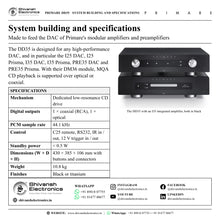
| Type | Full-size dedicated CD transport, 35 Series |
| Mechanism | Dedicated low-resonance CD drive, isolated transport |
| Digital audio interface | Internal I2S and S/PDIF with buffered memory |
| PCM sample rate | 44.1 kHz |
Digital outputs
| Coaxial | 1 × RCA |
| Optical | 1 × optical |
Control
| Remote control | C25 system remote control (IR) |
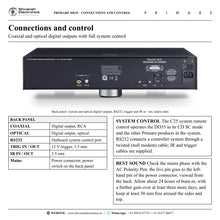
| RS232 | Outboard system control port |
| IR | 3.5 mm input / output |
| 12 V trigger | 3.5 mm input / output |
Power
| Power supply | Custom linear supply with an isolated, dedicated feed for the digital output; switch-mode standby supply, off during playback |
| Power consumption, standby | < 0.5 W |
General
| Dimensions (W × D × H) | 430 × 385 × 106 mm with buttons and connectors; 430 × 382 × 106 mm without buttons and connectors |
| Weight | 10.8 kg |
| Colour | Black or titanium |
| Safety | Designed to meet the IEC 60065 international electrical safety standard |
Versions
| DD35-BLACK | Black |
| DD35-TITANIUM | Titanium |
Product overview
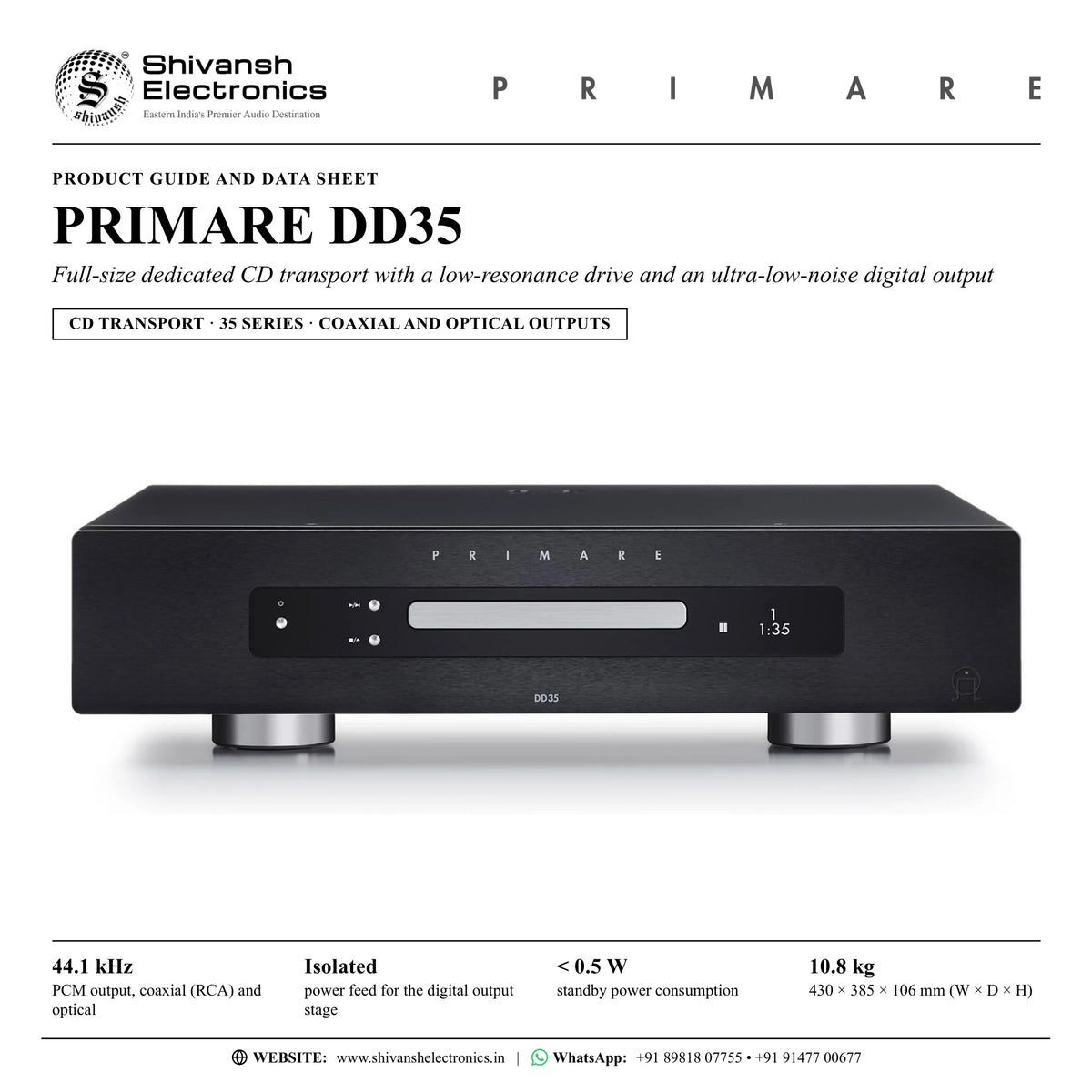
The Primare DD35 is a full-size, dedicated CD transport from the 35 Series that combines a state-of-the-art, low-resonance CD drive with an ultra-low-noise digital output, so that the most complete and noise-free signal from every compact disc reaches the digital-to-analogue converter of the system.
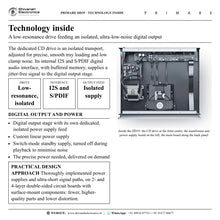
Its one job is the purest possible digital signal from CD. The dedicated drive is an isolated transport, adjusted for precise, smooth tray loading and low clamp noise, and an internal I2S and S/PDIF digital audio interface with buffered memory supplies a jitter-free signal to the digital output stage. That stage has its own discrete, isolated power supply feed for extremely low-noise output at the coaxial (RCA) and optical connectors.
Power comes from a custom linear supply with an isolated, dedicated feed for the digital output section, combined with a switch-mode standby supply that is turned off during playback to minimise noise, so the precise power needed is delivered on demand. It is Primare's Practical Design Approach at work: thoroughly implemented power supplies and artfully crafted, ultra-short signal paths, built on 2- and 4-layer double-sided circuit boards with surface-mount components for fewer, higher-quality parts and lower distortion.
The DD35 is designed to feed any high-performance DAC, and in particular the modular models of the 25 and 35 Series: the I25 DAC, I25 Prisma, I35 DAC, I35 Prisma, PRE35 DAC and PRE35 Prisma. With their DM36 DAC module, MQA CD playback is supported over the optical or coaxial connection, and an I35 fitted with the DAC and Prisma modules makes the DD35 part of a system with multi-room and multi-zone playback of every input, analogue or digital. The outputs also suit a digital preamplifier or a surround processor.
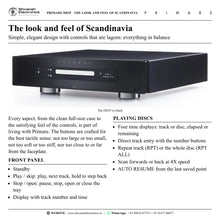
Like every Primare product it follows Scandinavian design: a simple, elegant full-size case with approachable, easy-to-understand functionality, and control buttons crafted for the best tactile feel, not too large or too small, not too soft or too stiff. Primare calls it lagom: not too much, not too little, everything in balance, proportion and harmony. The DD35 comes in black or titanium with the C25 system remote control, which also operates the other Primare products in the system.
| PCM digital output, coaxial and optical | 44.1 kHz |
| power feed for the digital output stage | Isolated |
| Standby power consumption | < 0.5 W |
| Weight, 430 × 385 × 106 mm | 10.8 kg |
Key features
- Full-size dedicated CD transport with a state-of-the-art, low-resonance CD drive
- Isolated drive, adjusted for precise, smooth tray loading and low clamp noise
- Internal I2S and S/PDIF digital audio interface with buffered memory for a jitter-free signal
- Ultra-low-noise digital output with its own dedicated, isolated power supply feed
- Custom linear power supply; switch-mode standby supply turned off during playback
- Coaxial (RCA) and optical digital outputs, PCM 44.1 kHz
- MQA CD playback with the DM36 DAC module of Primare's modular amplifiers and preamplifiers
- System control: C25 remote, RS232, IR in / out and 12 V trigger in / out
- Direct track entry, repeat track or disc, 4X scan and auto resume
- Four time displays, adjustable brightness, auto-dim, front-panel lock and auto-standby
- Scandinavian design with carefully crafted, tactile buttons, in black or titanium
Made for
- Hi-fi systems where the highest-quality digital signal from CD is required
- Primare I25 DAC, I25 Prisma, I35 DAC, I35 Prisma, PRE35 DAC and PRE35 Prisma
- Any high-performance DAC with a coaxial or optical digital input
- Digital preamplifiers and surround processors
- Multi-room and multi-zone systems built round an I35 with DAC and Prisma modules
- Installations run by a controller system over RS232, IR and 12 V trigger
In the box
- DD35 CD transport
- Mains cable
- IR cable
- Trigger cable
- C25 remote control with batteries
- AC Polarity Pen
Connections
- Digital output: 1 × coaxial (RCA)
- Digital output: 1 × optical
- RS232 outboard system control port
- IR in and IR out, 3.5 mm
- 12 V trigger in and trigger out, 3.5 mm
- Mains power connector, with the power switch on the back panel
Finishes
- Black (DD35-BLACK)
- Titanium (DD35-TITANIUM)
Primare DD35: frequently asked questions
What do I connect the DD35 to?
The DD35 is a dedicated CD transport: it reads the disc and sends the digital signal through its coaxial (RCA) or optical output to the digital-to-analogue converter of the system, for example the DM36 DAC module of a Primare I25, I35 or PRE35, a digital preamplifier or a surround processor.
Which Primare models is the DD35 designed for?
Any high-performance DAC, and in particular the I25 DAC, I25 Prisma, I35 DAC, I35 Prisma, PRE35 DAC and PRE35 Prisma. With their DM36 DAC module, MQA CD playback is supported over the optical or coaxial connection.
Can the DD35 switch on together with my amplifier?
Yes. The DD35 has 12 V trigger in and out on 3.5 mm sockets, and a trigger cable is supplied. With a Primare I35 or PRE35, run the cable from its TRIG OUT to the DD35 TRIG IN, so the DD35 switches on, or to standby, together with it.
Can the DD35 be used with a control system?
Yes. The RS232 port connects it to a controller system through a twisted (null modem) cable, IR in and out allow wired IR control with the supplied IR cable, and the 12 V trigger links it to the rest of the system. The C25 remote control operates the DD35 and the other Primare products.
How do I get the best sound from the DD35?
Use the supplied AC Polarity Pen to make sure the live pin of the mains cable goes to the left-hand pin of the power connector, viewed from the back panel. The DD35 starts to sound its best after a burn-in of about 24 hours, with a further smaller improvement over at least another three days of playing. Leave at least 50 mm of free space around the sides and top for ventilation.
Where can I buy the Primare DD35 in India?
The Primare DD35 is available from Shivansh Electronics, Kolkata, West Bengal, India, with delivery across India.
Workflow 1: Two-box stereo with an I35 DAC
Music lovers in a stereo listening room who want a dedicated CD source for a Primare integrated amplifier.
Connections
| Connect | To |
|---|---|
| DD35 COAXIAL digital out | I35 DAC coaxial input D10 |
| I35 TRIG OUT | DD35 TRIG IN (supplied trigger cable) |
| I35 speaker outputs | Pair of passive loudspeakers |
Setup
- Place the DD35 on a rack or stand made for audio equipment, with at least 50 mm of space around the sides and top.
- Connect the DD35 coaxial (RCA) output to coaxial input D10 of the I35 DAC with a digital RCA cable.
- Run the supplied trigger cable from the I35 TRIG OUT to the DD35 TRIG IN so the transport follows the amplifier on and to standby.
- Switch on with the back-panel switch, select D10 on the I35 and press CD SC on the C25 remote to control the DD35.
- Load a disc label side up and press play.
Tip: Give D10 an alias such as CD in the I35 input settings so the display names the source.
Workflow 2: Multi-room CD with an I35 Prisma
Homes that want the CD collection to play in more than one room.
Connections
| Connect | To |
|---|---|
| DD35 OPTICAL digital out | I35 optical input (D6 to D9) |
| I35 with DM36 DAC and SM35 Prisma modules | Home network, managed from the Prisma app |
Setup
- Fit the I35 with the DM36 DAC and SM35 Prisma modules, or choose the I35 Prisma.
- Connect the DD35 optical output to one of the optical inputs D6 to D9 with an optical cable.
- Connect the I35 to the home network and set it up in the Prisma app on a phone or tablet.
- Play a disc on the DD35 and share the input across rooms and zones from the Prisma app.
Tip: The Prisma module can be added at the time of purchase or at a later date.
Workflow 3: Separates with a PRE35 DAC
Listeners building a preamplifier and power amplifier system round a dedicated CD transport.
Connections
| Connect | To |
|---|---|
| DD35 COAXIAL digital out | PRE35 DAC coaxial input |
| PRE35 DAC XLR pre outputs | Power amplifier |
| PRE35 DAC TRIG OUT | DD35 TRIG IN |
Setup
- Connect the DD35 coaxial output to a coaxial input of the PRE35 DAC.
- Connect the PRE35 DAC balanced XLR pre outputs to the power amplifier.
- Link the PRE35 DAC TRIG OUT to the DD35 TRIG IN with the supplied trigger cable.
- Select the coaxial input and play; with the DM36 module, MQA CD playback is supported.
Tip: The DM36 up-sampling option can raise 16-bit / 44.1 kHz CD audio to 24-bit / 88.2 kHz for internal conversion.
Workflow 4: CD in a living-room home theatre
Families who play films and music through one surround system.
Connections
| Connect | To |
|---|---|
| DD35 COAXIAL or OPTICAL digital out | Digital input of a surround processor or AV receiver |
Setup
- Connect the DD35 coaxial or optical output to a free digital input of the surround processor.
- Name that input CD in the processor's set-up.
- Use the C25 remote in CD SC mode for the DD35 and the processor's remote for volume.
- Set AUTO-STANDBY in the DD35 general settings to 10, 15 or 20 minutes, or off.
Tip: The DD35 is designed for connection to a digital preamplifier or a digital surround processor.
Workflow 5: Controller-system installation
Homes and dedicated listening rooms run by a central control system.
Connections
| Connect | To |
|---|---|
| Controller system | DD35 RS232 (twisted, null modem cable) |
| IR control line | DD35 IR IN / IR OUT (3.5 mm) |
| Amplifier TRIG OUT | DD35 TRIG IN |
Setup
- Connect the controller to the DD35 RS232 port with a twisted (null modem) cable.
- Use the IR in and out sockets and the supplied IR cable for wired IR control.
- Link the 12 V trigger so the DD35 switches on and to standby with the system.
- Lock the front-panel buttons in GENERAL SETTINGS if the transport should be run only from the system.
Tip: Primare publishes an RS232 command list for the DD35.
Workflow 6: Set-up for the best sound
Every new DD35 owner, on the first day.
Connections
| Connect | To |
|---|---|
| AC Polarity Pen | Mains cable live pin |
| Mains cable live pin | Left-hand pin of the DD35 power connector |
Setup
- Remove the protective film from the display glass.
- Check the mains phase with the supplied AC Polarity Pen: the live pin goes to the left-hand pin of the power connector, viewed from the back.
- Leave at least 50 mm of space around the sides and top for ventilation.
- Set AUTO RESUME, AUTO-DIM and LED BRIGHTNESS in the settings menus.
- Allow an initial burn-in of about 24 hours; the sound improves further over at least three more days.
Tip: The phase of the AC supply can make a significant difference to the sound.