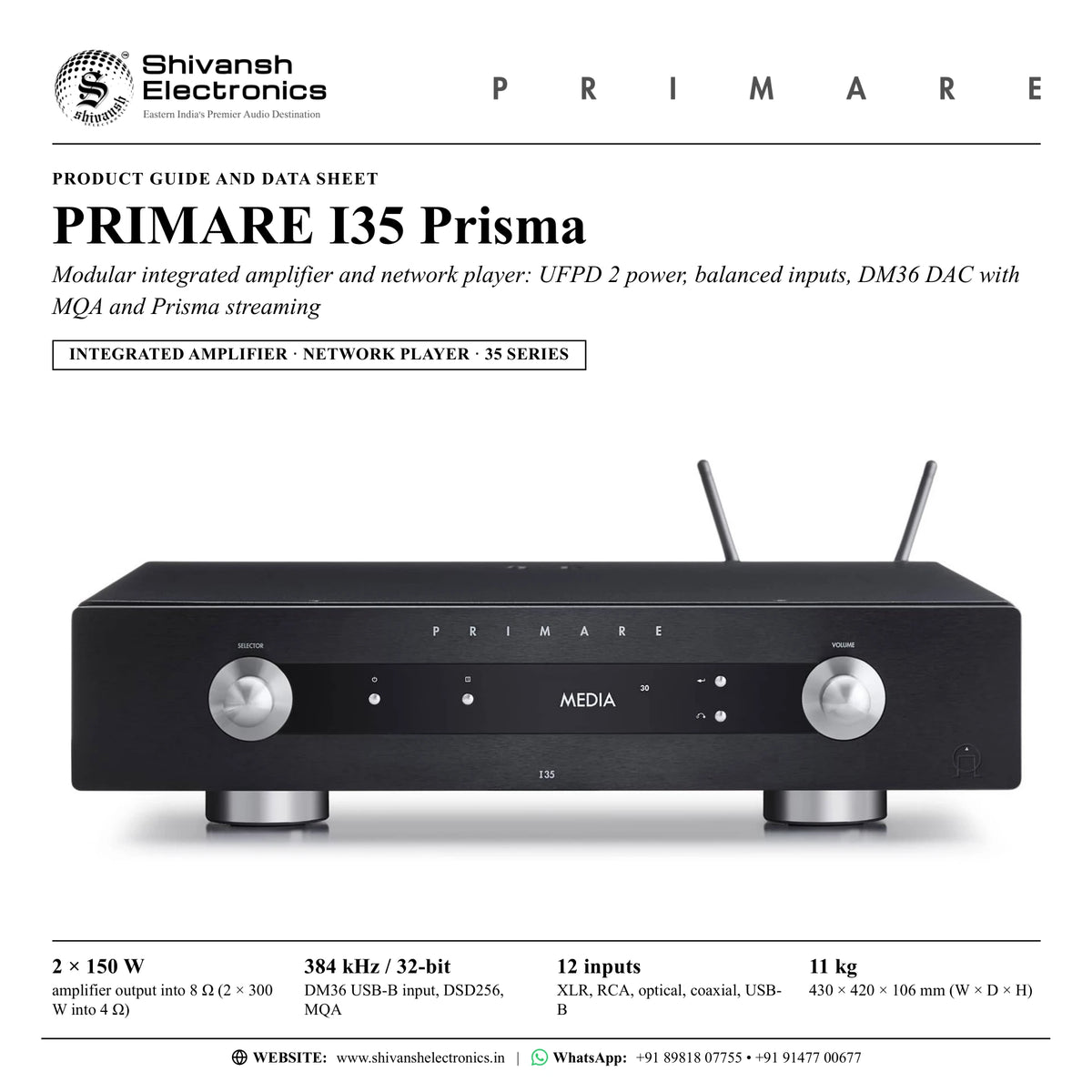
PRIMARE I35 Prisma
PRICE ON ENQUIRY
Primare I35 Prisma: modular integrated amplifier with UFPD 2, 2 × 150 W into 8 Ω, balanced inputs, DM36 DAC with MQA and Prisma streaming. Available in India from Shivansh Electronics, Kolkata, West Bengal, India.
VISUAL GUIDE — See Every Photo, Spec & Setup Step (PDF)
PRICE ON ENQUIRY. For the price, exclusive offers, delivery timelines, or any other information, please Contact / WhatsApp +91 89818 07755 / +91 91477 00677. We will gladly share a personalised quotation for Shivansh Electronics, Kolkata, West Bengal, India. All payments are processed securely through Razorpay, our secure payment gateway.
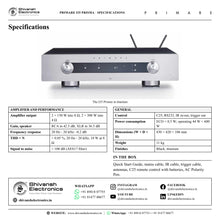
Amplifier
| Type | Modular integrated amplifier and network player (I35 Prisma DM36), 35 Series |
| Amplifier module | Primare UFPD 2 |
| Power supply | Primare APFC (switch-mode, Active Power-Factor Correction) |
| Amplifier output | 2 × 150 W into 8 Ω, 2 × 300 W into 4 Ω |
| Modules fitted | DM36 DAC module, SM35 Prisma network player module |
Analogue inputs and outputs
| Balanced inputs | 2 × XLR (A1, A2), 30 kΩ impedance |
| Unbalanced inputs | 3 × RCA (A3 - A5), 15 kΩ impedance |
| Preamplifier output | 1 × RCA stereo pair (PRE), 100 Ω impedance |
| Line output | 1 × RCA stereo pair (LINE), 100 Ω impedance |
| Speaker outputs | Left and right terminals for spade terminals, banana plugs or bare wires |
DM36 digital-to-analogue converter
| Optical inputs | 4 × TOSLINK (D6 - D9), up to 192 kHz / 24-bit |
| Coaxial inputs | 2 × RCA (D10, D11), up to 192 kHz / 24-bit |
| USB-B input | 1 × USB-B (PC/MAC), up to 384 kHz / 32-bit; DSD256 (11.2 MHz) |
| Digital output | 1 × RCA coaxial; analogue input = 96 kHz output; digital input = pass-through when up-sampling is disabled |
| PCM up-sampling | 44.1 / 48 kHz to 88.2 / 96 kHz (on by default) |
| MQA | Full MQA processing |
| Frequency response, DAC | 44.1 kHz: +0.1 / -0.4 dB, 20 Hz - 20 kHz; 48 / 96 / 192 kHz: +0.1 / -0.2 dB, 20 Hz - 20 kHz |
Performance
| Gain | Preamplifier output: RCA in 16.5 dB, XLR in 10.5 dB; line output 0 dB; speaker output: RCA in 42.5 dB, XLR in 36.5 dB |
| Analogue frequency response | 20 Hz - 20 kHz: -0.2 dB |
| Distortion, THD + N | < 0.05 %, 20 Hz - 20 kHz, 10 W at 8 Ω |
| Signal to noise | > 100 dB (AES17 filter) |
Prisma network player
| Connectivity | 2 × Ethernet LAN ports (built-in network switch); 2 × antennas for Bluetooth and Wi-Fi |
| LAN | 10/100 Mbit Ethernet; up to 192 kHz / 24-bit, DSD128 (5.6 MHz) |
| WLAN | IEEE 802.11 a/b/g/n/ac compliant; 2.4 / 5 GHz; b, g, n mode; maximum physical layer rate 390 Mbps |
| USB-A | 1 × USB-A, up to 192 kHz / 24-bit; DSD128 (5.6 MHz) |
| Audio formats | WAV, LPCM, AIFF, FLAC, ALAC, WMA, OGG: up to 192 kHz / 24-bit; MP3, MP4 (AAC): up to 48 kHz / 16-bit, VBR and CBR 320 kbps; DSD: up to DSD128 (5.6 MHz) |
| Streaming | AirPlay 2; Bluetooth; Chromecast built-in; UPnP / DLNA |
| Frequency response, network playback | 44.1 kHz: +0.1 / -0.6 dB; 96 kHz: +0.1 / -0.2 dB; 192 kHz: ±0.1 dB (20 Hz - 20 kHz) |
| Control app | Prisma app |
Control
| Remote control | C25 system remote control (IR) |
| RS232 | Outboard system control port |
| IR | 3.5 mm input / output |
| 12 V trigger | 3.5 mm output |
General
| Power consumption | Standby (ECO) < 0.5 W; standby (NORMAL) < 5 W; operating 44 W < 600 W |
| Network standby | < 6 W after 20 minutes without an audio stream (high network availability product) |
| Dimensions (W × D × H) | 430 × 420 × 106 mm with knobs and connectors; 430 × 382 × 106 mm without knobs and connectors |
| Weight | 11 kg |
| Colour | Black or titanium |
Versions
| I35-PRISMA-BLACK | Black |
| I35-PRISMA-TITANIUM | Titanium |
Product overview
The Primare I35 Prisma (I35 Prisma DM36) combines the DM36 digital-to-analogue conversion module and the SM35 Prisma network player module with the I35 modular integrated amplifier platform of the 35 Series, with UFPD 2 amplification delivering 150 W per channel and balanced inputs, to create an extraordinarily versatile control and power centre for any system.
Providing 150 watts per channel into 8 Ω (300 W into 4 Ω) of absolutely linear UFPD 2 amplification across the entire audible bandwidth, the I35 Prisma delivers naturally fast, clean and agile sound with an unprecedented ability to bring music to life. Two balanced XLR inputs feed a fully balanced preamplifier with relay input switching and a 2 × 4 channel balanced-mode volume control IC, and the UFPD 2 module draws on an APFC switch-mode power supply with dual PFC converters running 180 degrees out of phase and capacitive storage for peak transient bursts.
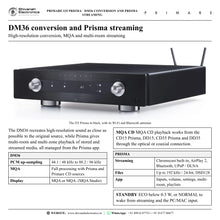
The DM36 is a completely new, thoroughly designed digital-to-analogue converter stage for playback of virtually any digital source with absolute accuracy and musicality, recreating high-resolution sound as close as possible to the original source. It converts up to PCM 384 kHz / 32-bit and DSD256 from a computer on the USB-B input, takes four optical and two coaxial inputs up to 192 kHz / 24-bit, offers PCM up-sampling of 44.1 and 48 kHz signals to 88.2 and 96 kHz, and provides full MQA processing with both Prisma and Primare CD sources.
The SM35 Prisma module is a bundle of network technologies for multi-room and multi-zone connectivity and control of stored and streamed media, wired or wireless, all managed from mobile devices through the dedicated Prisma app. Alongside AirPlay 2 and Bluetooth, Prisma features Chromecast built-in, a streaming portal with effortless direct connection to hundreds of streaming applications and services, including voice control. Music files play from a USB drive or a network drive up to 192 kHz / 24-bit and DSD128, and two Ethernet ports form a built-in network switch.
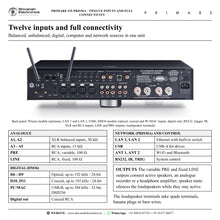
Twelve wired inputs, a variable PRE and a fixed LINE output, a coaxial digital output, speaker mute for headphone listening, fixed gain for surround sound pass-through, the C25 system remote control, RS232, IR in/out and a 12 V trigger output make the I35 Prisma easy to build a system around, from a single stereo room to a whole-home installation. In the look and feel of Scandinavia, its long-life, highly readable OLED display and Primare's signature control knob follow the idea of lagom: not too much, not too little, everything in balance, proportion and harmony.
| Amplifier output into 8 Ω (2 × 300 W into 4 Ω) | 2 × 150 W |
| DM36 USB-B input; DSD256 | 384 kHz / 32-bit |
| 2 XLR, 3 RCA, 4 optical, 2 coaxial, USB-B | 12 inputs |
| Full MQA processing in the DM36 | MQA |
Key features
- UFPD 2 amplification: amplifier output 2 × 150 W into 8 Ω, 2 × 300 W into 4 Ω
- Fully balanced preamplifier with two XLR inputs, relay input switching and a balanced-mode volume control IC
- APFC switch-mode power supply with capacitive storage for peak transients
- DM36 DAC module: up to PCM 384 kHz / 32-bit and DSD256 over USB-B, PCM up-sampling, full MQA processing
- SM35 Prisma network player: multi-room and multi-zone playback, controlled from the Prisma app
- Chromecast built-in, AirPlay 2, Bluetooth and UPnP / DLNA
- USB-A input for drives and network drive playback, up to 192 kHz / 24-bit and DSD128
- Two Ethernet ports with a built-in network switch; dual-band Wi-Fi
- Twelve inputs: 2 × XLR, 3 × RCA, 4 × optical, 2 × coaxial and USB-B for a computer
- Variable PRE and fixed LINE outputs, coaxial digital output, speaker mute for headphone listening
- Fixed gain (0 dB) for surround sound pass-through in a multi-channel system
- C25 system remote control, RS232, IR in/out, 12 V trigger out; OLED display; black or titanium
Made for
- Complete stereo systems with analogue, digital and streamed sources in one unit
- Multi-room and multi-zone homes with other Prisma products
- Computer audio through the USB-B input, in a study or home office
- CD playback with the Primare DD35 CD transport
- Home theatre systems, as the amplifier for the front channels via fixed gain
- Custom installations with RS232, IR and 12 V trigger control
In the box
- I35 Prisma integrated amplifier and network player
- Chromecast built-in Quick Start Guide
- Mains cable
- IR cable
- Trigger cable
- Antennas for Bluetooth and Wi-Fi
- C25 remote control with batteries
- AC Polarity Pen
Connections
- 2 × balanced analogue inputs, XLR (A1, A2), 30 kΩ
- 3 × unbalanced analogue inputs, RCA (A3 to A5), 15 kΩ
- 4 × optical digital inputs, TOSLINK (D6 to D9), up to 192 kHz / 24-bit
- 2 × coaxial digital inputs, RCA (D10, D11), up to 192 kHz / 24-bit
- 1 × USB-B computer input (PC/MAC), up to 384 kHz / 32-bit, DSD256
- 1 × USB-A input for USB drives, up to 192 kHz / 24-bit, DSD128
- 2 × Ethernet LAN, 10/100 Mbit, with built-in network switch; ANT 1 and ANT 2 for Wi-Fi and Bluetooth
- Preamplifier output (PRE, variable) and line output (LINE, fixed), RCA, 100 Ω
- 1 × coaxial digital output, RCA
- Loudspeaker terminals for spade terminals, banana plugs or bare wires
- RS232, IR in / out (3.5 mm), 12 V trigger out (3.5 mm)
- Mains inlet with power switch on the back panel
Finishes
- Black
- Titanium
Primare I35 Prisma: frequently asked questions
What do the DM36 and SM35 modules add?
The DM36 is the digital-to-analogue converter stage: optical, coaxial and USB-B inputs, a coaxial digital output, PCM up-sampling and MQA processing. The SM35 is the Prisma network player: Ethernet, Wi-Fi, Bluetooth, USB-A, streaming, multi-room and app control. The I35 Prisma has both fitted.
Can I connect my computer?
Yes. Connect the computer to the USB-B (PC/MAC) input with a USB-A to USB-B cable and select PC/MAC; the I35 then appears as a sound output device on the computer. Depending on the computer, Primare's USB audio driver from primare.net may be needed.
Does it play MQA?
Yes. The DM36 provides full MQA processing with both Prisma and Primare CD sources. The OLED display shows MQA or MQA. (MQA Studio), and the Prisma app shows a green or blue dot. MQA CD playback works from the CD15 Prisma, DD15, CD35 Prisma and DD35 through the optical or coaxial connection.
Can the I35 Prisma be used in a home theatre system?
Yes. Any input can be set to fixed gain (0 dB, equivalent to volume setting 66), which works as a surround sound pass-through, so the I35 Prisma can power the front left and right channels of a multi-channel system.
How do I listen on headphones?
Connect a headphone amplifier to the RCA outputs and turn on SPEAKER MUTE (or press and hold MUTE on the C25). Use LINE when the volume is set on the headphone amplifier, or PRE to control the volume from the I35 Prisma.
Where can I buy the Primare I35 Prisma in India?
The Primare I35 Prisma is available from Shivansh Electronics, Kolkata, West Bengal, India, with delivery across India.
Workflow 1: Complete stereo system in the living room
Families who want records, CDs, TV sound and streaming through one amplifier.
Connections
| Connect | To |
|---|---|
| CD player (balanced) | I35 Prisma A1 (XLR) |
| Phono preamplifier or other line source | A3 - A5 (RCA) |
| TV optical output | D6 (TOSLINK) |
| I35 Prisma speaker terminals | Pair of passive loudspeakers |
Setup
- Connect the loudspeakers, red to + and black to -, with spades, banana plugs or bare wire.
- Connect the sources and give each input an ALIAS such as CD, PHONO or TV.
- Fit the antennas, connect Ethernet and set up the Prisma app.
- Set AUTO SENSE to WAKE+SELECT on the TV input so the amplifier wakes when the TV plays.
- Match the source levels with INPUT GAIN.
Tip: Check the mains plug with the AC Polarity Pen and allow about 24 hours of burn-in.
Workflow 2: CD collection with the DD35 transport
CD collectors who want the DM36 to convert their discs.
Connections
| Connect | To |
|---|---|
| DD35 optical or coaxial digital output | I35 Prisma D6 - D9 or D10 / D11 |
| I35 Prisma TRIG OUT | DD35 TRIG IN |
Setup
- Connect the DD35 digital output to an optical or coaxial input of the I35 Prisma.
- Run the supplied trigger cable from I35 TRIG OUT to DD35 TRIG IN.
- The DD35 now switches on and to standby with the amplifier.
- Rename the input CD and play; MQA CDs are decoded by the DM36.
Tip: Leave PCM UPSAMPLING on to up-sample 44.1 kHz CD audio to 88.2 kHz.
Workflow 3: Desktop and home office audio
Listeners who keep their music library on a computer.
Connections
| Connect | To |
|---|---|
| Computer USB port | I35 Prisma USB-B (PC/MAC) with a USB-A to USB-B cable |
Setup
- Connect the computer to the USB-B input.
- Install Primare's USB audio driver from primare.net if the computer needs it.
- Select the PC/MAC input on the I35 Prisma.
- Choose the I35 as the sound output device on the computer.
Tip: The USB-B input accepts up to 384 kHz / 32-bit and DSD256.
Workflow 4: Streaming and multi-room music
Homes with Prisma products in several rooms.
Connections
| Connect | To |
|---|---|
| Router | I35 Prisma LAN 1 |
| I35 Prisma LAN 2 | Another network device |
| Phones and tablets | Chromecast built-in, AirPlay 2 or Bluetooth |
Setup
- Connect LAN 1 to the router; use LAN 2 for a nearby device through the built-in switch.
- Set up Chromecast built-in and the Prisma app on a phone.
- Set STANDBY MODE to NORMAL so the amplifier wakes from streaming and PC/MAC.
- Group rooms and zones from the Prisma app.
Tip: Keep STANDBY MODE on NORMAL when LAN 2 feeds another device.
Workflow 5: Home theatre with surround sound pass-through
Home theatre owners who want the I35 Prisma to power the front speakers for films and music.
Connections
| Connect | To |
|---|---|
| AV processor front left / right pre-outs | I35 Prisma A2 (XLR) set to FIXED |
| I35 Prisma speaker terminals | Front left and right loudspeakers |
Setup
- Connect the processor's front left and right outputs to one input.
- Set that input's VOLUME to FIXED (0 dB, equivalent to volume 66) and confirm the warning.
- The processor now sets the front channel level for films.
- Keep the other inputs variable for stereo and streaming.
Tip: Fixed gain overrules MAXIMUM VOLUME, so set the processor levels before playing.
Workflow 6: Custom installation and whole-home control
Installers and owners of media rooms and automated homes.
Connections
| Connect | To |
|---|---|
| Home-automation controller | I35 Prisma RS232 (null-modem cable) |
| I35 Prisma TRIG OUT | TRIG IN of another component |
| IR distribution | I35 Prisma IR IN / IR OUT (3.5 mm) |
Setup
- Connect the controller to RS232 with a twisted (null-modem) cable.
- Use the trigger output so connected components follow the I35 Prisma on and off.
- Use the IR cable and IR in/out for control inside a cabinet.
- Lock the front panel and set AUTO-STANDBY in GENERAL SETTINGS.
Tip: Hold the i button on the remote to show the network information quickly.