

RME Fireface 802 FS AE
MRP - Rs. 2,60,190
RME Fireface 802 FS AE 60-channel 192 kHz USB interface in black: 4 mic/instrument preamps, 12 analog I/O, 2 x ADAT, AES/EBU, SteadyClock FS. Available in India from Shivansh Electronics, Kolkata, West Bengal, India.
VISUAL GUIDE — See Every Photo, Spec & Setup Step (PDF)
The price shown is the MAXIMUM RETAIL PRICE (MRP), inclusive of all taxes. For the best price, exclusive offers and discounted rates, delivery timelines, or any other information, please DM us or call +91 89818 07755 / +91 91477 00677. We will gladly share an exclusive coupon code that you can apply at checkout. All payments are processed securely through Razorpay, our trusted payment gateway partner.
General
| Type | 60‑channel 192 kHz high‑end USB audio interface, black finish |
| Channels | 30 inputs / 30 outputs at 48 kHz (12 analog, 16 ADAT, 2 AES/EBU each way) |
| Computer connection | 1 x USB 2.0 (works with USB 2.0 and USB 3.0 ports) |
| Supported sample rates | 28 kHz up to 200 kHz; up to 192 kHz |
| Buffer sizes | 48 to 8192 samples |
| Clock sources | Internal, ADAT In, AES In, SPDIF In, Word Clock In |
| Clock technology | SteadyClock FS; jitter suppression of external clocks > 50 dB (> 1 Hz) |
| Mixer | TotalMix FX: 1800‑channel mixer, 46‑bit internal resolution; 3‑band EQ, Low Cut, Reverb, Echo, Compressor, Expander, Auto Level, Room EQ |
| Modes | Driver‑based USB 2, Class Compliant (rear button), stand‑alone (6 memory slots) |
Inputs and outputs
| Mic/instrument/line inputs 9‑12 | 4 x XLR/TRS combo (front), 48V or instrument mode per channel |
| Line inputs 1‑8 | 8 x 6.3 mm TRS, electronically balanced (rear) |
| Line outputs 1‑8 | 8 x 6.3 mm TRS, servo‑balanced, DC‑coupled (rear) |
| Headphone outputs | 2 x 6.3 mm TRS stereo (front), channels 9/10 and 11/12 |
| ADAT | 2 x TOSLINK I/O; Multi‑Mode as optical SPDIF |
| AES/EBU | 1 x XLR I/O, transformer‑balanced |
| Word clock | 1 x BNC I/O, switchable 75 Ohm termination |
| MIDI | 1 x MIDI I/O on 5‑pin DIN |
| Remote | 1 x USB‑A REMOTE port for the optional ARC USB |
Audio performance
| Mic in 9‑12 | |
|---|---|
| Connector | XLR, balanced |
| SNR (A‑weighted) | 116 dB |
| THD+N | < -110 dB |
| Max level | +10 dBu (gain +6 dB) |
| Inst in 9‑12 | |
| Connector | 6.3 mm TS, 1 MOhm |
| SNR (A‑weighted) | 116 dB |
| THD+N | < -110 dB |
| Max level | +21 dBu (gain +6 dB) |
| Line in 1‑8 | |
| Connector | 6.3 mm TRS, balanced |
| SNR (A‑weighted) | 118 dB |
| THD+N | < -110 dB |
| Max level | +19 dBu |
| Line out 1‑8 | |
| Connector | 6.3 mm TRS, servo‑balanced |
| SNR (A‑weighted) | 118.5 dB |
| THD+N | < -110 dB |
| Max level | +19 dBu |
| Phones | |
| Connector | 6.3 mm TRS stereo |
| SNR (A‑weighted) | 118 dB |
| THD+N | - |
| Max level | +17 dBu |
Analog details
| Mic gain | +6 dB to +60 dB (54 dB range) |
| Mic EIN (A‑weighted) | -131 dBu (54 dB gain, 150 Ohm, 20 Hz - 20 kHz) |
| Mic input impedance | 3.4 kOhm |
| Line input THD | < -120 dB (< 0.0001 %) |
| Line input levels | Lo Gain (+19 dBu) or +4 dBu (+13 dBu) for 0 dBFS; digital gain 0 to +12 dB |
| Line output levels | Hi Gain +19 dBu, +4 dBu (+13 dBu), -10 dBV (+2 dBV); 75 Ohm |
| Phones | +17 dBu; 2 Ohm; 200 mW per channel into 32 Ohm |
| Frequency response | Line in: 8.9 Hz - 20.4 kHz (-0.1 dB, 44.1 kHz); line out: 0 Hz - 20.2 kHz (-0.1 dB, 44.1 kHz) |
| Channel separation | > 110 dB |
Digital
| ADAT | 2 x 8 channels at 48 kHz; 2 x 4 at 96 kHz (S/MUX); 2 x 2 at 192 kHz (S/MUX4) |
| AES/EBU | AES3‑1992; Professional and Consumer formats; 27 - 200 kHz |
| SPDIF optical | Via ADAT 1/2 ports, IEC 60958 |
| Word clock | Level range 1.0 - 5.6 Vpp; 27 - 200 kHz; output 4.0 Vpp into 75 Ohm |
Physical
| Format | 19‑inch enclosure, 44 mm high; black finish |
| Dimensions (W x H x D) | 43.6 x 4.4 x 23.5 cm without rack ears/handles 48.3 x 4.4 x 24.2 cm incl. rack ears |
| Weight | 2.8 kg |
| Power | Internal switching PSU, 100 - 240 V AC, 30 W |
| Power consumption | Idle 15 W; typical 22 W |
| Operating temperature | +5 to +50 °C |
System requirements
| Windows | RME driver for Windows |
| Mac | RME driver for macOS (Intel and ARM) |
| Class Compliant | Linux, Mac and iPadOS, all channels |
| Computer port | 1 x USB 2.0 or USB 3.0 port, at least Intel Core i5 CPU |
Included software
| Mixer | TotalMix FX |
| Remote | TotalMix Remote |
| Analysis | DIGICheck |
Product overview
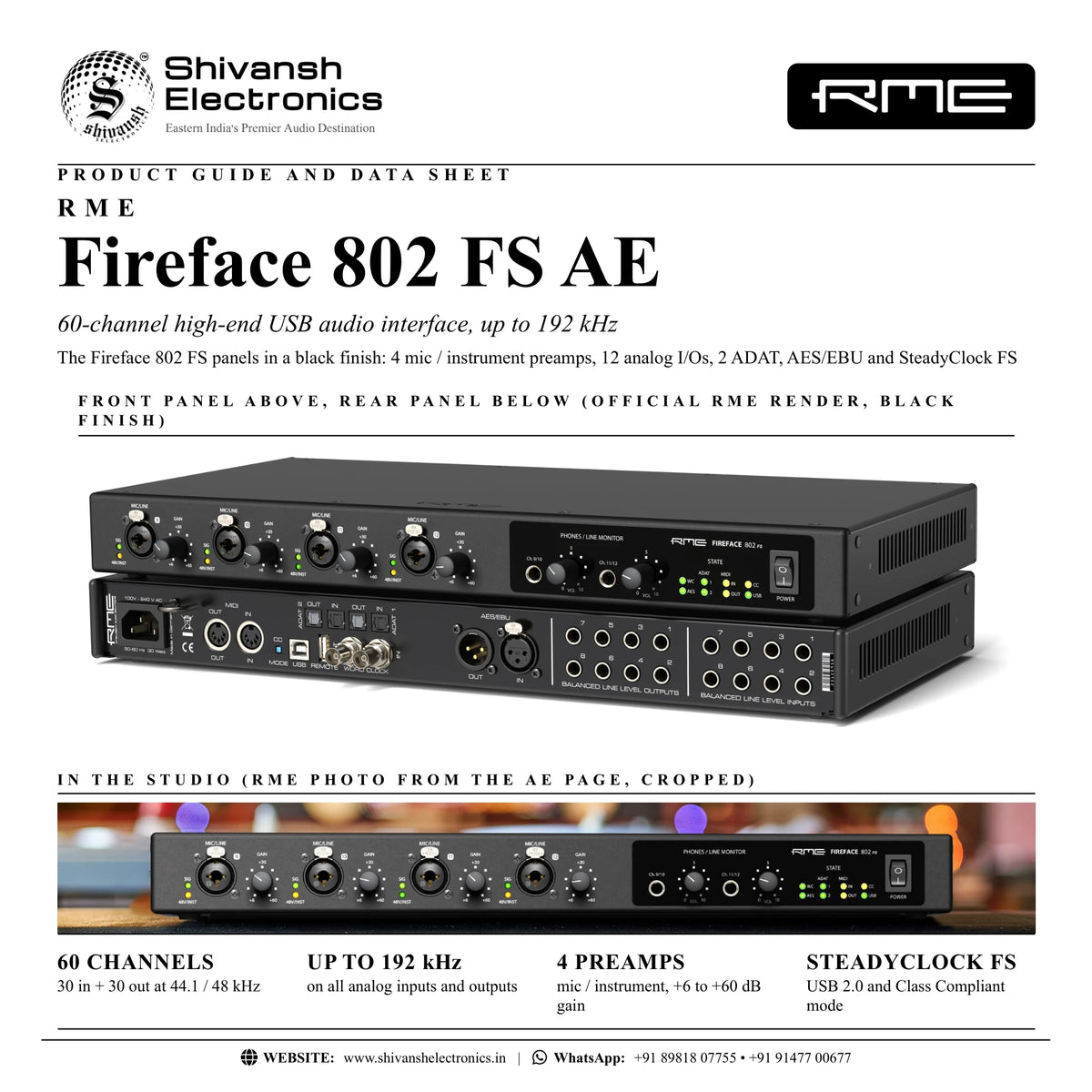
The RME Fireface 802 FS AE is a 60-channel 192 kHz high-end USB audio interface with black front and rear panels, four high-transparency mic/instrument preamps, 12 analog inputs and outputs, two ADAT ports, AES/EBU, word clock, MIDI and SteadyClock FS.
On the front, four XLR/TRS combo inputs take microphones, instruments and line sources, each with individually switchable 48V phantom power or instrument mode, next to two high-power stereo headphone outputs. The rear offers eight balanced line inputs and eight balanced, DC-coupled line outputs, two ADAT optical I/Os (also usable as optical SPDIF), AES/EBU, word clock, MIDI and a USB port for the optional ARC USB. TotalMix FX with a complete effects section, Room EQ, Class Compliant mode and stand-alone operation with six memory slots make it a central hub for studio and live use.
| Channels at 48 kHz (30 in / 30 out) | 60 |
| Max sample rate | 192 kHz |
| Mic EIN (A‑weighted) | -131 dBu |
| Mic gain | +6 to +60 dB |
Key features
- 30 inputs / 30 outputs: 12 analog, 16 ADAT and 2 AES/EBU each way
- 4 x mic/instrument/line preamps on XLR/TRS combo sockets, +6 to +60 dB gain, 48V and Hi-Z instrument mode per channel
- 8 x balanced line inputs and 8 x balanced line outputs on 6.3 mm TRS
- 2 x stereo headphone outputs, +17 dBu, 200 mW into 32 Ohm
- Individually switchable reference levels on every input and output: -10 dBV, +4 dBu, Hi/Lo Gain
- 2 x ADAT I/O (Multi-Mode: optical SPDIF), AES/EBU, word clock and MIDI
- SteadyClock FS jitter suppression and Intelligent Clock Control
- TotalMix FX with EQ, dynamics, reverb, echo and Room EQ
- DC-coupled line outputs for CV/Gate control of modular synthesisers
- Class Compliant mode with all channels on Linux, Mac and iPadOS; stand-alone with 6 memory slots; ARC USB port
High-transparency preamps
The four front preamps use the classic technology of RME's OctaMic II: a symmetrical design with very low distortion, a high signal-to-noise ratio and a linear frequency response, measuring -131 dBu EIN (A-weighted). Each input works as a Hi-Z instrument input too, so up to four guitars can be plugged in directly. LEDs show signal, clip, TS operation and phantom power.
Reference-class conversion
All I/Os operate at up to 192 kHz with low-latency AD and DA converters. The line outputs reach 118.5 dB SNR (A-weighted) with THD+N below -110 dB, and both headphone outputs drive high- and low-impedance headphones to high volume. Every input and output can be switched to -10 dBV, +4 dBu or Hi Gain, and all outputs support ASIO Direct Monitoring.
TotalMix FX and Room EQ
TotalMix FX creates multiple latency-free monitor mixes, as RME puts it, with EQ, dynamics, reverb and delay for every output, including main monitors and musicians' headphone mixes. Room EQ adds a 9-band PEQ with delay and volume calibration. TotalMix Remote controls everything from an iPad or another computer over Ethernet and WiFi, and DIGICheck is included for analysis.
Class Compliant and stand-alone
A recessed button on the rear switches to Class Compliant mode, giving driverless access to all channels on Linux, Mac and iPadOS. Six memory slots store complete configurations, so the Fireface 802 FS AE operates independently from a computer and can be set up via iPad, MIDI remote or ARC USB. Intelligent Clock Control retains the last valid sample rate if an external clock fails.
DC-coupled outputs for CV/Gate
All line-level outputs are fully DC-coupled, so they can send control voltages and gate signals to modular synthesisers and other studio hardware.
In the box
- RME Fireface 802 FS AE
- USB 2.0 cable, USB-A/B, 1.8 m
- Power cord
- Manual
- Optical cable (TOSLINK), 2 m
- 4 self-adhesive rubber feet
Free RME software: TotalMix FX, TotalMix Remote and DIGICheck. Drivers for Windows and macOS; Class Compliant for Linux, Mac and iPadOS.
RME Fireface 802 FS AE: frequently asked questions
How many channels does the Fireface 802 FS AE have?
60 at 48 kHz: 30 inputs and 30 outputs, made up of 12 analog, 16 ADAT and 2 AES/EBU channels each way.
Can I record guitars directly?
Yes. All four front inputs switch to Hi-Z instrument mode (1 MOhm), so up to four instruments can be connected without extra hardware.
Can I add more mic inputs?
Yes. The two ADAT I/Os add up to 16 channels of external preamps or converters at 44.1/48 kHz.
Does it work with an iPad?
Yes. In Class Compliant mode, an iPad with USB-C can use up to 60 channels for recording and playback, with TotalMix FX for iPad.
Where can I buy the RME Fireface 802 FS AE in India?
The RME Fireface 802 FS AE is available from Shivansh Electronics, Kolkata, West Bengal, India, with delivery across India.
Workflow 1: Band tracking in a commercial studio
Record a full band with four front preamps plus two ADAT preamps, with individual headphone mixes.
Connections
| Connect | To |
|---|---|
| Vocal and guitar mics | Mic inputs 9‑12, 48V as needed |
| Two 8‑channel ADAT preamps (drums, room) | ADAT 1 and ADAT 2 IN |
| Keyboards and outboard | Line inputs 1‑8 |
| Studio monitors | Line outputs 1‑2 |
| Musicians' headphones | Phones 9/10 and 11/12 |
| Computer | USB 2.0 |
Setup
- Install the RME driver and set the sample rate (up to 48 kHz for 16 ADAT channels).
- Set gains with the front knobs (+6 to +60 dB) and watch the SIG/CLIP LEDs.
- Build latency-free headphone mixes with reverb in TotalMix FX.
- Record up to 30 inputs at once.
Tip: At 96 kHz the ADAT ports carry 2 x 4 channels with S/MUX.
Workflow 2: Mixing and monitoring with outboard gear
Use the eight balanced line I/Os as inserts for analog processors during mixdown.
Connections
| Connect | To |
|---|---|
| Analog compressors and EQs (inputs) | Line outputs 3‑8 |
| Analog compressors and EQs (outputs) | Line inputs 3‑8 |
| Main monitors | Line outputs 1‑2 |
| Computer | USB 2.0 |
Setup
- Set each output to the level your outboard expects: -10 dBV, +4 dBu or Hi Gain.
- Set matching input levels on line inputs 3-8.
- Use hardware inserts in your mixing software.
- Calibrate the main monitors with Room EQ in TotalMix FX.
Workflow 3: Live multitrack recording
Record a live show from stage preamps or a digital console's ADAT outputs.
Connections
| Connect | To |
|---|---|
| Console direct outs or ADAT outputs | Line inputs 1‑8 and ADAT 1‑2 IN |
| Ambience mics | Mic inputs 9‑12 |
| Word clock from the console | Word clock IN |
| Laptop | USB 2.0 |
Setup
- Select word clock as clock source; SteadyClock FS removes jitter.
- Check sync status in the Settings dialog.
- Arm all channels in your recording software.
- Intelligent Clock Control keeps the last valid rate if the external clock fails.
Workflow 4: Stand-alone preamp and AD/DA converter
Use the 802 FS AE without a computer as a 4-channel preamp and 12-channel converter for a digital mixer.
Connections
| Connect | To |
|---|---|
| Mics | Mic inputs 9‑12 |
| Line sources | Line inputs 1‑8 |
| Digital mixer | ADAT 1 I/O |
| Mains power | Power inlet |
Setup
- Set up the routing in TotalMix FX with a computer connected.
- Store the configuration in one of six memory slots.
- Disconnect the computer: the unit works stand-alone.
- Recall configurations via MIDI remote or ARC USB.
Workflow 5: Driverless recording on Linux, Mac or iPad
Record all channels on a computer or iPad without installing a driver.
Connections
| Connect | To |
|---|---|
| Mics and instruments | Inputs 9‑12 |
| Line sources | Line inputs 1‑8 |
| Linux/Mac computer or USB‑C iPad | USB 2.0 |
Setup
- Press the recessed CC MODE button on the rear.
- Check that the CC LED is lit.
- Select the Fireface 802 FS AE in your recording app.
- On iPad, use TotalMix FX for iPad to control the hardware mixer.
Workflow 6: Modular synth and CV/Gate studio
Sequence and record modular synthesisers alongside a full studio setup.
Connections
| Connect | To |
|---|---|
| Modular CV/Gate inputs | DC‑coupled line outputs 5‑8 |
| Modular audio outputs | Line inputs 5‑8 |
| MIDI synth | MIDI I/O |
| Monitors | Line outputs 1‑2 |
Setup
- Route CV and gate tracks to outputs 5-8.
- Set output level to Hi Gain for the widest voltage range.
- Record the modules on line inputs 5-8.
- Control MIDI gear via the MIDI port.