RME M-32 AD
MRP - Rs. 4,72,165
RME M-32 AD 32-channel analog to MADI/ADAT converter, 192 kHz, 116 dBA, levels up to +24 dBu, SteadyClock, 2U. Available in India from Shivansh Electronics, Kolkata, West Bengal, India.
VISUAL GUIDE — See Every Photo, Spec & Setup Step (PDF)
The price shown is the MAXIMUM RETAIL PRICE (MRP), inclusive of all taxes. For the best price, exclusive offers and discounted rates, delivery timelines, or any other information, please DM us or call +91 89818 07755 / +91 91477 00677. We will gladly share an exclusive coupon code that you can apply at checkout. All payments are processed securely through Razorpay, our trusted payment gateway partner.
General
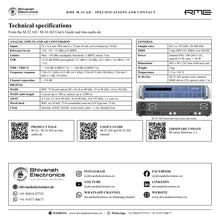
| Type | 32‑channel AD converter, analog to MADI / ADAT, 19‑inch, 2U |
| Channels | 32 analog inputs |
Analog inputs and AD conversion
| Inputs | 32 x 6.3 mm TRS and 4 x 25‑pin D‑sub, servo‑balanced |
| Input impedance | 10 kOhm |
| Reference levels | +24, +19, +13 dBu at 0 dBFS |
| Limiter | Max. +30 dBu unclipped; threshold -3 dBFS (on), +3 dB (off); attack 5 ms; THD+N 0.03 % |
| Resolution | 24 bit |
| SNR | 112.9 dB RMS unweighted, 117 dBA (+24 dBu, 44.1 kHz); 112.7 dB / 116 dBA (+19); 112.2 dB / 116 dBA (+13) |
| Frequency response | 5 Hz - 21.5 kHz (-0.5 dB, 44.1 kHz); 5 Hz - 45.5 kHz (96 kHz); 5 Hz - 66.5 kHz (-1 dB, 192 kHz) |
| THD | < -110 dB (< 0.00032 %) |
| THD+N | < -104 dB (< 0.00063 %) |
| Channel separation | > 110 dB |
Digital
| MADI | BNC 75 Ohm and optical SC (62.5/125, 50/125), in and out; 56/64‑channel, 96k frame |
| MADI cable length | Coaxial up to 100 m; optical up to 2,000 m |
| ADAT outputs | 4 x optical: 32 ch 24 bit at 48 kHz; 16 ch at 96 kHz (S/MUX); 8 ch at 192 kHz (S/MUX4) |
| ADAT input | 1 x optical, clock synchronisation only; lock range 31.5‑50 kHz |
| Word clock | BNC in (10 kOhm, switchable 75 Ohm, 1.0‑5.6 Vpp, 27‑200 kHz) and out (4.0 Vpp into 75 Ohm) |
| Clock sources | Internal, ADAT, MADI, word clock |
| Jitter | < 1 ns in PLL mode; suppression > 30 dB (2.4 kHz) |
| Sample rates | 44.1, 48, 88.2, 96, 176.4, 192 kHz; 28‑200 kHz |
| MIDI | 5‑pin DIN in/out; MIDI over MADI (user bit channel 56) |
Power and dimensions
| Power supply | Internal switching PSU, 100‑240 V AC, 40 W |
| Consumption | Typical 23 W, max. < 30 W |
| Dimensions (W x H x D) | 483 x 88 x 242 mm with rack ears; 436 x 88 x 235 mm without |
| Weight | 3 kg |
| Cooling | Temperature‑controlled low‑noise fan |
| Operating temperature | +5 to +50 °C, humidity < 75 % non‑condensing |
Product overview
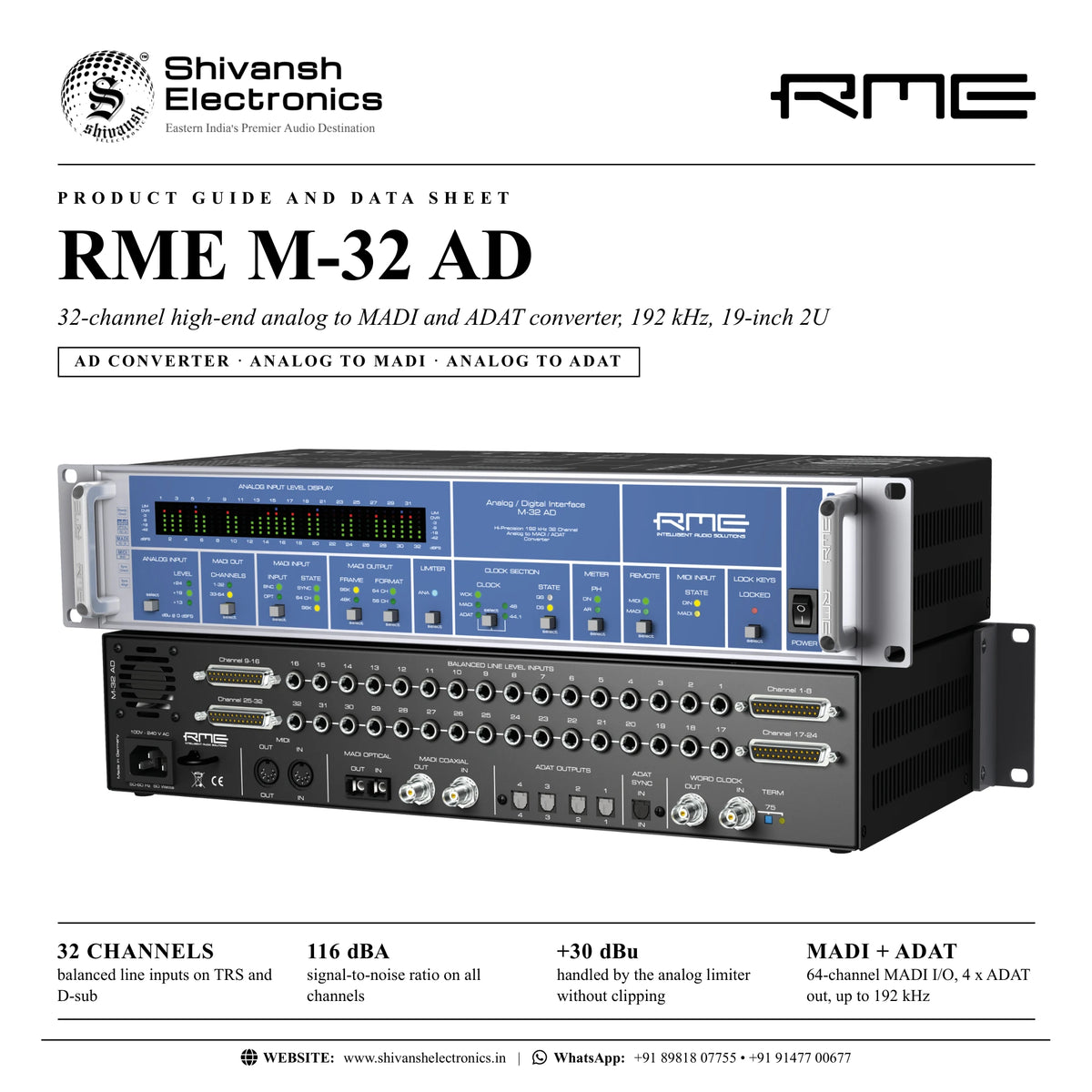
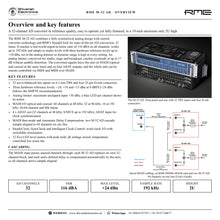
The RME M-32 AD is a 32-channel high-end AD converter in a 19-inch, 2U enclosure: 32 balanced analog line inputs converted to MADI and ADAT in reference quality, up to 192 kHz, with analog limiters and three hardware reference levels up to +24 dBu.
A fully symmetrical analog design with current converter technology and RME's SteadyClock reaches a real-world signal-to-noise ratio of 116 dBA on all channels. The analog limiter, conceived for studio, stage and broadcast, handles input overloads of up to 17 dB without audible distortion (maximum input level +30 dBu). The inputs are on 6.3 mm TRS jacks and 25-pin D-sub connectors; the converted signals leave on optical and coaxial MADI at the same time and on four ADAT outputs.
| AD channels | 32 |
| Signal‑to‑noise ratio | 116 dBA |
| Max. reference level | +24 dBu |
| Max. sample rate | 192 kHz |
Key features
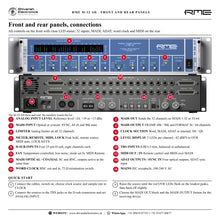
- 32 servo-balanced line inputs on 6.3 mm TRS and 4 x 25-pin D-sub (internally connected)
- Three hardware reference levels: +24, +19 and +13 dBu at 0 dBFS
- Analog limiter: maximum unclipped input +30 dBu, LED per channel
- MADI I/O optical and coaxial: 64 ch at 48 kHz, 32 at 96 kHz, 16 at 192 kHz
- 4 x ADAT out (S/MUX up to 192 kHz) and ADAT sync input
- 32 five-LED level meters with peak hold
- MADI thru-mode and Automatic Delay Compensation for sample-aligned stacking
- SteadyClock, SyncCheck and Intelligent Clock Control; word clock I/O
- Remote control via MIDI and MIDI over MADI; all settings stored
- Temperature-controlled low-noise fan
Hardware reference levels
The level is switched in the analog domain with high-quality electronic switches, so signal-to-noise ratio and distortion stay at their best in every setting. +24 dBu at 0 dBFS gives 20 dB headroom over +4 dBu and follows the SMPTE recommendation; +19 dBu gives 15 dB and +13 dBu 9 dB.
Cascading on one MADI line
The MADI input is a pass-through input: the converter replaces its own channel block and passes the rest unchanged. Up to 48 kHz two M-32 AD or four M-16 AD share one MADI line. Each unit's defined delay is compensated automatically by the next, so all channels stay sample-aligned.
SteadyClock and remote control
SteadyClock makes the conversion independent of the quality of external clocks. Intelligent Clock Control shows every clock state and keeps the last valid sample rate if the external source fails. The complete unit can be monitored and controlled via MIDI or MIDI over MADI, each unit with its own ID, using RME's free MIDI Remote software for Mac and PC.
In the box
- RME M-32 AD
- Power cord
- Manual
- RME driver CD
- Optical cable, 2 m
RME M-32 AD: frequently asked questions
Which digital formats does it support?
MADI (optical and coaxial outputs at the same time) and four ADAT optical outputs; the ADAT input serves only as an optional clock source.
Can I use TRS and D-sub at the same time?
No. The TRS jacks and D-sub connectors are internally connected, so use one or the other for each channel.
How many units can share one MADI line?
Up to 64 channels at 48 kHz: two 32-channel or four 16-channel M-series converters. At 96 kHz 32 channels, at 192 kHz 16 channels.
Where can I buy the RME M-32 AD in India?
The RME M-32 AD is available from Shivansh Electronics, Kolkata, West Bengal, India, with delivery across India.
Workflow 1: 32 analog channels into a computer over MADI
Record a console, preamps or outboard on many channels with an RME HDSPe MADI card.
Connections
| Connect | To |
|---|---|
| Line sources (console outputs, preamps) | TRS inputs or D‑sub inputs |
| RME HDSPe MADI card | MADI optical or coaxial OUT / IN |
Setup
- Connect the analog sources and set ANALOG INPUT to their level.
- Connect the card's MADI output to the converter's MADI input and vice versa.
- Set the card as clock master and the converter's CLOCK to MADI.
- Choose the MADI OUT channel block and record.
Tip: Raise the source until the red OVR LEDs flash on the loudest peaks, then back off slightly.
Workflow 2: ADAT recording with an RME HDSPe RayDAT
Transfer 32 channels at 48 kHz with standard optical ADAT cables.
Connections
| Connect | To |
|---|---|
| Analog sources | Line inputs |
| RME HDSPe RayDAT | ADAT outputs 1‑4 |
| Clock | ADAT SYNC IN or word clock |
Setup
- Connect the four ADAT outputs to the card's ADAT inputs.
- Use ADAT SYNC IN or word clock to lock to the card.
- Set the converter's CLOCK to ADAT or WCK.
- At 96 kHz, 16 channels travel via S/MUX.
Workflow 3: Cascading several converters on one MADI line
Build 32, 48 or 64-channel systems on a single MADI cable.
Connections
| Connect | To |
|---|---|
| First converter | MADI OUT to the second unit's MADI IN |
| Last converter | MADI OUT to the recorder |
Setup
- Connect the units serially via MADI.
- Set a different MADI OUT block on each unit.
- Run all units in clock slave mode from the recorder or first unit.
- Automatic Delay Compensation keeps all channels sample-aligned.
Workflow 4: Stage to control room over fibre
Convert stage signals and send them over long distances.
Connections
| Connect | To |
|---|---|
| Stage line signals | Analog inputs |
| Optical MADI cable | MADI optical OUT, up to 2 km |
Setup
- Place the converter at the stage.
- Run optical MADI to the control room.
- Enable the limiter for protection against overloads.
- Lock the keys against accidental changes.
Workflow 5: Broadcast and studio levels
Match the converter to SMPTE or other studio levels.
Connections
| Connect | To |
|---|---|
| Equipment at +4 dBu nominal | Line inputs |
Setup
- Choose +24 dBu for SMPTE alignment with 20 dB headroom.
- Use +19 or +13 dBu for hotter conversion of lower-level sources.
- Check levels on the LED meters.
- Store settings: they are kept at power-off.
Workflow 6: Remote control via MIDI
Monitor and set several converters from one computer.
Connections
| Connect | To |
|---|---|
| Computer with RME MIDI Remote | MIDI IN / OUT or MIDI over MADI |
Setup
- Set REMOTE to MIDI or MADI.
- Give each unit its own ID in MIDI Remote.
- Set fan mode and word clock out options from the software.
- Read the complete device status, including all LEDs.