
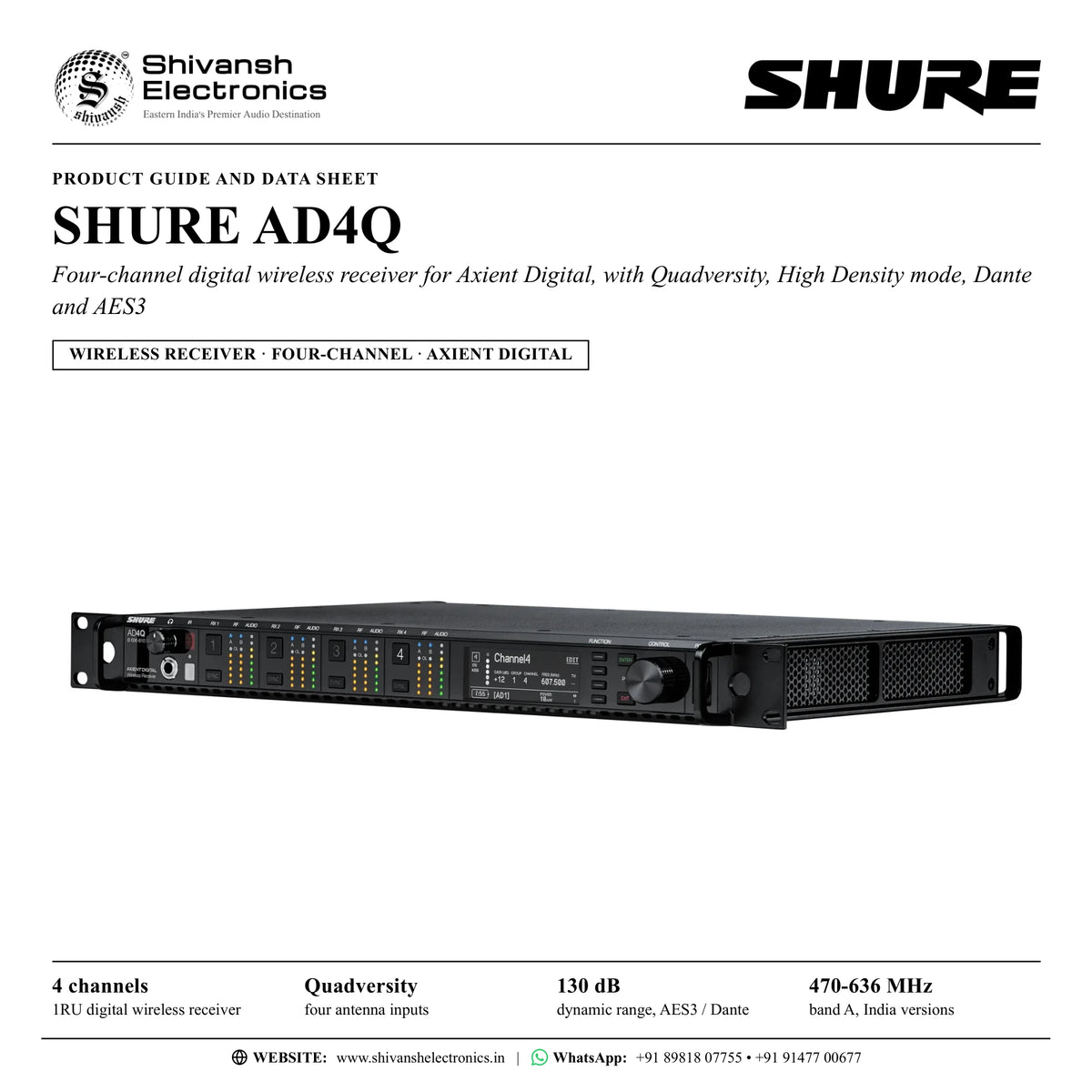



SHURE AD4Q
PRICE ON ENQUIRY
Shure AD4Q Axient Digital four-channel wireless receiver: Quadversity, High Density mode, AES3, Dante, AES67, encryption; band A, DC option. Available in India from Shivansh Electronics, Kolkata, West Bengal, India.
VISUAL GUIDE — See Every Photo, Spec & Setup Step (PDF)
PRICE ON ENQUIRY. For the price, exclusive offers, delivery timelines, or any other information, please Contact / WhatsApp +91 89818 07755 / +91 91477 00677. We will gladly share a personalised quotation for Shivansh Electronics, Kolkata, West Bengal, India. All payments are processed securely through Razorpay, our trusted payment gateway.
System
| RF carrier frequency range | 470-960 MHz, varies by region; AD4Q=A: 470-636 MHz |
| Working range | 100 m (330 ft); actual range depends on RF signal absorption, reflection and interference |
| RF tuning step size | 25 kHz, varies by region |
| Channel-to-channel spacing | Standard mode 350 kHz; High Density mode 125 kHz; varies by region |
| Image rejection | >70 dB, typical |
| RF sensitivity | -98 dBm at 10⁻⁵ BER |
| Latency, analog output | Standard mode 2.08 ms; High Density mode 2.96 ms |
| Audio frequency response | 20 Hz - 20 kHz (±1 dB); dependent on microphone type |
| Dynamic range, XLR line output | 120 dB A-weighted; 117 dB unweighted (typical, 20 Hz to 20 kHz, receiver gain -12 dB) |
| Dynamic range, digital (AES3 / Dante) | 130 dB A-weighted; 126 dB unweighted |
| Total harmonic distortion | <0.01 % (-6 dBFS, 1 kHz, System Gain @ +10) |
| System audio polarity | Positive pressure on the diaphragm gives positive voltage on pin 2 (re. pin 3) of the XLR output and the tip of the 1/4" output |
| Operating temperature | -18 °C (0 °F) to 50 °C (122 °F); battery characteristics may limit this range |
| Storage temperature | -29 °C (-20 °F) to 65 °C (149 °F) |
Audio output
| Gain adjustment range | -18 to +42 dB in 1 dB steps (plus Mute setting) |
| XLR configuration | Transformer coupled balanced (1 = ground, 2 = audio +, 3 = audio -) |
| TRS configuration | Transformer coupled balanced (tip = audio +, ring = audio -, sleeve = ground) |
| Impedance | 100 Ω, typical, XLR line out |
| Full scale output (200 kΩ load) | XLR LINE +18 dBV; XLR MIC -12 dBV; TRS +8 dBV |
| Mic/line switch | -30 dB |
| Phantom power protection | Yes |
Receiver
| Dimensions (H × W × D) | 44 × 483 × 333 mm |
| Weight | 4.8 kg (10.6 lb), without antennas |
| Housing | Steel; extruded aluminium |
| Power requirements | 100 to 240 V AC, 50-60 Hz, 0.68 A max. |
| Thermal power dissipation | Maximum 31 W (106 BTU/hr); idle 21 W (72 BTU/hr) |
| DC power requirements (DC version) | 10.9 to 14.8 V DC, 4.0 A max. |
Networking
| Network interface | 10/100 Mbps, 1 Gbps, Dante digital audio |
| Network addressing | DHCP or manual IP address |
| Maximum cable length | 100 m (328 ft) |
Cascade output
| Connector | BNC, for one additional receiver in the same band |
| Configuration | Unbalanced, passive |
| Impedance | 50 Ω |
| Insertion loss | 0 dB, typical |
RF input
| Spurious rejection | >80 dB, typical |
| Connector | BNC |
| Impedance | 50 Ω |
| Bias voltage | 12 to 13.5 V DC, 150 mA maximum, per antenna, switchable on/off |
Versions
| AD4QIN=-A | Band A: 470-636 MHz, India version |
| AD4QA=-A | Band A: 470-636 MHz |
| AD4Q-DC=-A | Band A: 470-636 MHz, DC power module |
Product overview
The Shure AD4Q is the Axient Digital four-channel digital wireless receiver, setting a new standard in transparent digital audio and maximum spectral efficiency with four channels in a single rack space.
The AD4Q receives four Axient Digital channels and is compatible with all AD series and ADX series transmitters. Wide tuning, low latency, High Density (HD) mode and Quadversity ensure solid performance in the most challenging RF environments. True digital diversity reception on each channel gives drop-out resistance, and a five-segment Channel Quality meter displays the RF signal-to-noise ratio as an early warning before problems become audible.
Quadversity mode lets the receiver accept four antenna inputs, turning the RF cascade ports into extra antenna inputs to maximise RF coverage and minimise the risk of dropouts and signal loss; in this mode the receiver provides two channels of audio. In High Density mode transmitters run at 2 mW with a narrower modulation bandwidth for up to 47 active transmitters in one 6 MHz TV channel (up to 63 in one 8 MHz TV channel). Frequency Diversity, with an ADX2FD handheld or a pair of AD1 or ADX1 bodypacks, and Interference Management keep critical audio running.
Networked control, AES3, AES67 and Dante output and signal routing options bring a new level of management and flexibility to the whole workflow. There are four transformer-balanced XLR and four 1/4" outputs, with XLR outputs 3 and 4 switchable to AES3 digital, plus Dante and AES67 on a configurable four-port Ethernet switch. The front panel headphone jack monitors any receiver channel and, through Dante Cue and Dante Browse, any Dante channel on the network. AES-256 encryption protects the audio, and Wireless Workbench and the ShurePlus Channels app give remote control.
Three India versions are offered in band A, 470 to 636 MHz: AD4QIN=-A, AD4QA=-A and AD4Q-DC=-A, the last with a DC power module for redundant power. The latest Axient Digital firmware adds Channel Linking and Preferred Access Point. When buying separate wireless components, match their frequency bands.
| Digital wireless receiver, 1RU | 4 channels |
| Four antenna inputs for extended coverage | Quadversity |
| Dynamic range, AES3 / Dante, A-weighted | 130 dB |
| Band A, India versions | 470-636 MHz |
Key features
- Four-channel Axient Digital receiver, compatible with all AD series and ADX series transmitters
- Quadversity mode for extended antenna coverage and improved RF signal-to-noise
- True digital diversity reception per channel for drop-out resistance
- Standard and High Density transmission modes: up to 47 transmitters in one 6 MHz TV channel
- Frequency Diversity with combining or selection modes
- Interference Management and Channel Quality meter
- AES-256 encryption to protect the audio channels
- Four XLR and four 1/4" outputs; XLR outputs 3 and 4 switchable to AES3
- Dante and AES67 output on a configurable Ethernet switch, redundant Dante
- Front panel headphone jack with Dante Cue and Dante Browse monitoring
- Networked control with Wireless Workbench and the ShurePlus Channels app
- Locking AC connectors with cascade; DC module version for redundant power
Made for
- Professional productions that demand flawless execution
- Multi-channel live sound, theatre and touring racks
- Large venues where Quadversity extends antenna coverage
- Crowded RF environments with many channels in a confined area
- Dante and AES67 networks and AES3 digital consoles
- Systems that need redundant power (DC module version)
In the box
- 1 × AD4Q receiver
- 1 × Locking power and jumper cables
- 2 × BNC bulkhead adapter
- 2 × Coaxial antenna
- 2 × BNC cable assemblies
- 2 × BNC cable
- 1 × Ethernet cables
- 1 × Rackmount kit
- 1 × User guide
Connections
- 4 × Transformer-balanced XLR outputs with mic/line switch and ground lift (outputs 3 and 4 switchable to AES3)
- 4 × Transformer-balanced 1/4" (6.35 mm) audio outputs
- AES3 switch for digital output on outputs 3 and 4
- 4 × Ethernet: ctrl 1, ctrl 2 (network control, PoE), Dante Primary, Dante Secondary
- Word clock input and thru (BNC) with 75 Ω termination switch
- 2 × BNC antenna inputs A and B and 2 × BNC cascade ports C and D (extra antenna inputs in Quadversity mode)
- IEC locking AC power input and locking AC cascade; DC input on the DC version
- Front panel 1/4" (6.3 mm) headphone jack and IR sync window
Shure AD4Q: frequently asked questions
What is Quadversity?
Quadversity mode lets the AD4Q accept four antennas: two on the antenna inputs and two on the RF cascade ports, which become extra antenna inputs. It maximises RF coverage and minimises the risk of dropouts. In Quadversity mode the receiver provides two channels of audio.
Which transmitters work with the AD4Q?
All AD series and ADX series transmitters, such as the AD1 and ADX1 bodypacks, ADX1M micro bodypack, AD2 and ADX2 handhelds and the ADX2FD Frequency Diversity handheld. Up to eight transmitters can be registered to one receiver channel. Match the frequency band to the receiver.
Which version should I choose?
All three India versions work in band A, 470 to 636 MHz. AD4Q-DC=-A has the DC power module (10.9 to 14.8 V DC input) to support redundant power; AD4QIN=-A is the India-only version.
How do I get AES3 out of the AD4Q?
Turn on the AES3 switch on the rear panel. XLR outputs 3 and 4 then carry AES3 digital audio, and per the user guide the analog XLR outputs 1 and 2 are disabled. Dante and AES67 network audio is available at the same time.
Can I monitor Dante channels from other devices?
Yes. Press the headphone volume knob for Dante Browse to search the network and listen to any Dante channel, or set the AD4Q as a Dante Cue station for central monitoring.
Where can I buy the Shure AD4Q in India?
The Shure AD4Q is available from Shivansh Electronics, Kolkata, West Bengal, India, with delivery across India.
Workflow 1: Four-piece band on a live stage
Live sound engineers running four wireless vocal and instrument channels.
Connections
| Connect | To |
|---|---|
| ADX2 handhelds and ADX1 bodypacks | AD4Q channels 1-4 |
| AD4Q XLR outputs 1-4 | Console inputs |
| Antennas A and B | AD4Q BNC antenna inputs |
Setup
- Rack the AD4Q and connect the two antennas with the supplied BNC cables and bulkhead adapters.
- Run a Group Scan and Deploy frequencies to the four channels.
- IR sync each transmitter at the front-panel sync window.
- Set mic or line level per output and adjust gain at soundcheck.
Tip: Up to eight transmitters can be registered to each channel, handy for spare packs.
Workflow 2: Large venue with Quadversity
Arenas, stadium shows and wide stages needing extended antenna coverage.
Connections
| Connect | To |
|---|---|
| Four antennas | AD4Q antenna inputs A, B and cascade ports C, D |
| AD4Q | Two channels of audio in Quadversity |
Setup
- In Device Configuration choose RF Device > Quadversity > On and reboot.
- Connect antennas to both RF antenna ports and both cascade ports.
- Place the antennas in a pattern that covers the venue.
- Do a walk test and adjust antenna positions if needed.
Tip: The orange Quadversity LED on the rear confirms the mode is on.
Workflow 3: Theatre rack in High Density
Theatres and musicals with many bodypacks in a confined area.
Connections
| Connect | To |
|---|---|
| AD1 or ADX1 bodypacks | Several AD4Q receivers |
| AD4Q Dante ports | Dante network to the console |
Setup
- Set Device RF > Transmission Mode to High Density.
- Coordinate frequencies with a full bandwidth scan in Wireless Workbench.
- Route all channels over Dante to the console.
- Check battery and Channel Quality in Wireless Workbench during the show.
Tip: High Density mode allows up to 47 active transmitters in one 6 MHz TV channel.
Workflow 4: AES3 and Dante to a digital console
Engineers feeding digital consoles and recorders.
Connections
| Connect | To |
|---|---|
| AD4Q XLR outputs 3 and 4 (AES3 on) | Console AES3 inputs |
| AD4Q Dante Primary / Secondary | Redundant Dante networks |
| House word clock | AD4Q word clock in |
Setup
- Turn on the rear AES3 switch so outputs 3 and 4 carry AES3.
- Connect external word clock to resolve the AES3 output.
- Use Split/Redundant mode for redundant Dante.
- Monitor any Dante channel on the headphone jack with Dante Browse.
Tip: With AES3 enabled the analog XLR outputs 1 and 2 are disabled, per the user guide.
Workflow 5: Broadcast and corporate events with redundant power
Broadcast trucks and mission-critical events.
Connections
| Connect | To |
|---|---|
| AD4Q-DC=-A AC input | Mains supply |
| AD4Q-DC=-A DC input | 10.9-14.8 V DC backup supply |
| ADX2FD handheld | Two channels in Frequency Diversity combining |
Setup
- Connect both AC and DC supplies to the DC version.
- Set Frequency Diversity to Combining for the ADX2FD.
- Enable Interference Management, Automatic mode.
- Turn on AES-256 encryption and re-sync the transmitters.
Tip: Frequency Diversity uses two independent frequencies to prevent dropouts.
Workflow 6: Networked control with ShowLink
System technicians managing transmitters remotely.
Connections
| Connect | To |
|---|---|
| AD610 access point | AD4Q network |
| ADX transmitters | ShowLink remote control |
| Computer with Wireless Workbench | AD4Q ctrl port |
Setup
- Connect the receivers and the AD610 to the control network.
- Open Wireless Workbench to see every channel strip.
- Change frequency, gain and RF power remotely.
- Use Preferred Access Point when several AD610 units are in use.
Tip: The ShurePlus Channels app gives quick control from a smartphone or tablet.


