

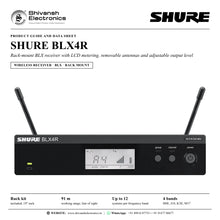


SHURE BLX4R
PRICE ON ENQUIRY
Shure BLX4R rack-mount BLX wireless receiver: LCD with RF and audio metering, removable antennas, adjustable output, rack kit included. Available in India from Shivansh Electronics, Kolkata, West Bengal, India.
VISUAL GUIDE — See Every Photo, Spec & Setup Step (PDF)
PRICE ON ENQUIRY. For the price, exclusive offers, delivery timelines, or any other information, please Contact / WhatsApp +91 89818 07755 / +91 91477 00677. We will gladly share a personalised quotation for Shivansh Electronics, Kolkata, West Bengal, India. All payments are processed securely through Razorpay, our trusted payment gateway.
Receiver
| Type | Single-channel analogue wireless receiver, rack mount |
| Antennas | 2 removable 1/4 wave antennas on BNC jacks A and B, diversity |
| Output impedance | XLR: 200 Ω; 6.35 mm (1/4"): 50 Ω |
| Audio output level | XLR: -20.5 dBV; 6.35 mm (1/4"): -13 dBV (into 100 kΩ load, ref. ±33 kHz deviation with 1 kHz tone) |
| Output level control | Volume control, screwdriver adjustable |
| RF sensitivity | -105 dBm for 12 dB SINAD, typical |
| Image rejection | >50 dB, typical |
| Display | LCD: TV channel, lock, group, channel, RF signal strength, audio meter, active antenna |
| Dimensions (H × W × D) | 42 × 198 × 163 mm (1.65 × 7.80 × 6.42 in) |
| Weight | 998 g (2.2 lbs) without antennas |
| Housing | Molded ABS, steel |
| Power | External DC power supply, 12 to 15 V DC |
System
| Working range | 91 m (300 ft) line of sight; actual range depends on RF signal absorption, reflection and interference |
| Audio frequency response | 50 to 15,000 Hz (dependent on microphone type) |
| Total harmonic distortion | 0.5 %, typical (ref. ±33 kHz deviation with 1 kHz tone) |
| Dynamic range | 100 dB, A-weighted, typical |
| Operating temperature | -18 °C (0 °F) to 57 °C (135 °F); battery characteristics may limit this range |
| Simultaneous systems | Up to 12 (band and RF environment dependent) |
| Polarity | Positive pressure on the microphone diaphragm produces positive voltage on pin 2 (with respect to pin 3) of the XLR output and the tip of the 1/4" output |
Versions
| BLX4RIN=-H8E | H8E: 518-542 MHz |
| BLX4RIN=-J10 | J10: 584-608 MHz |
| BLX4RIN=-K3E | K3E: 606-630 MHz |
| BLX4RIN=-M17 | M17: 662-686 MHz |
Product overview
The Shure BLX4R is a rack-mount analogue wireless receiver for the BLX wireless system, giving improved linearity and frequency response with group and channel scan, adjustable output level and a detailed LCD display.
The BLX4R is the rack-mount receiver of the BLX family, built with rugged metal construction and supplied with everything needed for rack mounting. It works with a BLX2 handheld transmitter or a BLX1 bodypack transmitter on the same band, and it is the BLX receiver for the premium presenter options: the brochure lists the WL185 and WL93 lavaliers and the MX153 earset with the BLX4R only.
The front panel brings an LCD screen with detailed RF and audio metering: RF signal strength bars, an audio meter with OL indication for clipping, group and channel, the TV channel for the selected frequency, a lock indicator and an active antenna indicator for the diversity signal. A transmitter battery LED shows green for more than one hour of runtime and red for less than one hour, so battery state is visible at the rack.
Two removable antennas connect to BNC jacks on the rear, which allows quick antenna distribution when several receivers share one antenna system. The rear also has an XLR microphone-level output, a 6.35 mm (1/4") instrument-level output and a volume control, adjusted with a screwdriver, to set the output level. One-touch QuickScan selects the best open frequency, the proportion between transmitter input and receiver output stays constant thanks to improved linearity, and up to 12 compatible systems can run per frequency band (region dependent).
The BLX4R is a component: the receiver alone, with antennas, rack hardware and power supply, to replace or add to a BLX system. In India it is offered in H8E (518-542 MHz), J10 (584-608 MHz), K3E (606-630 MHz) and M17 (662-686 MHz); choose the band that matches your BLX transmitter.
| Rack mount kit included | Rack mount |
| Working range, line of sight | 91 m (300 ft) |
| Compatible systems per frequency band | Up to 12 |
| XLR output level, adjustable | -20.5 dBV |
Key features
- Rack mount kit included for a standard 19" equipment rack
- LCD display with detailed RF and audio metering
- Removable antennas on BNC jacks for quick antenna distribution
- Adjustable output level with the rear volume control
- One-touch QuickScan frequency selection locates the best open frequency
- XLR and 6.35 mm (1/4") output connectors
- Transmitter battery LED: green more than 1 hour, red less than 1 hour
- Active antenna indicator for the diversity signal
- Up to 12 compatible systems per frequency band (region dependent)
- Lockable controls and power
- Rugged metal construction
Made for
- Rack-mounted BLX systems in venues, houses of worship and rental racks
- Presenters, instructors, teachers and clergy
- Vocal, headset, guitar and instrument BLX systems
- Several receivers sharing an antenna distribution system
In the box
- BLX4R wireless receiver
- 53A8611 rack mount bracket
- 53A8612 long rack mount bracket
- 53B8443 link bracket
- 90AZ8100 hardware kit
- 2 × 95A8699 antenna, BNC, 1/4 wave
- 2 × 95A8994 bulkhead BNC adapter
- 2 × 95K2035 BNC cable, 22 in.
- PS24 power supply
Connections
- Antenna jack A and antenna jack B (BNC)
- XLR microphone-level output (Mic Out)
- 6.35 mm (1/4") instrument-level output (INST Out)
- DC power jack for an external 12 to 15 V DC supply, with strain-relief loop
Shure BLX4R: frequently asked questions
Is a rack mount kit included?
Yes. The box contains everything needed for rack mounting: rack mount brackets, a link bracket and a hardware kit for a standard 19" audio equipment rack.
Which transmitters work with the BLX4R?
BLX transmitters on the same frequency band: the BLX2 handheld transmitter and the BLX1 bodypack transmitter for headset, lavalier, earset, instrument or guitar use.
Can several BLX4R receivers share antennas?
Yes. The antennas are removable for quick antenna distribution. Shure recommends the UA221 passive splitter for two receivers and the UA844 antenna power distribution amplifier for three or more; antennas and receivers must be from the same band. The supplied 1/4 wave antennas can be mounted directly on the UA844; remote-mounted antennas must be 1/2 wave.
How do I set the output level?
Use a screwdriver on the rear volume control. Set the transmitter gain while watching the audio meter on the receiver display: OL should only appear when you speak or play loudly.
What does the battery LED on the receiver show?
The transmitter battery LED is green when more than 1 hour of runtime remains and red when less than 1 hour remains.
Where can I buy the Shure BLX4R in India?
The Shure BLX4R is available from Shivansh Electronics, Kolkata, West Bengal, India, with delivery across India.
Workflow 1: Rack-mounted vocal wireless
Venues and bands that keep their wireless in a rack.
Connections
| Connect | To |
|---|---|
| BLX2 handheld | BLX4R |
| BLX4R XLR Mic Out | Mixer microphone input |
Setup
- Fit the rack brackets and mount the BLX4R in a 19" rack.
- Connect the antennas, the power supply and the XLR output.
- Press the group button to scan for the clearest group and channel.
- Set the transmitter group and channel to match; RF bars and the battery LED light.
- Set the gain while watching the audio meter.
Tip: Move the receiver to the top of the equipment rack for better reception.
Workflow 2: Several receivers on shared antennas
Houses of worship and venues running three or more BLX4R receivers.
Connections
| Connect | To |
|---|---|
| 2 antennas | UA844 antenna power distribution amplifier |
| UA844 outputs | BNC jacks A and B of each BLX4R |
Setup
- Use antennas and receivers from the same band.
- Mount the supplied 1/4 wave antennas directly on the UA844, or use 1/2 wave antennas when remote mounted.
- Set up each system one at a time and leave each transmitter on.
- Check every microphone at the end.
Tip: For two receivers, Shure recommends the UA221 passive splitter.
Workflow 3: Presenter in a lecture hall or church
Teachers, trainers and clergy on a lavalier or earset.
Connections
| Connect | To |
|---|---|
| Lavalier or earset | BLX1 bodypack |
| BLX4R XLR out | Room mixer or amplifier |
Setup
- Clip the BLX1 to a belt pressed against the base of the clip.
- Increase the BLX1 gain for lavaliers as desired.
- Watch the receiver audio meter: OL should appear only rarely.
- Lock the receiver: hold group and channel until the lock icon appears.
Tip: Keep clothing and jewellery from rubbing against the microphone.
Workflow 4: Guitar wireless into an amplifier
Guitarists and bass players with a rack at the side of the stage.
Connections
| Connect | To |
|---|---|
| Instrument cable | BLX1 TA4 input |
| BLX4R INST Out | Amplifier input |
Setup
- Turn the BLX1 gain to the minimum setting for instruments.
- Connect the BLX4R 1/4" output to the amplifier.
- Scan, match and check the RF bars.
- Adjust the rear volume control if needed.
Tip: Slide the guitar strap through the transmitter clip.
Workflow 5: Battery watch during a long event
Sound engineers monitoring several presenters.
Connections
| Connect | To |
|---|---|
| BLX4R front panel | Engineer's view at the rack |
Setup
- Fit fresh AA batteries before the event.
- Watch the transmitter battery LED on each receiver.
- Green means more than 1 hour of runtime; red means less than 1 hour.
- Swap batteries during a break when a LED turns red.
Tip: If the display dims to 50 %, the transmitter is beyond range: move it closer.
Workflow 6: Good RF practice
Anyone setting up wireless near other wireless devices.
Connections
| Connect | To |
|---|---|
| BLX4R antennas | Line of sight to the performers |
Setup
- Turn on other wireless equipment before scanning so it is detected.
- Keep antennas and receivers away from metal and dense materials.
- Keep transmitters more than 2 m apart.
- If audio drops out, change group or channel.
Tip: Mark trouble spots during sound check and keep performers away from them.


