


SHURE GLXD14R+
PRICE ON ENQUIRY
Shure GLXD14R+ dual-band digital wireless guitar rack system with WA302 cable, GLXD1+ bodypack and GLXD4R+ half-rack receiver. Available in India from Shivansh Electronics, Kolkata, West Bengal, India.
VISUAL GUIDE — See Every Photo, Spec & Setup Step (PDF)
PRICE ON ENQUIRY. For the price, exclusive offers, delivery timelines, or any other information, please Contact / WhatsApp +91 89818 07755 / +91 91477 00677. We will gladly share a personalised quotation for Shivansh Electronics, Kolkata, West Bengal, India. All payments are processed securely through Razorpay, our trusted payment gateway.
System (GLX-D+)
| Tuning bandwidth (Z4) | 2400-2483.5 MHz and 5725-5875 MHz |
| Band modes | 2.4 GHz only, 5.8 GHz only, or best band 2.4 + 5.8 GHz (default) |
| Transmit mode | Shure proprietary digital |
| RF output power | 10 mW E.I.R.P. maximum |
| Audio frequency response | 20 Hz - 20 kHz |
| Dynamic range | 120 dB, A-weighted |
| RF sensitivity | -88 dBm, typical |
| Total harmonic distortion | 0.07 %, typical |
| Battery life | Up to 11.5 hours |
| Channel count | Without frequency manager: up to 4 typical, 8 optimal (2.4 GHz only: 4 typical, 5 optimal); with GLX-D+ frequency manager: up to 11 typical, 16 optimal (2.4 GHz only: 9 typical, 11 optimal) |
| Latency | Group 1 and Group 3: 4.53 ms; Group 2: 8 ms |
| Ambient temperature | Operating 0 °C to 45 °C; charging 0 °C to 40 °C |
GLXD4R+ half-rack receiver
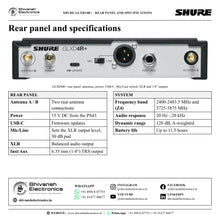
| Power requirements | 14.5 V - 17 V, 600 mA (PS43 power supply) |
| Antennas | Two, dual-band ½ wave sleeve dipole, rear-mounted, can be mounted remotely |
| Dimensions | 196.8 × 162.97 × 41.8 mm, without antennas |
| Weight | 866 g |
| Housing | Steel |
| Spurious rejection | > 35 dB, typical |
| Gain adjustment range | -18 to 42 dB, 1 dB increments |
| Phantom power protection | Yes |
| Outputs | XLR, balanced, 100 Ω; 6.35 mm (1/4") TRS Inst/Aux, impedance balanced, 100 Ω (50 Ω unbalanced) |
| Full scale output | XLR: LINE +18 dBV, MIC -12 dBV; 6.35 mm (1/4"): +12 dBV |
| Mic/Line switch | 30 dB pad |
| Pin assignments | XLR: 1 = ground, 2 = hot, 3 = cold; 6.35 mm: tip = audio, ring = no audio, sleeve = ground |
| Antenna input | 50 Ω; maximum input level -20 dBm |
| Mounting | Standard 19-inch rack with the supplied mounting hardware |
| Other connections | 15 V DC power port, USB-C (firmware), battery charging bay |
GLXD1+ bodypack transmitter
| Power | Shure SB904 rechargeable lithium-ion battery |
| Antenna type | Dual-band internal monopole |
| Dimensions (H × W × D) | 115 × 66.94 × 28.51 mm |
| Weight | 153.1 g, without battery |
| Housing | Aluminium alloy, ABS plastic |
| Input | 4-pin male mini connector (TA4M), unbalanced |
| Input impedance | 900 kΩ |
| Maximum input level | +8.4 dBV (7.5 Vp-p) |
| Pin assignments | 1 = ground (cable shield); 2 = +5 V bias; 3 = audio; 4 = tied through active load to ground |
| Other | USB-C charging port, link button, status LED, reversible belt clip |
WA302 instrument cable
| Length | 0.75 m (2.5 ft) |
| Connectors | 4-pin mini connector (TA4F) to 6.35 mm (1/4") |
SB904 battery
| Battery type | Rechargeable lithium-ion |
| Nominal capacity | 2420 mAh (8.71 Wh) |
| Nominal voltage | 3.6 V |
| Dimensions (H × W × D) | 72.8 × 20.96 × 20.80 mm |
| Weight | 53.7 g |
| Temperature | Charging 0 °C to 40 °C; operating -18 °C to 45 °C |
Versions
| GLXD14R+IN-Z4 | Z4: 2400-2483.5 MHz and 5725-5875 MHz |
Product overview
The Shure GLXD14R+ is a GLX-D+ dual-band digital wireless rack system with the WA302 guitar cable, the GLXD1+ bodypack and the GLXD4R+ half-rack receiver, for guitar and other instruments with a 6.35 mm (1/4") output.
The system works in both the 2.4 GHz and the 5.8 GHz bands. Shure Dual Band Technology more than doubles the available bandwidth, and automatic frequency management moves the system away from interference without interrupting the audio, so the system is ready to go every time without frequency planning.
The WA302 instrument cable (0.75 m, TA4F to 6.35 mm) connects the instrument to the bodypack, and the GLXD1+ clips to a belt or slides onto a guitar strap. It runs on a Shure SB904 lithium-ion rechargeable battery for up to 11.5 hours; the battery charges in the charging bay of the receiver or over USB-C on the transmitter, and the receiver screen shows the remaining runtime in hours and minutes.
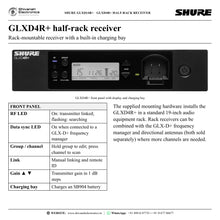
The GLXD4R+ half-rack receiver has a steel housing, two rear antennas that can also be mounted remotely, a front-panel display and charging bay, a balanced XLR output with a Mic/Line switch and a 6.35 mm (1/4") Inst/Aux output. The supplied hardware mounts it in a standard 19-inch rack, and rack receivers can be combined with the GLX-D+ frequency manager and directional antennas (both sold separately) for larger multi-channel installations.
In India the set is supplied as GLXD14R+IN-Z4 (2400-2483.5 MHz and 5725-5875 MHz) with the PS43 power supply, the rack-mount hardware and a zippered vinyl bag.
| Runtime, SB904 battery | Up to 11.5 h |
| Dual-band operation | 2.4 + 5.8 GHz |
| Dynamic range, A-weighted | 120 dB |
| Latency, groups 1 and 3 | 4.53 ms |
Key features
- Dual Band Technology: operates in 2.4 GHz and 5.8 GHz
- Automatic frequency management moves away from interference without audio interruption
- GLXD4R+ half-rack receiver with steel housing and rack-mount hardware
- Rear antennas, can be mounted remotely; compatible with the GLX-D+ frequency manager (sold separately)
- XLR output with Mic/Line switch and 6.35 mm (1/4") Inst/Aux output
- WA302 instrument cable, TA4F to 6.35 mm (1/4")
- GLXD1+ bodypack with rugged metal construction, slides onto a guitar strap
- SB904 lithium-ion rechargeable battery, up to 11.5 hours
- Charging bay in the receiver; USB-C charging on the transmitter
- Transmitter gain set from the receiver in 1 dB steps
Made for
- Electric guitar and other instruments with a 6.35 mm (1/4") output
- Rack-mounted stage and installed systems
- Bands and worship teams
- Multi-channel installations with the GLX-D+ frequency manager
In the box
- GLXD4R+ half-rack receiver
- GLXD1+ bodypack transmitter
- WA302 instrument cable (TA4F to 1/4")
- PS43 power supply
- SB904 lithium-ion rechargeable battery
- Rack-mount hardware
- Zippered vinyl bag
Connections
- Instrument output to the WA302, WA302 TA4F to the GLXD1+ TA4M input
- GLXD4R+: XLR audio output, switchable between microphone and line level
- GLXD4R+: 6.35 mm (1/4") TRS Inst/Aux output to mixers, recorders and amplifiers
- GLXD4R+: two rear antenna connections (antennas can be mounted remotely)
- GLXD4R+: 15 V DC power port for the PS43 power supply
- GLXD4R+: USB-C port for firmware updates from a computer
- GLXD1+: USB-C charging port
Shure GLXD14R+: frequently asked questions
Which output should I use?
Use the 6.35 mm (1/4") Inst/Aux output for a guitar amplifier, mixer or recorder, or the XLR output to a mixer; the Mic/Line switch sets the XLR output to microphone or line level.
Which frequencies does it use in India?
The India version (Z4) tunes 2400-2483.5 MHz and 5725-5875 MHz. By default the receiver uses the best band mode with both bands; it can also be set to 2.4 GHz only or 5.8 GHz only.
How is the battery charged?
Put the SB904 in the charging bay of the receiver while the receiver is plugged in, or connect a USB charger to the USB-C port of the GLXD1+. About 15 minutes of charging gives up to 1 h 30 min of use, 1 hour gives up to 6 hours and 3 hours gives up to 11 h 30 min. The transmitter does not pass audio while the charging cable is connected.
Can I use more systems together?
Up to 4 systems typical, 8 optimal without a frequency manager. With the GLX-D+ frequency manager (sold separately, rack receivers only) up to 11 typical, 16 optimal.
Where should the receiver go?
At least 3 m away from Wi-Fi access points, computers and other active 2.4 GHz and 5.8 GHz sources, with a clear line of sight to the transmitter, for example on stage or at the top of the equipment rack.
Where can I buy the Shure GLXD14R+ in India?
The Shure GLXD14R+ is available from Shivansh Electronics, Kolkata, West Bengal, India, with delivery across India.
Workflow 1: Guitarist on stage
Guitarists who want to move freely.
Connections
| Connect | To |
|---|---|
| Guitar output | WA302 to GLXD1+ |
| GLXD4R+ Inst/Aux output | Guitar amplifier input |
Setup
- Attach the antennas, connect the PS43 and the output.
- Switch on the receiver and press channel to scan.
- Switch on the GLXD1+; the RF LED stays lit when linked.
- Slide the bodypack onto the guitar strap.
- Set the gain on the receiver while playing.
Tip: Fully charge a new SB904 before first use.
Workflow 2: Straight to the mixer
Engineers taking the guitar direct to front of house.
Connections
| Connect | To |
|---|---|
| GLXD4R+ XLR output | Mixer input |
| Mic/Line switch | Line or mic level |
Setup
- Set the Mic/Line switch to suit the mixer input.
- Watch the audio meter and the OL indicator.
- Lock the receiver controls by holding group and channel.
Tip: The Mic/Line switch is a 30 dB pad on the XLR output.
Workflow 3: Rack-mounted rig
Touring bands and rental companies.
Connections
| Connect | To |
|---|---|
| GLXD4R+ | 19-inch equipment rack |
| Rear antennas | Remote mounting if needed |
Setup
- Mount the receiver with the supplied hardware.
- Place the rack near the top for a clear line of sight.
- If the rack is far away, mount the antennas remotely with low-loss reverse SMA cable.
- Do a walk-around test before the show.
Tip: Keep antennas away from metal objects and other antennas.
Workflow 4: Two guitars, one receiver
Players who switch guitars during a set.
Connections
| Connect | To |
|---|---|
| Guitar 1 with GLXD1+ | GLXD4R+ |
| Guitar 2 with a second GLXD1+ (sold separately) | GLXD4R+ |
Setup
- Switch off both transmitters.
- Switch on transmitter 1, link it and set its gain, then switch it off.
- Repeat for transmitter 2 with the link buttons.
- Use only one transmitter at a time.
Tip: Gain for each transmitter is stored separately.
Workflow 5: Multi-channel installation
Venues running many wireless systems.
Connections
| Connect | To |
|---|---|
| Several GLXD4R+ | GLX-D+ frequency manager (sold separately) |
| Frequency manager | Directional antennas |
Setup
- Connect more than two GLXD4R+ receivers to the frequency manager.
- The data sync LED lights when connected.
- Set the receivers to group A or B as needed.
Tip: Up to 11 systems typical, 16 optimal with the frequency manager.
Workflow 6: Worship band
Church musicians with a fixed rack.
Connections
| Connect | To |
|---|---|
| Guitar, WA302 and GLXD1+ | GLXD4R+ in the rack |
| GLXD4R+ XLR output | Mixer |
Setup
- Charge the SB904 in the receiver bay during the week.
- Check the runtime on the receiver before the service.
- Store the cable and bodypack in the zippered bag.
Tip: A red transmitter LED means less than 1 hour of battery left.


