


VELVON V-D2
MRP - Rs. 12,622
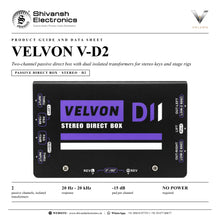
VELVON V-D2 passive 2-channel DI box: dual isolated transformers, -15 dB pads, ground lift and phase per channel, XLR + thru. Available in India from Shivansh Electronics, Kolkata, West Bengal, India.
VISUAL GUIDE — See Every Photo, Spec & Setup Step (PDF)
The price shown is the MAXIMUM RETAIL PRICE (MRP), inclusive of all taxes. For the best price, exclusive offers and discounted rates, delivery timelines, or any other information, please DM us or call +91 89818 07755 / +91 91477 00677. We will gladly share an exclusive coupon code that you can apply at checkout. All payments are processed securely through Razorpay, our trusted payment gateway partner.
Specifications
| Type | Passive direct box, stereo |
| Isolation | Dual isolated transformers |
| Frequency response | 20 Hz - 20 kHz |
| Pads | Dual -15 dB |
| Switches | Independent ground lift and phase |
| Outputs | Dual XLR |
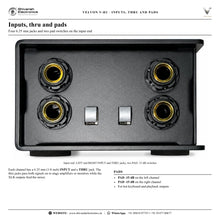
| Thru | Dual 6.35 mm (1/4 inch) |
| Power | None required |
Product overview
The VELVON V-D2 is a passive 2-channel DI box with galvanic isolation for stage rigs and stereo keyboards.
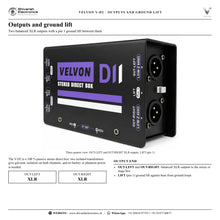
Two isolated transformers carry two channels from 20 Hz to 20 kHz without any power. Each channel has its own -15 dB pad, ground lift and phase switch, an XLR output and a 6.35 mm (1/4 inch) thru jack.
| Passive channels | 2 |
| Response | 20 Hz - 20 kHz |
| Pad per channel | -15 dB |
| Required | No power |
Key features
- Dual isolated transformers
- 20 Hz - 20 kHz
- Dual -15 dB pads
- Independent ground lift and phase switches
- Dual XLR outputs and dual 6.35 mm thru jacks
- 100 % passive
Made for
- Stereo keyboard workstations
- Dual acoustic instruments
- DJ consoles
- Playback rigs
In the box
- V-D2 DI box
VELVON V-D2: frequently asked questions
Does the V-D2 need power?
No. It is 100 % passive.
Can the two channels be set separately?
Yes: pad, ground lift and phase are on each channel.
Where can I buy the VELVON V-D2 in India?
The VELVON V-D2 is available from Shivansh Electronics, Kolkata, West Bengal, India, with delivery across India.
Workflow 1: Stereo keyboard
Keyboard players.
Connections
| Connect | To |
|---|---|
| Keyboard left / right | V‑D2 channel 1 / 2 |
| V‑D2 XLR outputs | Mixer |
| Thru jacks | Keyboard amplifier |
Setup
- Connect left and right.
- Send the XLR outputs to the mixer.
- Feed an on-stage amplifier from the thru jacks if needed.
Tip: Use the pads for hot line outputs.
Workflow 2: DJ console or playback rig
DJs and playback operators.
Connections
| Connect | To |
|---|---|
| Console / player outputs | V‑D2 inputs |
| XLR outputs | Stage box |
Setup
- Connect the stereo output.
- Run the XLR outputs to the stage box.
- Switch LIFT (pin 1) if a hum appears.
Tip: Galvanic isolation on both channels.
Workflow 3: Two acoustic instruments
Duos and multi-instrumentalists.
Connections
| Connect | To |
|---|---|
| Instrument 1 | V‑D2 left input |
| Instrument 2 | V‑D2 right input |
| XLR outputs | Mixer |
Setup
- Connect one instrument per channel.
- Set each pad as needed.
- Send both XLR outputs to the mixer.
Tip: Each channel has its own transformer.
Workflow 4: Hum from a laptop or console
Engineers.
Connections
| Connect | To |
|---|---|
| Stereo source | V‑D2 inputs |
| XLR outputs | Stage box |
Setup
- Connect the source.
- Switch LIFT (pin 1) if a hum appears.
- Check both channels again.
Tip: No batteries or phantom power needed.
Workflow 5: Polarity per channel
Engineers.
Connections
| Connect | To |
|---|---|
| V‑D2 outputs | Mixer |
Setup
- Listen to each channel with the rest of the mix.
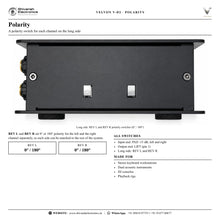
- Flip REV L or REV R where the sound gets thin.
- Keep the fullest setting.
Tip: REV L and REV R work separately.
Workflow 6: Feeding the stage and the mixer
Keyboard players with an amplifier.
Connections
| Connect | To |
|---|---|
| Keyboard left / right | V‑D2 inputs |
| THRU jacks | Keyboard amplifier |
| XLR outputs | Mixer |
Setup
- Connect the keyboard.
- Feed the amplifier from the thru jacks.
- Run the XLR outputs to the mixer.
Tip: Two thru jacks, one per channel.


