

XVIVE PX Portable 3-Channel Personal Mixer
MRP - Rs. 11,349
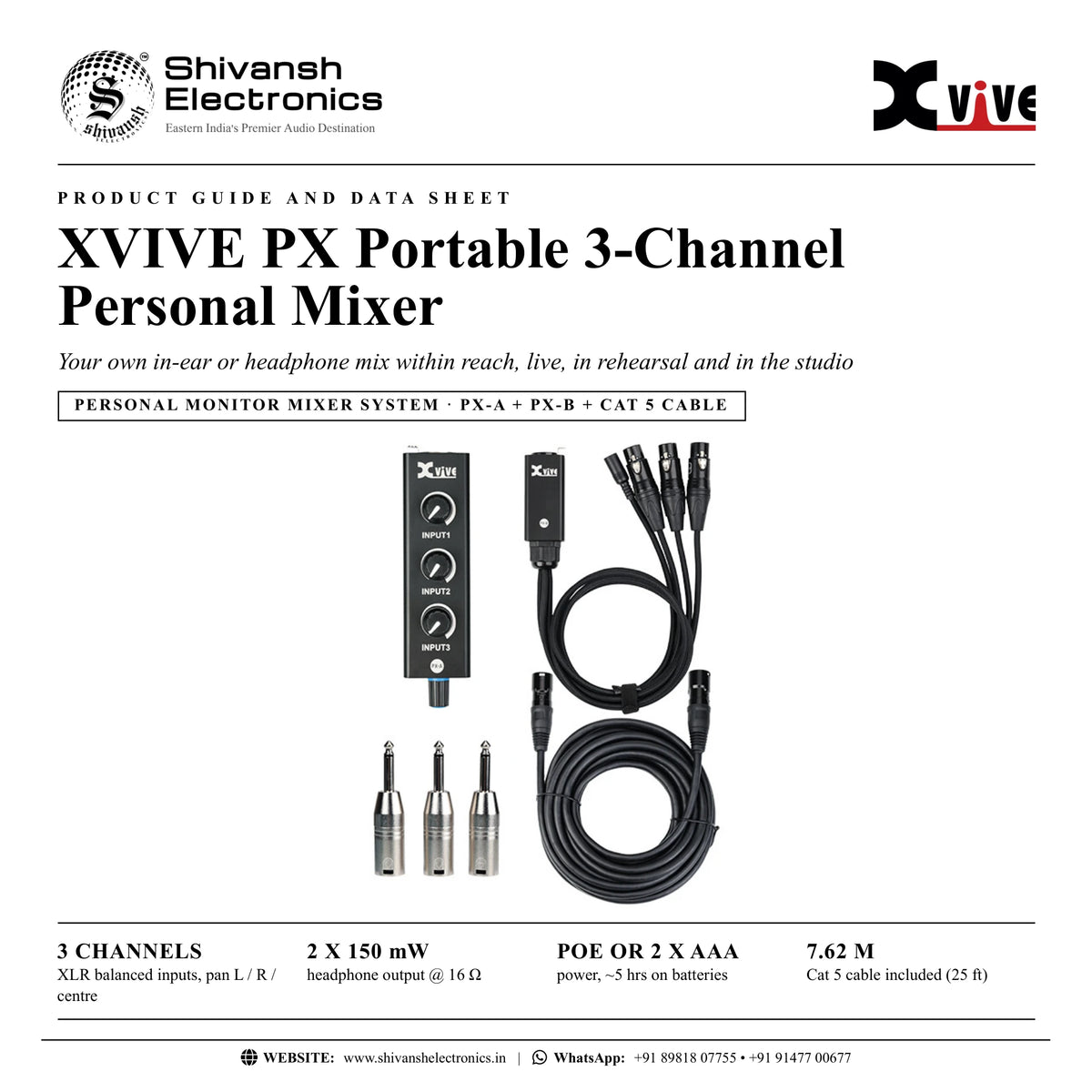
XVIVE PX System: 3-channel personal monitor mixer and headphone amp with PX-B snake and 7.62 m Cat 5 cable, PoE or AAA power. Available in India from Shivansh Electronics, Kolkata, West Bengal, India.
VISUAL GUIDE — See Every Photo, Spec & Setup Step (PDF)
The price shown is the MAXIMUM RETAIL PRICE (MRP), inclusive of all taxes. For the best price, exclusive offers and discounted rates, delivery timelines, or any other information, please DM us or call +91 89818 07755 / +91 91477 00677. We will gladly share an exclusive coupon code that you can apply at checkout. All payments are processed securely through Razorpay, our trusted payment gateway partner.
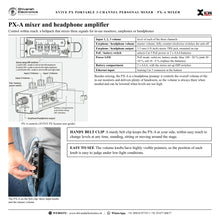
PX-A mixer / headphone amplifier
| Input type | XLR balanced, 3 channels (via the PX‑B snake and Cat 5) |
| Input impedance | 13.3 kΩ |
| Output type | 1/8 inch (3.5 mm) TRS, stereo |
| Max. output | 2 x 150 mW @ 16 Ω |
| Power input | PoE (Power over Ethernet) or 2 x AAA batteries |
| Battery life | ~5 hours |
| Current | ~210 mA |
| PoE power requirement | 9 V / 2 A centre‑negative, powers up to 5 PX‑A units; 9 V / 500 mA for one PX‑A |
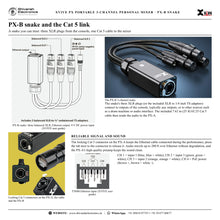
PX-B snake and cable
| PX‑B inputs | 3 balanced female XLR plugs (XLR to 1/4 inch TS adapters included) |
| PX‑B output | Cat 5 (Ethernet) |
| PX‑B power input | 9 V DC centre‑negative |
| Ethernet cable | EC25 Cat 5, 7.62 m / 25 ft included; up to 200 ft |
| Ethernet wiring | T568B: CH 1 = input 1, CH 2 = input 3, CH 3 = input 2, CH 4 = PoE power |
General
| Colour | Black |
| Not included | Power supply, AAA batteries |
Product overview
The XVIVE PX Portable 3-Channel Personal Mixer is a three-channel personal mixer and headphone amplifier system that lets singers and instrumentalists control their own in-ear or headphone mix.
Whether you perform live, rehearse with a band or record in a studio, you need to hear yourself and the other musicians, and you need control over what you hear. The PX-B snake takes three signals from the mixing console, one Cat 5 cable carries them together with power to the PX-A beltpack, and the PX-A lets you set the level of each channel, pan it left, right or centre and set the master volume for in-ear monitors, earphones or headphones.
| XLR balanced inputs | 3 channels |
| Output @ 16 Ω | 2 x 150 mW |
| Power | PoE or 2 x AAA |
| Cat 5 cable included (25 ft) | 7.62 m |
Key features
- 3-channel mixer and headphone amplifier for personal in-ear monitoring
- Ultra-compact beltpack with a sturdy belt clip and an ultra-rugged metal chassis
- One Cat 5 cable carries three audio channels and 9 V Power over Ethernet, up to 200 ft
- Three balanced female XLR plugs connect to the console or other audio devices
- DIP switches pan each channel left, right or both
- PoE or 2 x AAA batteries (up to 5 hours), with a battery LED
- Locking Cat 5 connector keeps the cable in place during the show
- Expandable to five performers with the PX-H hub
Control within reach
The PX-A is a beltpack that accepts three audio signals, lets you mix them however you like and passes the mix to your in-ear monitors, earphones or headphones through its 3.5 mm stereo output. Its master volume knob also switches the unit off when turned fully counter-clockwise, and the knobs have highly visible pointers for low-light stages.
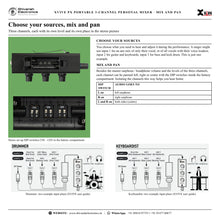
Choose your sources
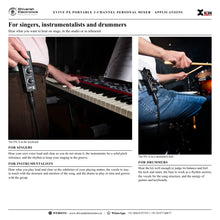
A singer might use input 1 for an aux mix of only their vocal, or all vocals with their voice loudest; input 2 for guitar and keyboards; input 3 for bass and kick drum. Drummers, keyboard players and other instrumentalists build their own three-channel plan the same way.
A snake you can trust
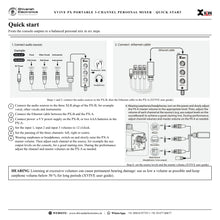
The PX-B snake's three XLR plugs, or the included XLR to 1/4 inch TS adapters, connect to console outputs, typically aux outputs, or to other sources such as a drum machine or audio interface. The included 7.62 m (25 ft) EC25 Cat 5 cable sends the audio to the PX-A; the Ethernet cable can be up to 200 ft long.
Power options
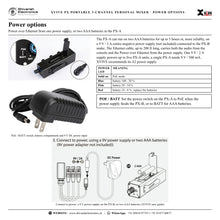
The PX-A runs on two AAA batteries for up to 5 hours or, more reliably, on a 9 V / 2 A centre-negative power supply (not included) connected to the PX-B; the Ethernet cable then carries both audio and Power over Ethernet. One 9 V / 2 A supply powers up to five PX-A units.
Expand for a band
For up to five people, add the PX-H 5-channel hub: each band member needs their own PX-A and Ethernet cable, while one PX-B snake and one power supply feed the hub and power all connected mixers.
In the box
- One PX-A mixer / headphone amplifier
- One PX-B 3-channel snake
- One EC25 Cat 5 cable, 7.62 m (25 ft)
- Three balanced XLR to unbalanced 1/4 inch TS adapters
FAQs
What does the PX System include?
One PX-A mixer / headphone amplifier, one PX-B snake, one 7.62 m (25 ft) Cat 5 cable and three balanced XLR to unbalanced 1/4 inch TS adapters. The power supply and AAA batteries are not included.
Can each channel be panned?
Yes: DIP switches inside the PX-A battery compartment send each channel to the left earphone, the right earphone or both.
How many performers can use one snake?
With the PX-H hub, one PX-B snake and one 9 V / 2 A power supply feed up to five PX-A mixers; several hubs can be stacked for larger groups.
How is the PX-A powered?
By Power over Ethernet from a 9 V / 2 A supply on the PX-B, or by two AAA batteries for about 5 hours, selected with the PoE / BATT switch.
Where can I buy the XVIVE PX Portable 3-Channel Personal Mixer in India?
The XVIVE PX Portable 3-Channel Personal Mixer is available from Shivansh Electronics, Kolkata, West Bengal, India, with delivery across India.
Workflow 1: Basic setup for a singer
Lead singers on stage.
Connections
| Connect | To |
|---|---|
| Console direct out (own vocal) | PX‑B input 1 |
| Aux 1 (keys and guitar) | PX‑B input 2 |
| Aux 2 (blend of other vocals) | PX‑B input 3 |
| PX‑B Cat 5 | PX‑A |
Setup
- Connect the three console outputs to the PX-B.
- Connect the EC25 cable between the PX-B and the PX-A.
- Set the three input volumes to 12 o'clock, then raise the master volume slowly.
- Balance the source levels on the console.
Tip: Use the XLR to 1/4 inch TS adapters for 1/4 inch aux outputs.
Workflow 2: Two performers, two PX systems
A lead singer and a backing vocalist or guitarist.
Connections
| Connect | To |
|---|---|
| Separate direct outs and aux sends | Each performer's PX‑B |
| Each PX‑B | Its own PX‑A |
Setup
- Give each performer their own three sends.
- Connect each PX system separately.
- Each performer sets their own levels and panning.
Tip: Instruments can sit on the left and voices on the right with the DIP switches.
Workflow 3: A whole band through the PX-H hub
Bands of up to five people.
Connections
| Connect | To |
|---|---|
| Three console outputs | PX‑B |
| PX‑B Cat 5 | PX‑H input |
| PX‑H outputs 1‑5 | Up to five PX‑A |
Setup
- Connect one 9 V / 2 A power supply to the PX-B.
- Run the PX-B Cat 5 output to the PX-H.
- Connect each PX-A to a hub output with its own Ethernet cable.
- Each player sets their own mix.
Tip: PX-H and the extra PX-A units are sold separately.
Workflow 4: Drummer's personal mix
Drummers.
Connections
| Connect | To |
|---|---|
| Kick drum direct out | Input 1 |
| Aux 1 (bass, guitar, keys or backing track) | Input 2 |
| Aux 2 (click track) | Input 3 |
Setup
- Plan the three channels with the engineer.
- Connect the PX-B and PX-A.
- Pan or balance the click against the band.
Tip: XVIVE's user guide shows these two drummer input plans.
Workflow 5: Keyboard player's mix
Keyboardists.
Connections
| Connect | To |
|---|---|
| Main keyboard direct out or all keyboards | Input 1 |
| Aux (bass, guitar) | Input 2 |
| Aux (all keyboards or backing tracks) | Input 3 |
Setup
- Send the three mixes from the console.
- Connect and power the system.
- Adjust the three levels on the PX-A during the show.
Tip: The belt clip keeps the PX-A within reach while playing.
Workflow 6: Recording in a studio
Singers in a vocal booth.
Connections
| Connect | To |
|---|---|
| Audio interface outputs (control room) | PX‑B |
| PX‑B Cat 5 | PX‑A in the vocal booth |
Setup
- Place the PX-B in the control room at the interface.
- Run the Cat 5 cable to the booth.
- The singer controls the blend of vocal, music and click.
Tip: A perfect monitor mix in the booth, controlled by the singer.