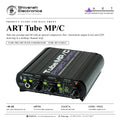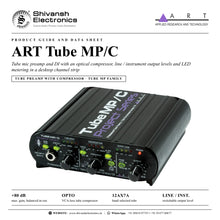
ART Tube MP/C
MRP - Rs. 20,326
ART Tube MP/C tube mic preamp and DI with optical compressor: up to 80 dB gain, 12AX7a, transformer isolated XLR out, line / instrument output, LED meters. Available in India from Shivansh Electronics, Kolkata, West Bengal, India.
VISUAL GUIDE — See Every Photo, Spec & Setup Step (PDF)
The price shown is the MAXIMUM RETAIL PRICE (MRP), inclusive of all taxes. For the best price, exclusive offers and discounted rates, delivery timelines, or any other information, please DM us or call +91 89818 07755 / +91 91477 00677. We will gladly share an exclusive coupon code that you can apply at checkout. All payments are processed securely through Razorpay, our trusted payment gateway partner.
Specifications
| Inputs | XLR balanced or 1/4 inch unbalanced |
| Outputs | 1/4 inch unbalanced; XLR balanced, transformer isolated |
| Input impedance | 1 MΩ (1/4 inch); 5 kΩ (XLR) |
| Output impedance | < 600 Ω (1/4 inch); < 300 Ω (XLR) |
| Maximum input level | +15 dBu unbalanced (instrument); +10 dBu balanced (mic) |
| Maximum output level | +19 dBu (line mode) |
| Maximum gain | +80 dB (balanced in‑out); +64 dB (unbalanced input, balanced output) |
| Frequency response | 30 Hz - 60 kHz ±1 dB balanced output; 20 Hz - 60 kHz ±1 dB 1/4 inch output |
| Total harmonic distortion | < 0.1 % at max. gain |
| Equivalent input noise | -128 dBu typical (A‑weighted, shorted XLR balanced input, gain at max.) |
| CMRR | > 60 dB at max. gain |
| Phantom power | Selectable, +48 V DC, filtered, current limited |
| Tube | 12AX7a, hand selected |
Compressor
| Type | Optical (VCA‑less), soft knee, bypassable |
| Slope | 2:1 (comp.) / 11:1 (limit) |
| Attack time | < 1 ms (limit), 20 ms (comp.) |
| Release time | 150 ms (Fast); 20 ms - 3 s, program dependent (Auto) |
| Low cut filter | -3 dB at 70 Hz, 6 dB / octave |
Power and physical
| Power requirements | 9 V AC at 1000 mA (external), product page |
| Power supply (owner's manual) | Universal adaptor: input 100‑240 V AC, 50/60 Hz; output 12 V DC at ≥ 800 mA |
| Chassis | All aluminium, black anodised, with integral rubber sides |
| Dimensions (H x W x D) | 4.45 x 15.0 x 16.5 cm (1.75 x 5.9 x 6.5 inch) |
| Weight | 1.32 kg (2.9 lb) |
Product overview
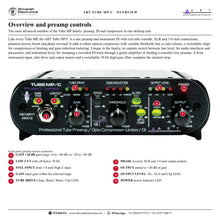
The ART Tube MP/C is the most advanced member of the Tube MP family: a tube mic preamp and instrument DI with an optical compressor, switchable line / instrument output level and LED metering in a desktop format.
Like every Tube MP, it is a mic preamp and instrument DI with real tube warmth, XLR and 1/4 inch connections, phantom power, boost and phase reversal. It also has a robust compressor: when engaged it offers variable threshold, switchable fast or auto release, a switchable slope for compression or limiting ratios and gain reduction metering. Unique among the Tube MP family, the outputs switch between line level, typically used with audio interfaces and signal processors, and instrument level, for sending a recorded DI track back to a guitar amplifier for reamping or for connecting the XLR output to a console's mic preamp. A front instrument input, tube drive and output level meters and a switchable 70 Hz high-pass filter complete a compact channel strip.
| Maximum gain, balanced in‑out | +80 dB |
| VCA‑less tube compressor | Opto |
| Hand selected tube | 12AX7a |
| Dynamic range | > 90 dB |
Key features
- Tube-based mic / line preamplifier with up to 80 dB of gain
- Hand selected 12AX7a tube
- Optical (VCA-less) compressor for transparent dynamics control, bypassable
- XLR balanced and 1/4 inch unbalanced inputs and outputs
- Transformer isolated XLR output
- Selectable output range for line / instrument interface levels
- LED meters for tube warmth, gain reduction and output level
- +48 V phantom power and phase reversal
- Selectable release time settings
- Custom extruded aluminium chassis
Preamp and tube drive
The Gain control covers +0 to +40 dB, or +20 to +60 dB with the +20 dB switch. The 12AX7a second stage adds 20 dB and is designed to overload before the input or output stage, so the tube gain can be used for different sonic results. The four-LED Tube Drive display shows Clean, two Warm steps and Clip; ART calls the second Warm LED the sweet spot. The Low Cut switch rolls off below 70 Hz to remove rumble and wind noise before amplification.
Optical compressor
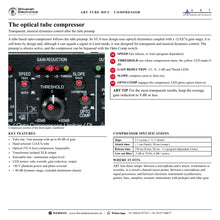
The compressor uses optical electronics coupled with a 12AX7a gain stage and is soft knee by design. Threshold sets where it acts; the Slope switch selects compression (2:1) or limiting (11:1); Speed selects a fast (150 ms) or program dependent auto release (20 ms - 3 s). The Gain Reduction display shows the amount of compression; ART suggests keeping the average gain reduction to 9 dB or less for the most transparent results. The Opto Comp switch bypasses the compressor.
Outputs
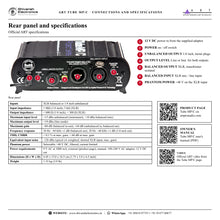
The XLR output is transformer isolated (pin 1 floats), so it can feed a second system without ground loops while the 1/4 inch output is in use. The rear Output switch sets Line (more gain and maximum output) or Inst. (for instrument inputs or a console mic input) for both jacks; the Output control gives up to +20 dB of gain.
In the box
- Tube MP/C tube preamp and compressor
- Power adaptor with four plug clips (stated in the owner's manual)
ART Tube MP/C: frequently asked questions
Can I use the Tube MP/C for reamping?
Yes. Connect the line output of the recording gear to the instrument input, set the Output switch to Inst. and connect either output to the guitar amplifier.
Can the compressor be switched off?
Yes. Releasing the Opto Comp switch bypasses the compressor; the preamp stays active.
How is it powered?
By an external supply. The product page states 9 V AC at 1000 mA; the 2021 owner's manual describes a universal 100-240 V AC adaptor with 12 V DC output, and the rear panel is marked 12 V DC.
Where can I buy the ART Tube MP/C in India?
The ART Tube MP/C is available from Shivansh Electronics, Kolkata, West Bengal, India, with delivery across India.
Workflow 1: Vocal recording with gentle compression
Home and project studios.
Connections
| Connect | To |
|---|---|
| Microphone | XLR balanced input |
| Balanced output (Line) | Audio interface line input |
Setup
- Set Gain until the second Warm LED lights.
- Engage Opto Comp, turn Threshold down until the yellow LED lights, then adjust.
- Use Fast release for vocals and set the Output.
Tip: Keep the average gain reduction to 9 dB or less for the most transparent results.
Workflow 2: Reamping a recorded DI track
Guitarists and producers.
Connections
| Connect | To |
|---|---|
| Recording gear line out | Tube MP/C instrument input |
| Tube MP/C output (Inst.) | Guitar amplifier input |
Setup
- Set the rear Output switch to Inst.
- Connect either output to the amplifier and mic the amplifier.
- Record the reamped signal.
Tip: The instrument level output suits guitar amplifier inputs.
Workflow 3: DI to a console and an amplifier
Bass and guitar players on stage.
Connections
| Connect | To |
|---|---|
| Instrument | Front instrument input |
| XLR output | Console |
| 1/4 inch output | Amplifier |
Setup
- Use both outputs at the same time.
- Set Gain and Output with the meters.
Tip: The transformer isolated XLR output avoids ground loops between the two systems.
Workflow 4: Feeding a console's mic input
Live and studio mixers without line inputs to spare.
Connections
| Connect | To |
|---|---|
| XLR output | Console mic input |
Setup
- Set the Output switch to Inst.
- Keep the Output control low.
Tip: Inst. mode lowers the output noise and prevents overloading the console's mic preamp.
Workflow 5: Limiting bass or digital recording peaks
Situations where a set level must not be exceeded.
Connections
| Connect | To |
|---|---|
| Source | Tube MP/C input |
Setup
- Engage Opto Comp and set Slope to Limit.
- Use Auto release for material with varying dynamics.
Tip: Limit gives an 11:1 slope with an attack under 1 ms.
Workflow 6: Adding tube warmth to tracks
Mixing and mastering.
Connections
| Connect | To |
|---|---|
| Interface or mixer output | Tube MP/C instrument input |
| Tube MP/C output | Line return |
Setup
- Set the gain for the desired warmth on the Tube Drive display.
- Match the level with the Opto Comp on and off for unity gain.
Tip: Low noise and variable gain and output make it useful for level matching in post-production.