ART Tube MP
MRP - Rs. 10,725
ART Tube MP tube mic preamp and DI: hand selected 12AX7A tube, up to 79 dB gain, +48 V phantom, +20 dB and phase switches, XLR and 1/4 inch I/O. Available in India from Shivansh Electronics, Kolkata, West Bengal, India.
VISUAL GUIDE — See Every Photo, Spec & Setup Step (PDF)
The price shown is the MAXIMUM RETAIL PRICE (MRP), inclusive of all taxes. For the best price, exclusive offers and discounted rates, delivery timelines, or any other information, please DM us or call +91 89818 07755 / +91 91477 00677. We will gladly share an exclusive coupon code that you can apply at checkout. All payments are processed securely through Razorpay, our trusted payment gateway partner.
Specifications
| Inputs | XLR (balanced), 1/4 inch TS |
| Outputs | XLR (balanced), 1/4 inch TS |
| Input impedance | 2 kΩ (XLR); 840 kΩ (1/4 inch) |
| Output impedance | 600 Ω (XLR); 300 Ω (1/4 inch) |
| Maximum input level | +14 dBu (XLR); +22 dBu (1/4 inch) |
| Maximum output level | +28 dBu (XLR); +22 dBu (1/4 inch) |
| Maximum gain | 79 dB XLR to XLR; 64 dB XLR to 1/4 inch; 60 dB 1/4 inch to XLR; 54 dB 1/4 inch to 1/4 inch (typical) |
| Frequency response | 10 Hz to 30 kHz, ±0.5 dB |
| Total harmonic distortion | < 0.1 % (typical) |
| Equivalent input noise | -129 dBu XLR to XLR; -105 dBu 1/4 inch to 1/4 inch (A‑weighted) |
| CMRR | > 75 dB (typical at 1 kHz) |
| Dynamic range | > 100 dB (20 Hz - 20 kHz) typical |
| Tube | 12AX7A, dual triode, hand selected |
Power and physical
| Power requirements | 9 V AC at 0.8 A (typ.), external adaptor |
| Dimensions (H x W x D) | 5.08 x 13.97 x 12.7 cm (2.0 x 5.5 x 5.0 inch) |
| Weight | 0.68 kg (1.5 lb) |
| Construction | All steel chassis |
Product overview
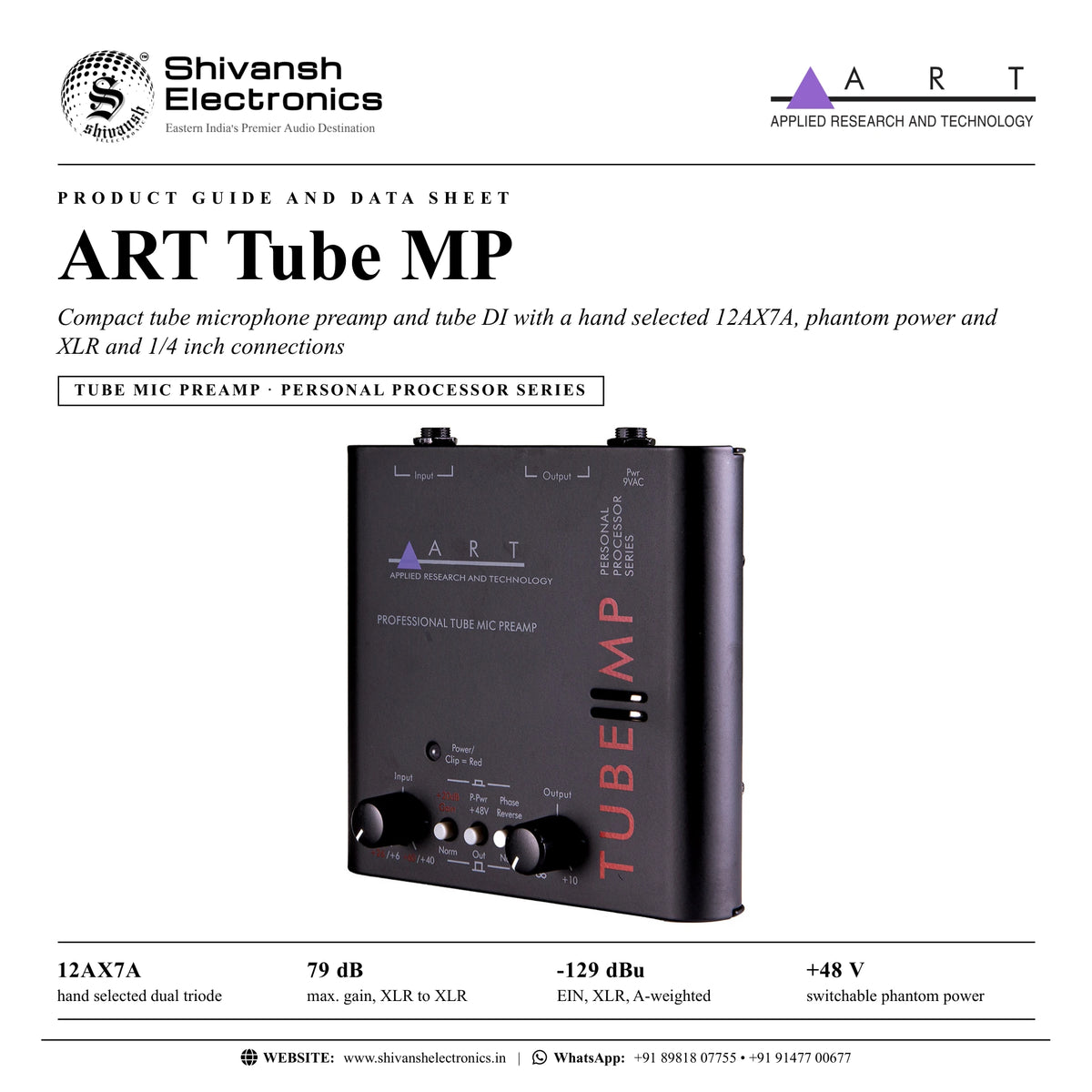
The ART Tube MP is a compact tube microphone preamp and tube DI with a hand selected 12AX7A tube, XLR and 1/4 inch connections, phantom power, boost and phase reversal.
First released in 1995, the Tube MP made the warmth of a real tube preamp accessible to recording musicians. It extends the functionality of an audio interface with a different character from its onboard mic preamps: with a genuine 12AX7 tube and up to 60 dB of input gain it can add harmonics and gentle saturation to help a track stand out, or more aggressive colour for creative effects. It is also a direct box that adds fullness to any instrument for thick, round tones. Compact and easy to use, it has variable input and output gain and switches for phantom power, boost and phase reversal, in a portable all steel chassis.
| Hand selected dual triode | 12AX7A |
| Maximum gain, XLR to XLR | 79 dB |
| Equivalent input noise (XLR, A‑weighted) | -129 dBu |
| Frequency response, ±0.5 dB | 10 Hz - 30 kHz |
Key features
- Preamplification for microphones, instruments and line level sources
- Hand selected 12AX7A tube for a smooth, warm and full sound
- Variable input and output gain controls
- +20 dB gain switch, +48 V phantom power and phase reverse
- Power / clip LED
- XLR and 1/4 inch inputs and outputs
- Excellent as a tube DI
- Portable, all steel construction
Hybrid tube design
The Tube MP circuit is a hybrid of solid-state and tube technology. Its transformerless design keeps signal integrity high and noise low; the active balanced input uses a multiple paired transistor / op amp design for low noise and excellent CMRR, and the instrument input has a high impedance so that it does not load the connected device. Phantom power is derived from the incoming AC voltage.
Controls
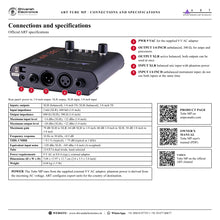
The Input control covers +6 to +40 dB, or +26 to +60 dB with the +20 dB Gain switch pressed (red markings). The Output control adds up to +10 dB on top of the input gain. The Power / Peak LED lights green when the unit is on and red when the signal is 6 dB below hard clipping at the tube's output. The P-Pwr switch applies +48 V to pins 2 and 3 of the XLR input, and the Phase Reverse switch inverts the output signal, for example when a multi-microphone sound is thin or out of position.
Connections
All connections are on the back. The balanced XLR input is for microphones and carries phantom power; the unbalanced 1/4 inch input is for instruments (do not use both inputs at the same time). The active balanced XLR output and the unbalanced 300 Ω 1/4 inch output can be used together. The unit runs from the supplied 9 V AC adaptor.
In the box
- Tube MP tube preamp
- 9 V AC power adaptor (supplied, as stated in the owner's manual)
ART Tube MP: frequently asked questions
Can I use the Tube MP as a DI box?
Yes. Plug the instrument into the 1/4 inch input; ART names acoustic and piezo pickups and any instrument feeding a console, amplifier, processor or recorder.
Does it supply phantom power?
Yes, switchable +48 V phantom power on the XLR input.
How much gain does it have?
Up to 79 dB from XLR to XLR (typical); the input control alone gives up to +60 dB with the +20 dB switch.
How is it powered?
By the supplied external adaptor: 9 V AC at 0.8 A (typ.); ART configures export units for the country of destination.
Where can I buy the ART Tube MP in India?
The ART Tube MP is available from Shivansh Electronics, Kolkata, West Bengal, India, with delivery across India.
Workflow 1: Tube colour in front of an audio interface
Home and project studios adding a character preamp.
Connections
| Connect | To |
|---|---|
| Microphone | Tube MP XLR input |
| Tube MP XLR output | Audio interface line input |
Setup
- Press P-Pwr +48V for a condenser microphone.
- Press +20 dB Gain for microphone level and set the Input control.
- Set the Output control for a healthy level into the interface.
Tip: If the Power / Clip LED stays red, reduce the Input control.
Workflow 2: Tube DI for guitar or bass
Players recording or playing direct.
Connections
| Connect | To |
|---|---|
| Instrument | Tube MP 1/4 inch input |
| Tube MP XLR output | Console or interface input |
Setup
- Connect the instrument to the 1/4 inch input only.
- Set the input gain range and Output level.
Tip: Do not use both inputs at the same time.
Workflow 3: Acoustic or piezo pickup preamp
Acoustic players on stage or in the studio.
Connections
| Connect | To |
|---|---|
| Acoustic or piezo pickup | Tube MP 1/4 inch input |
| Tube MP output | Console, amplifier, processor or recorder |
Setup
- Plug in the pickup and set the Input control.
- Send the XLR or 1/4 inch output to the next stage.
Tip: The instrument input's high impedance does not load the connected device.
Workflow 4: Feeding an amplifier and a recorder together
Users who need two outputs.
Connections
| Connect | To |
|---|---|
| Tube MP 1/4 inch output | Amplifier or processor |
| Tube MP XLR output | Recorder or console |
Setup
- Connect both outputs.
- Set the level with the Output control.
Tip: ART states that both outputs may be used at the same time.
Workflow 5: Adding saturation to a track
Producers shaping vocals and instruments.
Connections
| Connect | To |
|---|---|
| Source | Tube MP input |
| Tube MP output | Recording input |
Setup
- Raise the Input control for more drive into the tube.
- Balance the result with the Output control.
Tip: The clip LED lights 6 dB below hard clipping at the tube's output.
Workflow 6: Correcting phase between microphones
Multi-microphone recordings.
Connections
| Connect | To |
|---|---|
| Microphone | Tube MP XLR input |
Setup
- If the sound is thin or out of position, press Phase Reverse.
- Compare with the switch out.
Tip: Mic placement can affect the phase of the signals in multi-microphone setups.