


ECLER PLAYER ONE
PRICE ON ENQUIRY
ECLER PLAYER ONE compact streaming audio player: USB, microSD, Internet radio, DLNA and AirPlay, LCD display, 2 GPI, web set-up. Available in India from Shivansh Electronics, Kolkata, West Bengal, India.
VISUAL GUIDE — See Every Photo, Spec & Setup Step (PDF)
PRICE ON ENQUIRY. For the price, exclusive offers, delivery timelines, or any other information, please DM us or call +91 89818 07755 / +91 91477 00677. We will gladly share a personalised quotation for Shivansh Electronics, Kolkata, West Bengal, India. All payments are processed securely through Razorpay, our trusted payment gateway partner.
Audio and player
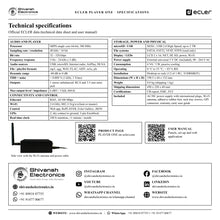
| Processor | MIPS single core 64‑bit, 580 MHz |
| Sampling rate | 48 kHz |
| Resolution | 16 bit |
| Bit rate | 32 - 320 kbps |
| Frequency response | 5 Hz - 24 kHz (-3 dB) |
| Audio sources | Local storage (USB and microSD), Internet radio, AirPlay, DLNA |
| File formats | mp3, ogg, WAV, FLAC, AIFF |
| Playlist formats | m3u, pls |
| Dynamic range | -80 dB to 0 dB |
| THD + noise | < 0.008 % (1 kHz, 1 Vrms) |
Outputs and connectivity
| Outputs | 1 stereo unbalanced output: 2 x RCA and 3.5 mm mini‑jack |
| Max output level | 6 dBV / 5 kΩ |
| Output impedance | 460 Ω |
| Ethernet | RJ45, 10/100 Mbps |
| Wi‑Fi | 2.4 GHz, 802.11 b/g/n |
| Programming and control | Web application, RePLAYER, Ecler Gallery |
| Third‑party integration | JSON |
| GPIs | 2 ports, dry contact to ground, 3‑pin terminal block |
| Real‑time clock | 240 h retention, ±1 minute / month accuracy |
Front panel and storage
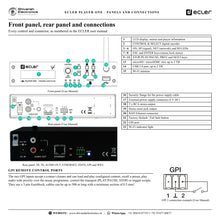
| Display | LCD alphanumeric 2 x 16 cells |
| LED indicators | Front: NET, SP, SD, power; rear: Wi‑Fi |
| Buttons | Front: encoder, ENTER, ESC, PLAY/PAUSE, NEXT, PREV, STOP; rear: Factory Defaults / Fail Safe (pin‑hole) |
| microSD | Front slot, SDXC supported |
| USB | Front USB 2.0 High Speed (480 Mbps) |
| Capacity | Up to 2 TB |
| File systems | FAT16, FAT32, VFAT, NTFS (read‑only) |
Power and physical
| Power supply | External universal 5 V DC (included) |
| AC mains | 90 - 264 V AC, 50 - 60 Hz; international plug set |
| Power consumption | 6 VA / 3 W |
| Ventilation | Passive |
| Operating temperature | 0 °C to 35 °C |
| Operating humidity | < 85 % RH |
| Storage temperature | -10 °C to 50 °C |
| Installation | Desktop, rack (1/2 of 1 RU) |
| Optional accessory | 1UHRMKIT |
| Dimensions (W x H x D) | 198.5 x 44 x 132 mm |
| Weight | 0.8 kg |
| Shipping dimensions | 450 x 220 x 60 mm |
| Shipping weight | 1 kg |
| Certifications | CB report, EMC, FCC |
Product overview
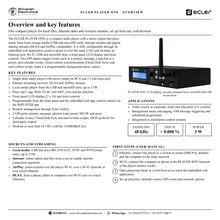
The ECLER PLAYER ONE is a compact streaming and media audio player with a stereo output that plays music from USB and microSD storage, Internet streams and DLNA or AirPlay streams, with a front panel LCD display and local controls.
PLAYER ONE is fully configurable through the web application embedded in the unit, point-to-point or over the same LAN, with no software to install. It connects by Ethernet or Wi-Fi, plays mp3, ogg, WAV, FLAC and AIFF files and m3u or pls playlists, and its two GPI inputs trigger priority messages, playlists, presets or mute. Calendar events, Cloud Disk Sync content synchronisation, user-written scripts and the JSON protocol make it a programmable music source for shops, offices, schools and hospitality venues. It stands on a desk or takes half of a 1 RU rack space with the 1UHRMKIT kit.
| USB and microSD media | 2 TB |
| Sampling rate | 48 kHz |
| Event trigger inputs | 2 x GPI |
| Power consumption | 3 W |
Key features
- Single-deck audio player with stereo output on RCA and 3.5 mm mini-jack
- Internet streaming receiver for online radios and server files
- DLNA and AirPlay streams from phones, tablets and computers
- Local media from the USB 2.0 and microSD slots, up to 2 TB
- Front panel LCD display (2 x 16) with encoder and transport keys
- Embedded web app, RePLAYER app remote control and Ecler Gallery remote management
- 2 GPI ports for priority messages, playlist load, preset activation and MUTE
- Calendar events, Cloud Disk Sync and user-written scripts
- JSON protocol for third-party control systems
- Desktop or rack (half of 1 RU with the 1UHRMKIT)
Every source in one compact unit
PLAYER ONE plays local files from USB drives and microSD cards (FAT16, FAT32, VFAT and NTFS read-only, up to 2 TB), online radios and files from a server, and wireless streams. AirPlay works point-to-point over the player's own Wi-Fi, over a Wi-Fi network or over wired Ethernet; DLNA works over Wi-Fi.
Set up from a web browser
Connect the player to a router by Ethernet (DHCP by default) or join its PLAYER-WIFI network, then open playerone.local/ in a browser. The embedded web application configures advanced options, playlists, calendar events, scripts and the GPI events, and controls basic functions remotely.
Events and automation
Two GPI inputs accept contact closures to load and play content, recall a preset, play audio with priority over the music programme or control the transport. Calendar events, cloud content synchronisation and user-written scripts automate playback, and a real-time clock keeps time for 240 hours without power.
In the box
- 1 x PLAYER ONE audio player
- 1 x AC/DC power supply (5 V DC) with international plugs
- 1 x Wi-Fi antenna
- Adhesive rubber feet
- Rack tray screws
- 1 x GPI connector
- 1 x warranty card
- 1 x user guide
ECLER PLAYER ONE: frequently asked questions
Which sources can the PLAYER ONE play?
USB drives and microSD cards up to 2 TB, Internet radio and server files, and DLNA and AirPlay streams.
Which audio formats are supported?
mp3, ogg, WAV, FLAC and AIFF files, and m3u and pls playlists.
How do I configure it?
Through the web application embedded in the unit, opened in a browser over Ethernet or Wi-Fi, or from the front panel LCD and keys.
Can it be rack mounted?
Yes. It takes half of a 1 RU rack space with the optional 1UHRMKIT rack mount kit, or stands on a desk.
Where can I buy the ECLER PLAYER ONE in India?
The ECLER PLAYER ONE is available from Shivansh Electronics, Kolkata, West Bengal, India, with delivery across India.
Workflow 1: Retail background music
A shop with scheduled music and recorded promotions.
Connections
| Connect | To |
|---|---|
| PLAYER ONE RCA output | Mixer amplifier line input |
| Ethernet port | Store network router |
Setup
- Load the music on a USB drive or microSD card, or choose online radio.
- Open playerone.local/ and build the playlists.
- Schedule the music and messages with calendar events.
- Set the output level on the amplifier.
Tip: Cloud Disk Sync keeps the content of several stores up to date from the cloud.
Workflow 2: Priority message on GPI
Venues that need a recorded announcement at the press of a button.
Connections
| Connect | To |
|---|---|
| Push button (contact closure) | GPI 1 terminal and ground |
| RCA output | Amplifier input |
Setup
- Wire the button to GPI 1 on the 3-pin Euroblock.
- In the web app, assign GPI 1 to play the message with priority.
- Test the button and set the message level.
Tip: GPI cables can be up to 500 m long with a minimum section of 0.5 mm².
Workflow 3: Wireless streaming in a café
Staff play music from a phone or tablet.
Connections
| Connect | To |
|---|---|
| Phone or tablet | PLAYER ONE Wi‑Fi (DLNA or AirPlay) |
| RCA output | Amplifier |
Setup
- Join the phone to the same Wi-Fi network as the player.
- Select the AIRPLAY or DLNA source on the front panel.
- Start playback from the phone.
Tip: DLNA works over Wi-Fi; AirPlay works over Wi-Fi or wired Ethernet.
Workflow 4: Corporate lobby and offices
Background music integrated with a building control system.
Connections
| Connect | To |
|---|---|
| Ethernet | Building network |
| Control system | JSON protocol over the network |
Setup
- Give the player a network address.
- Prepare playlists and presets in the web app.
- Let the control system recall presets via JSON.
Tip: Ecler Gallery allows remote management of the player.
Workflow 5: School bells and messages
Scheduled signals and announcements in education.
Connections
| Connect | To |
|---|---|
| RCA output | Paging amplifier input |
| Ethernet | School network |
Setup
- Store the bell sounds and messages on microSD.
- Create calendar events for each bell time.
- Check the real-time clock and NTP synchronisation.
Tip: The internal clock keeps time for up to 240 hours without power.
Workflow 6: Rack installation
A tidy equipment rack with the player beside the amplifiers.
Connections
| Connect | To |
|---|---|
| 1UHRMKIT | 19 inch rack, half of 1 RU |
| Mini‑jack or RCA output | Matrix or amplifier input |
Setup
- Fit the player in the 1UHRMKIT rack kit.
- Connect power, network and audio.
- Configure it from the web app.
Tip: Passive cooling and low consumption mean no forced ventilation is needed.


