


FONESTAR AS-6060
PRICE ON ENQUIRY
FONESTAR AS-6060 Hi-Fi stereo amplifier, 60 + 60 W RMS, Bluetooth/USB/FM player, 2 mic inputs with echo, remote control. Available in India from Shivansh Electronics, Kolkata, West Bengal, India.
VISUAL GUIDE — See Every Photo, Spec & Setup Step (PDF)
PRICE ON ENQUIRY. For the price, exclusive offers, delivery timelines, or any other information, please DM us or call +91 89818 07755 / +91 91477 00677. We will gladly share a personalised quotation for Shivansh Electronics, Kolkata, West Bengal, India. All payments are processed securely through Razorpay, our trusted payment gateway partner.
Amplifier
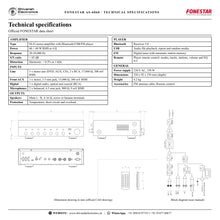
| Type | Hi‑Fi stereo amplifier with Bluetooth/USB/FM player |
| Power | 60 + 60 W RMS at 4 Ω |
| Response | 20‑20,000 Hz |
| S/N ratio | > 85 dB |
| Distortion | Harmonic: < 0.5% at 1 kHz |
Inputs
| Line | 3 x stereo aux (DVD, AUX, CD), 2 x RCA, 17,000 Ω, 300 mV RMS |
| Front AUX | 1 x stereo, 3.5 mm jack, 15,000 Ω, 300 mV RMS |
| Digital | 1 x digital audio, optical and coaxial (RCA) |
| Microphones | 2 x balanced, 6.3 mm jack, 900 Ω, 9 mV RMS |
Outputs and player
| Speakers | Main L / R, 4‑16 Ω, screw or banana terminals |
| Bluetooth | Receiver 5.0 |
| Player | USB player, FM radio, remote control |
| Protection | Temperature, short circuit and overload |
General
| Power supply | 230 V AC, 350 W |
| Dimensions | 330 x 92 x 276 mm (depth) |
| Weight | 4.2 kg |
| Accessories | FM antenna cable, Remote control |
Product overview
The FONESTAR AS-6060 is a Hi-Fi stereo amplifier, 60 + 60 W RMS at 4 Ω, with a Bluetooth/USB/FM player, two microphone inputs with echo and a remote control.
The AS-6060 has a unique FONESTAR design with high reliability and precision during playback. A brushed aluminium front and a high contrast LCD display give it an exceptional finish, and its stylish, practical design integrates into any furniture, at home or in professional use. Bluetooth, USB and FM playback plus LINE, DVD, CD, front AUX and a digital input for a TV make it highly versatile, and two microphone inputs turn it into a karaoke system. It suits homes, bars, pubs, restaurants, commercial premises and educational centres.
| At 4 Ω | 60 + 60 W RMS |
| Plus USB and FM | Bluetooth 5.0 |
| Echo, tone, volume | 2 mic inputs |
| S/N ratio | > 85 dB |
Key features
- Hi-Fi stereo amplifier, 60 + 60 W RMS at 4 Ω
- Bluetooth 5.0 receiver, USB player and FM radio
- Two microphone inputs with ECHO, MIC TONE and MIC VOL
- Digital audio input (optical and coaxial) to connect a TV, plus LINE, DVD, CD and front AUX inputs
- Bass, treble and balance controls
- Brushed aluminium front with high contrast LCD display
- Remote control of the player
- Outputs for 4-16 Ω loudspeakers, screw or banana terminals
- Protection against temperature, short circuit and overload
Multiple playback options
Select Bluetooth, USB, AUX or FM radio with MODE on the front or on the remote control. Bluetooth pairing is remembered, the USB player shows track and time with repeat and random modes, and the FM tuner stores stations automatically. In Bluetooth and USB modes the remote control also selects six equaliser presets (EQ 0-5).
Karaoke ready
Two balanced 6.3 mm microphone inputs are always mixed with the selected source without attenuating it. ECHO adds an echo or reverb effect, MIC TONE adjusts the microphone equalisation and MIC VOL sets their level.
Home or office
Connect one loudspeaker per channel at home or two per channel in an office, with 4-16 Ω loudspeakers on screw or banana terminals. BASS, TREBLE and BALANCE fine tune the sound.
Connect a TV
The CD - DIGITAL INPUT has optical and coaxial digital inputs and a selector: set it to DIGITAL to play the TV sound through the amplifier, or to CD for the analogue CD input.
In the box
- AS-6060 amplifier
- Remote control
- FM antenna cable
Available versions
- AS-6060: black
FONESTAR AS-6060: frequently asked questions
Does the AS-6060 have Bluetooth?
Yes. It has a Bluetooth 5.0 receiver, plus a USB player and an FM radio.
Can I connect my TV?
Yes. The digital audio input accepts optical or coaxial connections from a TV.
Can I use it for karaoke?
Yes. Two microphone inputs with echo, tone and volume controls play over the music without lowering it.
Which loudspeakers can I connect?
Passive loudspeakers of 4-16 Ω on the main L / R outputs; 60 + 60 W RMS at 4 Ω.
Is a remote control included?
Yes. The remote control changes modes, tracks, stations, volume and EQ presets.
Where can I buy the FONESTAR AS-6060 in India?
The FONESTAR AS-6060 is available from Shivansh Electronics, Kolkata, West Bengal, India, with delivery across India.
Workflow 1: Living room music
Music from a smartphone at home.
Connections
| Connect | To |
|---|---|
| Smartphone | Bluetooth |
| Two loudspeakers | Main L / R outputs |
Setup
- Connect one loudspeaker per channel.
- Select Bluetooth: the display shows BLUE.
- Pair the FONESTAR device on the phone.
- Set volume, BASS and TREBLE.
Tip: The amplifier recalls the last paired device.
Workflow 2: Karaoke night
Sing over your favourite songs.
Connections
| Connect | To |
|---|---|
| Two microphones | MIC 1 and MIC 2 |
| Music source | USB or Bluetooth |
Setup
- Connect both microphones.
- Start the music.
- Set MIC VOL, then add ECHO.
- Shape the voices with MIC TONE.
Tip: The microphones never lower the music.
Workflow 3: Bar or pub
Background music from the radio or a USB memory.
Connections
| Connect | To |
|---|---|
| FM antenna | FM input |
| Loudspeakers | 4‑16 Ω outputs |
Setup
- Connect the FM antenna.
- Long press play to store the stations.
- Choose stations with CH-/CH+ on the remote.
- Switch to USB for playlists.
Tip: Use the remote control from behind the bar.
Workflow 4: Office background sound
Two ceiling loudspeakers per channel.
Connections
| Connect | To |
|---|---|
| Ceiling loudspeakers | Main L / R outputs |
| Music source | AUX or Bluetooth |
Setup
- Wire two loudspeakers per channel.
- Keep the total impedance within 4-16 Ω.
- Select the source with MODE.
- Set a low background level.
Tip: BALANCE evens the level between the two sides.
Workflow 5: Classroom audio
Teacher's microphone and media playback.
Connections
| Connect | To |
|---|---|
| Microphone | MIC 1 |
| Computer or player | LINE or front AUX |
Setup
- Connect the microphone and the media source.
- Select the source.
- Set MIC VOL above the media.
- Use MIC TONE for clear speech.
Tip: Turn ECHO down for speech.
Workflow 6: TV sound
Better sound for the TV.
Connections
| Connect | To |
|---|---|
| TV | Optical or coaxial digital input |
| Loudspeakers | Main L / R outputs |
Setup
- Connect the TV to the digital input.
- Set the CD - DIGITAL selector to DIGITAL.
- Select DIGITAL / CD with the input selector.
- Set volume and tone.
Tip: The optical input has priority over the coaxial input.


