




FONESTAR FSD-22D
MRP - Rs. 58,990
FONESTAR FSD-22D DANTE expansion module for the FSD-2150E and FSD-2500E: 2 channels, 48 kHz, 1 ms, primary and secondary RJ-45. Available in India from Shivansh Electronics, Kolkata, West Bengal, India.
VISUAL GUIDE — See Every Photo, Spec & Setup Step (PDF)
The price shown is the MAXIMUM RETAIL PRICE (MRP), inclusive of all taxes. For the best price, exclusive offers and discounted rates, delivery timelines, or any other information, please DM us or call +91 89818 07755 / +91 91477 00677. We will gladly share an exclusive coupon code that you can apply at checkout. All payments are processed securely through Razorpay, our trusted payment gateway partner.
Specifications
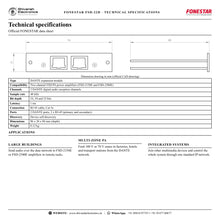
| Type | DANTE expansion module |
| Compatibility | FSD‑2150E and FSD‑2500E |
| Channels | 2 DANTE digital audio receiving channels |
| Sample rate | 48 kHz |
| Bit depth | 16, 24 and 32 bits |
| Latency | 1 ms |
| Connection | RJ‑45 cable, Cat 5e |
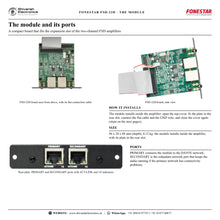
| Ports | 2 DANTE ports, 2 x RJ‑45 (primary and secondary) |
| Discovery | Device self‑discovery |
| Dimensions | 96 x 20 x 88 mm (depth) |
| Weight | 0.12 kg |
Product overview
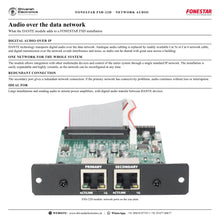
The FONESTAR FSD-22D is the DANTE expansion module for the FSD-2150E and FSD-2500E PA power amplifiers: 2 DANTE digital audio receiving channels, 48 kHz, 1 ms latency and two RJ-45 ports, primary and secondary.
The FSD-22D increases the capabilities of the FSD amplifier by making it compatible with other DANTE devices. DANTE technology transports digital audio over the data network in a simple way: analogue cabling is replaced by readily available Cat 5e or Cat 6 network cable, and digital transmission avoids interference and noise. It allows integration with other multimedia devices and control of the whole system through one standard IP network, and the installation can be reconfigured at any time.
| DANTE reception | 2 channels |
| Sample rate | 48 kHz |
| Latency | 1 ms |
| Primary and secondary | 2 x RJ‑45 |
Key features
- DANTE expansion module for the FSD-2150E and FSD-2500E
- 2 DANTE digital audio receiving channels
- 48 kHz sample rate, 16, 24 and 32 bit depth, 1 ms latency
- 2 DANTE ports, 2 x RJ-45: primary and secondary
- Connection via RJ-45 cable, Cat 5e
- Device self-discovery
- 96 x 20 x 88 mm, 0.12 kg
Redundant network connection
The secondary port gives a redundant network connection that prevents audio loss or interruption if the primary network has connectivity problems.
Easy configuration
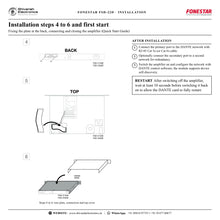
The module is configured with DANTE control software and includes automatic device discovery. After switching off the amplifier, wait at least 10 seconds before switching it back on so the DANTE card can fully restart.
Installation
The module installs inside the amplifier: open the top cover, fit the plate in the rear expansion slot, connect the flat cable, weld the GND wire between the module board and the amplifier board as the guide shows, and close the cover.
In the box
- FSD-22D DANTE expansion module
FONESTAR FSD-22D: frequently asked questions
Which amplifiers work with the FSD-22D?
FONESTAR states it is compatible with the FSD-2150E and FSD-2500E.
Which network cable does it need?
RJ-45 cable, Cat 5e (FONESTAR also mentions Cat 6 cable).
What is the secondary port for?
It is the redundant network port that keeps the audio running if the primary network has connectivity problems.
Where can I buy the FONESTAR FSD-22D in India?
The FONESTAR FSD-22D is available from Shivansh Electronics, Kolkata, West Bengal, India, with delivery across India.
Workflow 1: Remote amplifier rack
Sending audio over the data network to an amplifier far from the sources.
Connections
| Connect | To |
|---|---|
| DANTE network switch | PRIMARY port |
| Module | FSD‑2500E inputs |
Setup
- Install the FSD-22D in the amplifier.
- Connect PRIMARY to the network with Cat 5e cable.
- Configure the routing with DANTE control software.
- Set the zone volumes on the amplifier.
Tip: Wait 10 seconds before switching the amplifier back on.
Workflow 2: Redundant installation
Critical paging where audio must not stop.
Connections
| Connect | To |
|---|---|
| Primary network | PRIMARY port |
| Secondary network | SECONDARY port |
Setup
- Connect both ports to separate networks.
- Configure the device in the DANTE network.
- Test by disconnecting the primary link.
- Document the network settings.
Tip: The secondary port prevents audio loss if the primary network fails.
Workflow 3: Large building PA
Factories, hotels and stations with many zones.
Connections
| Connect | To |
|---|---|
| DANTE network switch | PRIMARY port |
| Module | FSD‑2500E inputs |
Setup
- Fit a module in each FSD amplifier.
- Route the network channels to the amplifier zones.
- Set levels per zone.
- Check every zone from the control position.
Tip: One standard IP network carries audio and control.
Workflow 4: Multimedia integration
Systems that share audio with other networked devices.
Connections
| Connect | To |
|---|---|
| DANTE network switch | PRIMARY port |
| Module | FSD‑2500E inputs |
Setup
- Connect the module to the same IP network.
- Let device discovery find the module.
- Subscribe the channels you need.
- Save the configuration.
Tip: The network can be reconfigured at any time.
Workflow 5: Upgrading an existing amplifier
Adding network audio to a FSD-2500E already in service.
Connections
| Connect | To |
|---|---|
| DANTE network switch | PRIMARY port |
| Module | FSD‑2500E inputs |
Setup
- Switch off and disconnect the amplifier.
- Follow the six installation steps of the guide.
- Connect the network cable.
- Configure and test.
Tip: Weld the GND wire between both boards as the guide shows.
Workflow 6: Conference and event venues
Rooms that receive audio from a networked mixing position.
Connections
| Connect | To |
|---|---|
| DANTE network switch | PRIMARY port |
| Module | FSD‑2500E inputs |
Setup
- Connect the module to the venue network.
- Route the mix channels to the amplifier.
- Set the zone volumes.
- Test before the event.
Tip: 1 ms latency keeps speech in step with the room.


