



FONESTAR FSD-2500E
MRP - Rs. 1,77,990
FONESTAR FSD-2500E class D PA amplifier, 2 x 400 W RMS (2 channels), 100 V / 70 V outputs, 1 U rack, DANTE-ready with FSD-22D. Available in India from Shivansh Electronics, Kolkata, West Bengal, India.
VISUAL GUIDE — See Every Photo, Spec & Setup Step (PDF)
The price shown is the MAXIMUM RETAIL PRICE (MRP), inclusive of all taxes. For the best price, exclusive offers and discounted rates, delivery timelines, or any other information, please DM us or call +91 89818 07755 / +91 91477 00677. We will gladly share an exclusive coupon code that you can apply at checkout. All payments are processed securely through Razorpay, our trusted payment gateway partner.
Audio
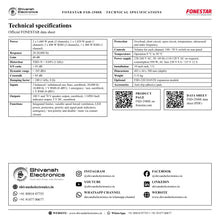
| Power | 2 x 1,600 W peak (2 channels), 1 x 1,920 W peak (1 channel); 2 x 400 W RMS (2 channels), 1 x 480 W RMS (1 channel) |
| Response | 20‑20,000 Hz |
| Gain | 40 dB |
| Distortion | THD+N < 0.04% (1 kHz) |
| S/N ratio | > 95 dB |
| Dynamic range | > 105 dBA |
| Crosstalk | > 85 dB |
| Damping factor | > 200 (1 kHz, 8 Ω) |
Connections and functions
| Inputs | 2 balanced / unbalanced aux lines, euroblock, 20,000 Ω / 10,000 Ω, 1 V RMS (0 dBV) |
| Emergency input | 1 emergency / test, euroblock, 1 V RMS (0 dBV) |
| Outputs | 100 V and 70 V speaker output, euroblock; 1 GPIO fault indicator output, 5 V DC, euroblock |
| Functions | Integrated limiter; forced ventilation with variable speed according to temperature; LED power, protection, priority and signal peak indicators; emergency / test priority via contact closure; disable / mute via contact closure |
| Protection | Overload, short circuit, open circuit, temperature, ultrasound and radio frequency |
| Controls | Volume for each channel; 100 / 70 V switch on rear panel |
General
| Temperature | Operation 0 °C to 50 °C |
| Power supply | 220‑240 V AC, 50 / 60 Hz (110‑120 V AC on request); power consumption 950 W; AC fuse 230 V 8 A / 115 V 12 A |
| Installation | 19 inch rack, 1 U |
| Dimensions | 483 x 44 x 380 mm (depth) |
| Weight | 5.15 kg |
| Optional | FSD‑22D: DANTE expansion module |
| Accessories | Anti‑slip adhesive pads |
Product overview
The FONESTAR FSD-2500E is a two-channel class D PA power amplifier with 100 V or 70 V line outputs in only 1 U of a 19 inch rack: 2 x 400 W RMS (2 channels), with DANTE support through the optional FSD-22D module.
FONESTAR designed the FSD-2500E for multi-zone PA and piped music systems with 100 V or 70 V line loudspeakers: commercial premises, sports centres, educational establishments, conference rooms, cafés, restaurants and theme parks. The class D stage is highly efficient and reliable thanks to low-maintenance protection circuits, with great sound quality, low noise and reduced weight. Secure, easy-to-connect euroblock connectors carry the audio inputs, the speaker outputs and the control signals.
| Power | 2 x 400 W RMS |
| Selectable per channel | 100 / 70 V |
| S/N ratio | > 95 dB |
| 19 inch rack | 1 U |
Key features
- 2 x 400 W RMS (2 channels), or 1 x 480 W RMS (1 channel)
- 100 V or 70 V speaker outputs, OUTPUT SET switch for each channel
- Class D with integrated limiter and variable speed forced ventilation
- 2 balanced / unbalanced line inputs plus an emergency / test input on euroblock
- Priority, disable / mute and fault output (GPIO, 5 V DC) via euroblock
- LED power, protection, priority and signal peak indicators; volume for each channel
- Protection against overload, short circuit, open circuit, temperature, ultrasound and radio frequency
- DANTE support with the optional FSD-22D expansion module
Multi-zone 100 V PA
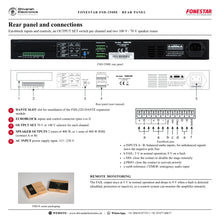
Each channel drives its own zone of high impedance loudspeakers: 2 zones of 400 W, or 1 zone of 480 W RMS (connect A or B). The OUTPUT SET selector chooses 70 V or 100 V independently for each channel.
Emergency and remote control
The EMER input, together with the PRIO contact, lets the message of an emergency system be emitted clearly. DIS disables the stage remotely so the wiring can be changed without switching off from the front, and the FAIL output stays at 5 V in normal operation and drops to 0 V on a fault, for remote monitoring.
Front panel
On/off switch, a volume control for each channel and CLIP, SIGNAL and PROT indicators for each channel, plus a status light that is green when the stage is on and red when the priority input is active.
In the box
- FSD-2500E power amplifier
- Anti-slip adhesive pads
FONESTAR FSD-2500E: frequently asked questions
Can the FSD-2500E drive 100 V and 70 V lines?
Yes. The OUTPUT SET switch on the rear panel selects 70 V or 100 V independently for each channel.
How many zones can the FSD-2500E power?
2 zones of 400 W, or 1 zone of 480 W RMS (connect A or B).
Does the FSD-2500E support DANTE?
Yes, with the optional FSD-22D DANTE expansion module.
Can it handle emergency messages?
Yes. The emergency / test input with priority by contact closure makes emergency messages clearly heard.
Where can I buy the FONESTAR FSD-2500E in India?
The FONESTAR FSD-2500E is available from Shivansh Electronics, Kolkata, West Bengal, India, with delivery across India.
Workflow 1: Factory paging zones
Announcements and alarms across production areas.
Connections
| Connect | To |
|---|---|
| Paging / music source | INPUT A (balanced) |
| CH A output, 100 V | Zone 1 loudspeakers |
Setup
- Set OUTPUT SET to 100 V for each channel.
- Wire one zone of loudspeakers per channel.
- Connect the emergency system to EMER and PRIO.
- Set each channel's volume for its area.
Tip: Keep the sum of the loudspeaker taps within 400 W per zone.
Workflow 2: Hotel background music
Music in lobby, restaurant and corridors.
Connections
| Connect | To |
|---|---|
| Paging / music source | INPUT A (balanced) |
| CH A output, 100 V | Zone 1 loudspeakers |
Setup
- Feed a different source to each input.
- Connect each area's loudspeakers to its channel.
- Adjust volumes zone by zone.
- Use DIS to work on wiring without switching off.
Tip: The CLIP light shows when an input level is too high.
Workflow 3: Transport station
Platform and concourse announcements.
Connections
| Connect | To |
|---|---|
| Paging / music source | INPUT A (balanced) |
| CH A output, 100 V | Zone 1 loudspeakers |
Setup
- Install the amplifier in a ventilated rack.
- Wire platforms as separate zones.
- Connect the FAIL output to the monitoring system.
- Test priority messages from the emergency input.
Tip: FAIL is 5 V in normal operation and 0 V on a fault.
Workflow 4: One large zone
A single large area that needs more power per zone.
Connections
| Connect | To |
|---|---|
| Source | INPUT A |
| CH A output, 100 V | Large zone loudspeakers |
Setup
- Use one channel per group (A or B).
- Connect the loudspeakers for up to 480 W RMS.
- Set the OUTPUT SET switch.
- Adjust the volume.
Tip: FONESTAR's connection examples show the 480 W RMS single-zone wiring.
Workflow 5: Networked audio
Audio delivered to a remote rack over the data network.
Connections
| Connect | To |
|---|---|
| DANTE network | FSD‑22D module in the amplifier |
| Amplifier outputs | 100 V zones |
Setup
- Install the optional FSD-22D module.
- Connect it to the network with RJ-45 cable.
- Configure the network with DANTE control software.
- Set the zone volumes on the front panel.
Tip: The secondary port gives a redundant connection.
Workflow 6: School or campus
Bells, announcements and music in classrooms and halls.
Connections
| Connect | To |
|---|---|
| Paging / music source | INPUT A (balanced) |
| CH A output, 100 V | Zone 1 loudspeakers |
Setup
- Wire classroom blocks to separate channels.
- Select 100 V or 70 V to match the loudspeakers.
- Connect the emergency input.
- Set levels before the school day.
Tip: Make sure the air intake and exhaust slots are free of obstacles.


