FONESTAR MPX-460P
PRICE ON ENQUIRY
FONESTAR MPX-460P touch screen remote control for the MPX-4088 audio matrix: zone volume, zone assignment and scenes, up to 8 in series, Cat 5e. Available in India from Shivansh Electronics, Kolkata, West Bengal, India.
VISUAL GUIDE — See Every Photo, Spec & Setup Step (PDF)
PRICE ON ENQUIRY. For the price, exclusive offers, delivery timelines, or any other information, please DM us or call +91 89818 07755 / +91 91477 00677. We will gladly share a personalised quotation for Shivansh Electronics, Kolkata, West Bengal, India. All payments are processed securely through Razorpay, our trusted payment gateway partner.
Control
| Function | Remote control for volume control, zone and scene allocation with touch screen for the MPX‑4088 audio matrix |
| Screen | Capacitive LCD touch screen |
| Controls | Volume control, zone and scene allocation |
Connections and power
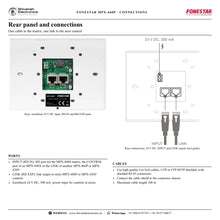
| Input | 1 RD port for connection to the MPX‑4088 matrix, RJ‑45 |
| Output | 1 extension link, RJ‑45 |
| Power supply | 24 V DC, 100 mA from the RD port; 24 V DC, 300 mA on euroblock for more MPX‑460P in series |
| Cabling | Cat 5e/6, UTP or FTP/SFTP shielded with shielded connectors; maximum 100 m |
General
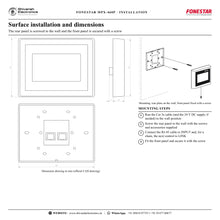
| Installation | Surface; rear panel screwed to the wall, front panel secured with a screw |
| Dimensions | 150 x 115 x 25 mm (depth) |
| Weight | 0.29 kg |
| Accessories | Screws and mounting accessories |
Product overview
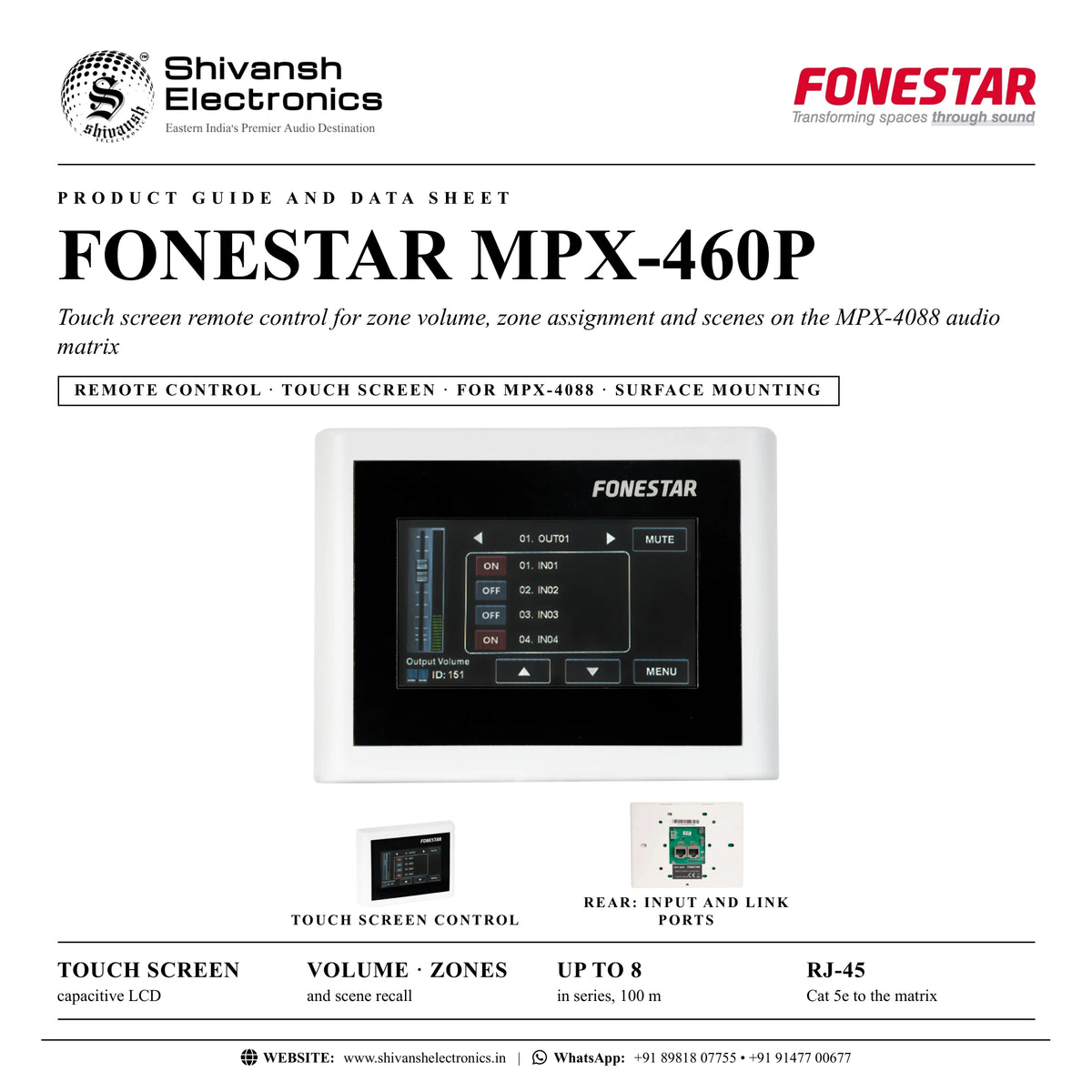
The FONESTAR MPX-460P is a remote control with a capacitive touch screen for zone volume, zone assignment and scenes on the FONESTAR MPX-4088 audio matrix.
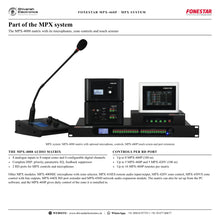
The MPX-4088 system is a highly versatile audio matrix for installations of any size, and the MPX-460P puts its daily control on the wall of each area. From the touch screen users set the volume, choose which inputs are heard in the zone and recall scenes. It connects to the matrix with RJ-45 Cat 5e cable, and a link output lets up to 8 MPX-460P be connected in series. It mounts on a surface: the rear panel is screwed to the wall and the front panel is secured with a screw. It suits shopping centres, hotels, conference rooms, stadiums and other installations with several audio sources and audience areas.
| Capacitive LCD | Touch screen |
| In series per link | Up to 8 |
| Cat 5e cable | 100 m |
| 150 x 115 x 25 mm | 0.29 kg |
Key features
- Remote control with touch screen for the MPX-4088 audio matrix
- Volume control, zone assignment and scenes
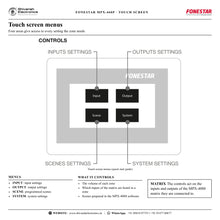
- Capacitive LCD touch screen with INPUT, OUTPUT, SCENE and SYSTEM menus
- Connection to the matrix by RJ-45, Cat 5e cable
- Link output for up to 8 MPX-460P in series
- Powered from the RD port (24 V DC, 100 mA) or a 24 V DC, 300 mA supply on euroblock
- Surface installation; screws and mounting accessories included
Touch control in every zone
Four areas on the screen open the input settings, the output settings, the programmed scenes and the system settings, so each area can adjust its own volume and source without access to the rack.
Simple wiring
One Cat 5e cable from the matrix RD port powers and connects a single MPX-460P. For more controls, the LINK output feeds the next MPX-460P or MPX-420V, with a 24 V DC, 300 mA supply on the euroblock input.
Three ways to connect
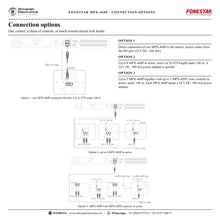
Option 1: one MPX-460P directly on the matrix. Option 2: up to 8 MPX-460P in series. Option 3: up to 5 MPX-460P together with up to 5 MPX-420V zone controls. In every case the total Cat 5e FTP cable length stays under 100 m.
In the box
- MPX-460P touch screen remote control
- Screws and mounting accessories
Available versions
- MPX-460P: black
FONESTAR MPX-460P: frequently asked questions
Which matrix does the MPX-460P work with?
The FONESTAR MPX-4088 audio matrix, through its RD port, an MPX-440X CONTROL port or the LINK of another MPX-460P or MPX-420V.
How many MPX-460P can be connected?
Up to 8 in series on one link, under 100 m of Cat 5e FTP cable; FONESTAR states up to 16 remotes per matrix.
Does it need a power supply?
A single MPX-460P is powered from the RD port. Controls in series need a 24 V DC, 300 mA supply on the euroblock input.
Which cable should I use?
High quality Cat 5e/6 cable, UTP or FTP/SFTP shielded, with shielded RJ-45 connectors and the shield connected to the connector, up to 100 m.
Where can I buy the FONESTAR MPX-460P in India?
The FONESTAR MPX-460P is available from Shivansh Electronics, Kolkata, West Bengal, India, with delivery across India.
Workflow 1: Hotel restaurant
Staff choose the music and set the level in the restaurant.
Connections
| Connect | To |
|---|---|
| MPX‑4088 RD port | MPX‑460P INPUT |
Setup
- Run Cat 5e FTP cable from the matrix to the wall.
- Mount the rear panel and fit the front panel.
- Select the restaurant zone's source on the screen.
- Set the volume for the time of day.
Tip: One control on the RD port needs no extra power supply.
Workflow 2: Shopping centre corridors
Several areas along one cable run.
Connections
| Connect | To |
|---|---|
| MPX‑4088 RD port | First MPX‑460P INPUT |
| LINK | Next MPX‑460P INPUT |
Setup
- Chain up to 8 MPX-460P with Cat 5e FTP.
- Power the chain with a 24 V DC, 300 mA supply.
- Keep the total cable length under 100 m.
- Each control manages its own zone.
Tip: Use shielded connectors with the shield connected.
Workflow 3: Conference centre
Touch screens in rooms and knobs in corridors.
Connections
| Connect | To |
|---|---|
| MPX‑460P (up to 5) | Series chain |
| MPX‑420V (up to 5) | Same chain |
Setup
- Mix up to 5 MPX-460P and 5 MPX-420V on one link.
- Give each MPX-460P its 24 V DC, 300 mA supply.
- Prepare scenes in the MPX-4088 software.
- Recall scenes from the touch screen.
Tip: Knobs for simple areas, touch screens where scenes matter.
Workflow 4: Sports facility
Separate control for the hall, gym and changing rooms.
Connections
| Connect | To |
|---|---|
| MPX‑4088 matrix | RD ports 9/10 and 11/12 |
| MPX‑460P controls | One per area |
Setup
- Use both RD ports for more controls.
- Install a touch screen in each area.
- Assign inputs to each zone from its control.
- Set safe maximum volumes in the software.
Tip: Up to 16 remotes per matrix.
Workflow 5: Bar with day and night scenes
Quick change of sources and levels.
Connections
| Connect | To |
|---|---|
| MPX‑4088 scenes | Recalled on the MPX‑460P |
Setup
- Create day and night scenes in the PC software.
- Open SCENE on the touch screen.
- Recall the scene for the time of day.
- Fine-tune the zone volume if needed.
Tip: Scenes avoid manual changes on every input.
Workflow 6: Office reception
A neat wall control for music and level.
Connections
| Connect | To |
|---|---|
| MPX‑440X CONTROL port | MPX‑460P INPUT |
Setup
- Connect the control through an MPX-440X port extension.
- Mount it on the wall next to the reception desk.
- Choose the reception source.
- Set a comfortable background level.
Tip: Surface mounting with the screws supplied.