





GENELEC 7040A
MRP - Rs. 1,72,000
GENELEC 7040A compact active subwoofer: LSE enclosure, 30 Hz extension, 100 dB SPL and stereo bass management. Available in India from Shivansh Electronics, Kolkata, West Bengal, India.
VISUAL GUIDE — See Every Photo, Spec & Setup Step (PDF)
The price shown is the MAXIMUM RETAIL PRICE (MRP), inclusive of all taxes. For the best price, exclusive offers and discounted rates, delivery timelines, or any other information, please DM us or call +91 89818 07755 / +91 91477 00677. We will gladly share an exclusive coupon code that you can apply at checkout. All payments are processed securely through Razorpay, our trusted payment gateway partner.
System
| Type | Active studio subwoofer with stereo bass management |
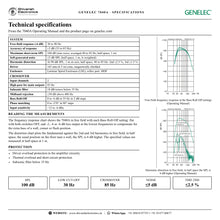
| Free‑field response (-6 dB) | 30 to 90 Hz |
| Accuracy of frequency response | ±3 dB (33 to 85 Hz) |
| Maximum short‑term SPL | 100 dB (sine wave averaged 40 to 85 Hz, half space, 1 m) |
| Self‑generated noise | ≤5 dB SPL (half space, 1 m, A‑weighted) |
| Harmonic distortion (90 dB SPL, 1 m, half space, 40 to 85 Hz) | 2nd ≤2.5 % 3rd ≤1.5 % |
| Driver | 165 mm (6.5 in) cone, magnetically shielded |
| Enclosure | Laminar Spiral Enclosure (LSE), reflex port, MDF |
Crossover
| Input channels | 2 |
| High‑pass frequency for main outputs | 85 Hz |
| Subsonic filter | 18 dB/octave below 35 Hz |
| Midband rejection | ≥50 dB above 400 Hz |
| Bass Roll‑Off | 0 to -6 dB at 35 Hz in 2 dB steps |
| Phase matching | 0 to -270° in 90° steps |
| Input sensitivity | +12 to -6 dBu |
Inputs and outputs
| Inputs | 2 x XLR female, balanced (pin 1 ground, pin 2 +, pin 3 -) |
| Input impedance | 10 kΩ balanced |
| Input level for 100 dB SPL at 1 m | Variable from +12 to -6 dBu |
| Outputs | 2 x XLR male (pin 1 ground, pin 2 +, pin 3 -) |
| Main monitor output gain | 0 dB |
Amplifier and power
| Amplifier | 50 W Class D (short‑term; long‑term output limited by driver protection) |
| Amplifier THD at nominal output | ≤0.08 % |
| Mains voltage | 100‑240 V AC, 50/60 Hz, universal |
| Power consumption | ISS standby ≤0.5 W Idle 5 W Full output 70 W |
| Protection | Driver overload, thermal overload and short‑circuit protection |
Physical
| Dimensions (H x W x D) | 410 x 350 x 205 mm (16 1/8 x 13 3/4 x 8 1/16 in) |
| Weight | 11.3 kg (24.9 lb) |
| Operating environment | Indoor, 15‑35 °C, 20‑80 % relative humidity, no condensation |
| Product code | 7040AP |
| Colour options | Black |
Product overview
The GENELEC 7040A is GENELEC's most compact professional active subwoofer, bringing controlled, accurate low end to the tightest production spaces with a 165 mm driver in a Laminar Spiral Enclosure and built-in stereo bass management.
Designed to extend GENELEC 8010, 8020 and M030 active monitors in stereo systems, the 7040A takes the response down to 30 Hz (-6 dB) and reaches 100 dB maximum short-term SPL. Its onboard bass management filters the low frequencies out of the two main channels at 85 Hz and reproduces them in the subwoofer, which increases the headroom and lowers the distortion of the main monitors. Sensitivity, Bass Roll-Off and phase controls on the connector panel let you match the 7040A to your monitors and your room, while Intelligent Signal Sensing (ISS) saves energy when the system is idle. Every 7040A is designed, assembled, tested and individually calibrated in GENELEC's factory in Finland.
| Maximum short‑term SPL | 100 dB |
| Low cut‑off (-6 dB) | 30 Hz |
| Magnetically shielded driver | 165 mm |
| Class D amplifier | 50 W |
Key features
- Laminar Spiral Enclosure (LSE): a spiral steel enclosure that forms a turbulence-free reflex port for precise, low-distortion bass
- Free-field response 30 to 90 Hz (-6 dB), accuracy ±3 dB from 33 to 85 Hz
- Stereo bass management: two balanced XLR inputs and two outputs with an 85 Hz crossover
- 50 W Class D amplifier with driver overload, thermal and short-circuit protection
- Input sensitivity adjustable from +12 to -6 dBu to match the monitors
- Bass Roll-Off in 2 dB steps (0 to -6 dB) for wall, corner and flush positions
- Phase matching from 0 to -270° in 90° steps
- Intelligent Signal Sensing (ISS): standby below 0.5 W after one hour without signal; can be disabled
- Compact footprint: 410 x 350 x 205 mm, narrow enough to fit in a 19-inch rack, 11.3 kg
- Universal mains input, 100-240 V AC
Not just more bass
A great subwoofer is about much more than delivering more bass. The 7040A's Laminar Spiral Enclosure is made from a spiral-shaped strip of steel that gives maximum mechanical stability for the large pressures inside the cabinet and also forms the bass reflex port, so air flows linearly even at the highest output. The result is high SPL that is precise, articulate and free from distortion right down to 30 Hz, and a subwoofer that blends seamlessly with 8010 and 8020 nearfield monitors.
Superior bass management
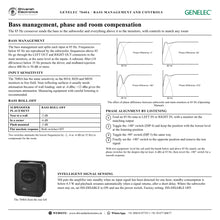
The 7040A splits each input at 85 Hz: everything below is reproduced by the subwoofer and everything above goes to the main monitors through the LEFT OUT and RIGHT OUT connectors, at the same level as the inputs. With the low frequencies handled by the subwoofer, the monitors gain headroom and work with less distortion. A subsonic filter below 35 Hz protects the driver.
Room compensation and phase alignment
Two Bass Roll-Off switches attenuate the lowest frequencies by -2, -4 or -6 dB to compensate for wall, corner or flush placement, and two phase switches align the subwoofer with the monitors in 90° steps. The Operating Manual describes a simple listening method with an 85 Hz tone, and a precise method with measuring equipment, so the crossover region stays smooth and mixes translate.
Compact and portable
Small rooms have limited floor space. The 7040A's footprint is smaller than that of a small practice guitar amplifier, it weighs 11.3 kg and its universal mains input works anywhere in the world. An optional carry bag lets professionals take it on location with portable monitors for an accurate, flexible monitoring tool.
In the box
- 1 x GENELEC 7040A subwoofer
- 1 x mains cable (1.8 m)
- 1 x operating manual
Balanced XLR signal cables are not included.
GENELEC 7040A: frequently asked questions
Which monitors is the 7040A designed for?
GENELEC designed the 7040A to extend the bass of its 8010, 8020 and M030 active monitors in stereo systems, down to 30 Hz (-6 dB).
Does the 7040A have bass management?
Yes. It has two balanced XLR inputs and two outputs. Frequencies below 85 Hz are reproduced by the subwoofer and frequencies above 85 Hz are sent to the main monitors.
Can I connect it to a source with RCA outputs?
Yes. The Operating Manual shows an RCA to XLR cable for unbalanced sources. The 7040A accepts line-level signals only, never the loudspeaker outputs of a power amplifier.
Does it switch off automatically?
Yes. Intelligent Signal Sensing puts it into standby (below 0.5 W) after one hour without an input signal and wakes it when a signal returns. Set ISS-DISABLE to ON to keep it always on.
Where can I buy the GENELEC 7040A in India?
The GENELEC 7040A is available from Shivansh Electronics, Kolkata, West Bengal, India, with delivery across India.
Workflow 1: Stereo nearfield system with 8010 or 8020 monitors
Extend a pair of compact GENELEC monitors down to 30 Hz for music creation in a small room.
Connections
| Connect | To |
|---|---|
| Mixing console or audio interface (L/R) | LEFT IN and RIGHT IN (balanced XLR) |
| Left and right monitors | LEFT OUT and RIGHT OUT (XLR) |
| Mains | MAINS INPUT, earthed outlet |
Setup
- Switch the subwoofer and the monitors off, then connect the source to the inputs and the monitors to the outputs.
- Place the 7040A slightly off-centre near the front wall, with the driver less than 0.6 m from the wall.
- Power up and set the sensitivity control to about -4 dBu as a starting point.
- Align the phase with the two phase switches and set the Bass Roll-Off for the position.
Tip: Keep the monitors at least 1.1 m from the walls to avoid losing low-frequency output.
Workflow 2: Phase alignment by listening
Get a smooth crossover between subwoofer and monitors without measuring equipment.
Connections
| Connect | To |
|---|---|
| 85 Hz test tone | LEFT IN or RIGHT IN |
| One monitor | The matching output |
Setup
- Feed an 85 Hz tone so it plays through the subwoofer and one monitor.
- Toggle the -180° switch (DIP 4) and keep the position with the lowest level at the listening position.
- Toggle the -90° switch (DIP 3) the same way.
- Set the -180° switch to the opposite position and remove the tone.
Tip: Set the phase only after the subwoofer position is final: placement changes the phase.
Workflow 3: Measured system alignment
Calibrate the system precisely with a measurement microphone and analyser.
Connections
| Connect | To |
|---|---|
| Pink noise or test signal | LEFT IN or RIGHT IN |
| Measurement microphone | Listening position |
Setup
- Adjust the subwoofer sensitivity until the bands below and above 85 Hz are reproduced at equal level.
- Set the phase switches for the deepest dip (at least -6 dB) at 85 Hz.
- Invert the -180° switch: the response around 85 Hz should now be smooth.
- Choose the Bass Roll-Off that gives the flattest low end in your room.
Tip: Suggested Bass Roll-Off: -2 dB near a wall, -6 dB in a corner, -2 dB flush mounted.
Workflow 4: Flush mounting in a wall or cabinet
Build the subwoofer into a studio wall or furniture for a clean installation.
Connections
| Connect | To |
|---|---|
| Recess | 7.5 cm wider than the subwoofer |
| Driver side | Facing the room |
Setup
- Make the recess 7.5 cm (3 in) wider than the subwoofer; keep height and depth close to the cabinet size.
- Place the subwoofer at the right end of the recess so the reflex port side has 7.5 cm of free space.
- Ventilate the space so the air stays below 35 °C.
- Start with -2 dB Bass Roll-Off and fine-tune by listening.
Tip: Never cover the driver; keep at least 10 cm of free space in front of the grille.
Workflow 5: Portable monitoring on location
Take an accurate low end to remote recording and improvised monitoring spaces.
Connections
| Connect | To |
|---|---|
| Portable recorder or interface | LEFT IN and RIGHT IN |
| Portable GENELEC monitors | LEFT OUT and RIGHT OUT |
| Local mains | Universal 100‑240 V input |
Setup
- Set up the 7040A near a wall in the room you are working in.
- Connect the source and the monitors with balanced XLR cables.
- Use the DIP switches to set Bass Roll-Off and phase for the new position.
- Check the low end with familiar reference material.
Tip: The 11.3 kg cabinet travels well in GENELEC's optional carry bag.
Workflow 6: Energy-saving operation with ISS
Keep the system ready to play while saving power when it is idle.
Connections
| Connect | To |
|---|---|
| ISS‑DISABLE switch | OFF (factory setting) |
| Power switch | On |
Setup
- Leave ISS-DISABLE OFF so the subwoofer goes to standby after one hour without signal.
- Start playback: the 7040A wakes automatically after a short delay.
- Where the subwoofer must always be on, set ISS-DISABLE to ON.
- With ISS disabled, turn the subwoofer off with the power switch.
Tip: In standby the 7040A uses less than 0.5 W.


