


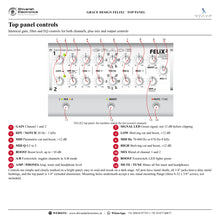
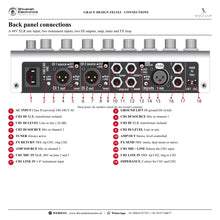
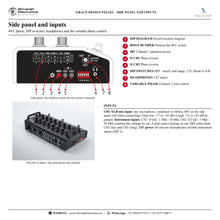
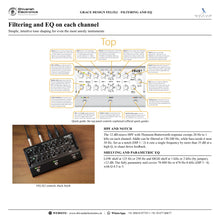


GRACE DESIGN FELiX2
PRICE ON ENQUIRY
GRACE DESIGN FELiX2 two-channel instrument and mic preamp, EQ and DI: blend or A/B, stereo FX loop, variable phase, dual isolated DI. Black or silver. Available in India from Shivansh Electronics, Kolkata, West Bengal, India.
VISUAL GUIDE — See Every Photo, Spec & Setup Step (PDF)
PRICE ON ENQUIRY. For the price, exclusive offers, delivery timelines, or any other information, please DM us or call +91 89818 07755 / +91 91477 00677. We will gladly share a personalised quotation for Shivansh Electronics, Kolkata, West Bengal, India. All payments are processed securely through Razorpay, our trusted payment gateway partner.
Gain range (input to DI output)
| CH1 mic, low / high gain | 17‑62 / 21‑63 dB |
| CH1 instrument, low / high gain | 3‑48 / 17‑62 dB |
| CH2 instrument | -1 to 37 dB |
| Boost | 0‑9 dB |
Distortion, noise and response
| THD+N mic to DI line @ 20 / 40 / 60 dB, +10 dBu | < 0.015 / 0.015 / 0.020 % |
| IMD @ 40 dB, SMPTE/DIN 4:1 | < 0.05 % |
| Noise referred to input, CH1 mic @ 60 dB, 50 Ω | < -128 dB |
| CMRR @ 60 dB, 100 Hz / 1 kHz / 10 kHz | > 55 / 75 / 85 dB |
| Frequency response, mic @ 40 dB / instrument @ 20 dB, -3 dB | 20 Hz - 65 kHz |
| Output noise @ min. gain, CH1 mic / CH1 inst. / CH2 inst. | < -90 / -89 / -98 dBu |
Impedances and levels
| CH1 mic input | 8.1 kΩ |
| CH1 instrument input | 10 MΩ / 1 MΩ / 10 kΩ |
| CH2 instrument input | 20 MΩ / 1 MΩ / 332 kΩ |
| Insert input | 10 kΩ |
| DI, amp, tuner, headphone and insert outputs | 150 Ω |
| Signal LED | Green -10 dBu, red +10 dBu |
| Maximum input CH1 mic, low / high gain | +4 / +1 dBu |
| Maximum input CH1 instrument, low / high gain | +18 / +4 dBu |
| Maximum input CH2 instrument | +20.5 dBu |
| Maximum output DI line / mic | +20 / -6 dBu |
| Maximum output amp, tuner, headphone, insert | +22 dBu |
Filters and EQ
| High‑pass filter | 20 Hz - 1 kHz, 12 dB/octave |
| Notch filter | 20 Hz - 1 kHz, > -35 dB, Q > 4.0 |
| EQ gain | ±12 dB |
| Low shelf | 125 Hz / 250 Hz |
| Mid frequency | 70‑880 Hz / 670 Hz‑8 kHz, Q 0.5‑5 |
| High shelf | 1 kHz / 2 kHz |
General
| Power | 100‑240 V AC, 50/60 Hz, 10 W max., Class II |
| Dimensions (H x W x D) | 3.0 x 9.5 x 5.5 in |
| Weight | 1.45 kg (3.2 lb) |
| Finishes | Black, Silver |
Product overview
The GRACE DESIGN FELiX2 is a studio quality two-channel acoustic instrument and mic preamp, EQ and DI: a 48V XLR mic input and two instrument inputs, independent HPF / notch and parametric EQ on each channel, blend or A/B operation, a stereo or dual mono FX loop, variable phase on channel 2 and two transformer-isolated DI outputs, in a rugged floor unit offered in black or silver.
FELiX helped usher in a renaissance of amplified acoustic sound: what once required racks of studio gear and stage techs became a single, affordable, rugged and compact floor unit. Honed together with many demanding players, FELiX2 is designed for working musicians, engineers, sound companies and venues looking for the highest quality solution for amplifying stringed instruments. Built of anodised aluminium and steel, it brings the audio performance and reliability of the GRACE DESIGN pro audio range to the stage.
| Mic / instrument blend or A/B | 2 channels |
| Parametric mid on each channel | 70 Hz - 8 kHz |
| Sweepable HPF or high‑Q notch | 20 Hz - 1 kHz |
| Transformer‑isolated XLR outputs | 2 x DI |
Key features
- Two-channel audio path with blend (MIX) output control or A/B switching
- m101-style transimpedance mic preamplifier on channel 1, no electrolytic capacitors in the signal path
- Independent EQ on both channels: hi and low shelving and fully parametric mid (70-880 Hz / 670 Hz-8 kHz)
- 20 Hz - 1 kHz sweepable HPF on both channels, switchable to a high-Q notch filter
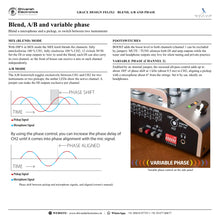
- Variable phase control on channel 2 for fine tuning a microphone against a pickup
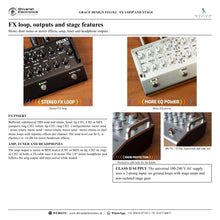
- Stereo or dual mono FX loops via TRS send and TRS return
- Dual ground-isolated DI outputs, each sourced from its channel or the mix
- Level-controlled stereo amp output, dedicated tuner output and 1/8" stereo headphone output that stay live when muted
- A/B, boost and mute / tune footswitches; channel 1 boost defeat
- 3 input impedances per channel; 12V power for electret microphones; phase reverse on each channel
- Class II universal 100-240 V AC supply; protective side rails; designed and built in Lyons, CO, USA
New in FELiX2
Stereo operation (dual mono or true stereo FX loop, stereo amp output, stereo headphone output), variable phase control on channel 2, a high shelf with 1 kHz and 2 kHz transition settings, a much higher-Q notch filter, a Class II power supply that eliminates ground loops with stage amps, protective side rails with lower-profile knobs, and channel 1 boost defeat.
The kitchen sink approach to I/O
Inputs include a 48V XLR mic input and two instrument inputs; a dual-source pickup can feed both channels on one TRS cable. Two transformer-isolated DI outputs can send the front of house a mix or each channel independently, the amp output can carry the mix or channel 2, and the side-panel headphone amplifier is there for practising and checking EQ decisions during soundcheck.
Available versions
| Black | Black finish |
| Silver | Silver finish |
In the box
- FELiX2 preamplifier
- Standard IEC AC power cable for the destination country
GRACE DESIGN FELiX2: frequently asked questions
Can I blend a microphone and a pickup?
Yes. Connect the microphone to the CH1 XLR input and the pickup to CH2, blend them with the MIX knob, and use the channel 2 variable phase control to bring them into phase alignment.
Can FELiX2 switch between two instruments?
Yes. In A/B mode the A/B footswitch toggles exclusively between channel 1 and channel 2.
Does it support stereo effects?
Yes. The TRS send and return work as mono, dual mono (separate loops per channel) or stereo.
Can I practise silently?
Yes. MUTE / TUNE silences the DI and amp outputs while the tuner and headphone outputs stay active.
Where can I buy the GRACE DESIGN FELiX2 in India?
The GRACE DESIGN FELiX2 is available from Shivansh Electronics, Kolkata, West Bengal, India, with delivery across India.
Workflow 1: Blending a microphone and a pickup
Acoustic guitarists and string players.
Connections
| Connect | To |
|---|---|
| Microphone | CH1 XLR mic input |
| Pickup | CH2 instrument input |
| DI outputs (MIX) | Front of house |
Setup
- Set CH1 mic/line to mic; 48V on after connecting.
- Set each gain to mostly green.
- Blend with MIX.
- Align the pickup with the variable phase control on headphones.
Tip: The variable phase control must first be enabled with an internal jumper.
Workflow 2: Two instruments on one preamp
Players switching between guitar and mandolin.
Connections
| Connect | To |
|---|---|
| Instrument 1 | CH1 line input |
| Instrument 2 | CH2 line input |
Setup
- Set DIP 6 to A/B mode.
- EQ each channel independently.
- Toggle with the A/B footswitch.
- Optionally make the DI outputs exclusive by jumper.
Tip: Each instrument keeps its own EQ settings.
Workflow 3: Separate channels to front of house
Sound engineers who want each source on its own channel.
Connections
| Connect | To |
|---|---|
| CH1 DI | Console channel 1 |
| CH2 DI | Console channel 2 |
Setup
- Set each DI source switch to its channel.
- Set the DI level to mic or line.
- Lift the ground if needed.
- Use the amp output for the stage.
Tip: Mic level pads the DI by 26 dB for console mic inputs.
Workflow 4: Stereo effects rig
Players with stereo reverb or delay.
Connections
| Connect | To |
|---|---|
| FX send (TRS) | Stereo effect input |
| FX return (TRS) | Stereo effect output |
| Amp out (stereo) | Stereo stage amp |
Setup
- Set the insert jumpers for stereo.
- Connect Y insert cables.
- Set the send pad (0, -6 or -16 dB).
- Play.
Tip: Dual mono mode gives each channel its own effects loop.
Workflow 5: Feedback control on a loud stage
Acoustic bass, guitar and fiddle players.
Connections
| Connect | To |
|---|---|
| Instrument | CH2 input |
Setup
- Set the filter to notch with the DIP switch.
- Sweep to the feeding-back frequency.
- Raise the HPF on the other channel for rumble.
- Shape the tone with the mid.
Tip: The notch cuts more than 35 dB at a high Q.
Workflow 6: Silent tuning and headphone practice
Performers during soundcheck.
Connections
| Connect | To |
|---|---|
| Tuner output | Tuner |
| Headphone jack | Headphones or IEMs |
Setup
- Press MUTE / TUNE.
- Tune silently.
- Practise on headphones.
- Note the amp level before unmuting.
Tip: The amp / phones knob sets both the headphone and the stage amp level.


