

LYNX Aurora(n)
PRICE ON ENQUIRY
LYNX Aurora(n) modular AD/DA converter: 8 to 32 channels in 1U, 24-bit / 192 kHz, microSD recorder, USB, TB3, Dante or HD2 LSlot cards. Available in India from Shivansh Electronics, Kolkata, West Bengal, India.
VISUAL GUIDE — See Every Photo, Spec & Setup Step (PDF)
PRICE ON ENQUIRY. For the price, exclusive offers, delivery timelines, or any other information, please DM us or call +91 89818 07755 / +91 91477 00677. We will gladly share a personalised quotation for Shivansh Electronics, Kolkata, West Bengal, India. All payments are processed securely through Razorpay, our trusted payment gateway partner.
Line in (LM-AIO8E and LM-PRE4 line inputs)
| THD+N | -113 dB (0.00022 %) at 1 kHz, -1 dBFS, 20 kHz filter, +20 dBu trim |
| Dynamic range | 119 dB, A‑weighted, -60 dBFS method |
| Frequency response | ±0.010 dB maximum, 20 Hz - 20 kHz |
| Crosstalk | -130 dB maximum, adjacent channel, 1 kHz, -1 dBFS |
| Common mode rejection | 75 dB minimum (manual); greater than 80 dB (product page) |
| Full‑scale trim settings | +6 dBV or +20 dBu, software selectable |
| Input impedance | 200 kΩ balanced, 100 kΩ unbalanced |
Line out (LM-AIO8E)
| THD+N | -108 dB (0.0004 %) at 1 kHz, -1 dBFS, 20 kHz filter, +20 dBu trim |
| Dynamic range | 120 dB, A‑weighted, -60 dBFS method |
| Frequency response | ±0.025 dB, 20 Hz - 20 kHz |
| Crosstalk | -130 dB maximum, adjacent channel, 1 kHz, -1 dBFS |
| Full‑scale trim settings | +6 dBV or +20 dBu, software selectable |
Headphone out
| THD+N | -107 dB (0.00045 %) at 1 kHz, -1 dBFS, volume at maximum |
| Dynamic range | 120 dB, A‑weighted, -60 dBFS method |
| Frequency response | ±0.025 dB, 20 Hz - 20 kHz |
| Crosstalk | -120 dB maximum, 1 kHz, -1 dBFS |
| Output level | +18.4 dBu maximum |
| Output power | 68 mW at 600 Ω; 135 mW at 300 Ω; 383 mW at 60 Ω; 212 mW at 32 Ω; 100 mW at 16 Ω |
| Connectors | Two 1/4" phone jacks, front panel |
Mic input (LM-PRE4 module)
| THD+N | -111 dB at 21.6 dB gain; -99 dB at 41.6 dB; -80 dB at 61.6 dB |
| EIN | -129 dBu A‑weighted at 61.6 dB gain |
| Dynamic range | 116 dB, A‑weighted, at 21.6 dB gain |
| Frequency response | +0.01 / -0.08 dB maximum, all gain settings |
| Full‑scale input for A/D | +28.7 dBu at 5.6 dB gain, pad enabled |
| Input impedance | 2.1 kΩ |
| Gain | 5.6 dB or 13.6 dB to 68.6 dB in 1 dB steps |
| Pad / high‑pass filter | 13.6 dB / 80 Hz, 12 dB per octave |
| Connector | Female XLR on combination jack |
Hi-Z input (LM-PRE4 module)
| THD+N | -109 dB (0.00035 %) at 21.6 dB gain |
| EIN | -115 dBu A‑weighted at 21.6 dB gain |
| Dynamic range | 114 dB, A‑weighted, at 21.6 dB gain |
| Full‑scale input for A/D | +14.9 dBu at 5.6 dB gain |
| Input impedance | 1 MΩ unbalanced (TS), 2 MΩ balanced (TRS) |
| Connector | TRS on combination jack |
Digital I/O and synchronisation
| LM‑DIG module | 16 inputs and 16 outputs of 24‑bit AES/EBU, transformer coupled, 44.1 - 192 kHz, two 25‑pin female D‑sub |
| DB‑ADAT module | 2 optical inputs and 2 outputs: 16 x 16 ADAT or 4 x 4 S/PDIF |
| Sample rates | All standard rates up to 192 kHz, SynchroLock 2 sample clock |
| Sync sources | Internal, external word clock, AES/EBU (with LM‑DIG) |
| Word clock I/O | 1 input and 3 outputs on BNC, 75 Ω (1 in, 1 out with LM‑PRE4) |
General
| Processing | 32‑bit RISC processor in field programmable FPGA |
| LSlot expansion port | LYNX LSlot cards with up to 32 inputs and outputs simultaneously |
| Display | 480 x 128 TFT LCD |
| AC power | 100‑240 V AC, 70 W maximum |
| Size (W x H x D) | 483 x 44.5 x 254 mm (19 x 1.7 x 10") |
| Weight | Aurora(n) 8: 7 lb; 16: 7.1 lb; 24: 7.2 lb; 32: 7.3 lb |
Product overview
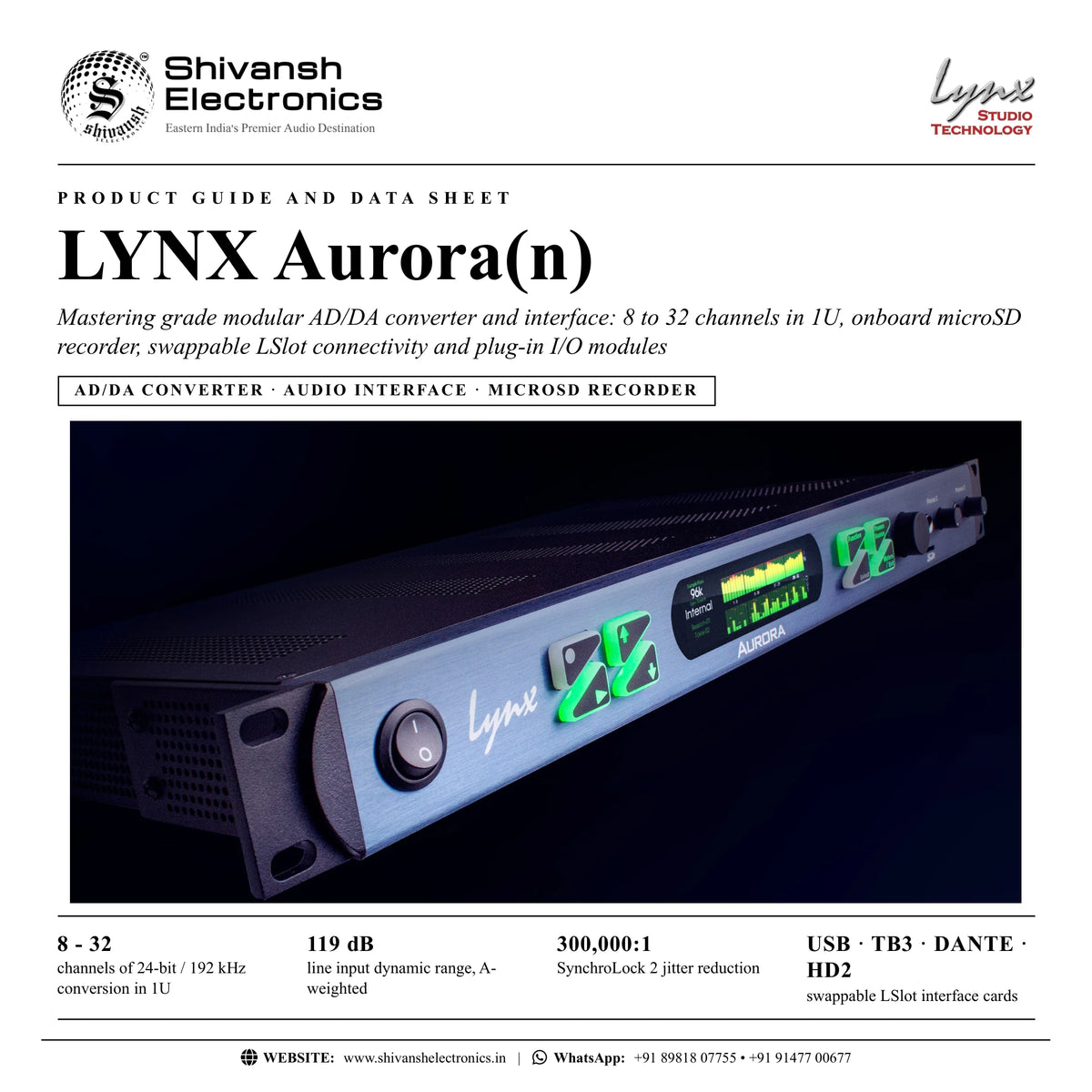
The LYNX Aurora(n) is a mastering grade modular AD/DA converter, computer interface and stand-alone recorder: 8, 16, 24 or 32 channels of 24-bit / 192 kHz conversion in one rack space, an onboard 32-channel microSD recorder, plug-in I/O modules and swappable LSlot cards for USB, Thunderbolt 3, Dante or HD system connection.
The Aurora set the standard for transparency, reliability and economy in a professional AD/DA converter; the Aurora(n) is a complete redesign from the bottom up. Next generation components and a discrete converter array, with a dedicated conversion device for each channel pair, give -113 dB THD+N and 119 dB of dynamic range at the low cost per channel LYNX is known for. Rather than a fixed feature set product, Aurora(n) is a platform: interchangeable LSlot cards and I/O modules let the unit you buy today grow with your studio, and it also works with no computer at all.
| Channels of 24‑bit / 192 kHz conversion in 1U | 8 - 32 |
| Line input dynamic range, A‑weighted | 119 dB |
| SynchroLock 2 jitter reduction | 300,000:1 |
| Swappable LSlot interface cards | USB / TB3 / Dante / HD2 |
Key features
- 8, 16, 24 and 32 channel versions, each in a 1U format
- 24-bit / 192 kHz mastering grade A/D and D/A conversion with a discrete converter array
- Onboard 32-channel microSD recorder for direct recording and playback, cards up to 2 TB
- Upgradable modules: LM-PRE4 mic preamp, LM-DIG AES/EBU digital I/O with optional DB-ADAT, LM-AIO8E line I/O
- Two audiophile-grade headphone outputs with independent volume controls
- 1 in, 3 out word clock with second generation SynchroLock 2 technology
- Future-proof LSlot design with swappable USB, Thunderbolt 3, HD2 and Dante cards
- NControl software for total control of routing and functions from a computer
- Road-ready, passively cooled, reinforced rack-mount chassis
Transparency and the discrete converter array
Signal coloration is additive and can kill an otherwise pristine mix. In the Aurora(n) the analogue signal path of each channel is a self-contained, shielded circuit and each channel pair has its own dedicated conversion device, reducing crosstalk and distortion while increasing dynamic range. Design and technology from the development of the Hilo bring Hilo-like performance to a multichannel converter.
A modular platform that grows with you
Start with eight, sixteen or twenty-four channels and add groups of eight up to thirty-two. Add modules for digital I/O and microphone preamps, change the connection method with an LSlot card, and add functions with free firmware updates. An 8-channel analogue USB system today can become a 16 analogue plus 16 digital Thunderbolt system later.
Stand-alone microSD recording and playback
The microSD slot records up to 32 channels of broadcast wave files at all sample rates, as a confidence recording during production or as a stand-alone recorder. Single or multitrack recordings and playlists play back to the outputs, perfect for installations or live performances with prerecorded tracks. Up to 128 sessions per card and 256 takes per session are supported.
SynchroLock 2 clocking
Mastering grade clock generation with better than 7 ppm accuracy makes the Aurora(n) an ideal studio master clock, delivering first generation, time aligned clock from three word clock outputs. As a clock slave, SynchroLock 2 reduces jitter by 300,000:1 and locks in about 5 seconds.
Immersive monitoring firmware
A free firmware update for registered owners supports speaker configurations up to 9.1.6 with 530 room correction filters, up to 16 filters per channel (parametric, low-pass, high-pass and shelving), level and delay compensation and bass management with LFE, at 64-bit floating-point accuracy.
In the box
- Aurora(n) AD/DA converter
- AC power cord
- Aurora(n) user's manual
- USB only: one 6' Type-A to Type-B shielded USB 2.0 cable
Available versions
- Aurora(n) 8: 8 analogue inputs and 8 outputs, 1 x DB25 each
- Aurora(n) 16: 16 analogue inputs and 16 outputs, 2 x DB25 each
- Aurora(n) 24: 24 analogue inputs and 24 outputs, 3 x DB25 each
- Aurora(n) 32: 32 analogue inputs and 32 outputs, 4 x DB25 each
- Each version with an LSlot card for USB (up to 16 channels), Thunderbolt 3, Dante or HD system connection
LYNX Aurora(n): frequently asked questions
Can I add channels or modules later?
Yes. Channels can be added in groups of eight up to 32, and LM-PRE4, LM-DIG (with DB-ADAT) and LM-A24 modules can be added. Some modules are user-installable; LM-PRE4 and DB-ADAT installation is done by LYNX or a LYNX custom shop integrator.
Can the Aurora(n) work without a computer?
Yes. It can record and play up to 32 channels on its microSD card, and every setting is available on the front panel, so it works as a stand-alone converter and recorder.
How do I connect it to my computer?
Through the LSlot card: LT-USB (USB 2.0, up to 16 channels), LT-TB3 (Thunderbolt 3), LT-DANTE (Dante network) or LT-HD2 (HD system). The card can be changed later.
What connectors are used for the analogue I/O?
25-pin D-sub connectors, 8 channels each, balanced or unbalanced. LYNX CBL-AIN85 and CBL-AOUT85 fan them out to 8 female or 8 male XLR.
Where can I buy the LYNX Aurora(n) in India?
The LYNX Aurora(n) is available from Shivansh Electronics, Kolkata, West Bengal, India, with delivery across India.
Workflow 1: Multitrack studio recording
Studios recording up to 32 channels to a computer.
Connections
| Connect | To |
|---|---|
| Microphone preamplifier outputs | LINE IN (25‑pin D‑sub via CBL‑AIN85) |
| Studio monitors and cue system | LINE OUT (via CBL‑AOUT85) |
| Computer | LSlot card (Thunderbolt 3, USB, Dante or HD2) |
| Headphones | PHONES 1 and 2 |
Setup
- Install the LYNX driver for your LSlot card.
- Connect the line inputs and outputs with D-sub cable sets.
- Set trims to +4 dBu or -10 dBV in banks of four.
- Record in your recording software and monitor on PHONES.
Tip: Leave an empty rack space above and below the Aurora(n) for cooling.
Workflow 2: Mastering conversion
Mastering engineers who need transparent conversion for an analogue chain.
Connections
| Connect | To |
|---|---|
| Outboard processor inputs | LINE OUT 1‑2 |
| Outboard processor outputs | LINE IN 1‑2 |
| Master clock for the studio | WORD CLOCK OUT 1‑3 |
Setup
- Set the Aurora(n) as the master clock on Internal.
- Feed the other digital devices from the three word clock outputs.
- Match the line trims to the outboard levels.
- Capture the return at 24-bit / 192 kHz.
Tip: SynchroLock 2 keeps jitter low even when the Aurora(n) is a clock slave.
Workflow 3: Computer-free live recording
Engineers recording concerts and events without a computer.
Connections
| Connect | To |
|---|---|
| Stage split or preamplifiers | LINE IN or LM‑PRE4 inputs |
| microSD card | Front panel slot |
| Headphones | PHONES |
Setup
- Create or select a session on the Sessions page.
- Choose the record channels on the SD Record Setup page.
- Press Record on the front panel.
- Copy the WAV files to a computer after the show.
Tip: Always record to a freshly formatted card and never delete files on the card from a computer.
Workflow 4: Installations with playback
Venues, museums and installations playing multitrack audio.
Connections
| Connect | To |
|---|---|
| Amplifiers or powered speakers | LINE OUT |
| microSD card with sessions or playlists | Front panel slot |
Setup
- Copy session folders with WAV takes to the card.
- Build a playlist for the installation.
- Select the take or playlist and press Play.
- Set output levels from the front panel.
Tip: The Aurora(n) plays 16, 24 and 32-bit PCM files with 2 to 32 channels.
Workflow 5: Network audio integration
Broadcast and installation systems built on a Dante network.
Connections
| Connect | To |
|---|---|
| Dante network switch | LT‑DANTE primary and secondary ports |
| Analogue sources and destinations | LINE IN / LINE OUT |
Setup
- Fit the LT-DANTE LSlot card (or order a DNT version).
- Connect primary and secondary network ports.
- Route channels with the network controller.
- Use NControl for Aurora(n) routing and levels.
Tip: Use Cat 5e or Cat 6 cables for the network connection.
Workflow 6: Digital format conversion
Studios linking AES/EBU and ADAT equipment.
Connections
| Connect | To |
|---|---|
| AES/EBU devices | LM‑DIG 25‑pin D‑sub (CBL‑DIGY85) |
| ADAT devices | DB‑ADAT optical ports |
| Analogue equipment | LINE IN / LINE OUT |
Setup
- Fit an LM-DIG, with a DB-ADAT for optical I/O.
- Select the sync source on the Clock Setup page.
- Route digital inputs to analogue or digital outputs.
- Check levels on the All I/O meter page.
Tip: Pressing Meters / Exit shows the AES and ADAT meters on units with LM-DIG and DB-ADAT.