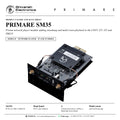

PRIMARE SM35
PRICE ON ENQUIRY
Primare SM35 Prisma network player module for CD35, I25, I35 and PRE35: Chromecast built-in, AirPlay 2, Bluetooth, Roon Ready. Available in India from Shivansh Electronics, Kolkata, West Bengal, India.
VISUAL GUIDE — See Every Photo, Spec & Setup Step (PDF)
PRICE ON ENQUIRY. For the price, exclusive offers, delivery timelines, or any other information, please Contact / WhatsApp +91 89818 07755 / +91 91477 00677. We will gladly share a personalised quotation for Shivansh Electronics, Kolkata, West Bengal, India. All payments are processed securely through Razorpay, our secure payment gateway.
General
| Type | Prisma network player module (control and connectivity) |
| Fits | CD35, I25, I35, PRE35 |
| Requires | DM35 or DM36 DAC module in amplifiers and preamplifiers |
Connectivity
| USB-A | 1 × digital input; up to PCM 24/192 kHz and DSD128 (5.6 MHz) |
| File formats (USB) | WAV, LPCM, AIFF, FLAC, ALAC, MP3, MP4 (AAC), WMA, OGG, DSD |
| Ethernet | Yes (Specs tab: × 2) |
| Wi-Fi | Dual band, IEEE 802.11 a/b/g/n/ac |
| AirPlay 2 | Yes |
| Bluetooth | Yes |
| Chromecast built-in | Yes |
| Roon Ready | Yes |
| Control | Prisma app |
Product overview
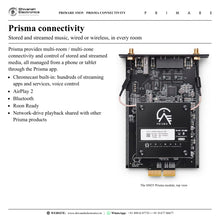
The Primare SM35 is the Prisma network player module for the CD35, I25, I35 and PRE35, adding Prisma control and connectivity: multi-room / multi-zone playback of stored and streamed music, wired or wireless, all managed from a phone or tablet with the Prisma app.
Prisma is a bundle of technologies created so that everyone in the household can explore, discover and share high-performance music playback. Alongside AirPlay 2, Bluetooth and Roon Ready, Prisma features Chromecast built-in, a streaming portal giving direct connection to hundreds of streaming apps and services, including voice control. A USB-A input plays music files from a drive at up to PCM 24/192 kHz and DSD128, and music stored on a network drive can be played and shared with other Prisma products on the network.
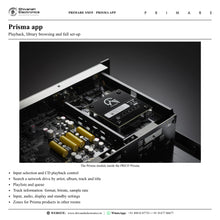
Network connection is by Ethernet or dual-band Wi-Fi, with two antennae supplied: one for Bluetooth and one for Wi-Fi. The Prisma app gives input selection, CD playback control and full network-drive browsing by artist, album, track and title, with playlists, queues and track information such as format, bitrate and sample rate, plus complete set-up of inputs, volume, display and standby settings.
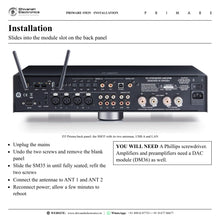
Fitting is simple: unplug the mains, remove the blank panel covering the module slot on the back panel, slide the SM35 in until it seats fully, secure it with the two screws, connect the antennae and power up. The Primare unit recognises the module after a few minutes and configures itself for the new features. In amplifiers and preamplifiers a DAC module (DM36) is required for the Prisma module.
Key features
- Prisma network player module for CD35, I25, I35 and PRE35
- Chromecast built-in, AirPlay 2, Bluetooth and Roon Ready
- Multi-room / multi-zone playback of stored and streamed music
- USB-A input: up to PCM 24/192 kHz and DSD128 (5.6 MHz)
- Ethernet and dual-band Wi-Fi; two antennae supplied
- Control and set-up from the Prisma app; installable at any time
Made for
- CD35, I25, I35 and PRE35 owners adding network streaming
- Whole-home and multi-room music
- Music libraries on a network drive or USB drive
In the box
- SM35 Prisma network player module
- 2 × antennae
Connections
- 1 × USB-A digital input
- Ethernet (LAN)
- ANT 1 and ANT 2 antenna sockets (Bluetooth and Wi-Fi)
Primare SM35: frequently asked questions
Which Primare products take the SM35?
The CD35 CD player, the I25 and I35 integrated amplifiers and the PRE35 preamplifier. With the module fitted they become the Prisma versions of these models. In the amplifiers and preamplifier a DAC module such as the DM36 is required.
How is it installed?
With a Phillips screwdriver: unplug the mains, undo the two screws of the blank panel over the module slot, slide the SM35 in until it seats fully, secure it with the same two screws, connect the two antennae to ANT 1 and ANT 2 and reconnect power. Allow a few minutes for the unit to reboot and recognise the module.
How do I connect it to my network?
Connect an Ethernet cable from your router to the LAN socket on the module, or set up Wi-Fi from a phone or tablet when the display shows the module is ready. Chromecast features such as casting, voice control and multi-room grouping are set up through the Chromecast set-up app.
Where can I buy the Primare SM35 in India?
The Primare SM35 is available from Shivansh Electronics, Kolkata, West Bengal, India, with delivery across India.
Workflow 1: Streaming in the living room
Owners of an I35, I25 or PRE35 with DAC who want streaming from phones and tablets.
Connections
| Connect | To |
|---|---|
| SM35 LAN socket | Home router (Ethernet) |
| Phone or tablet | Prisma app / AirPlay 2 / Chromecast built-in / Bluetooth |
Setup
- Unplug the mains and remove the blank panel over the module slot.
- Slide the SM35 in, secure it with the two screws and connect the antennae to ANT 1 and ANT 2.
- Reconnect power and allow a few minutes for the unit to recognise the module.
- Connect Ethernet, or set up Wi-Fi from your phone or tablet.
- Install the Prisma app and start playing.
Tip: Angle the two antennae slightly from vertical: one is for Bluetooth, the other for Wi-Fi.
Workflow 2: Whole-home music from a network drive
Families with several Primare Prisma products in different rooms.
Connections
| Connect | To |
|---|---|
| Network drive (NAS) | Home network |
| SM35 in each Primare product | Same home network |
Setup
- Connect every Prisma product to the same network.
- Select the media server under Source settings in the Prisma app.
- Create zones for the Prisma products in other rooms.
- Play stored music and send it to other Prisma products, or group rooms with Chromecast built-in or AirPlay 2.
Tip: Hi-res files can also play from a USB drive on the USB-A input, up to 24/192 kHz and DSD128.