RME M-1620 Pro
MRP - Rs. 3,58,838
RME M-1620 Pro 16-ch AD, 20-ch DA converter, 1U: 2 phones outs, 4 x ADAT I/O, MADI, Milan AVB, redundant power. Available in India from Shivansh Electronics, Kolkata, West Bengal, India.
VISUAL GUIDE — See Every Photo, Spec & Setup Step (PDF)
The price shown is the MAXIMUM RETAIL PRICE (MRP), inclusive of all taxes. For the best price, exclusive offers and discounted rates, delivery timelines, or any other information, please DM us or call +91 89818 07755 / +91 91477 00677. We will gladly share an exclusive coupon code that you can apply at checkout. All payments are processed securely through Razorpay, our trusted payment gateway partner.
General
| Type | 16‑channel AD, 20‑channel DA converter with ADAT, MADI and Milan AVB, 19‑inch, 1U |
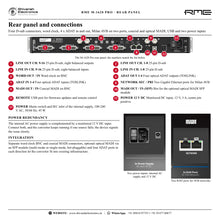
| Analogue | 16 x line in, 16 x line out on 25‑pin D‑sub; 2 x stereo phones (6.3 mm TRS) |
| ADAT | 4 x optical I/O |
| MADI | Coaxial I/O on BNC + optional optical SFP |
| Network | 2 x Gigabit Ethernet (802.3), Milan AVB, up to 128 channels at 48 kHz |
| Word clock | BNC in and out |
| USB | REMOTE port for firmware and remote control |
| Power | Internal AC supply 100‑240 V AC, 50/60 Hz, 45 W; monitored 12 V DC input (3 A); optional redundant PSU |
| Clock | SteadyClock FS |
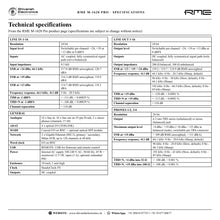
Line in 1-16
| Resolution | 24 bit |
| Input level | +24, +19 or +13 dBu at 0 dBFS, switchable per channel |
| Input impedance | 9.5 kOhm |
| SNR | +24 dBu: 117.0 dB RMS unweighted, 120.7 dBA; +19 dBu: 116.3 dB / 119.9 dBA; +13 dBu: 114.7 dB / 118.3 dBA |
| Frequency response | 5 Hz - 20.5 kHz (44.1 kHz, -0.1 dB) |
| THD / THD+N | < -111 dB / < -108 dB (-1 dBFS) |
| Channel separation | > 110 dB |
Line out 1-16
| Resolution | 24 bit |
| Output level | +24, +19 or +13 dBu at 0 dBFS, switchable per channel |
| Outputs | DC coupled, truly balanced; 200 Ohm balanced, 100 Ohm unbalanced |
| SNR | 119.2 / 119.7 / 119.9 dB RMS unweighted at +13 / +19 / +24 dBu |
| Frequency response | 0 Hz - 20.3 kHz (44.1 kHz, Sharp); 0 Hz - 30 kHz (96 kHz, Slow); 0 Hz - 60.5 kHz (192 kHz, Slow) |
| THD / THD+N | < -120 dB / < -113 dB (+19 dBu) |
| Channel separation | > 110 dB |
Phones 1/2, 3/4
| Output | 6.3 mm TRS stereo (unbalanced) or mono (balanced) |
| Maximum level | +4 dBu / +19 dBu (+10 / +25 dBu balanced), switchable per connector |
| SNR | > 109 dB RMS unweighted, > 111 dB(A) at +19 dBu |
| THD+N | < -100 dB (+4 dBu into 32 Ohm; +19 dBu into 100 Ohm) |
Product overview
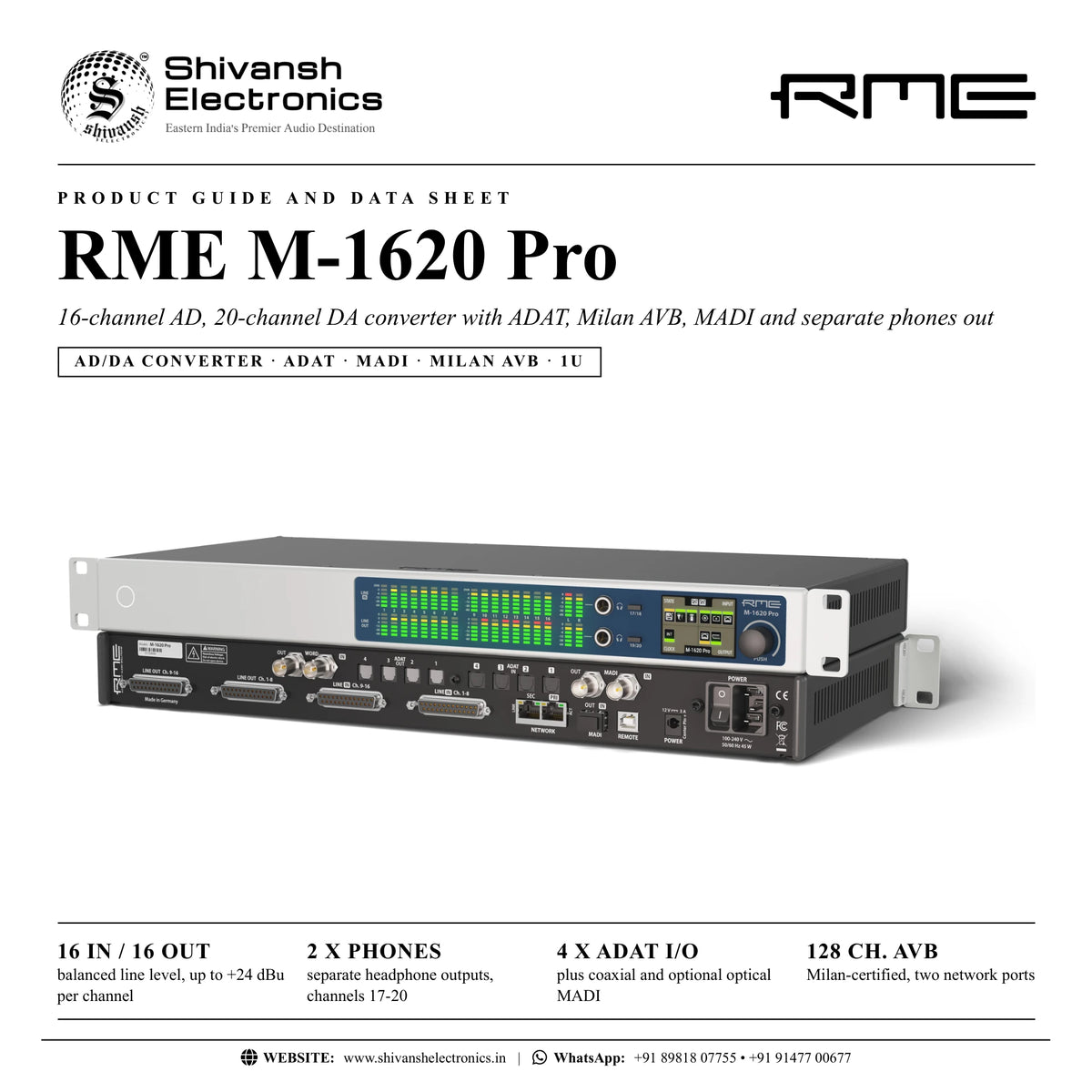
The RME M-1620 Pro is a 16-channel AD, 20-channel DA converter in a single-height 19-inch rack unit: 16 analogue line inputs and outputs (switchable up to +24 dBu per channel), two separate headphone outputs, 4 x ADAT I/O, coaxial and optional optical MADI and Milan AVB on two Gigabit ports.
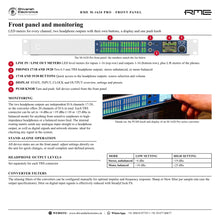
It converts 16 analogue line-level signals to and from MADI, ADAT and Milan network technology. The front panel combines LED level meters with a display and two separate headphone outputs for monitoring. Built-in redundancy covers dual network and dual MADI connections and a monitored DC input in addition to the internal AC power supply; a clear signalling system shows when an issue arises. With full stand-alone capability, settings are changed directly on the unit and complete user presets recalled.
| Line inputs / outputs (+24 dBu max.) | 16 / 16 |
| Separate headphone outputs | 2 |
| Optical I/O | 4 x ADAT |
| Milan AVB channels at 48 kHz | 128 |
Key features
- 16 analogue line inputs and 16 line outputs on 25-pin D-sub, each switchable to +24, +19 or +13 dBu
- 2 separate stereo headphone outputs (channels 17-20), +4 or +19 dBu per TRS connector
- LED level meters for all inputs and outputs plus a colour display and push knob
- 4 x ADAT optical I/O, coaxial MADI I/O and an optional optical MADI SFP module
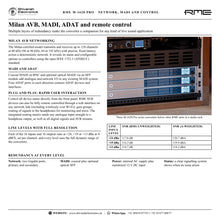
- Milan-certified AVB: up to 128 channels at 48 kHz (96 at 96 kHz, 64 at 192 kHz), IEEE 1722.1 ATDECC
- Built-in redundancy: dual network, dual MADI, internal AC supply plus a monitored 12 V DC input
- Converter filters configurable for the best impulse or frequency response
- SteadyClock FS jitter reduction on digital inputs
- DC-coupled outputs; USB for firmware and remote control
Milan AVB networking
The Milan-certified model transmits and receives up to 128 channels at 48 kHz (96 at 96 kHz, 64 at 192 kHz) with precise, fixed latency across a deterministic network, and reveals its status and options to controllers using the open IEEE 1722.1 (ATDECC) standard.
Add analogue and network I/O to any MADI system
Separate word clock BNC and coaxial MADI connectors, optional optical MADI via an SFP module and four ADAT ports in each direction let the converter fit into existing infrastructure. The aliasing filters can be configured manually (Sharp or Slow per sample rate) for optimal impulse and frequency response.
Monitoring and control
All device states are on the front panel, and the converter can be remote controlled over any network link, also wirelessly over Wi-Fi. The integrated routing matrix sends any analogue input straight to a headphone output, as well as digital signals and network streams, so checking any signal in the system is quick and simple.
In the box
- RME M-1620 Pro
RME publishes the latest manual online (docs.rme-audio.com); firmware updates are free on the RME product page.
RME M-1620 Pro: frequently asked questions
Why 20 channels of DA?
16 analogue line outputs plus the two stereo headphone outputs (channels 17-20).
What power redundancy does it have?
An internal AC supply (100-240 V AC) plus a monitored 12 V DC input; an optional redundant PSU is listed by RME.
How many ADAT ports are there?
Four optical ADAT inputs and four optical ADAT outputs.
Is optical MADI included?
Coaxial MADI is built in; optical MADI uses the optional RME SFP module (multi-mode or single-mode).
Where can I buy the RME M-1620 Pro in India?
The RME M-1620 Pro is available from Shivansh Electronics, Kolkata, West Bengal, India, with delivery across India.
Workflow 1: Outboard gear in a recording studio
Use analogue effects and instruments with a MADI or network-based system.
Connections
| Connect | To |
|---|---|
| Outboard inputs | LINE OUT Ch. 1‑16 (D‑sub) |
| Outboard outputs | LINE IN Ch. 1‑16 (D‑sub) |
| Recording system | MADI or Milan AVB |
Setup
- Connect the outboard with D-sub cables.
- Set each channel to +24, +19 or +13 dBu.
- Route the inputs and outputs to MADI or the network.
- Store the setup as a preset.
Workflow 2: Headphone monitoring of any signal
Check any analogue, digital or network signal in the system.
Connections
| Connect | To |
|---|---|
| Headphones | Phones 17/18 or 19/20 |
Setup
- Press the 17/18 or 19/20 button.
- Select the source in the routing matrix.
- Set the level for each TRS connector (+4 or +19 dBu).
- Adjust the volume with the knob.
Workflow 3: Milan AVB on two network paths
Keep audio running on stage if a network path fails.
Connections
| Connect | To |
|---|---|
| Primary network | NETWORK PRI |
| Secondary network | NETWORK SEC |
Setup
- Connect PRI and SEC to two separate network paths.
- Set up the network connections.
- Check the network status on the display.
- Store the configuration.
Workflow 4: ADAT expansion
Connect ADAT devices to the converter and the network.
Connections
| Connect | To |
|---|---|
| ADAT device | ADAT IN / OUT 1‑4 |
Setup
- Connect the optical cables.
- Choose the clock source.
- Route the ADAT channels in the matrix.
- Check sync on the display.
Workflow 5: MADI bridge
Add analogue, ADAT and network I/O to an existing MADI device.
Connections
| Connect | To |
|---|---|
| MADI device | MADI OUT / IN (BNC) |
| Optical MADI | Optional SFP module |
Setup
- Insert the optional SFP module if optical MADI is needed.
- Connect coaxial or optical MADI.
- Route MADI to the analogue, ADAT and Milan AVB I/O.
- Set word clock or MADI as clock source.
Workflow 6: Power redundancy
Keep the converter running if one power source fails.
Connections
| Connect | To |
|---|---|
| Mains | POWER (IEC) |
| 12 V DC supply | POWER 12 V DC |
Setup
- Connect mains to the internal supply.
- Connect a 12 V DC supply (3 A, centre pin positive).
- Switch on.
- Watch the power state on the display.