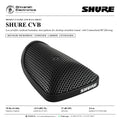
SHURE CVB
PRICE ON ENQUIRY
Shure CVB Centraverse cardioid boundary condenser mic for desktop installed sound, low profile, black, Commshield and 3.6 m XLR cable. Available in India from Shivansh Electronics, Kolkata, West Bengal, India.
VISUAL GUIDE — See Every Photo, Spec & Setup Step (PDF)
PRICE ON ENQUIRY. For the price, exclusive offers, delivery timelines, or any other information, please Contact / WhatsApp +91 89818 07755 / +91 91477 00677. We will gladly share a personalised quotation for Shivansh Electronics, Kolkata, West Bengal, India. All payments are processed securely through Razorpay, our trusted payment gateway.
Acoustics
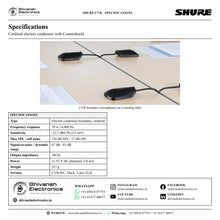
| Type | Electret condenser, boundary |
| Polar pattern | Cardioid |
| Frequency response | 70 to 16,000 Hz |
| Sensitivity (open circuit voltage, 1 kHz, typical) | -32.5 dBV/Pa (23 mV); 1 Pa = 94 dB SPL |
| Maximum SPL (1 kHz at 1 % THD) | 120 dB SPL |
| Signal-to-noise ratio (ref. 94 dB SPL at 1 kHz) | 67 dB |
| Dynamic range | 93 dB |
| Self noise (equivalent SPL, A-weighted, typical) | 27 dB SPL |
Electrical
| Output impedance | 180 Ω |
| Clipping level (1 kHz, 1 % THD) | -7 dBV |
| Common mode rejection (10 Hz to 100 kHz) | > 45 dB |
| Polarity | Positive pressure on diaphragm produces positive voltage on pin 2 with respect to pin 3 |
| Power requirements | 11-52 V DC phantom power, 2.0 mA (specifications measured at 48 V DC) |
| RF filtering | Commshield |
| Cable | Attached, 12 ft (3.6 m), back cable exit, 3-pin XLR |
Physical
| Weight | 227 g (8 oz) |
| Dimensions (shure.com) | 63 × 24 × 88 mm (W × H × D) |
| Mounting | Mounting holes; two flat-head screws 24 mm apart |
| Operating temperature | -18 to 57 °C (0 to 135 °F) |
| Storage temperature | -29 to 74 °C (-20 to 165 °F) |
| Relative humidity | 0 to 95 % |
Versions
| CVB-B/C | Condenser, cardioid, back cable exit, black, 3-pin XLR |
Product overview
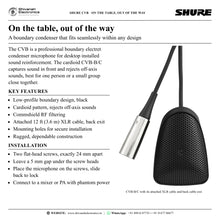
The Shure CVB is a professional boundary electret condenser microphone from the Centraverse installed sound range, made for desktop sound reinforcement with a low-profile design that fits seamlessly within any design aesthetic.
The CVB sold in India is the CVB-B/C: cardioid, black, with a back cable exit and an attached 12 ft (3.6 m) XLR cable that connects straight to a mixer or PA system.
The cardioid model captures sound in front of the microphone and rejects off-axis sounds, so it is best suited to capturing one person or a small group close to one another. It covers 70 Hz to 16 kHz with a sensitivity of -32.5 dBV/Pa (23 mV), a self noise of 27 dB SPL and a maximum SPL of 120 dB, and needs phantom power (11 to 52 V DC).
Like every Centraverse model, the CVB has Commshield RF filtering technology, which guards against unwanted RF interference from portable wireless devices such as smartphones, and gives high resistance to intense nearby radio signals. Mounting holes on the base let you fix the microphone securely to the table, and the rugged, dependable construction is built for daily installed use.
| Electret condenser boundary | Cardioid |
| Frequency response | 70 Hz-16 kHz |
| Sensitivity (23 mV) | -32.5 dBV/Pa |
| Attached 12 ft XLR cable | 3.6 m |
Key features
- Low-profile boundary design that fits seamlessly within any design aesthetic
- Cardioid pattern: captures sound in front, rejects off-axis sounds
- Commshield RF filtering guards against RF interference from portable wireless devices such as smartphones
- High resistance to intense nearby radio signals
- Attached 12 ft (3.6 m) XLR cable with back cable exit
- Mounting holes for secure installation
- Self noise of 27 dB SPL and maximum SPL of 120 dB
- Superior Shure design and rugged, dependable construction
Made for
- Desktop installed sound reinforcement
- Meeting rooms and boardroom tables
- Houses of worship
- One talker or a small group close together
In the box
- CVB-B/C boundary microphone with attached 12 ft (3.6 m) XLR cable
Connections
- Attached 12 ft (3.6 m) cable with XLR connector to a mixer or PA system
- Needs phantom power: 11 to 52 V DC, 2.0 mA
- Polarity: positive pressure on the diaphragm gives positive voltage on pin 2 with respect to pin 3
Shure CVB: frequently asked questions
How do I fix the CVB to a table?
Install two flat-head screws into the surface exactly 24 mm (15/16 in.) apart, leaving a 5 mm (3/16 in.) gap between the screw head and the surface. Place the microphone onto the screws and slide it backwards to lock it in place.
How many people can one CVB pick up?
The cardioid CVB-B/C captures sound in front of the microphone and rejects off-axis sounds, so it is best suited to one person or a small group sitting close together. For a long table, use one microphone for each talker or small group.
Does it need phantom power?
Yes. It needs phantom power, 11 to 52 V DC at 2.0 mA. Its specifications are measured at 48 V; it works at lower voltages with slightly less headroom and sensitivity.
Will smartphones on the table cause interference?
Commshield RF filtering technology guards against unwanted RF interference from portable wireless devices such as smartphones and gives high resistance to intense nearby radio signals.
Which version is sold in India?
The CVB-B/C: condenser, cardioid, back cable exit, black, 3-pin XLR connector.
Where can I buy the Shure CVB in India?
The Shure CVB is available from Shivansh Electronics, Kolkata, West Bengal, India, with delivery across India.
Workflow 1: Boardroom table
Meeting rooms that reinforce talkers around a table.
Connections
| Connect | To |
|---|---|
| One CVB per talker or small group | Attached 12 ft XLR cables |
| XLR cables | Mixer or PA inputs with phantom power |
Setup
- Place a CVB in front of each talker or small group, pointing at them.
- Fix each microphone on two screws 24 mm apart and slide it back to lock.
- Run the attached cables to the mixer and switch on phantom power.
- Set the gain for speech and keep unused microphones turned down.
Tip: The cardioid pattern rejects off-axis sounds from the rest of the room.
Workflow 2: Council or committee desk
Chambers and committee rooms with fixed seating.
Connections
| Connect | To |
|---|---|
| CVB at each seat | Installed sound mixer |
| Mixer | Room loudspeakers |
Setup
- Mount one CVB at each seat with the mounting holes.
- Route the back-exit cable under the desk.
- Set levels for each seat at the mixer.
- Check feedback with the loudspeakers on.
Tip: Screw mounting keeps the microphones in place day after day.
Workflow 3: Altar or lectern table
Houses of worship that need a discreet table microphone.
Connections
| Connect | To |
|---|---|
| CVB on the table | Mixer input with phantom power |
Setup
- Place the CVB facing the person speaking.
- Connect the XLR cable to the mixer.
- Switch on phantom power and set the gain.
- Keep loudspeakers behind the microphone's pickup.
Tip: The low-profile black design fits seamlessly within the setting.
Workflow 4: Panel discussion
Event venues with a seated panel.
Connections
| Connect | To |
|---|---|
| One CVB for every one or two panellists | Separate mixer channels |
Setup
- Seat panellists close together in pairs.
- Place a CVB in front of each pair.
- Connect each to its own channel with phantom power.
- Balance the voices at the mixer.
Tip: The cardioid CVB suits one person or a small group close to one another.
Workflow 5: Training room desk
Training rooms and classrooms with a presenter's desk.
Connections
| Connect | To |
|---|---|
| CVB on the presenter's desk | Mixer or PA input |
Setup
- Place the CVB on the desk in front of the presenter.
- Connect it and switch on phantom power.
- Set the level for normal speech.
- Ask the presenter to stay in front of the microphone.
Tip: Self noise of 27 dB SPL keeps speech clean.
Workflow 6: Tables full of phones
Rooms where people put smartphones next to the microphone.
Connections
| Connect | To |
|---|---|
| CVB | Mixer input |
Setup
- Install the CVB as usual.
- Leave phones where people put them.
- Listen for interference during a test call.
- Set the levels.
Tip: Commshield RF filtering guards against interference from portable wireless devices.