




YAMAHA MGX16
PRICE ON ENQUIRY
Yamaha MGX16 22-channel digital mixer: 8 mic preamps, 4.3-inch touchscreen, dual USB-C, Bluetooth, Sound Pads and 16-track microSD recording. Available in India from Shivansh Electronics, Kolkata, West Bengal, India.
VISUAL GUIDE — See Every Photo, Spec & Setup Step (PDF)
PRICE ON ENQUIRY. For the price, exclusive offers, delivery timelines, or any other information, please Contact / WhatsApp +91 89818 07755 / +91 91477 00677. We will gladly share a personalised quotation for Shivansh Electronics, Kolkata, West Bengal, India. All payments are processed securely through Razorpay, our trusted payment gateway.
General
| Product | 22-channel digital mixing console |
| Model | MGX16 |
Mixing capacity
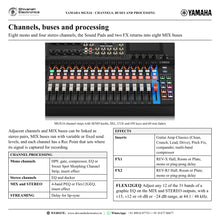
| Input channels | 8 mono + 4 stereo + 1 Sound Pad + 2 FX |
| Buses | 8 MIX (mono) + 2 FX + 1 CUE + 1 STEREO |
On-board processors
| DSP | Gate, Compressor, EQ, Sweet Spot Morphing Channel Strip (Comp & EQ), Guitar Amp Classics (Amp Simulator), Pitch Fix (Voice Changer), Ducker, Multi-Band Compressor, Compander, Delay, REV-X (Reverb) |
| FX1 / FX2 effects | REV-X Hall / Room / Plate (FX1), REV-R3 Hall / Room / Plate (FX2), Mono Delay, Ping Pong Delay |
| Graphic EQ | Flex12GEQ on MIX and STEREO, at 44.1 / 48 kHz |
I/O connectors
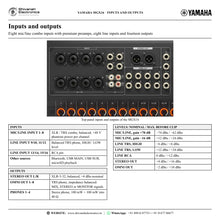
| Analog input | 8 Mic/Line (XLR/TRS combo), 8 Line (4 TRS phone, 4 RCA) |
| Analog output | 2 XLR, 8 TRS phone |
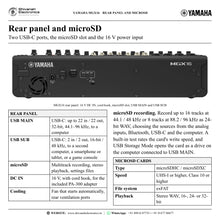
| USB TO HOST | 2 × USB Type-C (MAIN: 32-bit, SUB: 16-bit) |
| Phones | 4 × TRS stereo phone, 100 mW + 100 mW into 40 Ω |
| DC power input | 1 (barrel type) |
| microSD card slot | 1 |
| Bluetooth | 1 Bluetooth audio input (Bluetooth 5.0, A2DP) |
| HDMI | None (HDMI IN / THRU on the MGX16V) |
User interface
| Screen | 4.3-inch touch screen |
| Faders | 16 × 60 mm (15 + 1, non-motorised) |
| Knobs | 16 × SEND, 5 × rotary encoder (4 × screen knob, 1 × TOUCH AND TURN) |
Recording and playback
| USB MAIN | Up to 22-track recording, 22-track playback |
| USB SUB | 2-track recording, 2-track playback |
| microSD card | Up to 16-track recording, 2-track playback |
Digital inputs and outputs
| USB MAIN audio | PCM, 32-bit, up to 96 kHz; dedicated driver: up to 22 in / 22 out; USB Audio Class 2.0: 18 in / 16 out; USB Type-C, USB 2.0 High Speed |
| USB SUB audio | PCM, 16-bit / 48 kHz; USB Audio Class 1.0; 2 in / 2 out; USB Type-C, USB 2.0 Full Speed |
| microSD | WAV, 24-bit, up to 96 kHz; microSDHC / microSDXC (UHS-I or higher, Class 10 or higher), exFAT; recording 16 tracks @ 44.1 / 48 kHz, 8 tracks @ 88.2 / 96 kHz; playback 2 tracks |
| Bluetooth audio input | AAC, SBC; 16-bit, up to 48 kHz; Bluetooth 5.0, A2DP; 2 in |
| Bluetooth radio | Class 1, 2402–2480 MHz, TX power +10.4 dBm (11 mW) |
| Format conversion | Audio from Bluetooth and USB SUB is converted to the mixer audio format automatically |
Audio performance
| Sampling frequency | 44.1 / 48 / 88.2 / 96 kHz, accuracy ±50 ppm |
| Signal delay | Less than 0.4 ms (INPUT to STEREO OUT @ Fs = 96 kHz) |
| Frequency response | +0.0 / −0.5 dB, 20 Hz–20 kHz, reference to the nominal output level @ 1 kHz, MIC/LINE INPUT to STEREO OUT |
| Total harmonic distortion (THD+N) | Less than 0.002 % @ +4 dBu (20 Hz–20 kHz), MIC/LINE INPUT to STEREO OUT, input gain min. |
| Equivalent input noise | −128 dBu typ., MIC/LINE INPUT to STEREO OUT, input gain max. |
| Residual output noise | −108 dBu, STEREO OUT off |
| Dynamic range | 125 dB typ., DAC to STEREO OUT; 115 dB typ., MIC/LINE INPUT to STEREO OUT, input gain min. |
| Crosstalk @ 1 kHz | −120 dB, adjacent INPUT / STEREO OUT channels, input gain min. |
| Gain range | 86 dB (+70 dB to −16 dB) |
| AD converter (MIC/LINE) | Dynamic range 120 dB, THD+N −112 dB |
| DA converter (STEREO OUT) | Dynamic range 130 dB, THD+N −120 dB |
Analog input characteristics
| MIC/LINE 1–8 | Combo jack, balanced; load impedance 4 kΩ, for 150 Ω mics or 600 Ω lines; at gain +70 dB: sensitivity −94 dBu, nominal −74 dBu, max. before clip −62 dBu; at gain −16 dB: sensitivity −8 dBu, nominal +12 dBu, max. before clip +24 dBu |
| LINE 9/10, 11/12 | TRS phone jack, balanced; load impedance 10 kΩ, for 600 Ω lines; HIGH: sensitivity −26 dBu, nominal −6 dBu, max. before clip +6 dBu; LOW: sensitivity −8 dBu, nominal +12 dBu, max. before clip +24 dBu |
| LINE 13/14, 15/16 | RCA pin jack, unbalanced; load impedance 10 kΩ, for 600 Ω lines; sensitivity −20 dBu, nominal 0 dBu, max. before clip +12 dBu |
Analog output characteristics
| STEREO OUT L/R | XLR-3-32, balanced; source impedance 300 Ω, for 10 kΩ lines; nominal +4 dBu, max. before clip +16 dBu |
| OMNI OUT 1–8 | TRS phone jack, impedance balanced; source impedance 150 Ω, for 10 kΩ lines; nominal −2 dBu, max. before clip +10 dBu |
| PHONES 1–4 | Stereo phone jack; source impedance 10 Ω, for 40 Ω phones; nominal 6 mW + 6 mW, max. before clip 100 mW + 100 mW |
Power
| Power requirements | DC 16 V / 2.4 A, PA-300 AC power adapter (100–240 V, 50/60 Hz) |
| Power consumption | 38.4 W |
Physical
| Dimensions (W × H × D) | 419 × 96 × 319 mm (16.5" × 3.8" × 12.6") |
| Net weight | 4.7 kg (10.4 lb) |
| Operating temperature | 0–40 °C |
| Storage temperature | −20 to 60 °C |
Included accessories
| In the box | Start Guide, Safety Guide, two recording / editing software licence cards, a basic effects plug-in licence card, AC power adapter PA-300 (including power cord) |
Options
| Rack mount kit | RK-MGX16 |
Versions
| MGX16 B | Black |
| MGX16 W | White |
Product overview
The Yamaha MGX16 is a 22-channel digital mixing console that pairs a 4.3-inch touchscreen with real faders and knobs and combines eight premium microphone preamps with dual USB-C audio interfaces, Bluetooth audio input, eight Sound Pads and 16-track microSD recording.
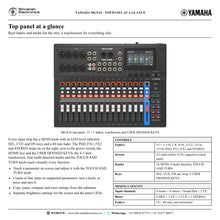
MGX is the digital evolution of Yamaha's MG analog mixers: it carries forward a sound philosophy refined through decades of analog mixer design, the pursuit of “True Sound” that faithfully captures every nuance of a performance, and adds the reach of a modern digital console. The MGX16 takes eight microphones and eight line-level sources on a 15 + 1 fader surface. Every strip has a SEND knob, SEL, CUE and ON keys and a 60 mm fader, while the 4.3-inch touchscreen, four screen knobs and the TOUCH AND TURN knob give quick access to virtually every function.
Sound quality is designed in from input to output. High-performance 32-bit / 96 kHz AD/DA converters and premium analog circuitry give a dynamic range of up to 115 dB on the inputs and 125 dB on the stereo output, with total harmonic distortion below 0.002 %. The mic preamps offer an 86 dB gain range and an equivalent input noise of −128 dBu, more than enough clean gain for low-sensitivity dynamic microphones. A built-in custom DSP gives every mono channel a gate, compressor and EQ or the one-knob Sweet Spot Morphing Channel Strip, and adds Guitar Amp Classics, Pitch Fix, a ducker, multi-band compressor and compander, Flex12GEQ on the MIX and STEREO outputs, and REV-X and REV-R3 reverbs, technologies also found in Yamaha's flagship digital consoles. Monitoring is latency-free: input to stereo out takes less than 0.4 ms at 96 kHz.
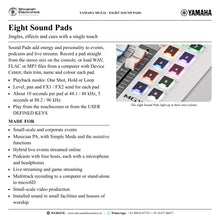
Beyond mixing, MGX works as a multifunctional hub. Dual USB-C ports connect two devices at once: USB MAIN carries up to 22 inputs and 22 outputs at 32-bit / 96 kHz to a computer, including three separate stereo devices for multi-stream audio, while USB SUB carries 2 in / 2 out to a second computer, a smartphone or tablet, or a game console. Bluetooth 5.0 brings in music from a phone or tablet, eight Sound Pads fire jingles and effects with one touch, and a microSD card records up to 16 tracks and plays back stereo files with no computer, or runs as a backup recorder beside one.
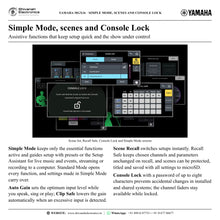
Assistive functions make the MGX16 quick for first-time users and fast for engineers. Simple Mode keeps only the essential functions active and guides setup step by step, with presets for live music and events, streaming and recording to a computer; Auto Gain sets the mic/line input level while you speak, sing or play, and Clip Safe lowers the gain when an excessive input arrives. Scene Recall switches setups instantly, Recall Safe protects chosen channels during a recall, and Console Lock with a password guards installed and shared systems. Weighing just 4.7 kg and offered in Black or White, the MGX16 serves live sound, streaming, podcasting, recording and installed sound alike.
| 8 mono + 4 stereo + Sound Pad + 2 FX | 22 channels |
| 86 dB gain range, +48 V phantom power | 8 mic preamps |
| dynamic range, DAC to stereo out, 32-bit AD/DA | 125 dB |
| USB MAIN audio, 32-bit / 96 kHz | 22 in / 22 out |
Key features
- 15 + 1 fader layout: 16 × 60 mm faders, 16 SEND knobs, a 4.3-inch touchscreen, four screen knobs and a TOUCH AND TURN knob
- Eight mic/line combo inputs with premium preamps, 86 dB gain range and +48 V phantom power, plus four TRS and four RCA line inputs
- 32-bit / 96 kHz AD/DA: 125 dB dynamic range (DAC to STEREO OUT), THD+N below 0.002 %
- Mixing capacity: 8 mono + 4 stereo + Sound Pad + 2 FX channels into 8 MIX, 2 FX, CUE and STEREO buses
- Dual USB-C: USB MAIN up to 22 in / 22 out (32-bit / 96 kHz) with three multi-stream devices; USB SUB 2 in / 2 out (16-bit / 48 kHz)
- 16-track microSD recording and 2-track playback (24-bit, up to 96 kHz), stand-alone or as a backup
- Bluetooth 5.0 audio input (A2DP, AAC / SBC) for music from phones and tablets
- Eight Sound Pads for jingles, effects and cues, triggered on screen or from the USER DEFINED KEYS
- DSP: gate, compressor, EQ, Sweet Spot Morphing Channel Strip, Guitar Amp Classics, Pitch Fix, ducker, multi-band compressor, compander, Flex12GEQ, REV-X and REV-R3
- Assistive functions: Simple Mode, Auto Gain, Clip Safe, Scene Recall with Recall Safe, Console Lock with password
- Four PHONES outputs (100 mW + 100 mW into 40 Ω), each with its own monitor source and level
- Rugged, compact 4.7 kg body in Black or White; optional RK-MGX16 rack mount kit
Made for
- Small-scale and corporate events
- Musician PA, with Simple Mode and the assistive functions
- Hybrid live events streamed online
- Podcasts with four hosts, each with a microphone and headphones
- Live streaming and game streaming
- Multitrack recording to a computer or stand-alone to microSD
- Small-scale video production
- Installed sound in small facilities and houses of worship
In the box
- MGX16 digital mixing console
- AC power adapter PA-300 (including power cord)
- Start Guide
- Safety Guide
- Two recording / editing software licence cards
- A basic effects plug-in licence card
Connections
- MIC/LINE INPUT 1–8: XLR / TRS combo jacks, balanced, +48 V phantom power
- LINE INPUT 9/10, 11/12: balanced TRS phone jacks, HIGH / LOW input level
- LINE INPUT 13/14, 15/16: RCA pin jacks
- STEREO OUT L/R: XLR-3-32, balanced
- OMNI OUT 1–8: TRS phone jacks, impedance balanced
- PHONES 1–4: stereo phone jacks
- USB MAIN and USB SUB: USB Type-C
- microSD card slot
- Bluetooth audio input (Bluetooth 5.0, A2DP)
- 16 V DC IN (barrel type) for the included power adapter
Yamaha MGX16: frequently asked questions
What is the difference between the MGX16 and the MGX16V?
The MGX16V is a model of the MGX16 with an HDMI input and an HDMI pass-through (THRU) port. It captures HDMI video to a computer over USB and passes it on to a display for hybrid live events, game streaming and video production, and it weighs 4.9 kg against 4.7 kg for the MGX16. Mixing, inputs and outputs are the same.
Should I choose the MGX16 or the MGX12?
Choose by the number of microphones. The MGX16 (22 channels) has eight mic/line combo inputs, eight OMNI outputs and 15 + 1 faders; the MGX12 (18 channels) has four combo inputs, six OMNI outputs and 11 + 1 faders in a 335 mm wide, 3.9 kg body. Both have the same eight line inputs, four headphone outputs, dual USB-C, Bluetooth, Sound Pads and microSD recording.
Can the MGX16 record without a computer?
Yes. Insert a microSD card (microSDHC or microSDXC, UHS-I and Class 10 or higher) to record up to 16 tracks at 44.1 / 48 kHz or 8 tracks at 88.2 / 96 kHz as 24-bit WAV files, and to play back stereo WAV files for background music. The card also stores console settings files with all scenes, and works as a backup recorder while a computer records over USB.
What can I connect to USB MAIN and USB SUB?
USB MAIN connects to a computer for up to 22 inputs and 22 outputs at up to 32-bit / 96 kHz with the dedicated driver installed by TOOLS for MGX/URX (18 in / 16 out as a class-compliant USB Audio Class 2.0 device), and the computer also sees three separate stereo devices for multi-stream audio. USB SUB carries 2 in / 2 out at 16-bit / 48 kHz from a second computer, a smartphone or tablet, or a game console. Use a USB-C to USB-C or USB-A to USB-C cable shorter than 3 m.
Is the MGX16 suitable for beginners?
Yes. On first start-up you can choose Simple Mode, which shows only the essential functions and guides you through connecting inputs, headphones and speakers, with presets for live music and events, streaming and recording to a computer. Auto Gain and Clip Safe take care of input levels, and Standard Mode opens every function when you are ready.
Where can I buy the Yamaha MGX16 in India?
The Yamaha MGX16 is available from Shivansh Electronics, Kolkata, West Bengal, India, with delivery across India.
Workflow 1: Small live venue: band with FOH and stage monitors
Venues, bands and sound engineers running live music with separate monitor mixes.
Connections
| Connect | To |
|---|---|
| Drum, bass, guitar and vocal microphones or DI boxes | MIC/LINE INPUT 1–8 |
| Electric piano and synthesizer | LINE INPUT 9/10, 11/12 |
| CD player | LINE INPUT 13/14 or 15/16 (RCA) |
| Phone with background music | Bluetooth audio input |
| STEREO OUT L/R | FOH speakers |
| OMNI OUT 1–8 | Stage monitors |
Setup
- Connect the microphones and DI boxes and switch on +48 V for condenser microphones.
- Press Auto Gain on each MIC/LINE channel while the band plays at performance level; keep Clip Safe on.
- Patch MIX buses to the OMNI OUT jacks and set each monitor mix with the SEND knobs.
- Feed the FOH speakers from STEREO OUT and shape the main mix with Flex12GEQ on the STEREO channel.
- Record the show to a computer over USB MAIN while the microSD card captures the multitrack.
Tip: Store a scene for each act; Recall Safe keeps chosen channels unchanged when a scene is recalled.
Workflow 2: Four-host podcast
Podcasters and radio-style studios with several hosts, remote guests and jingles.
Connections
| Connect | To |
|---|---|
| Four host microphones | MIC/LINE INPUT 1–4 |
| Four pairs of headphones | PHONES 1–4 |
| Remote guest's computer or smartphone | USB SUB |
| CD player or DJ mixer | LINE inputs |
| Computer with podcast software | USB MAIN |
Setup
- Connect the four microphones and set their levels with Auto Gain while each host speaks.
- Bring the remote guest in over USB SUB as the source of a stereo channel.
- Load jingles onto the Sound Pads with Device Center (WAV, FLAC or MP3) and trigger them with one touch.
- Give each host a headphone mix from MONITOR 1–4 with its own PHONES level.
- Record the mix on the computer over USB MAIN, with a multitrack backup on microSD.
Tip: Turn on the ducker on the music channel so background music dips automatically when a host speaks.
Workflow 3: Live streaming and game streaming
Streamers, gamers and performers broadcasting from one desk.
Connections
| Connect | To |
|---|---|
| Microphone | MIC/LINE INPUT 1 |
| Game console | USB SUB |
| Streaming computer | USB MAIN |
| Headphones | PHONES 1 |
Setup
- Choose the Streaming preset in Simple Mode, or build the routing in Standard Mode.
- Set the microphone with Auto Gain and add EQ, compressor or REV-X reverb.
- Bring game audio in over USB SUB and music from a phone over Bluetooth.
- In the streaming software, select the console's USB device A, which carries the streaming mix.
- Balance the stream with the faders and the headphone mix with the SEND knobs.
Tip: Three multi-stream devices (A, B and C) let apps on the computer use separate stereo streams.
Workflow 4: Multitrack recording with a computer
Musicians and home studios recording and mixing in software.
Connections
| Connect | To |
|---|---|
| Microphones, guitar and keyboards | MIC/LINE and LINE inputs |
| Computer with recording software | USB MAIN (USB-C) |
| Studio monitors | STEREO OUT |
| Headphones | PHONES 1 |
Setup
- Install TOOLS for MGX/URX on the computer and connect USB MAIN with a USB-C cable shorter than 3 m.
- Choose the DAW recording preset in Simple Mode: each input is sent to its own USB track.
- Record each input on its own track at 32-bit, up to 96 kHz, monitoring through the console without latency.
- Play back from the software through STEREO OUT to the studio monitors.
- Mix in the bundled recording software, which supports 32-bit recording and playback.
Tip: Turn on Follow USB in the Sampling Frequency menu so the console runs at the computer's rate.
Workflow 5: On-location dialogue recording for video
Video crews recording talent and boom microphones on location.
Connections
| Connect | To |
|---|---|
| Three talent microphones and a boom microphone | MIC/LINE INPUT 1–4 |
| OMNI OUT (mix) | Video equipment audio input |
| Monitor headphones | PHONES 1–4 |
| Computer | USB MAIN |
Setup
- Connect the talent and boom microphones, switching on +48 V where needed.
- Load a sync tone onto a Sound Pad and send it to the video equipment to synchronise audio and video.
- Route the mix to the video equipment from an OMNI OUT and give the crew individual headphone mixes.
- Record the mix to a computer over USB MAIN while the microSD card captures the multitrack.
Tip: Keep Clip Safe on for the talent channels so a sudden loud line does not clip.
Workflow 6: House of worship or small facility
Houses of worship, halls and small facilities with an installed system.
Connections
| Connect | To |
|---|---|
| Lectern, choir and handheld microphones | MIC/LINE INPUT 1–8 |
| Phone or tablet with background music | Bluetooth audio input |
| STEREO OUT L/R | Main speakers |
| OMNI OUT | Monitor speakers |
Setup
- Place the console on a desk, or in a rack with the optional RK-MGX16 kit.
- Play background music from a phone over Bluetooth or from stereo WAV files on microSD.
- Store a scene for each service or event and recall it at the start.
- Assign scene recall to the USER DEFINED KEYS so a setup changes with one press.
- Set a Console Lock password between uses to prevent accidental changes.
Tip: The channel faders stay available while Console Lock is on, so levels can still be adjusted.


