



ECLER GLOBE5RM
PRICE ON ENQUIRY
ECLER GLOBE5RM two-way WiSpeak wireless sphere speaker, 32 W RMS, 360° dispersion, lighting rail mount powered from the rail. Available in India from Shivansh Electronics, Kolkata, West Bengal, India.
VISUAL GUIDE — See Every Photo, Spec & Setup Step (PDF)
PRICE ON ENQUIRY. For the price, exclusive offers, delivery timelines, or any other information, please DM us or call +91 89818 07755 / +91 91477 00677. We will gladly share a personalised quotation for Shivansh Electronics, Kolkata, West Bengal, India. All payments are processed securely through Razorpay, our trusted payment gateway partner.
Wireless (WiSpeak)
| Frequency band | 5.18 - 5.32 GHz, 5.55 - 5.825 GHz |
| RF channels | Up to 24 non‑overlapping; DFS support |
| Coverage range | Up to 12 m from the transmitter, direct line of sight |
| Audio channels | 1 mono channel from the WiSpeak network |
| Audio transmission | 24 bit uncompressed, 48 kHz |
| Digital frequency response | 20 Hz - 20 kHz (-0.1 dB) |
| DAC | 24 bit, 100 dB dynamic range |
| Latency | Below 6 ms, transmitter input to speaker |
| Jitter among receivers | ±1 µs |
| Pairing and reconnection time | Up to 120 s |
System and transducers
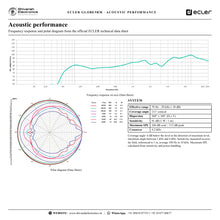
| Effective frequency range | 70 Hz - 20 kHz (-10 dB) |
| Coverage angle | 111° conical |
| Dispersion (H x V) | 360° x 160° |
| Sensitivity (1 W / 1 m) | 91 dB |
| Maximum SPL | 106 dB continuous / 112 dB peak |
| Ways | 2‑way full range |
| Low frequency driver | 5 inch woofer |
| High frequency driver | 1 inch silk dome tweeter |
| Crossover | 4.2 kHz |
| Nominal impedance | 8 Ω |
Amplifier and power
| Power | 32 W RMS / 128 W peak |
| THD + noise | Below 0.15 % |
| Signal to noise ratio | Above 95 dB |
| Power supply | Internal, universal, regulated switch mode with PFC |
| AC mains | 100 - 240 V AC, 50 - 60 Hz |
| Mains connection | Ceiling rail connection |
| Control | Volume and tone via the WiSpeak grip app; unpair button |
| LEDs | WiS and STR |
Physical
| Installation | Lighting rail mount |
| Rail system | 4‑wire, 3‑circuit track systems |
| Environmental | IP10 |
| Certifications | FCC, EMC, CB |
| Enclosure | ABS reinforced with fibreglass |
| Operating temperature | 0 °C to 35 °C |
| Operating humidity | Below 85 % RH |
| Storage | -10 °C to 50 °C, below 90 % RH |
| Colours | White (RAL9003), black (RAL9005) |
| Dimensions (Ø x H) | 287 x 331 mm (sphere) |
| Weight | 2.2 kg |
| Shipping dimensions (W x H x D) | 360 x 480 x 360 mm |
| Shipping weight | 3.7 kg |
Product overview
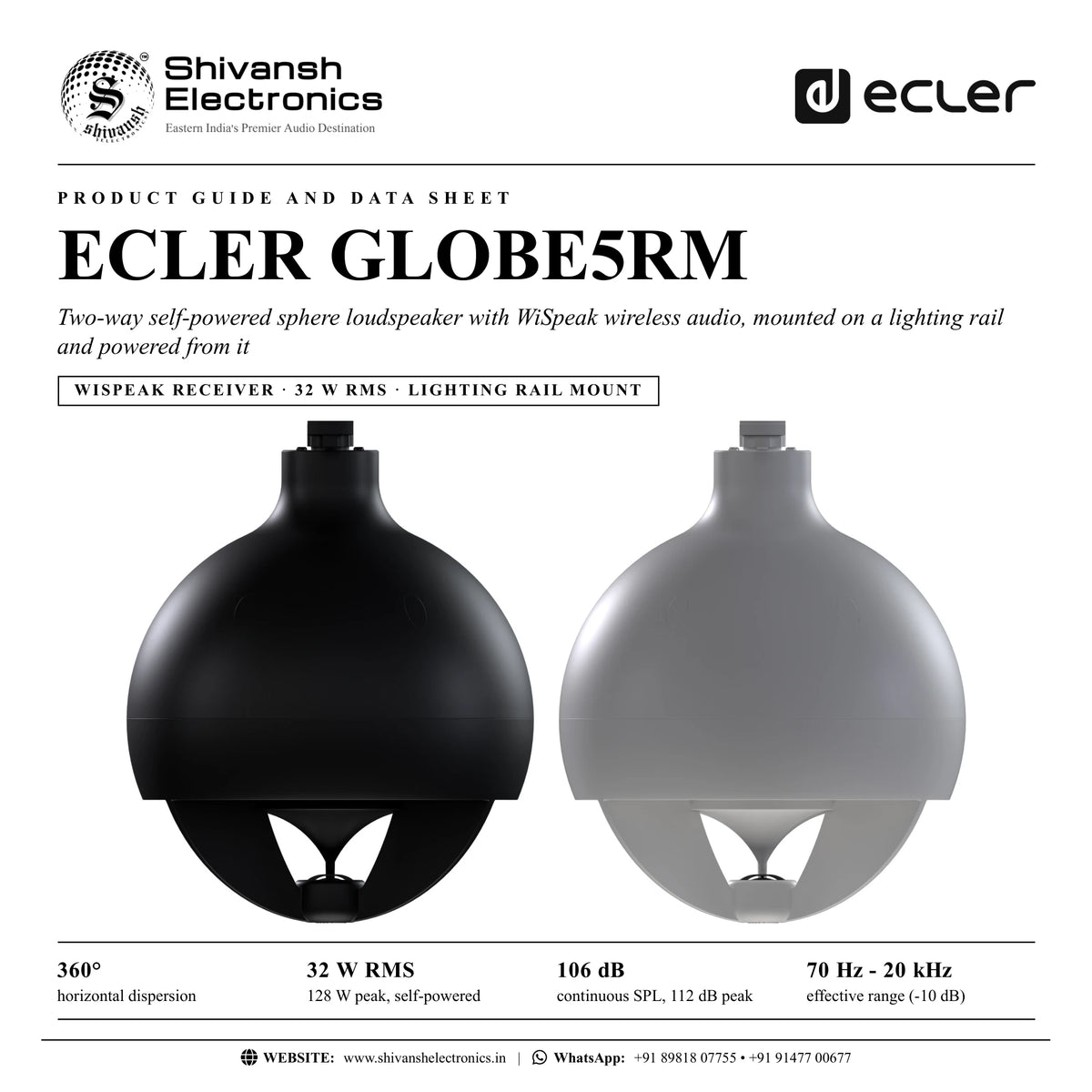
The ECLER GLOBE5RM is the rail-mount version of the WiSpeak GLOBE: a two-way self-powered sphere loudspeaker with 360° horizontal dispersion and wireless audio, mounted on a ceiling lighting rail and powered from it.
The GLOBE combines a 5 inch woofer and a 1 inch silk dome tweeter with 32 W RMS of built-in amplification, covering 70 Hz to 20 kHz with 360° x 160° dispersion. Its audio arrives wirelessly from a WiSpeak CORE transmitter, uncompressed at 24 bit / 48 kHz and in sync with up to 24 WiSpeak receivers, and its universal internal power supply takes mains power from the lighting rail bracket: no audio or power cable needs to be run. The sphere is made of ABS reinforced with fibreglass and comes in white (RAL9003) or black (RAL9005).
| Horizontal dispersion | 360° |
| 128 W peak, self‑powered | 32 W RMS |
| Continuous SPL, 112 dB peak | 106 dB |
| Effective range (-10 dB) | 70 Hz - 20 kHz |
Key features
- Two-way sphere loudspeaker: 5 inch woofer and 1 inch silk dome tweeter, crossover at 4.2 kHz
- 32 W RMS / 128 W peak; 91 dB sensitivity
- 360° x 160° (H x V) dispersion, 111° conical coverage angle
- Lighting rail mount for 4-wire, 3-circuit track systems
- Power from the rail: universal internal power supply with power factor correction
- Wireless WiSpeak audio from the paired CORE, up to 12 m in open space
- Front panel unpair button and WiS / STR LEDs
- Volume and tone per speaker in the WiSpeak grip app
- ABS reinforced with fibreglass; white (RAL9003) or black (RAL9005)
Sound all around
Sound leaves the sphere through its open lower section and a central diffuser, spreading 360° around the speaker. One GLOBE covers the space all around it, which suits open shop floors, counters and seating areas. It also suits applications where the lower frequencies need reinforcing, on its own or with TUBE and CUBE speakers, though it is not meant to replace a traditional subwoofer.
Installs like a track light
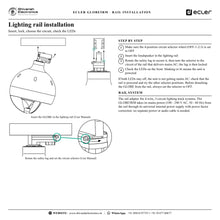
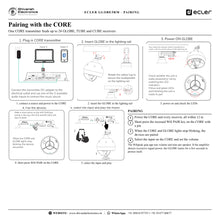
Set the circuit selector to OFF, insert the GLOBE in the lighting rail, rotate the safety lug and turn the selector to the circuit that carries mains power. The LEDs on the underside confirm power. To remove it, set the selector to OFF first.
Part of a WiSpeak system
A short press on the CORE's pair key links up to 24 GLOBE, TUBE and CUBE receivers; when the lights stop blinking, the system plays the selected input. The WiSpeak grip app adds per-speaker volume and tone.
In the box
- 1 x GLOBE5RM loudspeaker with its lighting rail adapter
Available versions
- GLOBE5RM white (RAL9003): reference CGLOBE5RMWH
- GLOBE5RM black (RAL9005): reference CGLOBE5RMBK
ECLER GLOBE5RM: frequently asked questions
How is the GLOBE5RM installed?
On a ceiling lighting rail (4-wire, 3-circuit track systems), from which it also takes its mains power.
Does it need an audio cable?
No. It receives audio wirelessly from a WiSpeak CORE transmitter within 12 m.
What is the difference between GLOBE5RM and GLOBE5PD?
They share the same sphere and electronics. The RM version mounts on a lighting rail and is powered from it; the PD version hangs on steel cords with a Euroblock power connection.
Which colours are available?
White (RAL9003, reference CGLOBE5RMWH) and black (RAL9005, reference CGLOBE5RMBK).
Where can I buy the ECLER GLOBE5RM in India?
The ECLER GLOBE5RM is available from Shivansh Electronics, Kolkata, West Bengal, India, with delivery across India.
Workflow 1: Store on a lighting track
360° sound from the existing track.
Connections
| Connect | To |
|---|---|
| Lighting track | GLOBE5RM (power) |
| CORE | GLOBE5RM (wireless audio) |
Setup
- Set the selector to OFF and insert the GLOBE in the track.
- Lock the safety lug and select the powered circuit.
- Check the LEDs.
- Pair with the CORE.
Tip: Keep every GLOBE within 12 m of the CORE with a clear line of sight.
Workflow 2: Café counter
Music all around a counter from one speaker.
Connections
| Connect | To |
|---|---|
| Phone (Bluetooth) | CORE |
| CORE | GLOBE5RM |
Setup
- Mount a GLOBE on the track over the counter.
- Pair with the CORE.
- Play music over Bluetooth.
- Set the volume.
Tip: One GLOBE covers the area all around it.
Workflow 3: Showroom with TUBEs
Track speakers plus fuller low end.
Connections
| Connect | To |
|---|---|
| Music source | CORE |
| CORE | GLOBE5RM and TUBE speakers |
Setup
- Fit TUBEs for spot areas and GLOBEs for open areas.
- Pair all receivers in one session.
- Balance the levels in the app.
- Set the master volume.
Tip: GLOBE reinforces the low end alongside TUBE and CUBE speakers.
Workflow 4: Restaurant
Speakers that match the track lights.
Connections
| Connect | To |
|---|---|
| Background music source | CORE |
| CORE | Black or white GLOBE5RM |
Setup
- Choose the colour to match the track lights.
- Mount and power the GLOBEs.
- Pair with the CORE.
- Adjust tone in the app.
Tip: Set the selector to OFF before detaching a GLOBE.
Workflow 5: Gallery or museum
Ambient sound without cables on display walls.
Connections
| Connect | To |
|---|---|
| Media player | CORE |
| CORE | GLOBE5RM speakers |
Setup
- Mount GLOBEs on the gallery track.
- Pair with the CORE.
- Set gentle levels per speaker.
- Lock the volume range in the app.
Tip: Concrete and metal block the radio link: keep a clear line of sight.
Workflow 6: Office reception
Background music in a reception area.
Connections
| Connect | To |
|---|---|
| Media player | CORE |
| CORE | GLOBE5RM |
Setup
- Mount the GLOBE on the reception track.
- Pair with the CORE.
- Limit the volume range in the app.
- Give staff the simple user screen.
Tip: The app can limit the range end users can set.