






ELAC Debut ConneX DCB41
PRICE ON ENQUIRY
ELAC Debut ConneX DCB41: powered bookshelf speakers, 2 × 50 W, HDMI ARC, USB 96/24, optical, Bluetooth aptX, phono preamp. Available in India from Shivansh Electronics, Kolkata, West Bengal, India.
VISUAL GUIDE — See Every Photo, Spec & Setup Step (PDF)
PRICE ON ENQUIRY. For the price, exclusive offers, delivery timelines, or any other information, please Contact / WhatsApp +91 89818 07755 / +91 91477 00677. We will gladly share a personalised quotation for Shivansh Electronics, Kolkata, West Bengal, India. All payments are processed securely through Razorpay, our secure payment gateway.
General
| Speaker type | Bass reflex, powered (powered + passive speaker) |
| Frequency response (anechoic) | 66 Hz - 25 kHz |
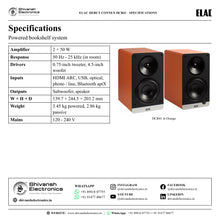
| Frequency response (in room) | 50 Hz - 25 kHz |
| Maximum system output | 102 dB at 1 m |
| Total harmonic distortion | ≤ 0.20 % |
| Signal-to-noise ratio | ≥ 90 dB |
Drivers
| Tweeter | 0.75-inch soft dome, custom waveguide |
| Woofer | 4.5-inch polypropylene, long excursion, wide-rolled surround |
| Port | Rear-firing, S-shaped |
Amplifier
| Amplifier output | 2 × 50 W |
| Bass enhancement | XBass (switchable) |
Inputs and outputs
| HDMI | 1 × HDMI (ARC), CEC |
| Analogue | 1 × line / phono (switchable), ground screw |
| USB audio | 1 × USB, 96 kHz / 24-bit |
| Optical | 1 × |
| Bluetooth | aptX |
| Outputs | Subwoofer, speaker (to passive speaker) |
| Remote control | Infrared |
| Firmware | Upgradeable via USB |
Physical
| Cabinet | 12 mm reinforced MDF |
| Grilles | Removable |
| Mains voltage | 120 - 240 V, 50 / 60 Hz |
| Power rating (rear panel) | 80 W |
| Dimensions (W × H × D) | 139.7 × 244.5 × 203.2 mm (5.5 × 9.6 × 8 in) |
| Weight | 3.45 kg powered speaker (7.6 lb), 2.86 kg passive speaker (6.3 lb) |
Versions
| DCB41-Black Ash | Black Ash |
| DCB41-Walnut | Walnut |
| DCB41-Royal Blue | Royal Blue |
| DCB41-Orange | Orange |
Product overview
The ELAC Debut ConneX DCB41 is a powered bookshelf speaker system: a powered speaker with a 2 × 50 W amplifier and a passive second speaker, each with a 4.5-inch long-excursion woofer and a 0.75-inch soft-dome tweeter in a custom waveguide, with HDMI ARC, USB audio up to 96 kHz / 24-bit, optical, Bluetooth aptX and a switchable phono / line input built in.
The DCB41 shows how simple a premium audio system for films and music can be. All the electronics sit inside the powered speaker, so a TV, a computer, a turntable or a phone connects straight to the speakers without any additional equipment. The supplied speaker cable links it to the passive speaker, and a rear L / R switch sets which side the powered speaker plays.
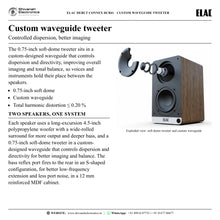
Each speaker uses a long-excursion 4.5-inch polypropylene woofer with a wide-rolled surround for more output and deeper bass, and a 0.75-inch soft-dome tweeter in a custom-designed waveguide that controls dispersion and directivity for better imaging and balance. The bass reflex port fires to the rear in an S-shaped configuration, for better low-frequency extension and less port noise, in a 12 mm reinforced MDF cabinet.
ELAC's proprietary XBass circuit boosts low-frequency output and extension from the compact cabinets, with selectable settings from the remote; it can be switched off completely when a subwoofer is connected to the SUB OUT. Response reaches 50 Hz - 25 kHz in room (66 Hz - 25 kHz anechoic), with a maximum output of 102 dB at 1 m.
Connect the TV over HDMI ARC and the TV remote controls power, mute and volume. A USB Type B input plays high-resolution audio up to 96 kHz / 24-bit from a computer, with volume from the computer. The switchable phono preamp accepts a turntable directly, with a ground screw, and Bluetooth aptX streams from phones and tablets. An infrared remote control is included, and the speakers come in Black Ash, Walnut, Royal Blue and Orange.
| Amplifier output | 2 × 50 W |
| Frequency response (in room) | 50 Hz - 25 kHz |
| USB audio | 96 kHz / 24-bit |
| Maximum output at 1 m | 102 dB |
Key features
- Powered bookshelf system: powered speaker with 2 × 50 W amplifier plus passive speaker
- HDMI ARC with CEC: TV remote controls power, mute and volume (eARC TVs supported)
- USB audio input for computers, up to 96 kHz / 24-bit
- Switchable phono preamp with ground screw, or line input
- Bluetooth with aptX
- Optical digital input
- Subwoofer output, with the XBass bass enhancer that can be switched off
- 4.5-inch long-excursion woofer with wide-rolled surround
- 0.75-inch soft-dome tweeter in a custom waveguide
- Rear-firing S-shaped bass reflex port for less port noise
- Infrared remote control; auto standby after 15 minutes
- Black Ash, Walnut, Royal Blue and Orange finishes
Made for
- TV sound in living rooms and bedrooms over HDMI ARC
- Vinyl listening with a turntable plugged straight in
- Desktop and home-office music from a computer over USB
- Music from phones and tablets over Bluetooth aptX
- Gaming with a console over optical
- Small systems that may grow with a subwoofer
In the box
- Powered speaker and passive speaker
- Speaker cable
- HDMI cable
- Power cord
- Remote control with batteries
- Rubber feet
Connections
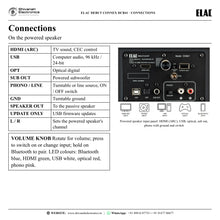
- HDMI (ARC) input
- USB audio input (USB Type B), 96 kHz / 24-bit
- Optical digital input
- Phono / line input (RCA) with PHONO ON / OFF switch and ground screw
- Bluetooth (aptX)
- Subwoofer output
- Speaker output to the passive speaker
- USB for firmware updates only
- L / R switch
- AC mains inlet, 120 - 240 V
Finishes
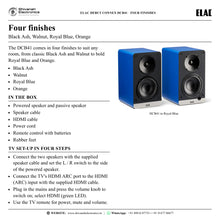
- Black Ash
- Walnut
- Royal Blue
- Orange
ELAC Debut ConneX DCB41: frequently asked questions
Do I need an amplifier?
No. The amplifier (2 × 50 W) and all inputs are built into the powered speaker, which drives the passive speaker through the supplied speaker cable.
Can my TV remote control the DCB41?
Yes. Connected over HDMI ARC, most televisions can control power, mute and volume through CEC. HDMI eARC and ARC outputs from most televisions are supported; optical is the alternative.
Can I connect a turntable directly?
Yes. Set the PHONO switch on the speaker to ON and connect the turntable's RCA leads; the ground screw is optional but recommended to lower residual noise. If your turntable has its own phono preamp switched on, set the DCB41 switch to OFF.
Can I add a subwoofer?
Yes, through the SUB OUT. When a subwoofer is connected, XBass can be switched off completely by holding the XBass button on the remote for 2 seconds.
How do I pair a phone over Bluetooth?
On first power-up the Bluetooth LED flashes and the speaker appears as ELAC DCB41. Later, press and hold the BT button on the remote, or hold the volume knob while on the Bluetooth input, until the LED flashes.
Where can I buy the ELAC Debut ConneX DCB41 in India?
The ELAC Debut ConneX DCB41 is available from Shivansh Electronics, Kolkata, West Bengal, India, with delivery across India.
Workflow 1: Living-room TV sound over HDMI ARC
Families who want clearer, fuller TV sound with one remote.
Connections
| Connect | To |
|---|---|
| TV HDMI ARC / eARC port | DCB41 HDMI (ARC) input |
| DCB41 SPEAKER OUT | Passive speaker (supplied cable) |
Setup
- Place the speakers either side of the TV on a unit or shelf, on the rubber feet.
- Connect the two speakers with the supplied speaker cable and set the L / R switch to the side of the powered speaker.
- Connect the TV's HDMI ARC port to the HDMI (ARC) input with the supplied HDMI cable.
- Plug in the mains and press the volume knob to switch on; select HDMI (green LED).
- Use the TV remote for power, mute and volume.
Tip: If the TV has no HDMI ARC, use the optical input instead.
Workflow 2: Vinyl corner
Record collectors who want to play vinyl without a separate phono stage or amplifier.
Connections
| Connect | To |
|---|---|
| Turntable RCA audio out | DCB41 PHONO / LINE input |
| Turntable ground wire | DCB41 GND screw |
Setup
- Set the DCB41 PHONO switch to ON.
- If the turntable has a built-in phono preamp, switch it OFF.
- Connect the turntable's RCA leads to the phono / line input.
- Connect the ground wire to the GND screw.
- Select phono (pink LED) on the remote.
Tip: The ground connection is optional but recommended; it can lower residual noise.
Workflow 3: Desktop and home office with a computer
People who work and listen at a desk.
Connections
| Connect | To |
|---|---|
| Computer USB port | DCB41 USB audio input (USB Type B) |
Setup
- Stand the speakers either side of the screen on the rubber feet.
- Connect a USB Type A to Type B cable (printer cable) from the computer to the USB audio input.
- Select USB (white LED).
- Control the volume from the computer; play files up to 96 kHz / 24-bit.
Tip: The USB port marked UPDATE ONLY is for firmware updates, not audio.
Workflow 4: Bluetooth music from a phone
Anyone who plays playlists and podcasts from a phone or tablet.
Connections
| Connect | To |
|---|---|
| Phone or tablet (Bluetooth aptX) | DCB41 |
Setup
- Switch on the speakers; on first use the Bluetooth LED flashes.
- Select ELAC DCB41 on the phone.
- To pair another device, press and hold BT on the remote until the LED flashes.
- Use the remote to skip tracks.
Tip: aptX gives CD-quality streaming from compatible phones.
Workflow 5: Adding a subwoofer
Rooms where films and music need deeper bass.
Connections
| Connect | To |
|---|---|
| DCB41 SUB OUT | Powered subwoofer line input |
Setup
- Connect the SUB OUT to the subwoofer's input with an RCA cable.
- Hold the XBass button on the remote for 2 seconds to switch XBass off (LED blinks once).
- Set the subwoofer level and crossover to blend with the speakers.
- Check the balance with familiar music.
Tip: Without a subwoofer, press XBass to cycle through its settings for extra bass from the speakers.
Workflow 6: Gaming room with a console
Gamers who want detailed stereo from a console or PC.
Connections
| Connect | To |
|---|---|
| Console or PC optical output | DCB41 optical input |
Setup
- Place the speakers either side of the screen.
- Connect the optical output to the optical input.
- Set the source's audio output to PCM / stereo.
- Select optical (red LED) on the remote.
Tip: The speakers go to standby after 15 minutes of no use; press the remote power button or the volume knob to wake them.