

FONESTAR MPX-410ES
MRP - Rs. 50,990
FONESTAR MPX-410ES wall audio I/O for the MPX-4088 matrix: XLR mic with 48 V phantom, RCA line, 2 balanced outputs. Available in India from Shivansh Electronics, Kolkata, West Bengal, India.
VISUAL GUIDE — See Every Photo, Spec & Setup Step (PDF)
The price shown is inclusive of all taxes. Contact / WhatsApp +91 89818 07755 / +91 91477 00677 to check if any offers or additional discounts are available. If available, we will gladly share a coupon code that you can apply at checkout for the best price. All payments are processed securely through Razorpay, our trusted payment gateway.
Specifications
| Type | Audio input / output control for audio matrix MPX‑4088 |
| Mic input | 1 balanced mic., XLR, 5,100 Ω, assignable to channels 10 or 12 |
| Line input | 1 stereo RCA line, 5,100 Ω, 7.74 V, assignable to channels 9/10 or 11/12 |
| RD port | 1 RD port for connection to matrix MPX‑4088, RJ‑45 |
| Outputs | 2 balanced line, euroblock, 240 Ω, 7.74 V, assignable to digital channels 9/10 or 11/12 |
| Controls | Microphone volume control; selectable phantom power |
| Phantom | 48 V |
| Connection | RJ‑45, Cat 5e cable |
| Power supply | 24 V DC, 100 mA, via RD port |
| Dimensions | 147 x 86 x 47 mm (depth) |
| Weight | 0.25 kg |
| Accessories | Surface box |
Product overview
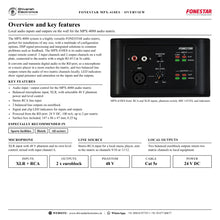
The FONESTAR MPX-410ES is the wall audio input and output control for the FONESTAR MPX-4088 audio matrix: a microphone input with 48 V phantom, a stereo RCA line input and two balanced line outputs, connected with one Cat 5e cable.
The MPX-4088 system is a highly versatile FONESTAR audio matrix, perfect for installations of any size, with a multitude of configuration options, DSP signal processing and integrated solutions to common problems such as feedback. The MPX-410ES converts and transmits digital audio to the RD port and returns two matrix channels on balanced euroblock outputs, with signal and clip indicators for inputs and outputs.
| Audio channels | 2 in / 2 out |
| Mic and line inputs | XLR + RCA |
| Phantom power | 48 V |
| Via RD port | 24 V DC |
Key features
- Audio input / output control for the MPX-4088 audio matrix
- Balanced XLR microphone input with selectable 48 V phantom and level control
- Stereo RCA line input
- 2 balanced line outputs on euroblock
- SIGNAL and CLIP LED indicators for inputs and outputs
- Powered from the RD port: 24 V DC, 100 mA; up to 2 per matrix
- Surface box included; 147 x 86 x 47 mm, 0.25 kg
Inputs
The RCA inputs A and B are assigned to channels 9 or 10 (A) and 11 or 12 (B), according to the RD port used on the matrix. The XLR microphone signal is mixed with input channel A and has its own MIC LEVEL control and PHANTOM 48 V switch.
Outputs
Two balanced euroblock outputs, 240 Ω, 7.74 V, carry output channels 9/10 or 11/12 of the matrix for local equipment.
Installation
Insert the RJ-45 connector in the RD port on the rear and the other end in RD port 9/10 or 11/12 of the MPX-4088, or the AUDIO port of the MPX-440X expansion. Two MPX-410ES per matrix, one in each RD port; total cable length up to 150 metres of STP Cat 5e.
In the box
- MPX-410ES audio input / output control
- Surface box
FONESTAR MPX-410ES: frequently asked questions
Can I connect a condenser microphone?
Yes. The XLR input has a selectable 48 V phantom power supply.
How many MPX-410ES can one matrix use?
Two, one in each RD port (9/10 and 11/12).
Does it need a power adaptor?
No. It is powered through the RD port: 24 V DC, 100 mA.
Where can I buy the FONESTAR MPX-410ES in India?
The FONESTAR MPX-410ES is available from Shivansh Electronics, Kolkata, West Bengal, India, with delivery across India.
Workflow 1: Hotel meeting rooms
Each room adjusts its own sound from the wall.
Connections
| Connect | To |
|---|---|
| Microphone | MIC (XLR) |
| MPX‑410ES RD port | MPX‑4088 RD 9/10 or 11/12 |
Setup
- Fix the surface box beside the door.
- Connect the microphone or music player to the XLR or RCA inputs.
- Connect the RJ-45 cable to the matrix RD port.
- Test the control with the matrix running.
Tip: Use Cat 5e or superior cable, up to 150 m with STP cable.
Workflow 2: Shopping mall zones
Shop areas and corridors with their own music level.
Connections
| Connect | To |
|---|---|
| Microphone | MIC (XLR) |
| MPX‑410ES RD port | MPX‑4088 RD 9/10 or 11/12 |
Setup
- Install the control in each zone.
- Connect the microphone or music player to the XLR or RCA inputs.
- Connect to the RD 9/10 or 11/12 port of the matrix.
- Configure the zones in the MPX-4088.
Tip: The control is powered through the same RJ-45 cable.
Workflow 3: Conference room
Speakers and presenters in a room served by the matrix.
Connections
| Connect | To |
|---|---|
| Microphone | MIC (XLR) |
| MPX‑410ES RD port | MPX‑4088 RD 9/10 or 11/12 |
Setup
- Mount the control near the lectern.
- Connect the microphone or music player to the XLR or RCA inputs.
- Connect it to the matrix.
- Check levels before the event.
Tip: LED or display feedback shows the state at a glance.
Workflow 4: Stadium hospitality areas
Boxes and lounges with independent control.
Connections
| Connect | To |
|---|---|
| Microphone | MIC (XLR) |
| MPX‑410ES RD port | MPX‑4088 RD 9/10 or 11/12 |
Setup
- Fit a control in each lounge.
- Connect the microphone or music player to the XLR or RCA inputs.
- Run Cat 5e cable to the matrix rack.
- Set the matrix routing per lounge.
Tip: FONESTAR recommends the MPX-4088 system for stadiums.
Workflow 5: Restaurant with several areas
Dining room, bar and terrace on one matrix.
Connections
| Connect | To |
|---|---|
| Microphone | MIC (XLR) |
| MPX‑410ES RD port | MPX‑4088 RD 9/10 or 11/12 |
Setup
- Place the control in the staff area.
- Connect the microphone or music player to the XLR or RCA inputs.
- Connect it to the matrix.
- Adjust each area during service.
Tip: The full system manual is on fonestar.com.
Workflow 6: School or campus building
Halls and classrooms connected to one matrix.
Connections
| Connect | To |
|---|---|
| Microphone | MIC (XLR) |
| MPX‑410ES RD port | MPX‑4088 RD 9/10 or 11/12 |
Setup
- Install controls where staff need them.
- Connect the microphone or music player to the XLR or RCA inputs.
- Connect to the matrix RD port or the MPX-440X.
- Document which control serves which zone.
Tip: Keep the total cable length within 150 m of STP Cat 5e.