

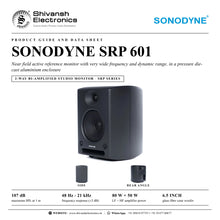


SONODYNE SRP 601
PRICE ON ENQUIRY
SONODYNE SRP 601 near field active reference monitor: 6.5 inch glass fibre woofer, aluminium die-cast enclosure, 107 dB max SPL. Available in India from Shivansh Electronics, Kolkata, West Bengal, India.
VISUAL GUIDE — See Every Photo, Spec & Setup Step (PDF)
PRICE ON ENQUIRY. For the price, exclusive offers, delivery timelines, or any other information, please DM us or call +91 89818 07755 / +91 91477 00677. We will gladly share a personalised quotation for Shivansh Electronics, Kolkata, West Bengal, India. All payments are processed securely through Razorpay, our trusted payment gateway partner.
System
| Description | 2 way bi‑amplifier speaker |
| Enclosure | Pressure die cast aluminium, vented, through rear‑firing aerodynamic port |
| HF transducer | 26 mm silk dome neodymium magnet tweeter with custom waveguide |
| LF transducer | 6.5 inch glass fibre cone woofer in die‑cast chassis |
| Amplifier power before clipping | LF 80 W; HF 50 W |
| Amplifier THD at rated power | Below 0.04 % |
| Maximum SPL at 1 m | 107 dB |
| Frequency response | 48 Hz - 21 kHz (±3 dB) |
| Frequency range | 42 Hz - 25 kHz (-10 dB) |
| Crossover frequency | 2 kHz |
| CMRR | Above 65 dB |
Controls
| Input | Fully balanced through XLR and linked TRS sockets |
| Input level for 90 dB SPL at 1 m | +7 dBu |
| Controls | Front: power switch and gain control; rear: bass tilt, treble tilt, bass roll‑off |
| Gain control range | -70 dB to +10 dB, 0 dB at (detented) centre |
| Bass tilt | -2 dB, -4 dB, -6 dB at 80 Hz |
| Treble tilt | -2 dB at 15 kHz |
| Bass roll‑off | 100 Hz, 6 dB/octave |
| S/N ratio (at unity gain) | Above 90 dB, referred to full output |
General
| Protection | Over current, overheat, RFI, switch on/off transients |
| Indicators | Power on/off |
| Finish | Powder coated grey |
| Power consumption | 175 VA max. |
| Power requirement | 230 V AC ±10 %, 50 Hz; 120 V optional |
| Dimensions (W x H x D) | 250 x 340 x 240 mm |
| Net weight | 11.9 kg |
| Wall mount bracket | SRP WB2 |
| Mounting options | 2 x M6 inserts on rear; 4 x M6 inserts on bottom |
| Warranty | 2 years |
Product overview
The SONODYNE SRP 601 is a near field active reference monitor with very wide frequency and dynamic range: a 6.5 inch glass fibre cone woofer and a 26 mm silk dome neodymium magnet tweeter in a custom waveguide, housed in a pressure die-cast aluminium enclosure.
A class AB bi-amplifier delivers 80 W to the woofer and 50 W to the tweeter before clipping, for a maximum SPL of 107 dB and a frequency response of 48 Hz - 21 kHz (±3 dB). Bass tilt (-2, -4 or -6 dB at 80 Hz), treble tilt (-2 dB at 15 kHz) and a 100 Hz bass roll-off at the rear help match the monitor to the room, and the fully balanced XLR input comes with a linked TRS socket.
| Maximum SPL at 1 m | 107 dB |
| Frequency response (±3 dB) | 48 Hz - 21 kHz |
| LF + HF amplifier power | 80 W + 50 W |
| Glass fibre cone woofer | 6.5 inch |
Key features
- Pressure die-cast aluminium enclosure, vented through an aerodynamic port
- 6.5 inch glass fibre cone woofer in a die-cast chassis
- 26 mm silk dome neodymium magnet tweeter in a custom waveguide
- Class AB bi-amplifier: LF 80 W, HF 50 W before clipping; THD below 0.04 % at rated power
- Discrete EQ: bass tilt -2, -4, -6 dB at 80 Hz, treble tilt -2 dB at 15 kHz, bass roll-off 100 Hz
- Fully balanced XLR input with linked TRS socket; gain control -70 dB to +10 dB with detented 0 dB centre
- Protection against over current, overheat, RFI and switch on/off transients
Rigid aluminium die-cast enclosure
The enclosure is pressure die-cast aluminium that maximises rigidity and lends it a unique form. SONODYNE explains that this is significantly more rigid than conventional MDF cabinets: it reduces cabinet resonance and colouration for tighter bass, greater clarity and improved overall accuracy, while the non-parallel edges minimise standing wave build-up.
Glass fibre woofer and custom waveguide
The 6.5 inch glass fibre woofer produces deep bass and exceptional transient response; the stiff fibre of the cone minimises cone breakup. The silk dome tweeter, with a lightweight neodymium magnet, is nested in a custom waveguide to produce on and off axis linearity and a wide, detailed soundstage.
Class AB bi-amplifier and discrete EQ
A new 80 W + 50 W bi-amplifier drives the transducers optimally while providing adequate headroom and dynamics; each driver has its own dedicated amplifier. At the rear, four switches set the bass roll-off (100 Hz, 6 dB/octave), bass tilt (-2, -4 or -6 dB at 80 Hz) and treble tilt (-2 dB at 15 kHz).
Connections and mounting
The SRP 601 accepts both XLR and TRS balanced inputs; +7 dBu at the input gives 90 dB SPL at 1 m. Two M6 inserts on the rear and four on the bottom, and the SRP WB2 wall mount bracket, give flexible mounting options.
In the box
- SRP 601 active reference monitor
SONODYNE SRP 601: frequently asked questions
Is the SRP 601 active or passive?
Active. All SRP monitors have built-in bi-amplification: the SRP 601 drives its woofer with 80 W and its tweeter with 50 W (before clipping).
Can I adjust the SRP 601 to my room?
Yes. The rear panel has bass tilt (-2, -4 or -6 dB at 80 Hz), treble tilt (-2 dB at 15 kHz) and bass roll-off (100 Hz, 6 dB/octave) switches.
Which inputs does the SRP 601 have?
A fully balanced XLR input and a linked TRS socket.
Do I need a separate amplifier?
No. Every SRP monitor has built-in amplification: connect your audio interface, mixer or monitor controller using balanced cables.
Who is the SRP 601 designed for?
SONODYNE designs the SRP range for music producers, recording and mastering engineers, broadcast professionals, content creators, home studios and audio training centres.
Where can I buy the SONODYNE SRP 601 in India?
The SONODYNE SRP 601 is available from Shivansh Electronics, Kolkata, West Bengal, India, with delivery across India.
Workflow 1: Mixing room near field monitoring
Engineers who mix on near field monitors.
Connections
| Connect | To |
|---|---|
| Audio interface or console monitor outputs (balanced) | XLR INPUT of each SRP 601 |
Setup
- Place a pair of SRP 601 monitors to form a triangle with the listening position.
- Connect each monitor's input to a balanced monitor output.
- Set the gain control on both monitors to the same position.
- Use the rear tilt switches to suit the room.
Tip: The 107 dB maximum SPL and wide dynamic range leave headroom for mixing at realistic levels.
Workflow 2: Music production studio
Music producers working on full mixes.
Connections
| Connect | To |
|---|---|
| Audio interface outputs (balanced) | XLR or TRS input |
Setup
- Connect the audio interface's balanced outputs to the monitors.
- Set the gain controls.
- Adjust the bass and treble tilts for the room and placement.
Tip: The 6.5 inch glass fibre woofer reaches 48 Hz (±3 dB).
Workflow 3: Home studio
Home studio enthusiasts and content creators.
Connections
| Connect | To |
|---|---|
| USB audio interface or mixer outputs | Balanced input of each monitor |
Setup
- Connect the monitors through an external USB audio interface or mixer.
- Use balanced XLR or TRS cables.
- Set the gain control and the tilt switches.
Tip: SONODYNE recommends an external interface or mixer for balanced outputs, better signal quality and lower noise.
Workflow 4: Broadcast and content production
Broadcast professionals and content creators.
Connections
| Connect | To |
|---|---|
| Console or interface monitor output (balanced) | XLR INPUT |
Setup
- Connect the balanced monitor output to the XLR inputs.
- Set the level with the gain control.
- Use the tilt switches where needed.
Tip: Fully balanced inputs with a CMRR above 65 dB.
Workflow 5: Wall-mounted monitoring
Rooms where the monitors are mounted on the wall or a bracket.
Connections
| Connect | To |
|---|---|
| SRP WB2 wall mount bracket | M6 inserts on the rear |
Setup
- Fit the SRP WB2 wall mount bracket to the M6 inserts.
- Position the monitor in the horizontal and vertical planes.
- Route the cables through the recessed inlet.
Tip: Two M6 inserts on the rear and four on the bottom give flexible mounting options.
Workflow 6: Audio training centre
Educational institutions and audio training centres.
Connections
| Connect | To |
|---|---|
| Mixer or interface outputs (balanced) | Balanced input of each monitor |
Setup
- Connect the mixer or interface to the monitor inputs.
- Set the gain controls.
- Demonstrate the effect of the tilt switches on the room response.
Tip: Protection against over current, overheat, RFI and switch on/off transients.


