


TASCAM TM-80
MRP - Rs. 8,100
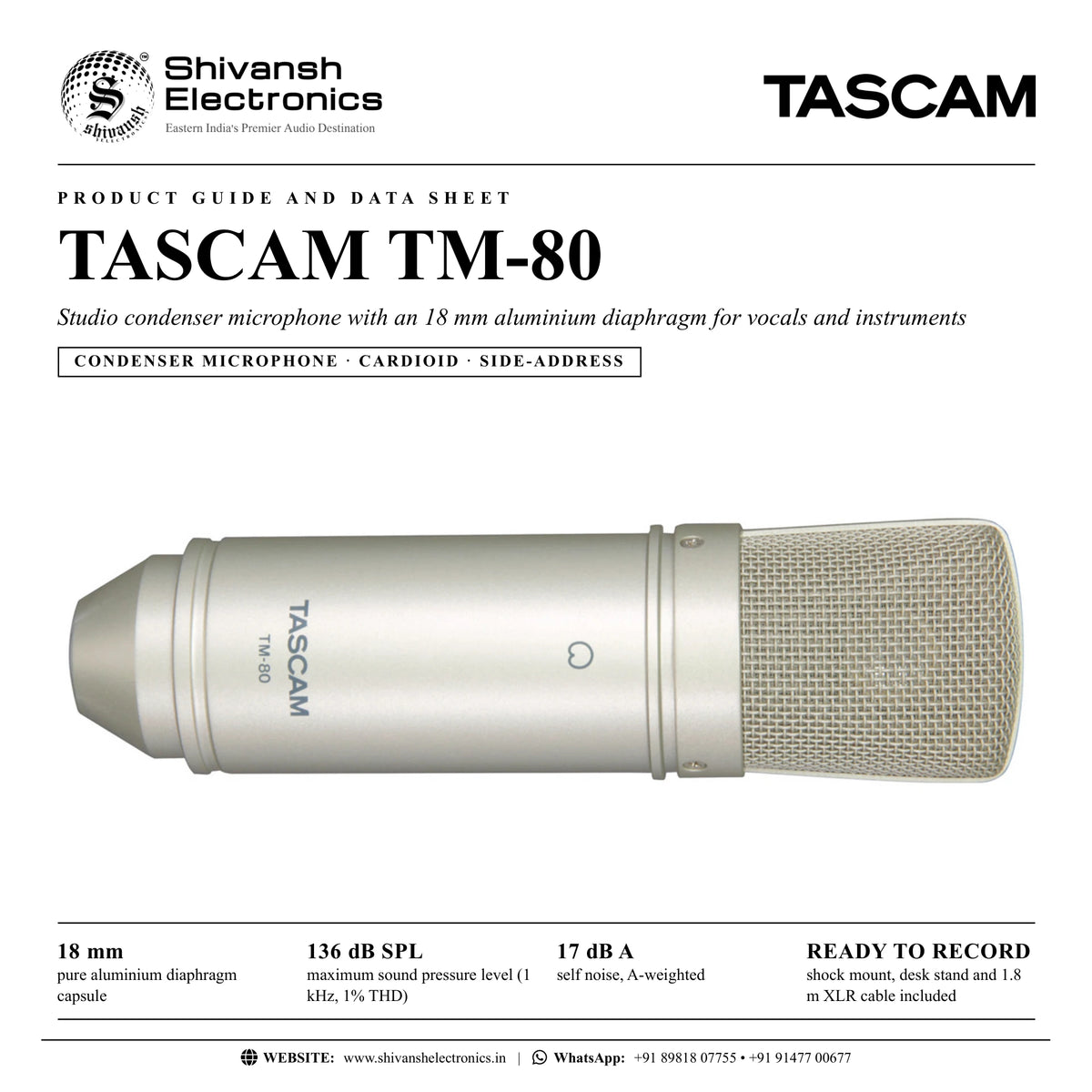
TASCAM TM-80 cardioid condenser microphone with 18 mm aluminium diaphragm, 136 dB SPL, shock mount, desk stand and cable. Available in India from Shivansh Electronics, Kolkata, West Bengal, India.
VISUAL GUIDE — See Every Photo, Spec & Setup Step (PDF)
The price shown is the MAXIMUM RETAIL PRICE (MRP), inclusive of all taxes. For the best price, exclusive offers and discounted rates, delivery timelines, or any other information, please DM us or call +91 89818 07755 / +91 91477 00677. We will gladly share an exclusive coupon code that you can apply at checkout. All payments are processed securely through Razorpay, our trusted payment gateway partner.
Acoustic
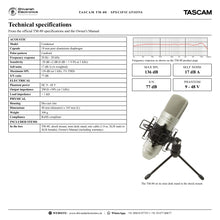
| Type | Condenser |
| Capsule | 18 mm pure aluminium diaphragm |
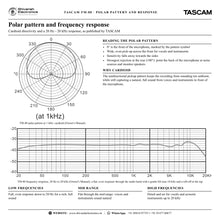
| Polar pattern | Cardioid |
| Frequency response | 20 Hz - 20 kHz |
| Sensitivity | -38 dB ±2 dB (0 dB = 1 V/Pa at 1 kHz) |
| Self noise (A‑weighted) | 17 dB A |
| Maximum SPL | 136 dB (at 1 kHz, 1% THD) |
| S/N ratio | 77 dB |
Electrical
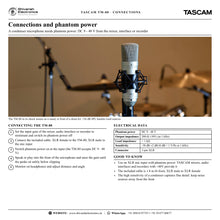
| Phantom power | DC 9 - 48 V |
| Output impedance | 200 Ω ±30% (at 1 kHz) |
| Load impedance | > 1 kΩ |
| Connector | 3‑pin XLR |
Physical
| Housing | Die‑cast zinc |
| Dimensions | 48 mm (diameter) x 165 mm (L) |
| Weight | 300 g |
| Compliance | RoHS compliant |
Included items
| Accessories | Shock mount, mini desk stand, mic cable (1.8 m, XLR male to XLR female) |
| Documents | Owner's Manual (including warranty) |
Product overview
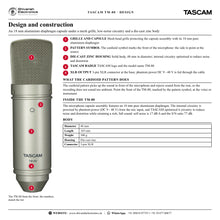
The TASCAM TM-80 is a cardioid studio condenser microphone designed for home recording, with an 18 mm aluminium diaphragm that sounds great on anything from vocals to acoustic instruments.
Internal circuitry is optimised to reduce noise and distortion while retaining a rich, full sound quality. The cardioid pickup pattern keeps recordings from sounding too ambient, and a maximum sound pressure rating of 136 dB SPL means the TM-80 can safely be used with guitar amps, drums and other loud instruments. A shock-absorbing suspension, a table-top mic stand and a 1.8 m mic cable are included, so you can set up at your desk and record right away.
| Aluminium diaphragm | 18 mm |
| Maximum SPL (1 kHz, 1% THD) | 136 dB SPL |
| Frequency response | 20 Hz - 20 kHz |
| Self noise | 17 dB A |
Key features
- 18 mm pure aluminium diaphragm capsule assembly
- Cardioid (unidirectional) polar pattern
- 20 Hz - 20 kHz frequency response, sensitivity -38 dB ±2 dB
- 136 dB SPL maximum sound pressure level for loud sources
- Low 17 dB A self noise and 77 dB S/N ratio
- Phantom power requirement: DC 9 - 48 V
- Die-cast zinc housing
- Shock mount, mini desk stand and mic cable included
A pro vocal sound
A cardioid condenser microphone is the perfect all-round microphone for vocal and instrument recording. The 18 mm aluminium diaphragm and wide frequency response capture detail and air, while the unidirectional pattern focuses on the source in front of the microphone.
Ready for loud sources
With a maximum SPL of 136 dB (at 1 kHz, 1% THD), the TM-80 can safely be placed in front of guitar amps, drums and other loud instruments as well as voices and acoustic instruments.
Everything to start recording
The shock-absorbing suspension reduces bass rumble, the mini desk stand puts the microphone on your desk and the 6-foot (1.8 m) XLR cable connects it to any mic input with phantom power, such as a TASCAM audio interface or recording mixer.
In the box
- TASCAM TM-80 condenser microphone
- Shock mount
- Mini desk stand
- Mic cable (1.8 m, XLR male to XLR female)
- Owner's Manual (including warranty)
TASCAM TM-80: frequently asked questions
Does the TM-80 need phantom power?
Yes. As a condenser microphone it needs phantom power of DC 9 - 48 V from the mixer, audio interface or recorder it is connected to.
What can I record with it?
TASCAM says it sounds great on anything from vocals to acoustic instruments, and its 136 dB SPL rating lets you use it with guitar amps, drums and other loud instruments.
What is the polar pattern?
Cardioid. It picks up the sound in front of the microphone and rejects sound from the rear, so recordings do not sound too ambient.
Which accessories are included?
A shock mount, a mini desk stand and a 1.8 m mic cable (XLR male to XLR female), plus the Owner's Manual with warranty.
Where can I buy the TASCAM TM-80 in India?
The TASCAM TM-80 is available from Shivansh Electronics, Kolkata, West Bengal, India, with delivery across India.
Workflow 1: Lead vocals at home
Record a detailed, focused vocal in a home studio.
Connections
| Connect | To |
|---|---|
| TM‑80 in the shock mount | Mic stand or the included mini desk stand |
| Mic cable | XLR mic input with phantom power on a TASCAM audio interface or recording mixer |
| Headphones | Headphone output for the singer |
Setup
- Mount the TM-80 in the shock mount with its front (pattern symbol) facing the singer.
- Connect the cable with phantom power off and the gain at minimum.
- Switch on phantom power and set the gain on the loudest phrase.
- Record while the singer monitors on headphones.
Tip: Point the rear of the microphone at monitor speakers: the cardioid pattern rejects sound from the rear.
Workflow 2: Acoustic guitar and acoustic instruments
Capture a rich, full acoustic sound.
Connections
| Connect | To |
|---|---|
| TM‑80 | Mic stand in front of the instrument |
| Mic cable | XLR mic input with phantom power |
Setup
- Place the TM-80 on a stand facing the instrument.
- Connect it and switch on phantom power.
- Set the gain while the player plays at full level.
- Record and adjust the position if needed.
Workflow 3: Guitar amplifier
Mic a guitar amp: the TM-80 handles up to 136 dB SPL.
Connections
| Connect | To |
|---|---|
| TM‑80 | Mic stand in front of the amplifier speaker |
| Mic cable | XLR mic input with phantom power |
Setup
- Position the TM-80 on a stand facing the speaker of the amplifier.
- Connect it with phantom power off, then switch phantom power on.
- Lower the input gain to suit the loud source.
- Record and check for clean peaks.
Workflow 4: Drums and percussion
Use the TM-80 on drums and other loud instruments.
Connections
| Connect | To |
|---|---|
| TM‑80 | Mic stand at the drum kit or percussion |
| Mic cable | XLR mic input of a TASCAM recording mixer or interface |
Setup
- Place the TM-80 on a stand at the kit.
- Connect it and switch on phantom power.
- Set the gain while the drummer plays at full level.
- Record alongside the other drum microphones.
Workflow 5: Voice-over and podcasting
A clear, detailed voice for narration and podcasts at the desk.
Connections
| Connect | To |
|---|---|
| TM‑80 on the mini desk stand | Included shock mount |
| Mic cable | XLR mic input with phantom power of a TASCAM podcast mixer or audio interface |
Setup
- Set the TM-80 up on the mini desk stand in the shock mount.
- Face the front of the microphone towards you.
- Switch on phantom power and set the gain with a test read.
- Record and listen back on headphones.
Tip: Keep computer fans and other noise sources behind the microphone.
Workflow 6: Ambient microphone at a live stream event
Pick up the crowd and room at an event stream, as in the TASCAM System Design Guide e-sports example.
Connections
| Connect | To |
|---|---|
| TM‑80 on a stand | Facing the audience |
| Mic cable | Mic input with phantom power of the event mixer |
Setup
- Place the TM-80 on a stand facing the audience area.
- Connect it to a mic input and switch on phantom power.
- Set the gain so the crowd sits under the speakers' microphones.
- Blend it into the stream mix.