

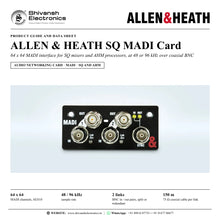

ALLEN & HEATH SQ MADI Card
PRICE ON ENQUIRY
Allen & Heath SQ MADI Card: 64 x 64 MADI at 48 or 96 kHz over BNC for SQ and AHM, with split or redundant links and word clock. Available in India from Shivansh Electronics, Kolkata, West Bengal, India.
VISUAL GUIDE — See Every Photo, Spec & Setup Step (PDF)
PRICE ON ENQUIRY. For the price, exclusive offers, delivery timelines, or any other information, please Contact / WhatsApp +91 89818 07755 / +91 91477 00677. We will gladly share a personalised quotation for Shivansh Electronics, Kolkata, West Bengal, India. All payments are processed securely through Razorpay, our trusted payment gateway.
General
| Type | MADI audio networking option card for the I/O Port |
| Order code | M-SQ-MADI-A |
| Compatible with | SQ / SQ+ mixers (including SQ-Rack), AHM matrix processors |
| Firmware | SQ firmware V1.5.2 or later |
Audio and network
| Format | AES MADI (AES10) over coaxial BNC |
| Channels | 64 x 64 |
| Sample rate | 48 kHz or 96 kHz |
| Link 1 at 48 kHz | Input 1-64, output 1-64 |
| Link 1 at 96 kHz | Input 1-32, output 1-32 |
| Link 2 | Link 1 redundant connection or second MADI port |
| Link 2, redundancy off, 48 kHz | Output 1-64 |
| Link 2, redundancy off, 96 kHz | Input 33-64, output 33-64 |
Connections
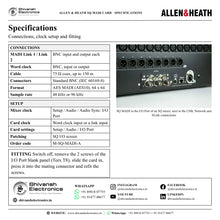
| MADI Link 1 | BNC input and BNC output |
| MADI Link 2 | BNC input and BNC output |
| Word clock | BNC, configurable as word clock input or output |
| Cable | 75 Ω coaxial, up to 150 m |
| Cable connectors | Standard BNC connectors (IEC 60169-8) |
Indicators
| Lnk/Err (per link) | Flashes yellow to indicate network activity; illuminates red when a connection or data error is detected |
| Word clock IN / OUT LEDs | Indicate the current mode |
Setup
| Mixer clock source | Setup / Audio / Audio Sync: typically Internal; I/O Port to sync to the card |
| Card clock source | Setup / Audio / I/O Port: word clock input or a link input |
| Sample rate, sync source, redundancy | Setup / Audio / I/O Port screen |
| Patching | SQ I/O screen, to or from the I/O Port |
Installation and compliance
| Fitting | I/O Port slot, 2 screws (Torx T8 driver), with the system switched off |
| EU directives | Electromagnetic Compatibility 2014/30/EU, Low Voltage 2014/35/EU |
Product overview
The Allen & Heath SQ MADI Card gives any SQ mixer or AHM matrix processor a 64 x 64 MADI interface running at 48 kHz or 96 kHz, for broadcast, recording and third-party console connections over coaxial cable.
SQ MADI (M-SQ-MADI-A) is one of the audio networking option cards for the I/O Port of Allen & Heath SQ mixers and AHM matrix processors. It provides 64 x 64 channels of AES MADI (AES10) over coaxial BNC, so an SQ or AHM can connect and synchronise with broadcast or recording systems, OB vans and third-party consoles for high-channel-count feeds.
Two BNC inputs pair with two BNC outputs to allow for split or redundant setups. Link 1 carries inputs 1-64 and outputs 1-64 at 48 kHz, or inputs and outputs 1-32 at 96 kHz. Link 2 can be configured as a redundant connection for Link 1 or as a second MADI port: with redundancy off it gives access to outputs 1-64 at 48 kHz, and to inputs and outputs 33-64 at 96 kHz, so the full 64 x 64 channels are available at either sample rate. Each link runs on 75 Ω coaxial cable up to 150 m, and its Lnk/Err LED flashes yellow to show network activity and lights red when a connection or data error is detected.
A dual-function BNC word clock connection, configurable as a word clock input or output, enables the console to sync with other equipment; its IN and OUT LEDs show the current mode. Synchronising the SQ to a MADI clock source is a two-step process: select I/O Port as the mixer clock source in the Setup / Audio / Audio Sync screen, then select the word clock input or a link input as the card clock source in the Setup / Audio / I/O Port screen, where the sample rate and redundancy mode are set too. Signals are patched to and from the I/O Port in the SQ I/O screen.
It is made for engineers who send high-channel-count feeds from an SQ to broadcast or recording systems, OB vans and third-party consoles, and for installers who connect an AHM matrix processor to MADI equipment. SQ MADI requires SQ firmware V1.5.2 or later.
| MADI channels, AES10 | 64 x 64 |
| Sample rate | 48 / 96 kHz |
| BNC in / out pairs, split or redundant | 2 links |
| 75 Ω coaxial cable per link | 150 m |
Key features
- 64 x 64 channels of AES MADI (AES10) over coaxial BNC
- 48 kHz or 96 kHz operation, with the full 64 x 64 channels at either rate
- Two MADI links, each a BNC input and output pair, for split or redundant setups
- Link 2 configurable as a redundant Link 1 connection or as a second MADI port
- At 96 kHz, channels 1-32 on Link 1 and channels 33-64 on Link 2
- Dual-function BNC word clock, configurable as input or output, with IN / OUT LEDs
- 75 Ω coaxial cables up to 150 m per link
- Lnk/Err LED per link: yellow for network activity, red for a connection or data error
- Sample rate, sync source and redundancy mode set in the Setup / Audio / I/O Port screen
- Fits the I/O Port of SQ / SQ+ mixers, including SQ-Rack, and AHM matrix processors
- Requires SQ firmware V1.5.2 or later
Fitting and setup
Switch the system off, use a Torx T8 driver to remove the 2 screws that secure the I/O Port blank panel, slide the card into the slot and press it firmly into the mating connector, then refit the 2 screws. Use cables terminated with standard BNC connectors (IEC 60169-8), and plug and unplug them with care to avoid damage to the BNC sockets.
Made for
- Broadcast feeds and OB vans
- Recording systems: multitrack recording and playback through a MADI interface
- Third-party MADI mixing consoles, recorders, interfaces and converters
- Split and redundant MADI setups
- Syncing an SQ with other equipment by word clock
- SQ / SQ+ mixers and AHM matrix processors
In the box
- SQ MADI option card (M-SQ-MADI-A)
Connections
- MADI Link 1: BNC input and BNC output, 75 Ω coaxial
- MADI Link 2: BNC input and BNC output, redundant connection or second MADI port
- Word clock: BNC, configurable as input or output, with IN / OUT mode LEDs
- Lnk/Err status LED for each link
- Mating connector in the I/O Port slot of the SQ or AHM, card fixed with 2 screws
Allen & Heath SQ MADI Card: frequently asked questions
Which mixers and processors take the SQ MADI card?
Any SQ mixer, SQ / SQ+ including SQ-Rack, or AHM matrix processor: the card fits the I/O Port. On SQ it requires SQ firmware V1.5.2 or later.
How many channels does it carry at 48 kHz and at 96 kHz?
64 x 64 at either rate. At 48 kHz Link 1 carries inputs 1-64 and outputs 1-64. At 96 kHz Link 1 carries inputs and outputs 1-32, and Link 2, with redundancy off, carries inputs and outputs 33-64.
Can the MADI link run redundant or split?
Yes. Link 2 can be configured as a redundant connection for Link 1. With redundancy off it works as a second MADI port, and at 48 kHz it gives access to outputs 1-64 for a split setup.
How do I sync the SQ to a MADI system?
Select I/O Port as the mixer clock source in the Setup / Audio / Audio Sync screen, then select the word clock input or a link input as the card clock source in the Setup / Audio / I/O Port screen. The word clock BNC can also be configured as an output, so the console can sync other equipment.
What cable does the SQ MADI card need?
75 Ω coaxial cable up to 150 m per link, terminated with standard BNC connectors (IEC 60169-8). Plug and unplug the cables with care to avoid damage to the BNC sockets.
Where can I buy the Allen & Heath SQ MADI Card in India?
The Allen & Heath SQ MADI Card is available from Shivansh Electronics, Kolkata, West Bengal, India, with delivery across India.
Workflow 1: Broadcast split to an OB van
Live and broadcast engineers sending a 64-channel feed from an SQ to an OB van.
Connections
| Connect | To |
|---|---|
| SQ MADI Link 1 OUT / IN | OB van MADI, 48 kHz, channels 1-64 (75 Ω coax) |
| SQ MADI Link 2 OUT / IN | OB van, redundant MADI link |
| SQ MADI word clock BNC | OB van word clock |
Setup
- Fit the card in the I/O Port of the SQ and run 75 Ω coaxial cables of up to 150 m to the OB van.
- In the Setup / Audio / I/O Port screen set 48 kHz and configure Link 2 as the redundant connection for Link 1.
- To sync the SQ to the OB van clock, select the word clock input as the card clock source and I/O Port in the Setup / Audio / Audio Sync screen.
- Patch the 64 channels to the I/O Port in the SQ I/O screen.
- Check the Lnk/Err LEDs: yellow flashing shows activity, red shows a connection or data error.
Tip: Link 2 runs as the redundant connection for Link 1, so the OB van gets a second MADI link.
Workflow 2: Third-party MADI equipment at 96 kHz
Engineers connecting an SQ to a MADI mixing console, recorder, interface or converter.
Connections
| Connect | To |
|---|---|
| SQ MADI Link 1 OUT / IN | MADI device, 96 kHz, channels 1-32 |
| SQ MADI Link 2 OUT / IN | MADI device, 96 kHz, channels 33-64 |
| Word clock generator | SQ MADI word clock BNC and the MADI device |
Setup
- Set 96 kHz in the Setup / Audio / I/O Port screen and switch redundancy off, so Link 2 works as a second MADI port.
- Connect Link 1 for channels 1-32 and Link 2 for channels 33-64, in both directions.
- Feed word clock from the master clock source to the card's word clock BNC, configured as an input.
- Select the word clock input as the card clock source and I/O Port as the mixer clock source.
- Patch the inputs and outputs in the SQ I/O screen.
Tip: At 96 kHz both links are needed for the full 64 x 64 channels.
Workflow 3: Multitrack recording and playback
Engineers recording shows and playing tracks back through a MADI interface and a computer.
Connections
| Connect | To |
|---|---|
| SQ MADI Link 1 OUT / IN | MADI interface, 48 kHz, channels 1-64 |
| MADI interface | Computer with recording software (USB) |
| Word clock generator | SQ MADI word clock BNC |
Setup
- Fit the card and connect Link 1 to the MADI interface with 75 Ω coaxial cable.
- Set 48 kHz in the Setup / Audio / I/O Port screen.
- Clock the card from the word clock generator and select I/O Port in the Setup / Audio / Audio Sync screen.
- In the SQ I/O screen, patch the signals to record to the I/O Port, and the I/O Port inputs to channels for playback.
Tip: At 48 kHz Link 1 carries inputs 1-64 and outputs 1-64, so recording and playback run over one link.
Workflow 4: One SQ, two MADI destinations
Engineers feeding the same 64 channels to two MADI systems, such as broadcast and recording.
Connections
| Connect | To |
|---|---|
| SQ MADI Link 1 OUT / IN | First MADI system: inputs and outputs 1-64, 48 kHz |
| SQ MADI Link 2 OUT | Second MADI system: outputs 1-64 |
Setup
- Set 48 kHz and switch redundancy off in the Setup / Audio / I/O Port screen.
- Connect Link 1 to the first system: it carries inputs 1-64 and outputs 1-64.
- Connect Link 2 OUT to the second system: it gives access to outputs 1-64.
- Select the card clock source, the word clock input or a link input, in the same screen.
Tip: Two BNC inputs pair with two BNC outputs to allow for split or redundant setups.
Workflow 5: MADI for an AHM installation
Installers connecting an AHM matrix processor to a third-party console or a recording system.
Connections
| Connect | To |
|---|---|
| SQ MADI card in the AHM I/O Port | Third-party console or recording system (MADI, 75 Ω coax) |
| SQ MADI word clock BNC | Word clock of the connected system |
Setup
- Fit the card in the I/O Port of the AHM-16, AHM-32 or AHM-64.
- Run 75 Ω coaxial cable of up to 150 m to the MADI equipment.
- Use 48 kHz for 64 x 64 channels on Link 1, or 96 kHz with both links.
- Patch the MADI inputs and outputs in the AHM system.
Tip: SQ MADI provides any AHM matrix processor with a 64 x 64 MADI interface.
Workflow 6: Word clock for other equipment
Engineers who sync other digital equipment to the SQ.
Connections
| Connect | To |
|---|---|
| SQ MADI word clock BNC (output) | Word clock input of the other equipment |
| SQ MADI Link 1 OUT / IN | MADI equipment |
Setup
- Leave the mixer clock source on Internal in the Setup / Audio / Audio Sync screen.
- Configure the card's word clock BNC as an output; the OUT LED shows the mode.
- Connect it to the word clock input of the other equipment with 75 Ω coaxial cable.
- Patch the MADI signals in the SQ I/O screen.
Tip: The dual-function word clock BNC, input or output, enables the console to sync with other equipment.


