
ALLEN & HEATH SQ Waves Card
PRICE ON ENQUIRY
Allen & Heath SQ Waves Card: 64 x 64 Waves SoundGrid interface for SQ and AHM at 96 or 48 kHz, for plugins, multitrack recording and virtual soundcheck. Available in India from Shivansh Electronics, Kolkata, West Bengal, India.
VISUAL GUIDE — See Every Photo, Spec & Setup Step (PDF)
PRICE ON ENQUIRY. For the price, exclusive offers, delivery timelines, or any other information, please Contact / WhatsApp +91 89818 07755 / +91 91477 00677. We will gladly share a personalised quotation for Shivansh Electronics, Kolkata, West Bengal, India. All payments are processed securely through Razorpay, our trusted payment gateway.
General
| Type | Waves SoundGrid audio networking option card for the I/O Port |
| Order code | M-SQ-WAVES3 |
| Compatible with | SQ / SQ+ mixers (including SQ-Rack), AHM processors |
| Firmware | SQ firmware V1.3 or higher |
| Software | Waves card driver and software; SoundGrid Studio application |
Audio and network
| Protocol | Waves SoundGrid |
| Channels | 64 x 64 |
| Sample rate | 48 kHz or 96 kHz |
| Network | Standard Ethernet, Cat5e copper |
| Connection length | Up to 100 m |
| Switches | Can run through switches and VLANs |
| Virtual soundcard | 64 x 64 channels through a computer's Ethernet adaptor (SG Driver) |
| Compatibility | Waves Native and SoundGrid compatible; interconnection with SoundGrid-enabled devices |
Connections
| SoundGrid ports | 2 x locking RJ45, built-in Gigabit switch, up to two devices directly |
| Link Status LEDs | Lnk/Act per port, flash to indicate network activity |
Setup
| SQ patching | SQ I/O screen, to or from the I/O Port |
| SoundGrid patching | SoundGrid Studio: to or from other devices or the SG Driver; card sample rate and clock settings |
| Clock, mixer as master | Mixer clock Internal, card clock Digital |
| Clock, mixer as slave | Mixer synced from the I/O Port, card clock Ethernet |
Installation and compliance
| Fitting | I/O Port slot, 2 screws (Torx T8 driver), with the system switched off |
| EU directives | Electromagnetic Compatibility 2014/30/EU, Low Voltage 2014/35/EU |
Product overview
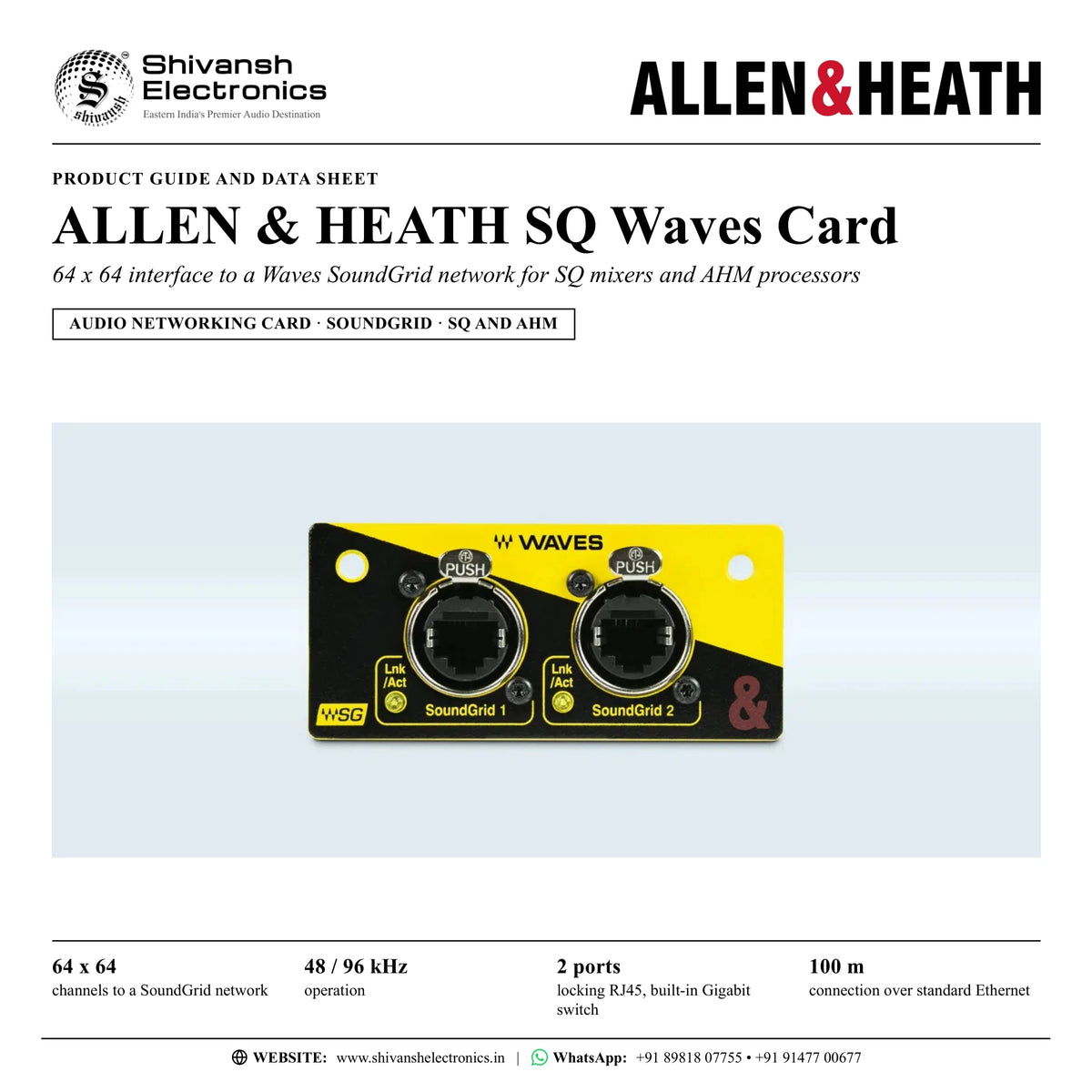
The Allen & Heath SQ Waves Card connects any SQ mixer or AHM processor to a Waves SoundGrid network with a 64 x 64 channel interface at 96 kHz or 48 kHz, for plugin processing, multitrack recording, virtual soundcheck and audio distribution.
SQ Waves (M-SQ-WAVES3) is one of the audio networking option cards for the I/O Port of Allen & Heath SQ mixers and AHM processors. It provides a 64 x 64 channel, 48 / 96 kHz interface to the Waves SoundGrid networking and processing platform, so engineers and installers can use Waves plugin processing with low latency, multitrack recording at 96 kHz or 48 kHz, virtual soundcheck and audio distribution.
Two locking RJ45 SoundGrid ports sit on a built-in Gigabit switch for connecting up to two devices directly, and a Lnk/Act LED beside each port flashes to show network activity. SoundGrid runs on standard Ethernet over Cat5e copper, with connections up to 100 m, and can run through switches and VLANs. The protocol allows the use of Waves plugins, integration with a Waves plugin server and interconnection with other SoundGrid-enabled devices, and it lets a computer's Ethernet adaptor work as a 64 x 64 channel virtual soundcard for recording and playback.
Signals are patched to and from the I/O Port in the SQ I/O screen, and the Waves SoundGrid Studio application patches SoundGrid signals to and from other devices or the SoundGrid driver (SG Driver) and sets the sample rate and clock of the card. With the mixer clock set to Internal, the card clock is set to Digital; in a slave system, such as a digital split, the mixer syncs from the I/O Port and the card clock is set to Ethernet.
SQ Waves requires SQ firmware V1.3 or higher. The card driver and software are downloaded from Waves, and the latest SQ firmware from Allen & Heath.
| Channels to a SoundGrid network | 64 x 64 |
| Operation | 48 / 96 kHz |
| Locking RJ45, built-in Gigabit switch | 2 ports |
| Connection over standard Ethernet | 100 m |
Key features
- 64 x 64 channel interface to a Waves SoundGrid network through the I/O Port
- 96 kHz or 48 kHz operation
- Waves plugin processing with low latency; integration with a Waves plugin server
- Multitrack recording and playback at 96 kHz or 48 kHz
- 64 x 64 channel virtual soundcard through a computer's Ethernet adaptor
- Virtual soundcheck and audio distribution
- Two locking RJ45 SoundGrid ports on a built-in Gigabit switch, for up to two devices directly
- Lnk/Act LED per port flashes to show network activity
- Standard Ethernet on Cat5e copper, connections up to 100 m, runs through switches and VLANs
- Interconnection with other SoundGrid-enabled devices; Waves Native and SoundGrid compatible
- Fits any SQ / SQ+ mixer or AHM processor; requires SQ firmware V1.3 or higher
Fitting and setup
Switch the system off, use a Torx T8 driver to remove the 2 screws that secure the I/O Port blank panel, slide the card into the slot and press it firmly into the mating connector, then refit the 2 screws. Install the card driver and software from Waves, patch the SoundGrid signals and set the card sample rate and clock in SoundGrid Studio, and patch the SQ signals in the SQ I/O screen.
Made for
- Waves plugin processing on SQ and AHM
- Multitrack recording at 96 kHz or 48 kHz
- Virtual soundcheck
- Audio distribution over SoundGrid networks
- Digital split setups
- Live engineers and installers
In the box
- SQ Waves option card (M-SQ-WAVES3)
Connections
- SoundGrid 1 and SoundGrid 2: 2 x locking RJ45 on a built-in Gigabit switch
- Lnk/Act status LED for each port
- Mating connector in the I/O Port slot of the SQ or AHM, card fixed with 2 screws
Allen & Heath SQ Waves Card: frequently asked questions
What can I do with the SQ Waves card?
Waves plugin processing, multitrack recording at 96 kHz or 48 kHz, virtual soundcheck and audio distribution, on any SQ / SQ+ mixer or AHM processor.
How do I record to a computer?
Connect the computer's Ethernet port to a SoundGrid port. With the SoundGrid driver (SG Driver) the computer works as a 64 x 64 channel virtual soundcard; patch the signals in SoundGrid Studio and in the SQ I/O screen.
Why does the card have two SoundGrid ports?
The two locking ports sit on a built-in Gigabit switch for connecting up to two devices directly, for example a Waves plugin server and a computer. SoundGrid can also run through network switches and VLANs.
How do I set the clock?
With the mixer clock set to Internal in the Setup / Audio / Audio Sync screen, set the card clock to Digital in SoundGrid Studio. In a slave system, such as a digital split, set the mixer to sync from the I/O Port and the card clock to Ethernet.
Which firmware and software does it need?
SQ firmware V1.3 or higher. The card driver and software are downloaded from Waves, and the latest SQ firmware from Allen & Heath.
Where can I buy the Allen & Heath SQ Waves Card in India?
The Allen & Heath SQ Waves Card is available from Shivansh Electronics, Kolkata, West Bengal, India, with delivery across India.
Workflow 1: Live plugin processing
Live engineers who want Waves plugins on SQ channels and mixes.
Connections
| Connect | To |
|---|---|
| SQ Waves SoundGrid port | Waves plugin server |
| SQ I/O Port | SoundGrid network, 64 x 64 channels |
Setup
- Fit the card in the SQ I/O Port and install the card driver and software from Waves.
- Connect the plugin server to a SoundGrid port; the built-in Gigabit switch takes up to two devices directly.
- In the SQ I/O screen, patch the signals to process to the I/O Port and the returns back to the SQ.
- Route the SoundGrid signals to and from the server in SoundGrid Studio.
- Leave the mixer clock on Internal and set the card clock to Digital.
Tip: SoundGrid brings Waves plugins to SQ with low latency.
Workflow 2: Multitrack recording at 96 or 48 kHz
Engineers recording every channel of a show to a computer.
Connections
| Connect | To |
|---|---|
| SQ Waves SoundGrid port | Computer Ethernet port with the SG Driver |
| SG Driver | Recording software, up to 64 x 64 channels |
Setup
- Connect the computer to a SoundGrid port over standard Ethernet, up to 100 m.
- Install the SoundGrid driver: the computer works as a 64 x 64 channel virtual soundcard.
- Set 96 kHz or 48 kHz and patch the SoundGrid signals to the SG Driver in SoundGrid Studio.
- In the SQ I/O screen, patch the signals to record to the I/O Port.
Tip: Multitrack recording runs at 96 kHz or 48 kHz.
Workflow 3: Virtual soundcheck
Engineers who play recorded multitracks back through the SQ to prepare the mix.
Connections
| Connect | To |
|---|---|
| Computer with the SG Driver | SQ Waves SoundGrid port |
| SQ I/O Port inputs | SQ input channels |
Setup
- Record the show channels to the computer over SoundGrid.
- Patch the SG Driver playback channels to the card in SoundGrid Studio.
- In the SQ I/O screen, patch the I/O Port inputs to the input channels.
- Play the tracks back and work on the mix.
Tip: All SQ patching to and from the I/O Port is done in the SQ I/O screen.
Workflow 4: Audio distribution over SoundGrid
Engineers and installers sharing audio between SoundGrid-enabled devices on a network.
Connections
| Connect | To |
|---|---|
| SQ Waves SoundGrid port | Network switch or VLAN |
| Network switch | Other SoundGrid-enabled devices |
Setup
- Connect the card to the network over standard Ethernet on Cat5e copper, up to 100 m.
- SoundGrid can run through switches and VLANs.
- Patch the SoundGrid signals to and from the other devices in SoundGrid Studio.
- Patch the SQ or AHM signals to and from the I/O Port.
Tip: The SoundGrid protocol is compatible with other SoundGrid-enabled devices.
Workflow 5: Digital split with the SQ as clock slave
Engineers sharing sources between two SoundGrid-equipped systems in a digital split.
Connections
| Connect | To |
|---|---|
| Master SQ with SQ Waves (clock Internal, card Digital) | SoundGrid network |
| SoundGrid network | Slave SQ with SQ Waves (sync from the I/O Port, card Ethernet) |
Setup
- Connect both systems to the SoundGrid network.
- On the master SQ, keep the mixer clock on Internal and set the card clock to Digital.
- On the slave SQ, set the Setup / Audio / Audio Sync screen to sync from the I/O Port.
- In SoundGrid Studio, set the slave card clock to Ethernet.
- Patch the shared signals in SoundGrid Studio and in the SQ I/O screen.
Tip: In a digital split the slave mixer syncs from the Waves card.
Workflow 6: SoundGrid on an AHM processor
Installers who fit SQ Waves to an AHM for plugin processing, recording or audio distribution.
Connections
| Connect | To |
|---|---|
| SQ Waves card in the AHM I/O Port | SoundGrid network |
| SoundGrid network | Computer with the SG Driver, plugin server or other SoundGrid devices |
Setup
- Fit the card in the I/O Port of the AHM-16, AHM-32 or AHM-64.
- Connect up to two devices directly to the SoundGrid ports, or connect a network switch.
- Patch the SoundGrid signals in SoundGrid Studio.
- Patch the I/O Port inputs and outputs in the AHM system.
Tip: SQ Waves provides any SQ or AHM with a 64 x 64 interface to a SoundGrid network.