





RME Digiface USB
MRP - Rs. 66,599
RME Digiface USB 66-channel 192 kHz USB interface: 4 x optical ADAT/SPDIF I/O, headphone output, TotalMix FX, compact and USB bus-powered. Available in India from Shivansh Electronics, Kolkata, West Bengal, India.
VISUAL GUIDE — See Every Photo, Spec & Setup Step (PDF)
The price shown is the MAXIMUM RETAIL PRICE (MRP), inclusive of all taxes. For the best price, exclusive offers and discounted rates, delivery timelines, or any other information, please DM us or call +91 89818 07755 / +91 91477 00677. We will gladly share an exclusive coupon code that you can apply at checkout. All payments are processed securely through Razorpay, our trusted payment gateway partner.
General
| Type | 66‑channel 192 kHz USB audio interface |
| Channels | 32 inputs / 34 outputs at 48 kHz (4 x 8 ADAT + stereo phones) |
| Computer connection | 1 x USB 2.0, bus‑powered (works on USB 2.0 and USB 3 ports) |
| Supported sample rates | 28 kHz up to 200 kHz; up to 192 kHz |
| Buffer sizes | 32 to 8192 samples |
| Clock sources | Internal, ADAT In, SPDIF In |
| Clock technology | SteadyClock, SyncAlign, SyncCheck |
| Mixer | TotalMix FX: 2244‑channel mixer, 46‑bit internal resolution; up to 17 independent stereo submixes |
| Modes | Driver‑based, Class Compliant (via firmware) |
Inputs and outputs
| Optical inputs | 4 x TOSLINK, ADAT or SPDIF (auto‑detected) |
| Optical outputs | 4 x TOSLINK, ADAT or SPDIF (switchable per port) |
| Analog output | 1 x 6.3 mm TRS stereo line/headphone output (channels 33/34), DC‑coupled |
| USB | 1 x USB 2.0, audio and power |
Digital
| ADAT channels | 32 at 48 kHz; 16 at 96 kHz (S/MUX); 8 at 192 kHz (S/MUX4), each way |
| ADAT lock range | 31.5 kHz - 50 kHz; Bitclock PLL for varispeed |
| SPDIF | IEC 60958 compatible on every optical port |
| Jitter | < 1 ns in PLL mode, all inputs; PLL operates even at more than 100 ns jitter |
Headphone output
| Dynamic range (A‑weighted) | 113 dB |
| Dynamic range (unweighted) | 110 dB |
| THD+N | -95 dB (0.0017 %) at -1 dBFS |
| Output level | +9.5 dBu at 0 dBFS, 1 kOhm load |
| Output impedance | 2 Ohm |
| Max power | 50 mW at 0.1 % THD |
| Frequency response | 0 Hz - 20.8 kHz (-0.5 dB, 44.1 kHz) |
| Channel separation | > 100 dB |
Physical
| Dimensions (W x H x D) | 12.8 x 2.2 x 5.5 cm |
| Weight | 220 g |
| Power | USB bus power |
| Power consumption | Typical 1.2 W; max. below 2 W |
| Operating temperature | +5 to +50 °C |
System requirements
| Windows | RME driver for Windows 10 / 11 (Intel x64 and ARM) |
| Mac | RME driver for macOS (Intel and ARM) |
| Computer port | 1 x USB 2.0 or USB 3 port |
Included software
| Mixer | TotalMix FX |
| Remote | TotalMix Remote |
| Analysis | DIGICheck |
Product overview
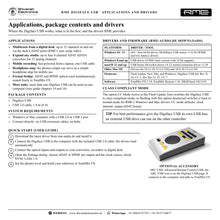
The RME Digiface USB is a 66-channel 192 kHz USB audio interface: four optical ADAT/SPDIF inputs and outputs plus a high-quality headphone output, in a compact, lightweight, bus-powered box.
Each of the four optical ports carries ADAT (up to 8 channels) or SPDIF (stereo), giving 32 inputs and 32 outputs over ADAT at 48 kHz. The inputs detect the received format automatically, and each output can be switched individually between ADAT and SPDIF. A 6.3 mm TRS line/headphone output adds channels 33/34, freely routable in TotalMix FX. One USB 2.0 cable carries audio and power, so the Digiface USB connects ADAT converters, preamps and digital mixers to any Mac or Windows computer, and can even serve as a simple headphone amp on the move.
| Channels at 48 kHz (32 in / 34 out) | 66 |
| Optical ADAT/SPDIF I/O | 4 |
| Max sample rate | 192 kHz |
| Weight, USB bus‑powered | 220 g |
Key features
- 4 x optical I/O, each switchable between ADAT (8 channels) and SPDIF (stereo)
- 32 inputs / 34 outputs at 48 kHz; 16 channels at 96 kHz (S/MUX), 8 channels at 192 kHz (S/MUX4)
- ADAT and SPDIF can be used at the same time on different ports
- Analog line/headphone output (6.3 mm TRS), 50 mW, 2 Ohm, DC-coupled, with its own submix
- USB bus-powered: one USB 2.0 cable for audio and power, works on USB 2.0 and USB 3 ports
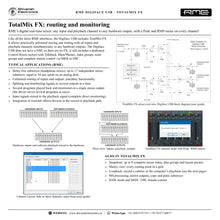
- TotalMix FX routing and mixing: up to 17 independent stereo submixes, Control Room section, talkback
- SteadyClock, SyncAlign and SyncCheck; clock from internal, ADAT or SPDIF
- Class Compliant mode selectable via firmware
- ARC USB support and free DIGICheck analysis software
- Compact: 12.8 x 5.5 x 2.2 cm, 220 g
Four optical ports, one USB cable
With four ADAT ports, the Digiface USB connects up to 32 channels of ADAT converters, mic preamps or digital mixer outputs to a computer. Supported are S/MUX and S/MUX4, so at 192 kHz eight channels remain available in each direction via 4 x ADAT or 4 x SPDIF. A Bitclock PLL keeps ADAT synchronised even in varispeed operation.
TotalMix FX routing
TotalMix FX allows practically unlimited routing and mixing of all inputs and playback channels to any output, with up to 17 fully independent stereo submixes for headphone mixes. A dedicated Control Room section adds talkback, Main/Phones switching, fader and mute groups, and remote control via Mackie or OSC protocol. Every input, playback channel and output has peak and RMS meters calculated in hardware.
Headphone output
The 6.3 mm TRS output hosts channels 33/34 with 113 dB dynamic range (A-weighted), 2 Ohm output impedance and 50 mW of power, for monitoring or as an unbalanced line output with its own independent submix.
In the box
- RME Digiface USB
- USB 2.0 cable, 1.8 m
Free RME software: TotalMix FX, TotalMix Remote and DIGICheck. Drivers for Windows (Intel x64 and ARM) and macOS (Intel and ARM).
RME Digiface USB: frequently asked questions
What can I connect to the Digiface USB?
Any device with ADAT or SPDIF optical connections: ADAT converters, mic preamps, digital mixers and recorders. Four ports give up to 32 channels each way at 44.1/48 kHz.
Does it need a power supply?
No. It is powered by its USB connection and works on USB 2.0 and USB 3 ports.
Can I use ADAT and SPDIF at the same time?
Yes. Each output can be set to ADAT or SPDIF individually, and the inputs detect the format automatically.
How many channels are available at higher sample rates?
16 channels each way at 96 kHz (S/MUX) and 8 channels each way at 192 kHz (S/MUX4), plus the headphone output.
Where can I buy the RME Digiface USB in India?
The RME Digiface USB is available from Shivansh Electronics, Kolkata, West Bengal, India, with delivery across India.
Workflow 1: Expand a studio with ADAT converters
Add up to 32 channels of ADAT mic preamps or AD/DA converters to a computer.
Connections
| Connect | To |
|---|---|
| ADAT preamp 1‑4 outputs | Optical IN 1‑4 |
| ADAT converter 1‑4 inputs | Optical OUT 1‑4 |
| Headphones | Phones output |
| Computer | USB 2.0 (bus power) |
Setup
- Install the RME driver and connect the Digiface USB.
- Set one device as clock master; the others, including the Digiface USB, as slaves.
- Check that the SYNC LEDs 1-4 are lit.
- Record up to 32 channels at 44.1/48 kHz.
Tip: At 96 kHz each ADAT port carries 4 channels (S/MUX), so plan for 16 channels in total.
Workflow 2: Multitrack recording from a digital mixer
Record a live show or rehearsal from a digital mixing console with ADAT outputs.
Connections
| Connect | To |
|---|---|
| Console ADAT outputs | Optical IN 1‑4 |
| Console ADAT inputs (playback) | Optical OUT 1‑4 |
| Laptop | USB 2.0 |
Setup
- Set the Digiface USB to clock from ADAT In.
- Arm all channels in your recording software.
- Record the show; use playback to the console for a virtual soundcheck.
- Monitor any channel on headphones via TotalMix FX.
Workflow 3: Format conversion and digital patchbay
Route signals between ADAT and SPDIF devices under computer control.
Connections
| Connect | To |
|---|---|
| ADAT device | Optical port 1 |
| SPDIF optical device (e.g. DAT or DAC) | Optical port 2, set to SPDIF |
| Computer | USB 2.0 |
Setup
- Set output 2 to SPDIF in the Settings dialog; inputs detect the format automatically.
- Route channels between ports in TotalMix FX.
- Use the matrix to split one signal to several outputs.
- Save the setup as a TotalMix FX snapshot.
Workflow 4: Headphone mixes for a band
Feed individual headphone mixes to musicians through ADAT headphone amplifiers or DA converters.
Connections
| Connect | To |
|---|---|
| ADAT DA converter or headphone system | Optical OUT 1‑2 |
| Recording sources | Optical IN 1‑4 |
| Engineer's headphones | Phones output |
| Computer | USB 2.0 |
Setup
- Create up to 17 stereo submixes in TotalMix FX.
- Assign each submix to an output pair.
- Use the Control Room section and talkback to communicate.
- Monitor yourself on the phones output with its own mix.
Workflow 5: High-resolution digital transfer
Record or play back at up to 192 kHz with SPDIF or S/MUX4 devices.
Connections
| Connect | To |
|---|---|
| 192 kHz SPDIF optical source | Optical IN 1 |
| 192 kHz SPDIF optical DAC | Optical OUT 1 |
| Computer | USB 2.0 |
Setup
- Set the sample rate to 192 kHz.
- Choose SPDIF or ADAT (S/MUX4) per port.
- Lock to the incoming signal or use the internal clock.
- Record or play back up to 8 channels each way.
Workflow 6: Mobile headphone amp and monitoring
Use the bus-powered Digiface USB as a portable headphone output for a laptop.
Connections
| Connect | To |
|---|---|
| Headphones | Phones output (6.3 mm TRS) |
| Laptop | USB 2.0 |
Setup
- Connect the Digiface USB: it runs on USB bus power.
- Route playback to channels 33/34 in TotalMix FX.
- Set the volume in TotalMix FX.
- Take it anywhere: it weighs 220 g.


