



RME MADIface XT II
MRP - Rs. 2,67,895
RME MADIface XT II 394-channel Triple MADI USB 3.0 interface with 2 mic preamps, AES/EBU, SteadyClock FS, TotalMix FX DSP and stand-alone use. Available in India from Shivansh Electronics, Kolkata, West Bengal, India.
VISUAL GUIDE — See Every Photo, Spec & Setup Step (PDF)
The price shown is the MAXIMUM RETAIL PRICE (MRP), inclusive of all taxes. For the best price, exclusive offers and discounted rates, delivery timelines, or any other information, please DM us or call +91 89818 07755 / +91 91477 00677. We will gladly share an exclusive coupon code that you can apply at checkout. All payments are processed securely through Razorpay, our trusted payment gateway partner.
General
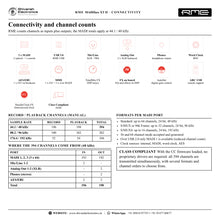
| Type | 394‑channel Triple MADI USB 3.0 audio interface |
| Channels | 196 record / 198 playback at 48 kHz; 100 / 102 at 96 kHz; 52 / 54 at 192 kHz (24 bit) |
| Computer connection | 1 x USB 3.0 (compatible with USB 2.0, reduced channel count) |
| Supported sample rates | 28 kHz up to 200 kHz |
| Buffer sizes | 32 to 8192 samples |
| Clock sources | Internal, MADI In, Word Clock In, AES In |
| Clock technology | SteadyClock FS; jitter suppression of external clocks > 50 dB (> 315 Hz) |
| Mixer | TotalMix FX: 4096‑channel mixer, 46‑bit internal resolution, DSP effects, Room EQ |
| Modes | Driver‑based USB 3, Class Compliant, stand‑alone |
Inputs and outputs
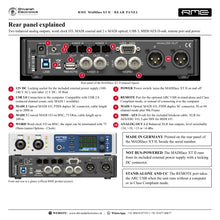
| MADI | 2 x optical I/O (SC duplex) + 1 x coaxial I/O (BNC, 75 Ohm) |
| Mic/line inputs | 2 x XLR/TRS combo (front), 48V phantom power on XLR, AutoSet |
| Line outputs | 2 x XLR, balanced (rear) |
| Headphone output | 1 x 6.3 mm TRS stereo (front), also usable as unbalanced line output |
| AES/EBU | 1 x I/O on XLR via breakout cable, transformer‑balanced, SPDIF compatible |
| Word clock | 1 x I/O on BNC, switchable 75 Ohm termination |
| MIDI | 1 x MIDI I/O via breakout cable; 3 x MIDI I/O over MADI |
| Remote | 1 x USB‑A REMOTE port for the optional ARC USB |
Audio performance
| Mic/line in | |
|---|---|
| Connector | XLR, electronically balanced |
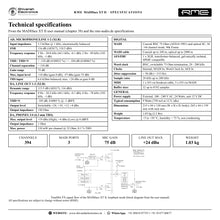
| SNR / dynamic range (A‑weighted) | 118.5 dB |
| THD+N | < -104 dB |
| Max level | +18 dBu (gain 0 dB) |
| Line in (TRS) | |
| Connector | 6.3 mm TRS, balanced |
| SNR / dynamic range (A‑weighted) | 118.5 dB |
| THD+N | < -104 dB |
| Max level | +24 dBu (gain 0 dB) |
| Line out | |
| Connector | XLR, balanced |
| SNR / dynamic range (A‑weighted) | 116 dB |
| THD+N | -105 dB |
| Max level | +24 dBu |
| Phones | |
| Connector | 6.3 mm TRS, unbalanced |
| SNR / dynamic range (A‑weighted) | 116 dB |
| THD+N | -105 dB |
| Max level | +19 dBu (High) |
Analog details
| Mic/line gain range | 75 dB in 1 dB steps |
| Mic input impedance | 3.3 kOhm |
| TRS input impedance | 6.6 kOhm balanced, 3.3 kOhm unbalanced |
| Mic SNR (AES17) | 116 dB |
| Mic THD | < -110 dB (< 0.00032 %) |
| Line out dynamic range (AES17) | 113.5 dB |
| Line out levels | +24, +19, +13, +4 dBu (switchable); 150 Ohm output impedance |
| Phones | +19 dBu (High) / +4 dBu (Low); 1 Ohm; 210 mW per channel into 32 Ohm |
| Frequency response | Mic: 5 Hz - 20.8 kHz (-0.1 dB, 44.1 kHz); line out: 0 Hz - 20.2 kHz (-0.1 dB, 44.1 kHz) |
| Channel separation | > 110 dB |
Digital
| MADI formats | 56 and 64 channel mode, plus 96k Frame |
| MADI channels per port | 64 at 48 kHz; 32 at 96 kHz (S/MUX); 16 at 192 kHz (S/MUX4) |
| MADI cable length | Coaxial up to 100 m; optical up to 2000 m |
| AES/EBU | AES3‑1992; Professional and Consumer (SPDIF) formats; lock range 27 - 200 kHz |
| Word clock | Level range 1.2 - 5.6 Vpp; lock range 28 - 200 kHz; output 4.0 Vpp into 75 Ohm |
Physical
| Dimensions (W x H x D) | 21.5 x 4.4 x 13.0 cm without rack ears (body depth) 26.5 x 4.4 x 15.9 cm incl. rack ears, full depth |
| Weight | 1.03 kg |
| Power | External power supply, 100 - 240 V AC; 12 V DC input with locking connector; power switch |
| Typical power consumption | 9 W |
| Operating temperature | +5 to +50 °C |
System requirements
| Windows | RME driver for Windows (Intel x64 and ARM) |
| Mac | RME driver for macOS (Intel and ARM) |
| Class Compliant | Supported natively by Windows, macOS and Linux |
| Computer port | 1 x USB 3.0 port (or USB 2.0 port, at least Intel Core i5 CPU) |
Included software
| Mixer | TotalMix FX |
| Remote | TotalMix Remote |
| Analysis | DIGICheck |
Product overview
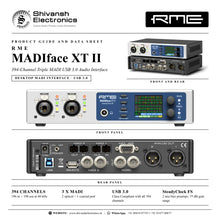
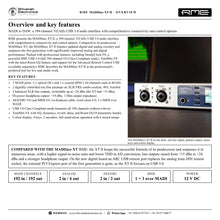
The RME MADIface XT II is a 394-channel Triple MADI USB 3.0 audio interface: three MADI ports, two mic/line preamps, AES/EBU, word clock and MIDI in a compact desktop unit, with SteadyClock FS, on-board DSP effects and full stand-alone operation.
Two optical MADI ports and one coaxial MADI port carry up to 192 channels in each direction at 48 kHz. Two front XLR/TRS combo inputs with 48V phantom power and AutoSet take microphones or line sources, two balanced XLR outputs feed your monitors, and a separate high-power headphone output can also work as an unbalanced line output. AES/EBU and MIDI arrive on a D-sub with an included breakout cable. The colour display, two encoders and four keys let you set up the unit without a computer, and USB 3 Class Compliant mode transmits all 394 channels without a driver.
| Channels at 48 kHz (196 in / 198 out) | 394 |
| MADI ports (2 optical, 1 coaxial) | 3 |
| Mic/line gain range | 75 dB |
| Max sample rate | 192 kHz |
Key features
- 3 x MADI I/O: 2 x optical (SC) and 1 x coaxial (BNC), 64 channels each at 48 kHz
- 394 channels over USB 3.0: 196 record / 198 playback channels at 48 kHz; USB 2.0 compatible
- 2 x mic/line preamps on XLR/TRS combo sockets, 75 dB gain range in 1 dB steps, 48V phantom power and AutoSet
- 2 x balanced XLR line outputs, switchable +24, +19, +13 and +4 dBu
- High-power headphone output, 1 Ohm output impedance, 210 mW into 32 Ohm
- AES/EBU I/O (SPDIF compatible), word clock I/O and MIDI I/O, plus 3 x MIDI over MADI
- SteadyClock FS, RME's femtosecond clock and jitter-rejection technology
- TotalMix FX with DSP EQ, dynamics, reverb and echo, plus Room EQ with 9-band PEQ, delay and volume calibration
- USB 3 Class Compliant mode with all 394 channels, for Mac, Windows and Linux without a proprietary driver
- Full stand-alone operation with colour display, 6 memory Setups, MIDI remote and ARC USB port
Triple MADI on your desk
Each MADI port accepts and generates 56- and 64-channel mode plus 96k Frame, with up to 64 channels at 48 kHz, 32 channels at 96 kHz (S/MUX) and 16 channels at 192 kHz (S/MUX4). Optical MADI runs on standard SC connectors (62.5/125 and 50/125 fibre), coaxial MADI on 75 Ohm BNC. On a USB 2.0 port the unit stays usable with a reduced channel count on MADI 1.
Analog inputs and outputs
The two Neutrik combo inputs reach a signal-to-noise ratio of 118.5 dB (A-weighted) with THD+N below -104 dB. The XLR outputs deliver 116 dB dynamic range (A-weighted) at up to +24 dBu, and the headphone output reaches +19 dBu with a 1 Ohm output impedance. Gain is set from the front MIC/GAIN key or in TotalMix FX.
TotalMix FX and Room EQ
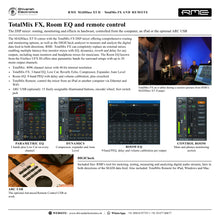
TotalMix FX gives fully independent routing and mixing of every input and playback channel to every output, with RME's latency-free submixes. The DSP adds 3-band EQ, Low Cut, Reverb, Echo, Compressor, Expander and Auto Level. Room EQ adds a 9-band parametric EQ with delay and volume calibration for monitor systems, including surround set-ups. TotalMix Remote controls the mixer from an iPad or another computer over Ethernet or WiFi.
SteadyClock FS
Based on a femto clock, SteadyClock FS reduces the intrinsic jitter of the MADIface XT II to an absolute minimum and filters clock jitter from as low as 1 Hz. The unit clocks from its internal clock, MADI, AES or word clock.
Class Compliant and stand-alone
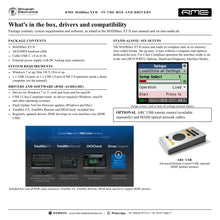
In Class Compliant mode the operating system recognises the MADIface XT II directly and all 394 channels are transmitted at once, with several channel-order formats. Without a computer, the unit works as a stand-alone MADI router, mic preamp and monitor controller: store up to six complete Setups, control it via MIDI, or connect the optional ARC USB to the rear REMOTE port.
In the box
- RME MADIface XT II
- AES/MIDI breakout cable
- USB 3 cable, 1.8 m
- External power supply with locking DC connector
Free RME software: TotalMix FX, TotalMix Remote and DIGICheck. Drivers for Windows (Intel and ARM) and macOS (Intel and ARM).
RME MADIface XT II: frequently asked questions
How many channels does the MADIface XT II handle?
394 channels at 48 kHz: 196 inputs and 198 outputs over USB 3.0. At 96 kHz it records and plays back 100/102 channels, at 192 kHz 52/54 channels.
Does it need a driver?
RME drivers are available for Windows and macOS. In Class Compliant mode no proprietary driver is required, and all 394 channels are still available.
Can it work without a computer?
Yes. Set it up from the colour display and keys, store up to six Setups, and use it as a stand-alone MADI router, preamp and monitor controller, with MIDI remote and ARC USB support.
Does it work with a USB 2.0 port?
Yes. The USB 3 port is compatible with USB 2.0, with a reduced channel count on MADI 1.
Where can I buy the RME MADIface XT II in India?
The RME MADIface XT II is available from Shivansh Electronics, Kolkata, West Bengal, India, with delivery across India.
Workflow 1: Live multitrack recording over MADI
Record every channel of a live show from a MADI-equipped mixing console straight into a laptop.
Connections
| Connect | To |
|---|---|
| Console MADI output | MADI 1 optical IN |
| Console MADI input | MADI 1 optical OUT |
| Laptop | USB 3.0 |
| Headphones | Front phones output |
Setup
- Install the RME driver, or select Class Compliant mode in the Options menu.
- Set the console and the MADIface XT II to the same sample rate and MADI format (56 or 64 channels).
- Arm up to 64 MADI channels per port in your recording software.
- Check sync and levels on the display's global level meters during soundcheck.
Tip: Use the coaxial MADI 3 port or MADI 2 for a second console or stage rack: three ports give up to 192 channels each way at 48 kHz.
Workflow 2: Virtual soundcheck playback
Play a recorded show back into the console to tune the mix without the band.
Connections
| Connect | To |
|---|---|
| Console MADI input | MADI 1 OUT |
| Console MADI output | MADI 1 IN |
| Laptop | USB 3.0 |
Setup
- Record the show as in workflow 1.
- In TotalMix FX, route the playback channels to the MADI 1 output.
- Switch the console's channel inputs to the MADI return.
- Play the session and adjust the console mix as if the band were on stage.
Workflow 3: Studio hub for MADI converters
Connect MADI AD/DA converters, a mic preamp rack and a monitoring system to one desktop interface.
Connections
| Connect | To |
|---|---|
| MADI AD/DA converter | MADI 1 optical I/O |
| MADI preamp rack | MADI 2 optical I/O |
| Studio monitors | Analog XLR outputs |
| Word clock master or slave | Word clock I/O (BNC) |
| Computer | USB 3.0 |
Setup
- Set the clock master in TotalMix FX or the Options menu; use SteadyClock FS for the lowest jitter.
- Route converter channels to your recording software and the main mix to the XLR outputs.
- Set the XLR output level (+24, +19, +13 or +4 dBu) to suit your monitors.
- Adjust monitor and headphone volume with encoders 1 and 2.
Tip: Room EQ in TotalMix FX corrects your monitors with a 9-band PEQ, delay and volume calibration.
Workflow 4: Broadcast and OB MADI routing
Route, split and monitor MADI signals between three MADI devices in an OB van or machine room.
Connections
| Connect | To |
|---|---|
| MADI source A | MADI 1 IN |
| MADI source B | MADI 2 IN |
| MADI destination (coaxial) | MADI 3 OUT |
| AES/EBU device | AES I/O on the breakout cable |
| Headphones | Front phones output |
Setup
- Build the routing between MADI ports and AES in TotalMix FX.
- Store it in one of the six Setups.
- Disconnect the computer: the unit keeps routing stand-alone.
- Monitor any signal on headphones from the front panel.
Tip: The 64-channel MADI format can be switched to 56 channels or 96k Frame per port to match the connected device.
Workflow 5: Driverless multichannel recording
Record up to 394 channels on a computer where you cannot or do not want to install a driver.
Connections
| Connect | To |
|---|---|
| MADI sources | MADI 1, 2 and 3 IN |
| Mics | Front mic/line inputs 1‑2 |
| Computer (Mac, Windows or Linux) | USB 3.0 |
Setup
- Select CC (Class Compliant) as the interface mode in the Options menu.
- Choose the channel-order format that suits your recording software.
- Set mic gain with the MIC/GAIN key and the encoders.
- Select the MADIface XT II as the audio device in your software and record.
Workflow 6: Location recording with mics and MADI
Combine two local microphones with a MADI stage box for a concert or orchestral recording.
Connections
| Connect | To |
|---|---|
| Two room mics (XLR) | Mic/line inputs 1‑2, 48V on |
| MADI stage box | MADI 1 optical I/O |
| Laptop | USB 3.0 |
| Headphones | Front phones output |
Setup
- Switch on 48V for condenser mics after connecting them.
- Use AutoSet to protect the mic inputs from overload.
- Record the room mics together with all stage box channels.
- Monitor on the high-power headphone output.
Tip: Optical MADI runs up to 2000 m, so the laptop can sit far from the stage.


