

RME MADIface USB
MRP - Rs. 93,680
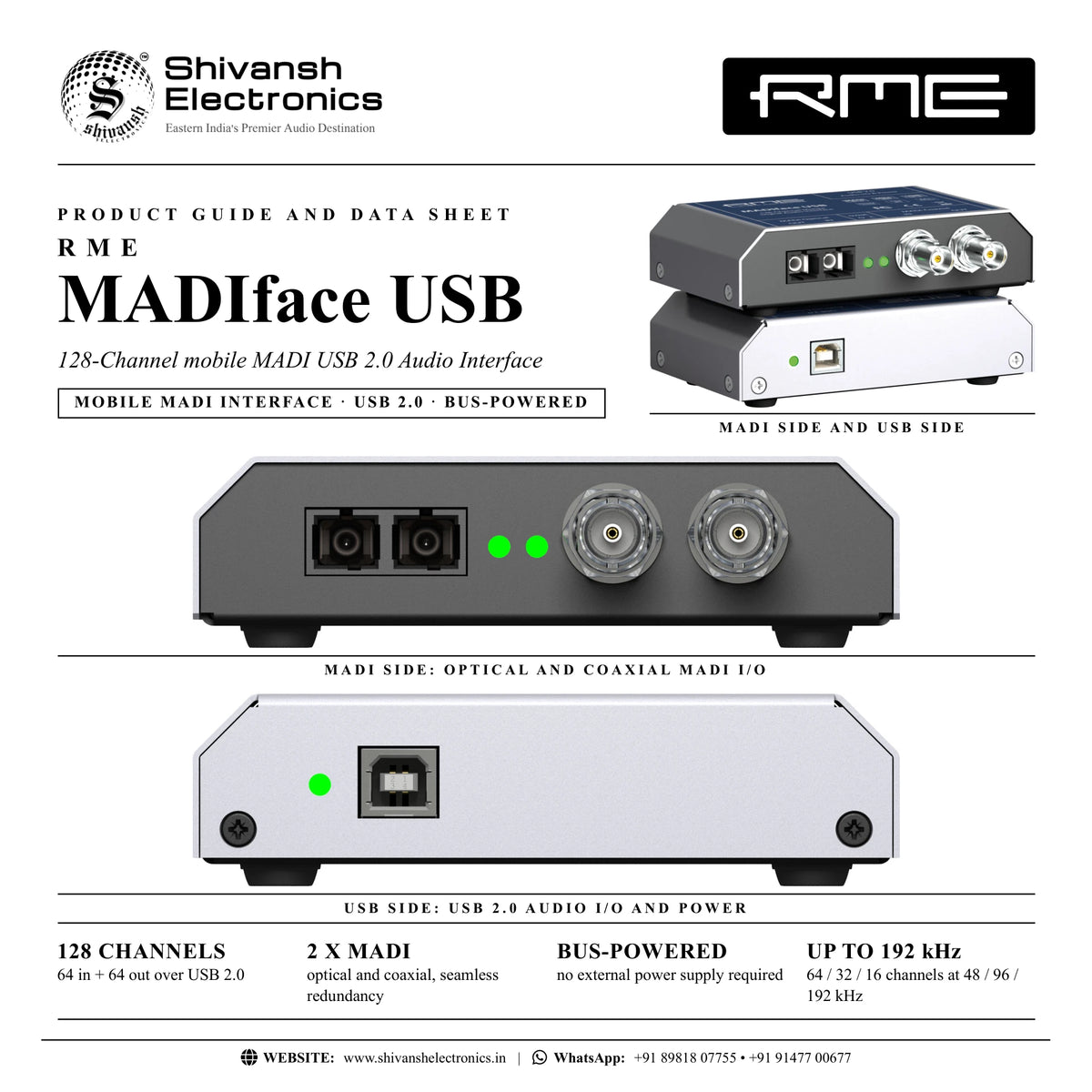
RME MADIface USB 128-channel mobile MADI interface: 64 in / 64 out over USB 2.0, optical and coaxial MADI, bus-powered, redundancy and stand-alone mode. Available in India from Shivansh Electronics, Kolkata, West Bengal, India.
VISUAL GUIDE — See Every Photo, Spec & Setup Step (PDF)
The price shown is the MAXIMUM RETAIL PRICE (MRP), inclusive of all taxes. For the best price, exclusive offers and discounted rates, delivery timelines, or any other information, please DM us or call +91 89818 07755 / +91 91477 00677. We will gladly share an exclusive coupon code that you can apply at checkout. All payments are processed securely through Razorpay, our trusted payment gateway partner.
General
| Type | 128‑channel mobile MADI USB 2.0 audio interface |
| Channels | 64 record / 64 playback at 48 kHz; 32 at 96 kHz; 16 at 192 kHz (24 bit); 2 channels AES recording |
| Computer connection | 1 x USB 2.0, bus‑powered |
| Sample rates | 44.1, 48, 88.2, 96, 176.4, 192 kHz, variable (Sync/DDS); supported range 28 - 200 kHz |
| Buffer sizes | 32 to 8192 samples |
| Clock modes | Master (internal) and slave (MADI, AES or word clock via BNC) |
| Clock technology | SteadyClock, SyncAlign, SyncCheck |
| Mixer | TotalMix FX: 2048‑channel mixer, latency‑free submixes, ASIO Direct Monitoring |
| Operation modes | 64 Channel Mix, Redundancy (AutoSelect), 128 Channel Mix, Disable TotalMix; stand‑alone; Class Compliant (firmware, 01/2026) |
Inputs and outputs
| MADI optical | 1 x I/O, FDDI duplex SC connector, 62.5/125 and 50/125 compatible |
| MADI coaxial | 1 x I/O, BNC, 75 Ohm, AES10‑1991 |
| BNC input functions | MADI coaxial, AES3 (AES/EBU, SPDIF) or word clock, detected automatically |
| MIDI | Virtual MIDI port embedded in MADI, 16 channels |
| USB | 1 x USB 2.0, audio and power |
Digital
| MADI formats | 56 and 64 channel mode, plus 96k Frame |
| MADI channels | 64 at 48 kHz; 32 at 96 kHz (S/MUX); 16 at 192 kHz (S/MUX4) |
| MADI input sensitivity | < 0.2 Vpp (coaxial) |
| MADI output | Coaxial 400 mVpp, cable up to 100 m; optical cable up to 2000 m |
| AES via BNC | AES3‑1992, SPDIF compatible, Consumer and Professional; lock range 27 - 200 kHz |
| Word clock via BNC | Terminated 75 Ohm; Double/Quad Speed detection; lock range 27 - 200 kHz |
| Jitter | < 1 ns in PLL mode, all inputs; PLL operates even at more than 100 ns jitter |
Physical
| Dimensions (W x H x D) | 11.2 x 2.7 x 8.3 cm |
| Weight | 273 g |
| Power | USB bus power; stand‑alone from any 5 V USB power supply or battery |
| Typical power consumption | 2 W |
| Operating temperature | +5 to +50 °C |
System requirements
| Windows | RME driver for Windows 10 / 11 (Intel x64 and ARM) |
| Mac | RME driver for macOS (Intel and ARM) |
| Computer port | 1 x USB 2.0 port |
Included software
| Mixer | TotalMix FX |
| Analysis | DIGICheck |
Product overview
The RME MADIface USB is a 128-channel mobile MADI USB 2.0 audio interface: 64 channels of recording and 64 channels of playback from a pocket-sized, bus-powered box with optical and coaxial MADI.
RME describes it as mixer, router, format converter, stream splitter and signal repeater in one. Connect it to a Mac or Windows computer with a single USB cable that carries both audio and power, then link any MADI equipment over optical (SC) or coaxial (BNC) MADI. Both inputs can run in Seamless Redundancy mode, switching to the other input in real time if the current one fails. Without a computer, powered from any USB power supply or battery, it works as a bi-directional format converter and active repeater.
| Channels at 48 kHz (64 in / 64 out) | 128 |
| MADI ports (optical + coaxial) | 2 |
| Max sample rate | 192 kHz |
| Weight, USB bus‑powered | 273 g |
Key features
- 64 record / 64 playback channels over USB 2.0 at 48 kHz; 32 at 96 kHz, 16 at 192 kHz
- Optical and coaxial MADI I/O, 56 and 64 channel mode plus 96k Frame
- USB bus-powered: one cable for audio and power
- Seamless Redundancy with AutoSelect: automatic real-time switch to the other input
- Four operation modes: 64 Channel Mix, Redundancy, 128 Channel Mix and straight routing
- Multi-format BNC input: coaxial MADI, AES3 (incl. SPDIF) or word clock as sync source
- SteadyClock jitter suppression and DDS for free setting of the sample rate
- TotalMix FX routing matrix: 2048-channel mixer with latency-free submixes
- MIDI over MADI: virtual MIDI port with 16 channels to remote-control other MADI devices
- Stand-alone mode as format converter and active repeater, plus Class Compliant mode via firmware
MADI portability
The compact MADIface USB supports the full 64 channels of a MADI stream for recording and playback on Mac and Windows. Its sturdy, bus-powered design makes it equally at home in a laptop bag and on a studio desk, connecting MADI equipment to any computer with a USB 2.0 port.
Operation modes
Disable TotalMix turns the unit into a straight 64-channel I/O interface with mirrored outputs. 64 Channel Mix uses one MADI input and sends identical data to both outputs. With AutoSelect both inputs run in Seamless Redundancy mode. 128 Channel Mix keeps recording and playback at 64 channels but makes the second input available in TotalMix FX, with separate outputs and 128 output channels for independent mixes, monitoring and serial pass-through of a second source.
Stand-alone format converter and repeater
Powered from a USB wall supply or USB battery, the MADIface USB enters a pre-configured stand-alone mode. With one input connected, it converts coaxial to optical or optical to coaxial and sends the signal to two devices at once. With two inputs it converts in both directions simultaneously, even at different sample rates. Each MADI signal is fully decoded, rebuilt and reclocked by SteadyClock, so the unit also works as an active repeater that extends cable runs.
TotalMix FX and DIGICheck
TotalMix FX handles mixing and routing between optical, coaxial and USB channels with RME's latency-free submixes and ASIO Direct Monitoring. DIGICheck, RME's measurement, analysis and test tool, is included free for Mac and Windows.
In the box
- RME MADIface USB
- USB 2.0 cable, 1.8 m
Free RME software: TotalMix FX and DIGICheck. Drivers for Windows (Intel x64 and ARM) and macOS (Intel and ARM).
RME MADIface USB: frequently asked questions
What does 128 channels mean?
64 input and 64 output channels over USB at 48 kHz. In 128 Channel Mix mode, the second MADI input is additionally available in TotalMix FX for monitoring and routing.
Does it need a power supply?
No. The MADIface USB is powered by its USB connection. For stand-alone use, any standard 5 V USB power supply or USB battery works.
Can it switch inputs if a MADI line fails?
Yes. With AutoSelect active and both inputs connected, it switches to the other input in real time if the current one fails.
Which sample rates are supported?
44.1, 48, 88.2, 96, 176.4 and 192 kHz, plus variable rates. MADI carries 64 channels at 48 kHz, 32 at 96 kHz and 16 at 192 kHz.
Where can I buy the RME MADIface USB in India?
The RME MADIface USB is available from Shivansh Electronics, Kolkata, West Bengal, India, with delivery across India.
Workflow 1: FOH multitrack recording from a laptop
Record all 64 MADI channels of a live show with nothing more than a laptop and one USB cable.
Connections
| Connect | To |
|---|---|
| Console or stage box MADI output | MADI optical IN (or coaxial IN) |
| Console MADI input | MADI optical OUT |
| Laptop | USB 2.0 (audio and power) |
Setup
- Install the RME driver and connect the MADIface USB to the laptop.
- In the Settings dialog, set the clock to the active MADI input.
- Select Disable TotalMix for a straight 64-channel I/O.
- Arm all channels in your recording software; the SYNC LEDs stay lit when the clock is correct.
Tip: Play the recording back to the console through the MADI output for a virtual soundcheck.
Workflow 2: Seamless redundancy for critical shows
Protect a live recording or playback system against a failed MADI line.
Connections
| Connect | To |
|---|---|
| Main MADI feed | MADI optical IN |
| Backup MADI feed | MADI coaxial IN (BNC) |
| Laptop | USB 2.0 |
Setup
- Feed the same MADI signal to both inputs.
- Select 64 Channel Mix and activate AutoSelect in the Settings dialog.
- Check that both input LEDs show a valid signal.
- If the current input fails, the unit switches to the other one in real time.
Workflow 3: Stand-alone optical / coaxial format converter
Link a device with optical MADI to one with coaxial MADI, without a computer.
Connections
| Connect | To |
|---|---|
| Optical MADI device | MADI optical I/O |
| Coaxial MADI device | MADI coaxial I/O (BNC) |
| USB power supply or USB battery | USB port |
Setup
- Power the MADIface USB from any 5 V USB power supply.
- Connect both devices: with two inputs the unit converts in both directions at once.
- The output format follows the input format (56/64 channel, 48k/96k Frame).
- Watch the SYNC LEDs to confirm a valid signal on each path.
Tip: Both paths can even run at different sample rates.
Workflow 4: Active MADI repeater
Extend a MADI link beyond normal cable length, or connect two units that do not talk to each other directly.
Connections
| Connect | To |
|---|---|
| MADI source | MADI IN (optical or coaxial) |
| MADI destination(s) | MADI optical and coaxial OUT |
| USB power supply | USB port |
Setup
- Place the MADIface USB at the end of the first cable run.
- Power it from a USB supply: it enters stand-alone mode automatically.
- The MADI signal is decoded, rebuilt and reclocked by SteadyClock.
- Connect the onward cable run to the output; with one input, both outputs carry the signal.
Workflow 5: Monitoring and pass-through with 128 Channel Mix
Record one MADI source while mixing or passing through a second source in TotalMix FX.
Connections
| Connect | To |
|---|---|
| MADI source 1 | MADI optical IN |
| MADI source 2 | MADI coaxial IN |
| Monitor system (MADI) | MADI coaxial OUT |
| Laptop | USB 2.0 |
Setup
- Select 128 Channel Mix in the Settings dialog.
- Choose the input used for recording; the other input appears in TotalMix FX.
- Build independent mixes or a serial pass-through for the second output.
- Record 64 channels while monitoring both sources.
Workflow 6: Theatre and installation playback
Play up to 64 channels of show audio into a MADI system from a computer.
Connections
| Connect | To |
|---|---|
| Playback computer | USB 2.0 |
| Mixing console or MADI DA converter | MADI optical OUT |
| Word clock or AES house sync | BNC input |
Setup
- Connect the house sync to the BNC input and select BNC In as clock source.
- Route playback channels to the MADI output in TotalMix FX.
- Use MIDI over MADI to send remote commands to other MADI devices if needed.
- Run the show from your playback software.