TASCAM IF-AN16/OUT
MRP - Rs. 1,09,950
TASCAM IF-AN16/OUT expansion card: 16 balanced analogue outputs on two D-sub connectors, per-channel attenuation and up to +24 dBu output. Available in India from Shivansh Electronics, Kolkata, West Bengal, India.
VISUAL GUIDE — See Every Photo, Spec & Setup Step (PDF)
The price shown is the MAXIMUM RETAIL PRICE (MRP), inclusive of all taxes. For the best price, exclusive offers and discounted rates, delivery timelines, or any other information, please DM us or call +91 89818 07755 / +91 91477 00677. We will gladly share an exclusive coupon code that you can apply at checkout. All payments are processed securely through Razorpay, our trusted payment gateway partner.
Outputs
| Formats and channels | 16 channels at 44.1/48/88.2/96 kHz, 16‑bit/24‑bit |
| Connector | D‑sub 25‑pin x 2 (ANALOG 1‑8/9‑16 OUT) |
| Locking screws | No. 4‑40 UNC (inch type) |
| Nominal output levels | +4 dBu, +6 dBu (+6 dBu only when maximum output level is +15 dBu) |
| Maximum output levels | +24, +22, +20, +18 or +15 dBu (set by the nominal level of the host unit) |
| Output impedance | 200 Ω or lower |
| Applicable load impedance | 2 kΩ or higher |
| Output attenuation | 0 to -14 dB in 0.5 dB steps |
Audio performance
| Frequency response | +0.1/‑0.5 dB, 20 Hz‑20 kHz (44.1/48 kHz) +0.1/‑1.0 dB, 20 Hz‑40 kHz (88.2/96 kHz) |
| Distortion (THD+N) | 0.001% or less (0 dBFS input, 1 kHz) |
| S/N ratio | 110 dB or higher |
| Dynamic range | 110 dB or higher |
| Crosstalk | 110 dB or higher (1 kHz) |
| Dimensions (W x H x D) | 107 x 40 x 161.5 mm (including protrusions) |
| Weight | 240 g |
Product overview
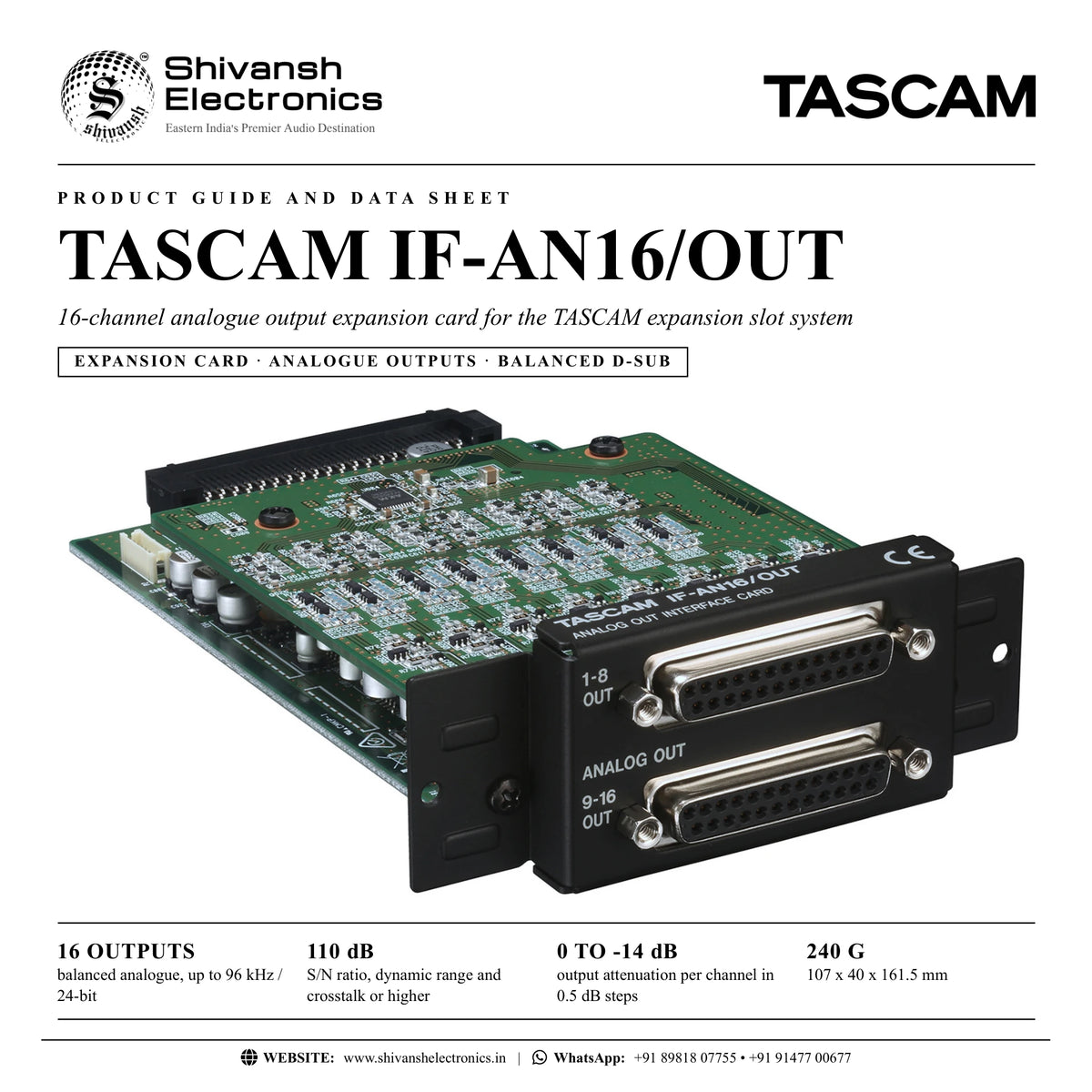
The TASCAM IF-AN16/OUT is an optional 16-channel analogue output interface card for the TASCAM expansion slot system.
Two 25-pin D-sub connectors carry 16 balanced outputs (channels 1-8 and 9-16) at sampling frequencies up to 96 kHz. Each channel has built-in output attenuation from 0 to -14 dB in 0.5 dB steps, and the maximum output level follows the nominal level of the host unit. TASCAM rates the outputs at 110 dB or higher signal-to-noise ratio, dynamic range and crosstalk, with distortion of 0.001% or less.
Compatible with
- TASCAM Sonicview 24XP
- TASCAM Sonicview 16XP
- TASCAM DA-6400
- TASCAM DA-6400dp
In the box
- IF-AN16/OUT x 1
- Owner's Manual with warranty x 1
Before installing, TASCAM advises checking its website for the latest list of models the card can be installed in.
TASCAM IF-AN16/OUT: frequently asked questions
Can I trim the level of each output?
Yes. Every channel has its own output attenuation from 0 to -14 dB in 0.5 dB steps.
Where can I buy the TASCAM IF-AN16/OUT in India?
The TASCAM IF-AN16/OUT is available from Shivansh Electronics, Kolkata, West Bengal, India, with delivery across India.
Workflow 1: Analogue playback outputs from the DA-6400
Theatre, installation and broadcast users sending DA-6400 tracks to analogue mixers or amplifiers.
Connections
| Connect | To |
|---|---|
| IF‑AN16/OUT | DA‑6400 expansion slot |
| ANALOG 1‑8 and 9‑16 OUT (D‑sub) | Analogue inputs of the mixer or amplifiers via D‑sub multi‑cables |
Setup
- Install the card in the expansion slot with the unit switched off.
- Connect D-sub multi-cables from the 1-8 and 9-16 outputs to the destination inputs.
- Assign the tracks to the card outputs.
- Trim each output with the attenuation (0 to -14 dB) to match the receiving equipment.
Workflow 2: Extra analogue outputs for a Sonicview console
Live engineers who need more analogue sends from a Sonicview 16XP or 24XP.
Connections
| Connect | To |
|---|---|
| Sonicview 16XP or 24XP expansion slot | IF‑AN16/OUT |
| Card D‑sub outputs | Amplifiers, recorders or monitor systems |
Setup
- Install the card in a free expansion slot with the console switched off.
- Connect the D-sub outputs with multi-cables or a D-sub to XLR loom.
- Route buses or direct outputs to the card in the console.
- Set the output attenuation per channel.